

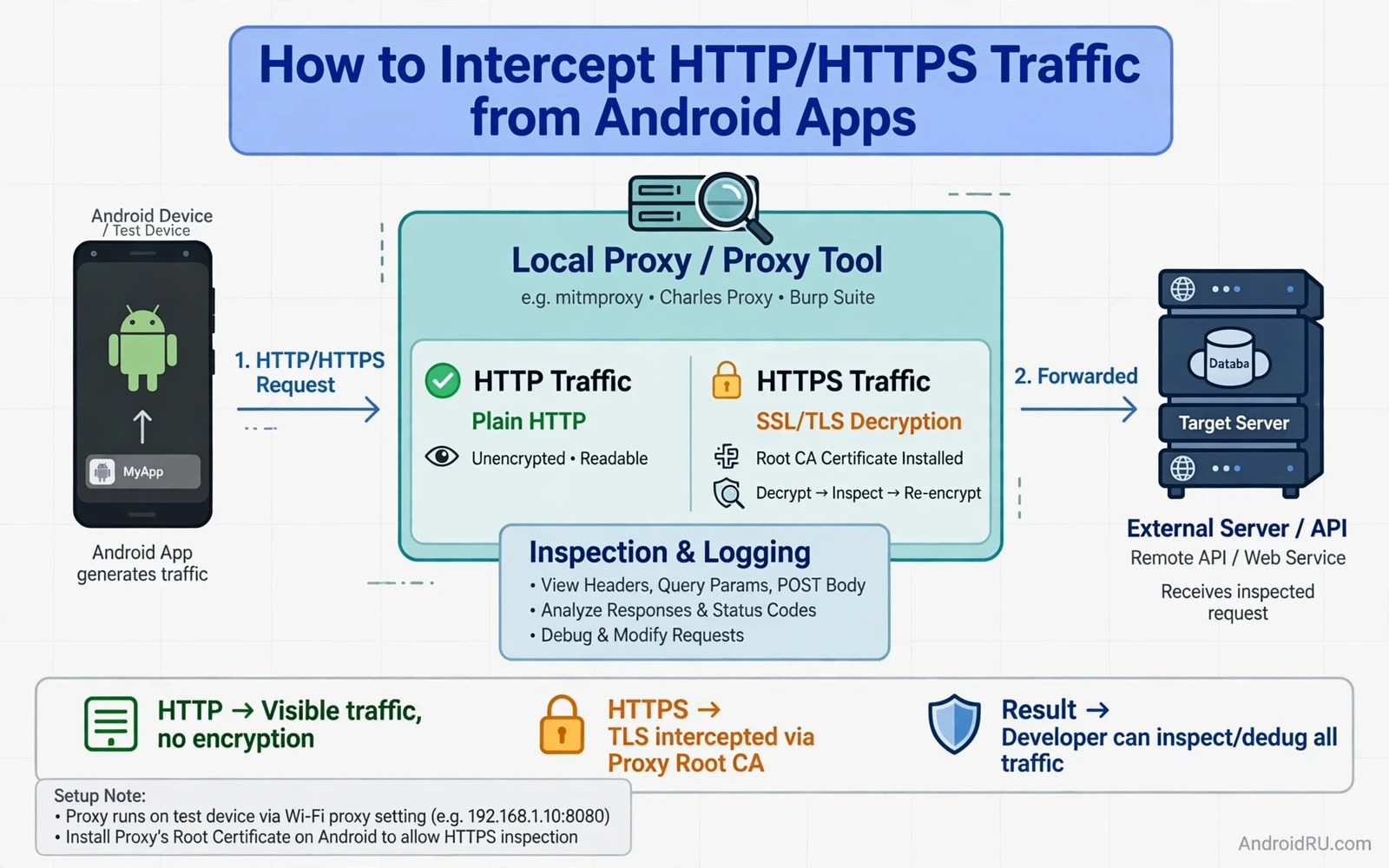
The Boundary for Traffic Interception
Traffic interception means placing a proxy between an app and the internet so that requests and responses can be inspected. This technique is powerful for debugging and for security testing. It is also intrusive when used without consent. The only safe scope for this guide is an app that you own or an app that you have explicit permission to test on a device that you control. Intercepting traffic from other people or from apps on devices that you do not control is not debugging. It is surveillance and it may break the law and it may break trust.
A test device should be separate from a personal device whenever possible. A test device can hold a test account and test data. It should not hold personal messages or banking access or private photos. A proxy certificate installed on a test device can decrypt traffic that passes through it. That power must stay on the test device. It must never be installed on a device that belongs to another person. Clear scope protects the tester as well as the user.
Interception also has limits that a tester must respect. Encrypted traffic is designed to resist interception. Modern apps use additional protections that detect proxies and reject them. A tester who bypasses those protections for an app without permission crosses from testing into tampering. The goal of this guide is to understand traffic for debugging and defence. The goal is not to extract secrets from apps that belong to others.
How HTTP and HTTPS Differ
Plain HTTP sends data without encryption. A proxy can read it directly. A network observer on the same network can also read it. That openness is the reason why sensitive data must never travel over plain HTTP. A tester can inspect plain HTTP traffic with a simple proxy and no certificate work. The inspection reveals headers and bodies and query values in clear form. That clarity is useful for debugging but it is a warning for production design.
HTTPS wraps HTTP inside an encrypted tunnel. The tunnel is built with a certificate that proves the identity of the server. A proxy cannot read the tunnel content without breaking that proof. A proxy that presents its own certificate can read the content only if the device trusts that certificate. Installing a custom root certificate on a test device creates that trust. The app then believes that the proxy is the real server for inspection purposes.
Certificate pinning adds a further check inside the app. A pinned app expects a specific server certificate or a specific public key. It rejects a proxy certificate even when the device trusts it. Pinning exists to stop interception attacks in production. A developer who owns the app can disable pinning in a debug build for testing. A tester without access to the app source cannot disable pinning legitimately. That limit is a security feature rather than a bug to bypass.
Setting Up a Local Proxy
A local proxy runs on a computer on the same network as the test device. The device Wi-Fi settings point to the proxy address and port. The proxy listens for connections and forwards them to the real server. It logs requests and responses for inspection. The tester should start with a simple app that the tester owns. A simple app gives clean traffic that is easy to read. A complex app with many services gives noisy traffic that hides the important requests.
The proxy tool should be configured to show request method and host and path and status code. It should show request headers without exposing sensitive values in screenshots or logs that may be shared. It should allow filtering by host so that the tester can focus on one service at a time. It should allow breakpoints that pause a request for inspection or modification in a test environment. Breakpoints are useful for testing error handling without changing server code.
Device setup requires care with network settings. The proxy address must match the computer address on the local network. The port must be open on the computer firewall for local traffic. The device must stay on the same Wi-Fi network as the computer. A mobile data connection will bypass the Wi-Fi proxy. The tester should confirm that traffic appears in the proxy before drawing any conclusions about an app.
Installing a Test Certificate
HTTPS inspection needs a custom root certificate on the test device. The proxy generates a root certificate. The tester installs that certificate in the device credential store. Modern Android versions treat user installed certificates differently from system certificates. Many apps will not trust a user installed certificate by default. A debug build can be configured to trust user certificates for testing. A release build should never trust user certificates in production.
On a rooted test device a certificate can be moved to the system store for deeper testing. That step changes the security posture of the device in a fundamental way. It should happen only on a dedicated test device that holds no personal data. It should be removed when testing ends. A device with a test root certificate in the system store will trust traffic inspection for every app on that device. That trust must not travel to a daily use device.
Certificate handling also affects other apps on the test device. A system level test certificate can intercept traffic from apps that the tester did not intend to test. The tester should limit testing time and should remove the certificate after the session. Logs that contain intercepted traffic should be treated as sensitive data. They should be stored securely and deleted when they are no longer needed for the test report.
Reading Requests and Responses
A request contains a method and a path and headers and optionally a body. A GET request usually carries parameters in the path or in headers. A POST request usually carries data in the body. The tester should look first at the host and the path to understand which service is being called. The tester should then look at headers for authentication style and content type. The tester should look at the body last because it often contains the largest and most sensitive data.
A response contains a status code and headers and optionally a body. A success status means the server accepted the request. A client error status means the request was malformed or unauthorised. A server error status means the server failed to process a valid request. The tester should map each status to the app behaviour that follows it. An app that shows a generic error for every status hides useful information from the user and from the tester.
Timing data also matters. A slow request may explain a slow screen. A repeated request may explain battery drain. A request that fires on every screen visit may explain data usage. The proxy timeline shows the order and the duration of requests. That timeline often reveals a performance bug faster than code review alone. A request that should happen once but happens many times is a clear signal for optimisation.
Common Patterns in App Traffic
Many apps call an authentication service first and then call data services with a token from that first call. The token may appear in a header on later requests. The tester should check whether the token travels over HTTPS only. The tester should check whether the token expires and whether it refreshes cleanly. A token that never expires increases risk when it leaks. A token that refreshes silently improves both security and user experience.
Many apps also call analytics and crash reporting services. Those calls may carry device information and usage events. The tester should check what data leaves the device in those calls. A privacy review should list each third party host and the data sent to it. Data that is not needed for the feature should not be sent. Minimising third party traffic reduces privacy risk and reduces battery and data cost.
Media traffic follows a different pattern. Images and videos often come from a content delivery host rather than from the main API host. Those requests may use range headers for partial downloads. They may be cached aggressively. The tester should separate media hosts from API hosts when analysing traffic. Mixing them makes API analysis noisy and hides API problems behind large media transfers.
Debugging With Intercepted Traffic
Intercepted traffic helps a developer reproduce a bug that only happens on a device. The developer can compare the request sent by the app with the request expected by the server. A missing header or a wrong parameter often explains a server error. A malformed body often explains a parsing failure. The proxy log gives evidence that is more precise than a user description of the bug.
Traffic modification in a test environment helps a developer test error handling. A tester can change a success response to an error response and watch how the app reacts. An app that crashes on an error response needs a fix. An app that shows a stale screen needs a fix. An app that retries forever needs a fix. Controlled modification in a test environment is a safe way to prove resilience before users meet the error in production.
Traffic inspection also helps a security reviewer find sensitive data in transit. A password in a query string is a finding. A token in a log is a finding. Personal data sent to an analytics host without need is a finding. Each finding should be reported with the request details and with a suggested fix. The fix may be to move data to a header or to a body or to remove the data entirely. The report should not include the sensitive value itself beyond what is needed to prove the finding.
Limits and Safer Alternatives
Server side logging is a safer alternative when the tester owns the server. The server can log requests without installing a certificate on a device. The developer can add request identifiers to logs to trace a device issue through server logs. That approach avoids decrypting traffic on the device at all. It is the preferred approach for production debugging.
Debug builds with verbose network logging are another safer alternative. The app itself can log request summaries in a debug build. Those logs stay on the test device and they do not require a proxy certificate. The release build must remove verbose logging. A release build that logs tokens or passwords creates a security risk even without a proxy.
Understanding how apps are distributed and inspected helps a tester place traffic work in context and a careful study of extracting APK files from installed Android apps shows how an app package can be examined on a test device with proper permission. Publishing context also matters because store rules shape what network behaviour is acceptable and the guide to publishing apps on alternative Android stores explains how different stores review app behaviour. Purchase flows deserve special care in traffic tests because payment data must never appear in clear logs and the guide to implementing in-app purchases safely shows how verified receipts keep payment handling trustworthy.
A Responsible Testing Checklist
Before interception a tester should confirm ownership or explicit permission for the app under test. The tester should confirm that the device is a dedicated test device. The tester should confirm that test data is used rather than personal data. The tester should confirm that the proxy runs on a local network that the tester controls. The tester should confirm that logs will be stored securely and deleted after the report.
After interception the tester should remove the test certificate from the device. The tester should restore normal network settings on the device. The tester should delete intercepted logs that are no longer needed. The tester should report findings without sharing sensitive values unnecessarily. The tester should suggest fixes that improve security rather than fixes that make interception easier for attackers.
// Proxy setup notes for a test device only
// Device Wi-Fi proxy: host = local computer address
// Port = proxy listen port
// Certificate = proxy root certificate installed for testing
// Scope = own app or explicitly permitted test app only

