

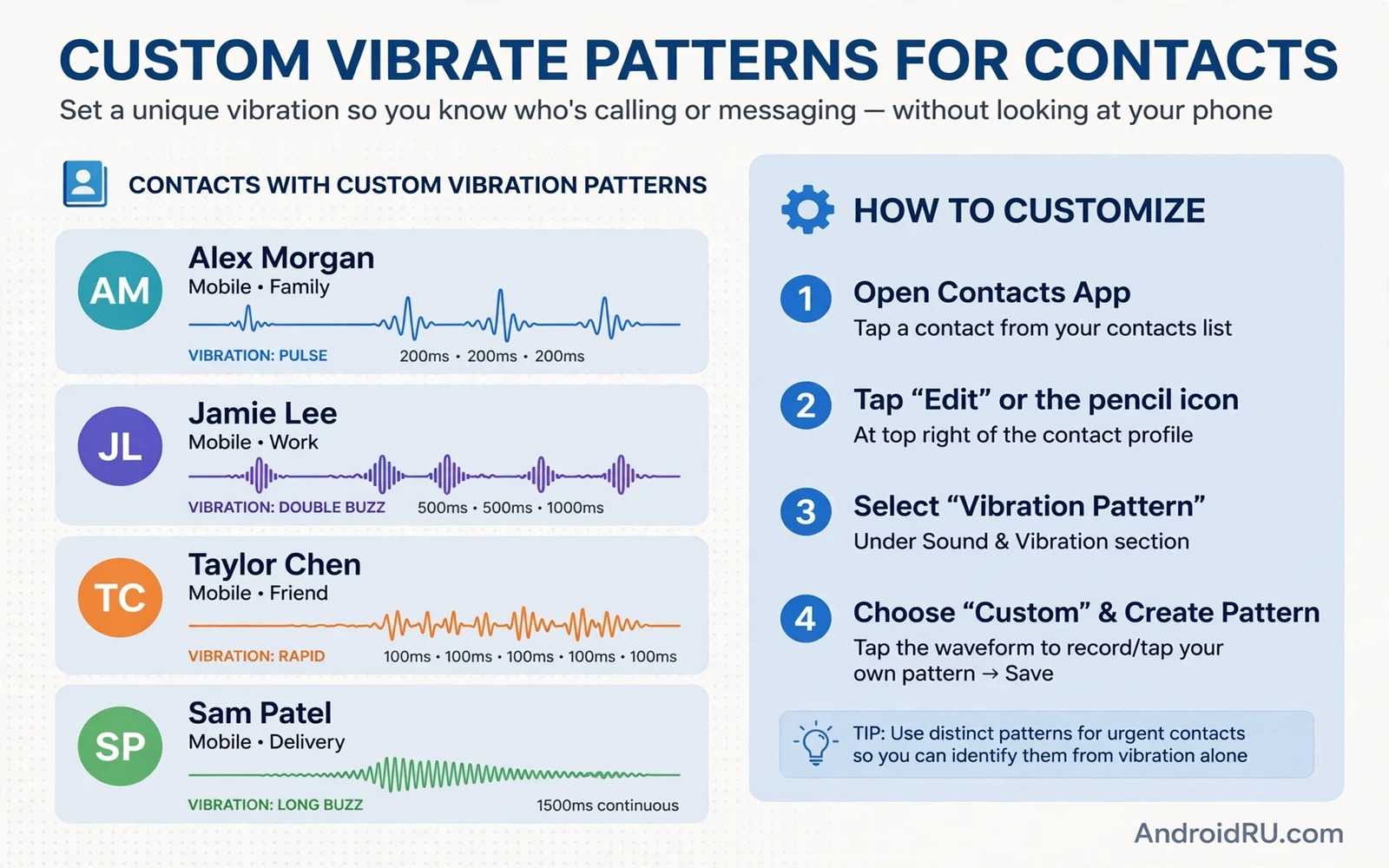
Why Per-Contact Vibration Is Useful
A custom vibrate pattern lets you recognise a caller without looking at the screen. A short double buzz can mean family. A long steady buzz can mean work. A gentle pattern can mean a friend. In a meeting or a quiet room that silent signal is far more discreet than a ringtone. It also helps when the phone sits in a pocket or a bag where the screen is hidden. Your hand learns the patterns quickly with a little practice.
Android does not offer one universal per-contact vibration editor on every phone. Some contact apps and phone apps include a vibration option per contact. Others rely on ringtone apps or on the default vibration for all calls. The path therefore varies. This guide starts with the built-in contact route and then covers the ringtone app route. Try the built-in route first because it needs no extra app and no extra permission.
Set A Custom Ringtone And Vibration Per Contact
Open the Contacts app and open the contact you want to customise. Tap Edit or tap the menu and look for Ringtone or Vibration pattern. On many phones the contact screen shows a ringtone field. Tap it and choose a distinct ringtone for that contact. Some phones show a vibration field beside the ringtone field. If a vibration field exists then tap it and pick a pattern or create one. Save the contact and test with a call from that number if possible.
If the contact screen shows a ringtone field but no vibration field then set the ringtone first and handle vibration through the phone app or a helper app later. A distinct ringtone already helps when sound is on. The vibration part needs the next steps. Keep notes on which pattern you assign to each person. A pattern only helps if you remember what it means. Start with two or three key contacts and add more once the system feels natural.
Use The Phone App Vibration Settings
Open the phone app settings and look for a calls section. Some phone apps let you choose a vibration pattern for incoming calls in general. That general pattern becomes the base for every caller. A per-contact pattern overrides the base when it exists. Set a clear base pattern that you like for unknown callers. A base pattern that is too long becomes annoying for spam calls. A short crisp base pattern works well for everyday use.
Check the system vibration settings too. Open Settings and then Sound and vibration and look for vibration intensity and pattern options. Some phones let you tune vibration strength for calls and notifications separately. Stronger vibration suits a bag or a thick case. Gentler vibration suits a desk or a quiet office. Tune the strength before you judge a pattern because a good pattern at the wrong strength still feels wrong.
Create Patterns With A Helper App
When the built-in options are thin a reputable vibration app from the Play Store can fill the gap. Such apps let you build patterns from taps and pauses and assign them per contact. Choose an app with a small permission footprint. A vibration app does not need access to your files or your location. It needs contact access to match callers and phone access to react to calls. Read the permission list before you install.
Build patterns that differ clearly from each other. A pattern of two short buzzes feels different from a pattern of one long buzz. A pattern with a pause in the middle feels different from a steady pattern. Avoid patterns that differ only by a tiny timing change because your hand will confuse them. Test each pattern by calling yourself from another phone or asking the contact to call. Real testing beats imagining how a pattern feels.
Separate Calls From Messages
Calls and messages deserve different vibration styles. A call pattern should be bold because a call needs an immediate answer. A message pattern should be lighter because a message can wait. Most messaging apps let you set a custom vibration or notification sound per conversation. Open the conversation and tap its details and look for notifications or customise options. Set a light pattern for close friends and the default pattern for groups.
Group chats deserve care. A busy group with a bold pattern will buzz constantly. Give groups a minimal pattern or silence them during work hours. Per-contact vibration is about attention management. Every pattern you assign is a decision about who may interrupt you. Keep the bold patterns for a small circle. Let everyone else use the gentle default. Your attention will thank you.
Test Patterns In Real Situations
A pattern that feels clear on a desk may vanish in a pocket. Test each pattern in the pocket and bag you actually use. Walk around while a friend calls. Notice whether you recognise the caller before you look. If you cannot tell patterns apart then make them more different. Lengthen the long pattern and shorten the short pattern. Add a pause to one pattern and remove pauses from another. Clarity matters more than creativity.
Test with the case on because a case dampens vibration. A thick rugged case can mute a gentle pattern entirely. Raise the vibration strength for cased use or choose bolder patterns. Also test while the phone charges because some phones reduce vibration while charging. Real world testing in your normal setup is the only test that counts. A lab test on a bare desk proves little.
Fix Patterns That Do Not Play
If a custom pattern never plays then check that vibration is on at all. A phone set to silent with vibration off will stay still no matter what pattern you assigned. Open Settings and then Sound and vibration and confirm that vibrate on calls is on. Check Do Not Disturb rules because they can suppress vibration for all but starred contacts. Star your key contacts if Do Not Disturb should still let them through.
If one contact pattern fails while others work then re-save that contact. A contact saved in two places such as a SIM and a Google account can create a duplicate that the phone app matches inconsistently. Merge duplicates in the Contacts app and assign the pattern to the merged entry. If a helper app pattern fails then check its battery permission. A helper app killed in the background cannot react to calls. Set it to unrestricted battery use if your phone offers that choice.
Build A Small Pattern Language
Keep your pattern language small and consistent. Family gets a warm double buzz. Work gets a steady long buzz. Close friends get a playful triple buzz. Unknown callers keep the default. Four patterns are easy to learn. Ten patterns blur together. You can always expand later once the core four feel automatic. Write the mapping down for the first week until memory takes over.
Per-contact vibration turns a silent phone into an informative phone. It respects quiet rooms and still tells you who needs you. Pair it with a thoughtful home screen for a fully personal device. The guide to changing the default launcher and the guide to customising dark mode across apps both extend the same idea. A phone shaped around your people and your habits feels calmer and more useful every day.
Vibration For Accessibility
Vibration patterns help people who cannot hear ringtones well. A strong distinct pattern can replace sound entirely for key contacts. Set the strongest comfortable vibration for family and emergency contacts. Test the pattern in a pocket with everyday clothing. A pattern that works on a desk may vanish inside a thick coat. Accessibility patterns should be bold rather than subtle.
Pair vibration with a flashing alert or a smartwatch buzz when available. Multiple channels reinforce each other. A watch buzz plus a phone vibration is hard to miss. A single channel can fail when the phone sits far away. Redundant alerts are a feature for accessibility not a nuisance. Build redundancy for the contacts that matter most.
Do Not Disturb And Vibration Together
Do Not Disturb rules interact with vibration in ways that surprise people. A rule that silences calls may also silence vibration for non-starred contacts. Star your key contacts so their vibration survives Do Not Disturb. Test the combination at night with a friend call. A test call proves the rule works before a real emergency tests it for you.
Schedule Do Not Disturb for sleep and work hours but keep starred contacts exempt. Review the exempt list monthly because relationships and priorities change. A stale exempt list lets old contacts interrupt sleep while new important contacts stay silent. A living exempt list keeps Do Not Disturb aligned with real life.
Patterns For Messaging Apps
Messaging apps often allow custom notification vibration per conversation. Use that feature to extend your pattern language beyond calls. A work group can have a short buzz. A family group can have a double buzz. A single close friend can have a unique pattern. Message patterns should stay lighter than call patterns because messages rarely need instant action.
Too many message patterns blur together just like too many call patterns. Limit message patterns to a handful of important conversations. Let the rest use the default. A small pattern set stays memorable. A large pattern set becomes noise. For the wider personalisation picture the guide to customising lock screen clock styles and widgets and the guide to one-handed mode on large screens both show how small settings combine into a phone that fits its owner.
A Practical Checklist For Vibration Patterns
Build your pattern set with a checklist rather than by accident. List the contacts that truly need silent identification and limit the list to a handful. Assign the boldest pattern to the most urgent contact and gentler patterns to the rest. Test each pattern in a pocket and in a bag with the case on. Ask a friend to call from each number and note whether you recognise the caller before looking. A pattern that fails the pocket test needs more contrast. Lengthen long patterns and shorten short patterns until each feels distinct in real conditions.
Review the pattern set monthly because priorities change. A contact who needed urgent identification last month may not need it now. A new important contact may deserve a pattern. Remove patterns for contacts who no longer need them. A pattern set that grows without pruning becomes noise. A pruned set stays meaningful. Keep a written mapping for the first weeks until memory takes over. A written mapping also helps when you set up a new phone because patterns do not always transfer automatically.
Combine vibration with other silent signals for reliability. A smartwatch buzz reinforces a phone vibration. A flashing alert reinforces both. Redundancy matters for accessibility and for noisy environments where a single vibration may go unnoticed. Test the combined signals together rather than assuming they add up. A watch buzz that arrives seconds after the phone vibration can confuse rather than reinforce. Synchronised signals feel like one alert. Staggered signals feel like two separate events. Aim for one clear alert through every channel at once.

