

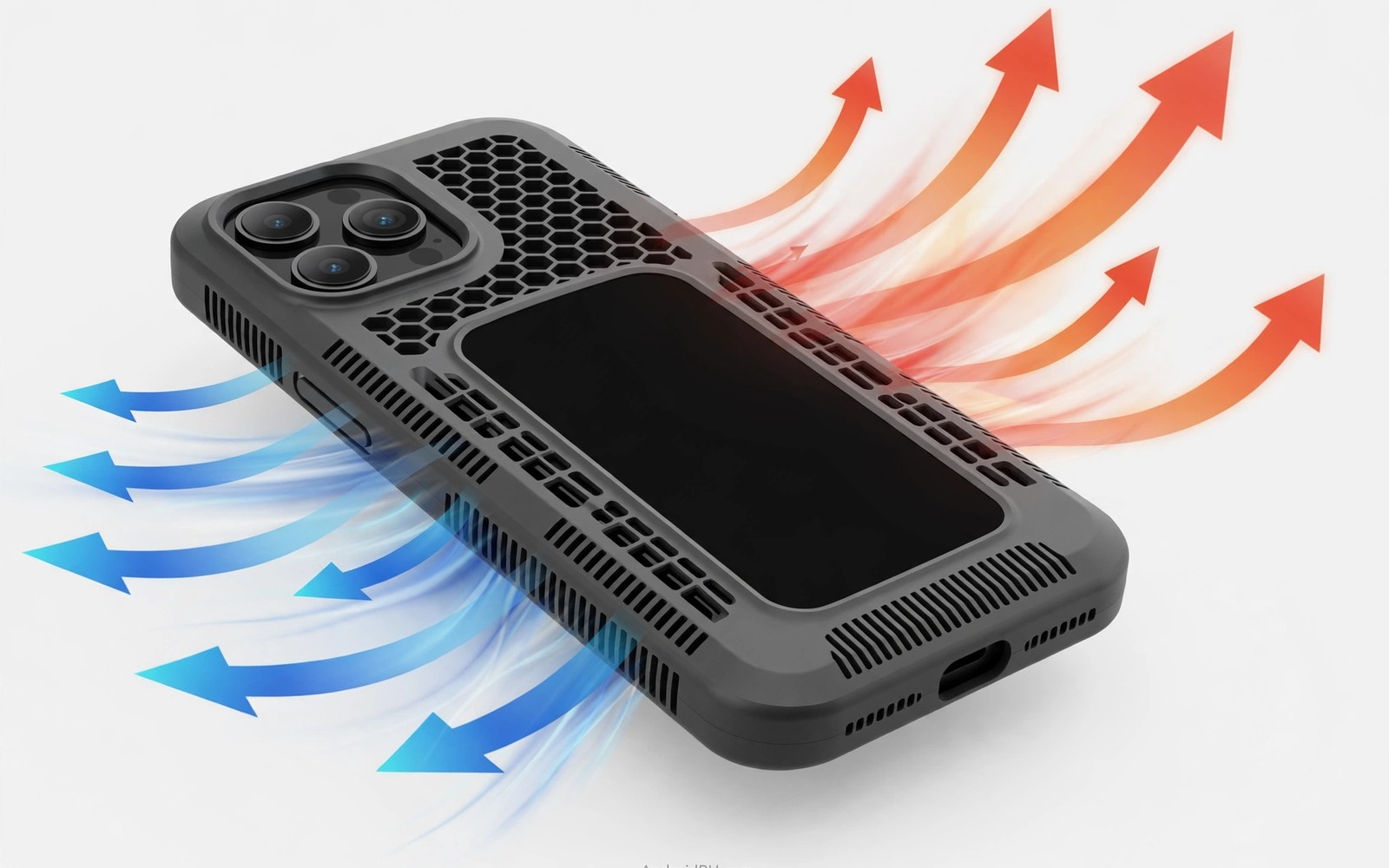
Phones slow down when they get too hot. The processor cuts speed to protect itself. This slowdown is called thermal throttling. Games stutter and apps lag during throttling. A case can make throttling worse. It traps heat against the phone back. A heat dissipation case tries to solve that problem.
Such cases use vents and heat spreading materials. Vents let warm air escape. Heat spreaders move warmth across a wider area. Both features help the phone shed heat faster. The benefit is real but modest. No case replaces good processor cooling design. A case can only avoid adding to the heat problem.
This guide explains how cooling cases work. It covers gaming and charging heat. It covers material choices and design traps. For magnetic charging heat, see magnetic ring compatibility on Android cases as a related topic.
Why Phones Throttle
A processor generates heat under heavy load. Gaming and video recording load it hardest. The phone body absorbs that heat first. Air cooling then removes heat slowly. A phone has no fan to speed cooling. It relies on its body as a heat sink.
Safety limits trigger throttling when internal temperature climbs. The processor cuts clock speed to reduce heat output. Frame rates drop and exports slow down. The phone feels laggy despite a fast chip. Cooling the body delays that trigger. A cooler body sustains full speed longer.
Cases interfere with body cooling. A thick plastic case insulates the back. Heat builds up under the insulation. A thin case insulates less. A vented case lets air reach the back. Material and airflow decide how much a case hurts cooling.
Vents Airflow And Heat Spreaders
Vents are holes or channels in the case back. They let air flow over the hot phone back. Moving air carries heat away faster than still air. Vent placement matters most over the processor zone. That zone sits near the top of most phones. Vents elsewhere help less.
Heat spreaders use metal or graphite layers inside the case. They conduct heat from hot spots to cooler areas. A wider warm area cools faster than a small hot spot. Graphite sheets are thin and light. Metal plates spread heat well but they add weight. Both beat plain plastic for heat flow.
Some cases add raised ribs on the inner back. Ribs create air channels between case and phone. Those channels let air move even when the phone lies flat. Ribs also reduce contact area. Less contact means less heat trapping. Rib design is a quiet but useful feature.
Gaming Heat And Real Gains
Gaming is the main test for cooling cases. A long session heats a phone steadily. A cooling case may delay throttling by minutes. It may also sustain slightly higher frame rates. Gains of a few frames per second are typical. Gains of a huge jump are unlikely. Expect modest help rather than a miracle.
Test gains with a simple method. Play the same game for thirty minutes in each case. Note when stutter starts in each run. Compare frame smoothness subjectively. A cooling case should delay stutter noticeably. A case with no gain still guards drops well. Judge it on protection if cooling fails to help.
Ambient temperature matters more than case design. A hot room throttles any phone faster. A cool room helps any case perform. Play in shade and avoid direct sun. Remove the case during extreme heat if needed. A bare phone cools fastest of all. Cooling cases narrow the gap rather than closing it.
Charging Heat And Wireless Charging
Charging generates heat as well. Fast charging warms a phone noticeably. Wireless charging warms it more than wired charging. A thick case adds to wireless heat. The coil gap grows and efficiency falls. Lost energy becomes extra heat. A cooling case helps wireless charging most.
Vent placement near the coil zone helps charging heat. Airflow over the coil area sheds warmth. A case with a solid back traps coil heat fully. A vented back lets that heat escape. Check vent position against your coil zone. Model specific vent maps beat generic vent patterns.
Slow charging overnight avoids most heat trouble. A cool slow charge preserves battery health. Fast charging suits daytime top ups. A cooling case helps fast charging sessions. It cannot fix a faulty charger or cable. Use maker approved chargers for safety first.
Design Traps And Trade Offs
Vents can weaken drop protection. Holes in the back reduce material strength. A vented case may crack more easily in a fall. Balance vent size against protection needs. Small vents over the processor zone suit most users. Large open backs suit cooling fans only.
Vents also admit dust and grit. Dust in vents can scratch the phone back. Clean vent channels weekly with a soft brush. A dusty vent insulates rather than cooling. Maintenance decides whether vents keep working. Neglect turns a cooling feature into a dirt trap.
Metal plates can block signals slightly. A large metal back may weaken wireless signals. It may also block wireless charging if placed poorly. Graphite spreaders avoid most signal trouble. Choose graphite over metal when signal strength matters. Test calls and data after fitting any metal case.
- Choose vents over the processor zone near the phone top.
- Prefer graphite spreaders over large metal plates.
- Clean vent channels weekly with a soft brush.
- Test gaming stutter delay with timed sessions.
- Use slow charging overnight to protect battery health.
- Remove the case in extreme heat for fastest cooling.
Choosing A Cooling Case
Start with your heat problem. Gamers need processor zone vents. Wireless chargers need coil zone vents. Desk users need neither urgently. Match vent placement to your heat source. Generic vent patterns help less than targeted ones.
Check drop protection alongside cooling. A cooling case must still guard falls. Thick corners and raised lips matter as much as vents. A case that cools well but cracks easily fails its main job. Protection remains the first duty of any case. Cooling is a bonus feature on top.
Read owner reviews for heat claims. Marketing often promises large cooling gains. Real gains are modest and measurable. Reviews with timed tests give honest numbers. A case with honest modest claims beats a case with wild promises. Stand use during gaming is covered in kickstand cases for hands-free viewing for comfortable long sessions.
Battery Health And Heat Links
Heat harms battery health over time. A hot battery ages faster than a cool battery. Repeated heat exposure cuts total capacity gradually. A case that traps heat therefore harms the battery indirectly. A cooling case helps battery lifespan modestly. It keeps peak temperatures lower during heavy use. Lower peaks mean slower chemical ageing. Battery gains from a case are small but real. They accumulate over two years of daily use.
Charging habits affect battery heat more than cases do. Fast charging heats batteries most. Overnight slow charging heats them least. A cooling case helps fast charging sessions best. It helps slow charging little. Users who fast charge daily gain most from cooling cases. Users who slow charge nightly gain little. Match case choice to charging habit for battery benefit. A case alone cannot rescue a harsh charging routine.
Remove the case during long gaming plus charging sessions. Combined load generates the most heat. A bare phone sheds that heat fastest. A cooling case sheds it second fastest. A thick plain case sheds it slowest. A short bare session cools the phone quickly. Refit the case after the phone cools. That habit protects both performance and battery. It costs only a few seconds of effort.
Outdoor Summer Use And Sun Heat
Direct sun heats phones faster than any app. A phone on a sunny dashboard can throttle within minutes. A case colour affects sun heating noticeably. Dark cases absorb more sunlight. Light cases reflect more sunlight. A white or light cooling case suits summer best. A black rugged case suits winter best. Colour is a real thermal factor outdoors. Choose case colour by climate and season when possible.
Shade is the strongest outdoor cooling tool. A phone in shade stays far cooler than a phone in sun. A cooling case cannot beat shade. Keep the phone in a pocket or a bag outdoors. Remove it only for brief use. Brief sun exposure harms little. Long sun exposure throttles any phone. A case helps at the margins only. Shade plus a cooling case gives the best outdoor result.
Pair cooling case choice with heavy-duty cases compared with slim covers for summer trips. A rugged case guards drops on trails. A cooling case guards heat in the sun. A hybrid with vents may serve both needs. Test any summer case on a hot day before a trip. Real sun testing reveals true performance fast. Lab claims mean little under a summer sun.
Video recording generates sustained processor heat. Long 4K clips heat phones steadily. A cooling case delays throttling during recording. It also delays recording shutdowns from heat. A shutdown mid clip loses footage. A cooling case reduces that risk modestly. Shade and short clips help more. Break long recordings into shorter segments. Segments let the phone cool between takes. A cooling case plus segmented recording protects important footage best.
5G connectivity adds heat during large downloads. A 5G radio works hard on weak signals. Weak signal areas heat phones fastest. The radio boosts power to hold a connection. A cooling case helps marginally there. Moving to a stronger signal area helps far more. Download large files on Wi-Fi where possible. Wi-Fi radios generate less heat than 5G radios. A cooling case cannot fix a weak signal heat problem alone.
Battery calibration apps sometimes promise cooler running through software tweaks. Most such apps change little about real heat output. They may close background apps that generate warmth. That closure helps marginally during idle time. It does not help during gaming or recording. Real cooling comes from airflow and sensible use. Do not pay for an app that promises dramatic cooling. A vented case plus shade delivers more than any app. Software cannot repeal the physics of processor heat.
Cooling case checklist:
- Vents: over processor zone and coil zone
- Spreader: graphite preferred, metal check signals
- Ribs: inner air channels present?
- Test: 30 minute gaming run, note stutter start
- Care: brush vents weekly
- Trade: vent size vs drop strength balance
The steps above follow the approach described in the official developer documentation for device care and accessory testing. The guidance draws on standard thermal behaviour and everyday phone use. Cooling cases delay throttling modestly. They work best combined with shade and sensible charging habits.

