

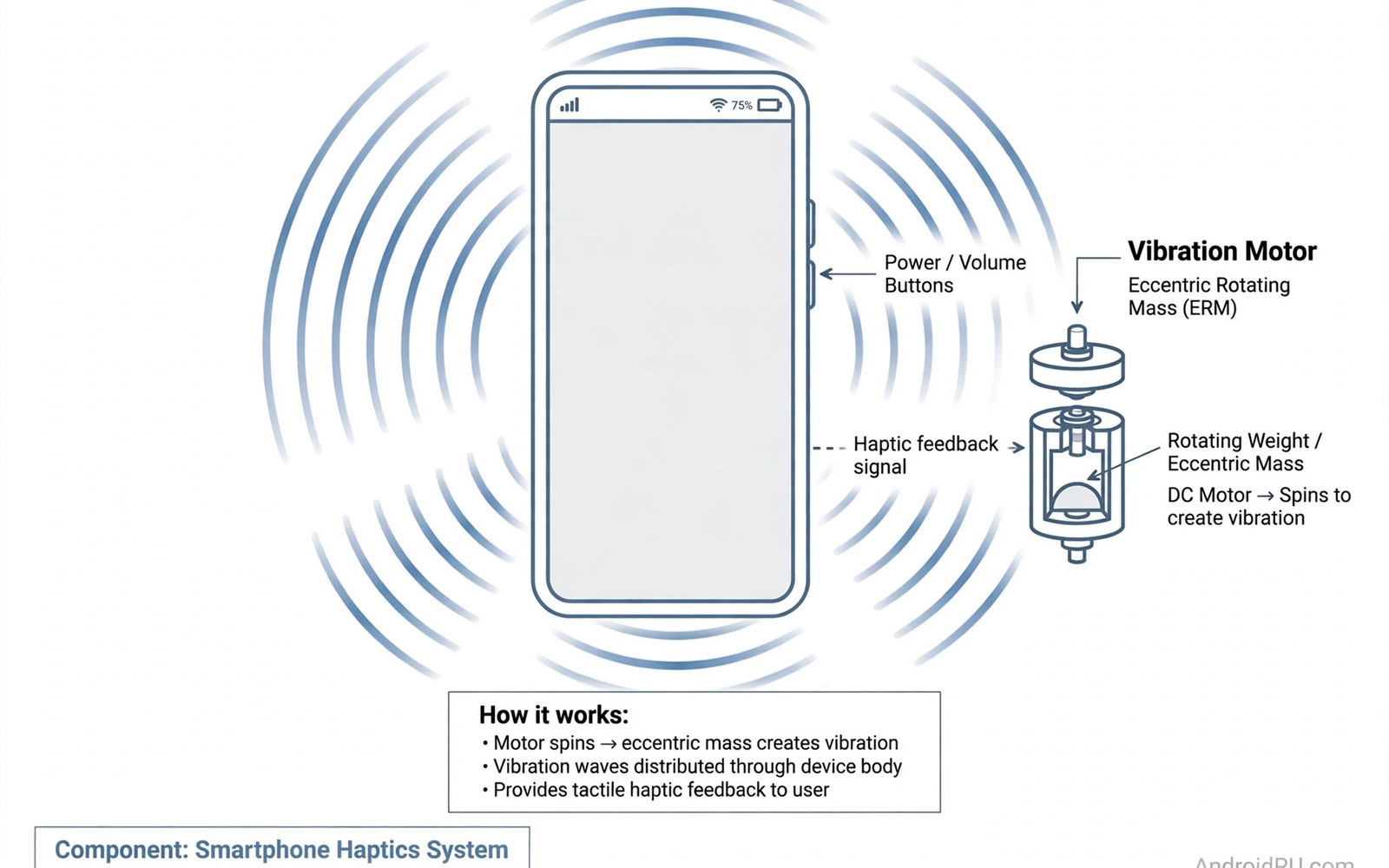
Vibration feedback shapes how premium a phone feels. Good haptics make typing feel crisp. Bad haptics feel buzzy and cheap. Motor type decides most of the difference. Software tuning decides the rest.
This comparison explains motor types and tests typing and calls and gaming. It helps buyers who notice touch feel daily. Readers who listen without headphones can also compare speaker quality for sound picks. Touch feedback is invisible on spec sheets but obvious in hand.
Linear Versus Rotary Motors
Linear motors move a mass back and forth precisely. They start and stop quickly for crisp taps. Rotary motors spin an off balance weight. They feel buzzy and slow to stop. Flagships now favor linear motors strongly.
Linear motor size affects strength and nuance. Large X axis motors deliver rich varied feedback. Small Z axis motors feel weaker and less precise. Premium brands invest in larger motors. Budget phones often keep small rotary motors.
Typing Feel And Keyboard Feedback
Typing feedback turns glass into tactile keys. Crisp taps confirm each keypress instantly. Weak buzz makes typing feel uncertain. Good tuning varies strength by key type. Spacebar taps can feel deeper than letter taps.
Keyboard apps control haptic strength and timing. Users can tune feedback to personal taste. Strong feedback drains little battery in typing. Excessive feedback annoys users in quiet rooms. Balanced default tuning suits most typists best.
| Aspect | First Option | Second Option |
|---|---|---|
| Motor type | Crisp precise taps | Buzzy slow buzz |
| Typing | Clear key confirmation | Uncertain mushy feel |
| Calls | Strong distinct patterns | Weak generic buzz |
| Gaming | Tight synced pulses | Laggy vague rumble |
| Tuning | Consistent system wide feel | Inconsistent app only feel |
Calls And Notifications
Call vibration must cut through pockets and bags. Strong distinct patterns signal calls clearly. Gentle patterns suit notifications without startling users. Custom patterns help users identify callers silently. Motor strength decides pocket noticeability most.
Notification haptics vary by app and system settings. Rich motors render subtle distinct patterns. Weak motors blur patterns into generic buzz. Users who keep phones silent rely on haptics heavily. Strong motors improve silent mode confidence greatly.
Gaming And Immersive Feedback
Gaming haptics add immersion to mobile play. Shooting and crashes trigger sharp pulses. Racing games rumble with engine and road feel. Good motors sync pulses tightly to on screen action. Laggy motors break immersion fast.
Game developers must support haptic APIs for best effects. Popular titles tune feedback for flagship motors. Casual games use simple buzz patterns only. Readers who game heavily can compare gaming phones and camera flagships for gaming devices. Haptics enrich games but never replace gameplay quality.
- Type a full paragraph with haptics on.
- Feel gesture taps across system menus.
- Test call vibration inside a pocket.
- Compare motors back to back at equal strength.
- Check accessibility settings for haptic control.
Software Tuning Differences
Software tuning separates good motors from great ones. One brand may tune the same motor more crisply. System wide haptics cover gestures and scrolling. App specific haptics cover likes and switches. Consistent tuning across the system feels premium.
Accessibility settings let users adjust haptic strength. Sensitive users can soften all feedback. Users with hearing loss gain from strong clear patterns. Tuning options matter more than motor specs alone. Buyers should test system gestures in store demos.
adb shell settings get system haptic_feedback_enabled
adb shell cmd vibrator vibrate 100
# Check haptic setting and test vibration
adb shell dumpsys vibrator | grep -i -m 5 effect
The commands above come from standard Android developer tooling for vibration inspection. They only read vibration data and they change no setting on the phone.
Testing Haptics Before Buying
Store tests should cover typing and gestures and calls. Type a paragraph with haptics enabled. Swipe through menus and feel gesture taps. Ask a friend to call the demo phone in a pocket. Compare motors back to back on equal settings.
Reviewers describe haptics subjectively but patterns emerge. Brands praised consistently usually tune motors well. Brands criticized consistently often use weaker motors. Hands on testing beats reviews for personal taste. Comfort with vibration is deeply personal.
Haptics In System Gestures
System gestures gain feel through haptic feedback. Back swipes trigger subtle confirmation taps. App switching gestures feel smoother with tactile cues. Scrolling to list ends produces gentle bumps. These micro feedbacks make interfaces feel responsive. Users notice their absence more than their presence.
Gesture haptics require precise motor control. Weak motors blur gesture cues into noise. Strong linear motors render distinct gesture taps. Consistency across gestures builds muscle memory. Inconsistent gestures confuse users subtly over time. Premium tuning covers gestures as carefully as typing.
Haptics For Accessibility Needs
Haptics serve accessibility needs beyond convenience. Deaf users rely on vibration for alerts. Distinct patterns communicate caller and app identities. Strong motors ensure alerts cut through clothing. Custom vibration patterns help users distinguish priorities. Accessibility settings should offer pattern customization widely.
Users with visual impairments use haptics for navigation cues. Gesture confirmations guide eyes free operation. Screen reader users benefit from tactile boundaries. Motor strength must suit varied sensitivity levels. Adjustable intensity accommodates sensitive and insensitive users. Accessibility haptics deserve more attention in reviews.
Motor Size And Phone Design
Motor size competes with battery and speaker space. Large motors consume internal volume significantly. Designers balance motor size against battery capacity. Premium phones prioritize large motors despite space costs. Budget phones shrink motors to save space and cost. Motor size differences explain much of feel variation.
Motor placement affects feel distribution across phones. Center placed motors vibrate evenly in hand. Off center motors feel stronger on one side. Users holding phones differently perceive placement effects. Case materials dampen vibration slightly. Thin cases preserve haptic feel better than thick rugged cases.
Haptic APIs For Developers
Developer APIs unlock rich haptic experiences. Modern APIs offer predefined effects for common actions. Custom waveforms let games create unique feedback. Adoption varies across apps and games. Popular apps implement haptics thoughtfully. Niche apps often use generic buzz only.
System wide haptic settings override app choices partially. Users can disable haptics globally for quiet environments. Per app controls remain limited on most systems. Developers should respect system settings consistently. Good haptic design enhances without annoying. Excessive haptics drive users to disable feedback entirely.
Testing Haptics Across Brands
Cross brand haptic testing needs consistent methods. Testers should use identical apps and settings. Typing tests reveal motor crispness quickly. Gesture tests reveal tuning consistency. Call tests reveal pocket noticeability. Gaming tests reveal sync and richness.
Reviewer language for haptics varies subjectively. Terms like crisp and tight describe linear motors generally. Terms like buzzy describe rotary motors generally. Hands on comparisons beat descriptions for personal taste. Users should visit stores to feel motors directly. Personal sensitivity varies too much for review scores alone.
Haptics In Wearables Versus Phones
Wearable haptics differ from phone haptics significantly. Watches use small motors for wrist taps. Phones use larger motors for hand feedback. Notification patterns transfer imperfectly between devices. Users adapt to each device separately.
Cross device haptic consistency remains limited. Brands tune watches and phones independently. Notification urgency feels different across devices. Users prioritize phone haptics for calls. Watch haptics suit silent alerts better.
Haptic Feedback And Battery Use
Haptic battery use stays modest for most users. Typing feedback consumes little power daily. Gaming haptics consume more during long sessions. Strong motors draw more power per pulse. Battery impact rarely justifies disabling haptics entirely.
Power saving modes may reduce haptic intensity. Users can customize intensity to balance feel and battery. Moderate haptics offer best efficiency balance. Heavy gamers notice battery effects most. Casual users ignore haptic battery costs safely.
Haptics For Music And Media
Music haptics sync vibrations to beats on some phones. Beat synced feedback enhances listening immersion. Movies gain rumble effects through haptics. Overuse of media haptics can distract viewers. Users can disable media haptics separately.
Rhythm games benefit most from synced haptics. Beat accuracy improves with tactile cues. Music apps implement haptics inconsistently. System level music haptics remain experimental. Media haptics suit enthusiasts more than general users.
Future Haptic Technologies
Future haptics promise richer localized feedback. Piezoelectric actuators enable precise surface vibrations. Multi zone haptics could simulate textures. Research prototypes demonstrate button-like virtual keys. Commercial adoption remains gradual due to costs.
Gaming controllers already showcase advanced haptics. Phone adoption lags controller innovation. Cost and space constrain phone haptic advances. Premium phones will lead future haptic improvements. Users who value touch should watch flagship releases.
Haptics And Phone Call Alerts
Phone call alerts rely on vibration patterns heavily. Distinct rhythms identify callers without looking. Strong motors cut through bags and pockets reliably. Gentle patterns suit quiet offices and meetings. Custom patterns help users prioritize calls silently.
Missed call anxiety drops with reliable vibration. Users trust strong haptics to alert them always. Weak motors cause missed calls in noisy places. Pocket placement affects vibration perception noticeably. Tight pockets transmit vibration better than loose bags. Reliable call alerts remain a core haptic benefit.
Final Verdict
Large linear motors with careful tuning win clearly. They make typing and gestures feel premium daily. Rotary motors feel dated by comparison. Buyers who type heavily should rank haptics highly.
Touch feel lovers can also explore fingerprint scanner tech for unlock feel differences. Haptics reward hands on testing most. Trust your fingers over spec sheets here.

