

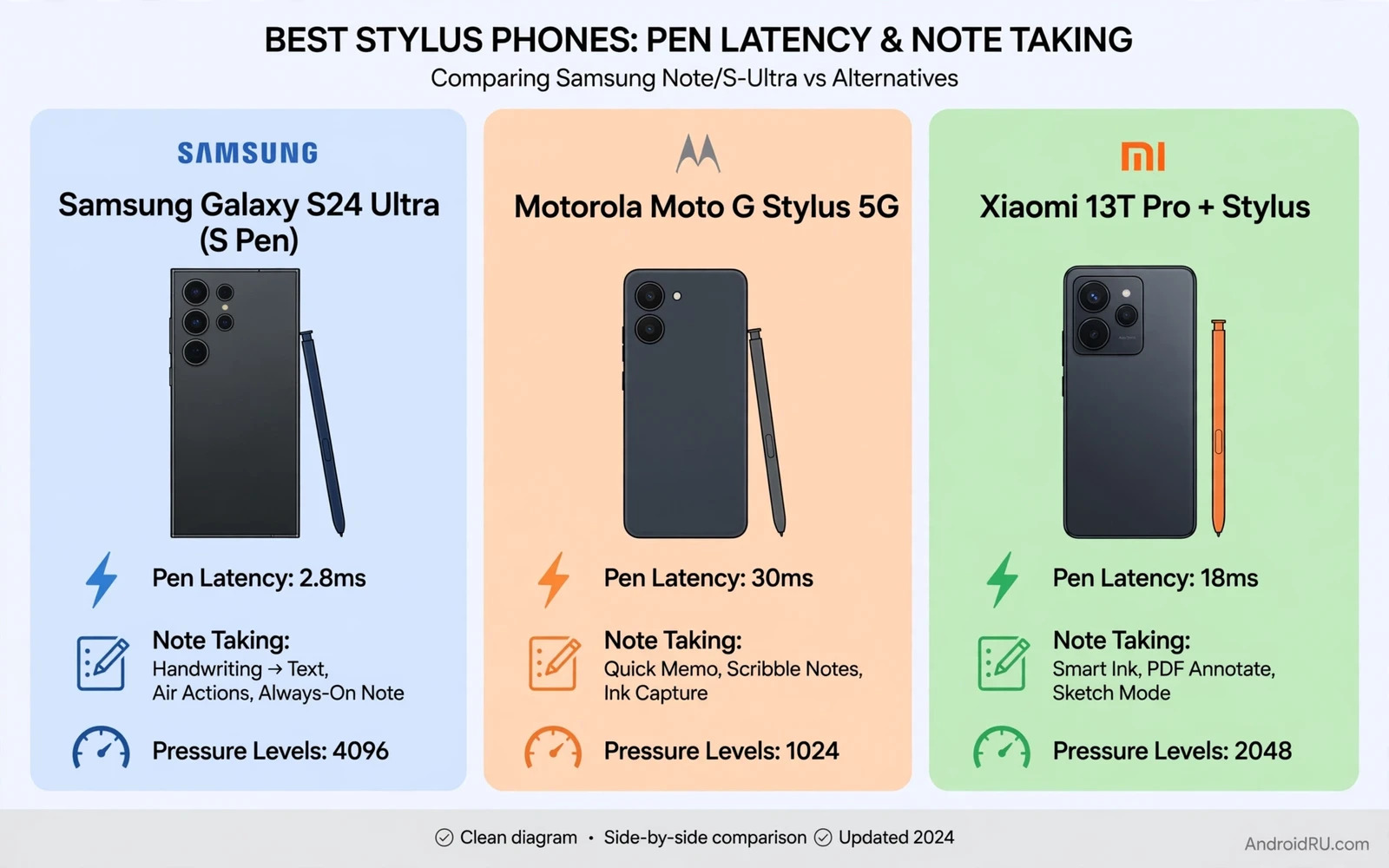
Best Stylus Phones Compared: Samsung Note/S-Ultra vs Alternatives
I bought my first pen phone because I was tired of losing ideas. A thought would arrive on a train, I would reach for my phone, and by the time the keyboard was open the sentence had already faded. A stylus changed that rhythm. I pull the pen out, write two lines on a dark screen, and the note is saved before the train reaches the next stop. That small change is the whole case for this category: a pen phone is not a phone with an accessory, it is a notebook that happens to make calls.
Samsung built this category with the Note line and now carries it with the Galaxy S Ultra models, where the S Pen lives inside the body and charges while it waits. Alternatives take different routes. Some bundle a larger pen that lives outside the phone. Some add stylus support to a foldable or a budget handset. Some are older models that still write beautifully and now cost far less than they did at launch. This comparison weighs pen feel, latency, software, and everyday phone quality together, because a great pen on a mediocre phone still disappoints by the second week.
Read this as a buying guide with real names and real trade-offs. Each phone below gets its own section with pros, cons, and a verdict, followed by a side-by-side table and a verdict for each type of user. If you write daily notes, sketch ideas, mark up PDFs, or sign documents on your phone, you will find your match here.
What Makes a Great Stylus Phone in 2026
A great pen phone starts with latency. Low latency means the ink appears under the tip the moment you move, with no visible gap between pen and line. High latency breaks the handwriting illusion and makes every stroke feel like a delayed echo. Modern flagship pen phones reach latency low enough that most writers notice no lag at all, helped by high refresh screens that redraw the ink many times per second. Budget alternatives vary more, because pen technology and screen refresh interact, and a 60 Hz screen will always feel a step behind a 120 Hz one for fast handwriting.
Pressure sensitivity shapes artistic use. More pressure levels allow subtle line variation for sketching and shading, while note takers need fewer levels but still benefit from a natural pressure response. Pen tip friction matters too: a tip that glides too smoothly can feel slippery on glass, while a tip with slight friction feels closer to paper. Matte screen protectors add a paper-like drag for many writers, though they can soften display sharpness slightly. Test pen feel with your own handwriting rather than trusting a specification number, because hands disagree with spec sheets more often than makers admit.
A built-in silo changes daily use fundamentally. The pen always travels with the phone, charges automatically inside the silo, and never gets left at home or lost in a bag. A separate pen offers a larger and more comfortable grip for long writing sessions, plus replacement flexibility, because a lost pen does not require a phone repair. Battery-free pens using electromagnetic resonance need no charging and feel light, while active pens with batteries offer extra buttons and features but need charging awareness. Choose based on writing frequency rather than pen size alone.
Latency and Pressure Sensitivity Explained
Latency is measured in milliseconds, and the numbers have fallen fast. The Galaxy S25 Ultra and S24 Ultra pair the S Pen with a 120 Hz display, and the ink tracks the tip closely enough that most writers stop noticing any delay after a few minutes. The Moto G Stylus line and the TCL Stylus 5G show a small but visible gap on fast strokes, which matters for artists doing quick hatching but rarely bothers note takers writing at normal speed. If you draw, prioritise the lowest latency you can afford. If you write meeting notes, a small delay is easy to live with.
Pressure levels tell a similar story. Samsung flagships advertise 4,096 levels of pressure, which sounds like a large number but really means the pen can tell a light sketch line from a firm one with fine steps in between. Cheaper stylus phones often offer fewer levels or a narrower range, which flattens line variation for artists. Students and business users who annotate PDFs will not feel the difference. Illustrators who shade with pen pressure will feel it on the first sketch.
Built-In Silo Versus a Separate Pen
The silo is the reason the Note line became a habit for so many people. Pulling the pen out can open a note instantly, even with the screen off, so an idea gets captured before it fades. The pen is always charged, always present, and always in the same place. A separate pen can be larger and more comfortable, and some writers prefer a full-size grip for hour-long sessions, but it needs a pocket, a case slot, or a bag, and it will be left behind on exactly the day you need it most. Honest self-assessment helps here: if you write every day, the silo wins. If you write twice a week, a separate pen saves money and still works well.
EMR Pens Need No Charging
Most pen phones use electromagnetic resonance, where the screen powers the pen and the pen needs no battery at all. The pen stays light, never runs flat, and works the moment you pick it up. Samsung S Pen models and the Motorola stylus both use this approach, which is one reason they feel so reliable. There is nothing to charge, nothing to pair, and nothing to forget overnight.
Active Pens and Extra Buttons
Active pens carry a battery and add features such as a side button, Bluetooth remote control for the camera shutter, or air gestures that trigger actions without touching the screen. The S Pen on the S24 Ultra and Note 20 Ultra supports remote shutter and air actions, which presenters and selfie-takers enjoy. The trade is charging awareness: an active pen that runs flat loses its extra features, though it usually still writes as a basic pen. Check whether you would actually use the remote features before paying for them.
The 8 Best Stylus Phones Compared
Each phone below was judged on pen feel, note software, screen quality, camera, battery, size, price, and update support. Prices change by region and by month, so check the current price before you buy, and treat the prices here as a guide to the tier each phone belongs to rather than a fixed quote.
1. Samsung Galaxy S25 Ultra
The Galaxy S25 Ultra is the current flagship of the category, pairing the integrated S Pen with a 6.9-inch flat display, a 200 MP main camera, and seven years of software updates promised by Samsung. The S Pen sits in its silo, writes with 4,096 pressure levels, and works with Samsung Notes, handwriting-to-text conversion, PDF annotation, and screen-off memos. The flat display is a real improvement for writers, because the pen no longer slides off a curved edge mid-stroke.
- Pros: integrated silo with always-charged pen, lowest latency in this group, flat display that suits writing, seven years of updates, flagship cameras and battery life.
- Pros: Samsung Notes converts handwriting to text accurately and syncs across phone, tablet, and PC, and the phone doubles as a strong everyday flagship.
- Pros: large bright screen with 120 Hz refresh keeps fast handwriting smooth and readable outdoors.
- Cons: large and heavy in the hand, premium price at launch, and the S Pen lost Bluetooth remote features on this model compared with earlier S Pen versions.
- Cons: size makes one-handed pocket use harder, and the flat design still needs a case to protect the camera lenses.
Verdict: the best pen phone for daily writers who want the strongest pen, the longest support, and a flagship phone in one device. Buy it if you write every day and keep phones for years.
2. Samsung Galaxy S24 Ultra
The Galaxy S24 Ultra is the previous flagship and now the smart buy in this group. It keeps the integrated S Pen with Bluetooth remote shutter and air gestures, a 6.8-inch display, a 200 MP camera, and seven years of updates. Its pen feels almost identical to the S25 Ultra in daily notes, with the same low latency and the same Samsung Notes software. The curved-edge display is the main difference writers will notice, and a matte screen protector tames the edge for most hands.
- Pros: full-featured S Pen with Bluetooth remote control, excellent note software, long update promise, and prices that have fallen since launch.
- Pros: strong cameras, long battery life, and a large screen that makes PDF markup comfortable.
- Cons: large and heavy, curved display edges can distract the pen near the border, and it costs more than the budget alternatives below.
- Cons: AI features vary by region and need a connection for some tasks.
Verdict: the best value flagship pen phone. Pick the S24 Ultra over the S25 Ultra if the lower price matters more than the flat display and you want the Bluetooth pen features the newer model dropped.
3. Samsung Galaxy Note 20 Ultra
The Galaxy Note 20 Ultra is the last phone to carry the Note name, and it remains a capable writing tool years after launch. Its S Pen has 4,096 pressure levels, very low latency for its generation, and the same screen-off memo habit that made the Note line famous. The 6.9-inch display still looks good, the cameras still take strong daylight photos, and used prices now sit far below the original launch price.
- Pros: genuine Note-era pen feel with low latency, integrated silo, large display, and much lower used prices than current flagships.
- Pros: Samsung Notes and handwriting conversion still work well, and the phone handles note taking, PDF markup, and sketching without fuss.
- Cons: software updates have ended or are ending, battery health on used units varies, and the camera and chip are a generation behind current flagships.
- Cons: buying used means checking battery health, screen condition, and pen presence carefully before paying.
Verdict: the best budget route into a true Samsung pen experience. Buy it only after checking battery health and update status, and only if you accept that support has run its course.
4. Samsung Galaxy Z Fold 6
The Galaxy Z Fold 6 takes a different approach: a foldable phone that opens into a small tablet, with S Pen support on the inner display. The pen is the S Pen Fold Edition, sold separately, and there is no silo inside the phone, so the pen lives in a case slot or a bag. The reward is canvas size. Unfolded, the inner screen gives you a note page nearly twice the size of a normal phone, which suits sketching, mind maps, and split-screen work with a document on one side and notes on the other.
- Pros: largest writing canvas of any phone here, excellent for sketching and split-screen notes, flagship performance and cameras, and long update support.
- Pros: the inner display makes PDF markup and multi-window research feel like tablet work in a pocket device.
- Cons: the S Pen is a separate purchase with no silo, the foldable screen needs more care, and the price sits above every other phone in this list.
- Cons: heavier than a normal phone when folded, and the crease can be felt under the pen on some strokes.
Verdict: the best pen phone for sketchers and multitaskers who want a tablet-sized canvas. Buy it if the large canvas matters more than the silo, and budget for the pen and a case that holds it.
5. Motorola Moto G Stylus 5G (2025)
The Moto G Stylus 5G (2025) is the strongest budget alternative with a built-in stylus. Motorola fits the pen into a silo in the body, pairs it with a 6.7-inch display, a large battery, and a clean Android experience with few preinstalled extras. The pen uses EMR technology, so it needs no charging, and Motorola’s note app covers handwriting, quick notes, and sketching, with third-party apps filling the gaps. The price is a fraction of a Samsung flagship, which is the point.
- Pros: integrated silo at a budget price, no pen charging needed, large battery that lasts a long day, and clean software that stays out of the way.
- Pros: good value for students and occasional writers, with a headphone jack and expandable memory on this model.
- Cons: pen latency is higher than Samsung flagships, note software is thinner and relies more on third-party apps, and update support is shorter.
- Cons: camera quality sits below flagship level, especially in low light.
Verdict: the best affordable pen phone for students and occasional writers. Buy it if you want a real silo and a real pen without flagship prices, and you can live with thinner note software.
6. TCL Stylus 5G
The TCL Stylus 5G is the cheapest way into a new pen phone with a built-in silo. TCL pairs the EMR pen with a large display, a big battery, and a price that undercuts every other new phone in this list. The pen writes smoothly for notes and lists, and the phone handles everyday tasks, calls, and media without complaint. Students comparing tablets and phones for note taking often cross-shop this model, and the Android tablets for students guide is a useful companion read, because note apps and stylus use overlap strongly between tablets and pen phones.
- Pros: lowest price of any new pen phone here, integrated silo, large display and battery, and a pen that needs no charging.
- Pros: solid choice for basic notes, lists, and signatures at work or school.
- Cons: pen latency and pressure range are modest, note software is basic, and update support is limited.
- Cons: performance and camera quality trail the rest of this list, and availability varies by region.
Verdict: the best ultra-budget pen phone. Buy it if price is the deciding factor and your writing is mostly short notes rather than art or long documents.
7. LG Stylo 6
The LG Stylo 6 is an older budget pen phone that still appears in used and refurbished listings. It has a built-in stylus, a 6.8-inch display, and a simple note app with screen-off memo support. The pen writes adequately for lists and quick notes, and the large screen suits readers who want big text. LG has left the phone business, so there are no new software updates, and buyers should treat this as a used-only option with eyes open.
- Pros: very low used prices, integrated silo, large display, and a simple pen experience that needs no setup.
- Pros: fine for basic notes, shopping lists, and signatures when a modern phone is out of reach.
- Cons: no software updates, older chip and cameras, pen latency and pressure sensitivity trail modern phones, and spare parts are scarce.
- Cons: battery health on used units is a lottery, and some apps may no longer support its Android version.
Verdict: a usable stopgap only. Buy it if the budget is extremely tight and the phone is only for basic notes, and check the battery and the Android version before paying.
8. Microsoft Surface Duo 2
The Microsoft Surface Duo 2 is the wildcard in this list: a dual-screen device that supports the Surface Slim Pen 2, sold separately, with haptic feedback that makes writing feel like pen on paper. The two screens open flat into a wide canvas for notes beside a document, and the pen attaches magnetically to the device for charging. It is a productivity device first and a phone second, and its camera and phone features trail the Samsung flagships.
- Pros: wide dual-screen canvas for notes beside documents, excellent pen haptics with the Slim Pen 2, and a unique multitasking layout.
- Pros: strong for business users who annotate documents and run two apps side by side all day.
- Cons: the pen is a separate purchase, software updates have ended, the camera is weak for the price, and the device is no longer sold new.
- Cons: app support for the dual-screen layout is uneven, and the hinge adds bulk.
Verdict: the best pen device for dual-screen document work, and a poor pick as a primary phone. Buy it used only if the two-screen workflow is the feature you actually need.
Side-by-Side Comparison Table: Stylus Phones at a Glance
The table below lines up the eight phones on the criteria that decide a pen purchase. Use it to narrow the list to two or three candidates, then test pen feel in person before you commit.
| Phone | Pen and silo | Latency and pressure | Note software | Price tier and support |
|---|---|---|---|---|
| Samsung Galaxy S25 Ultra | Integrated silo, S Pen included | Very low latency, 4,096 levels | Samsung Notes, handwriting search, PDF tools | Premium, seven years of updates |
| Samsung Galaxy S24 Ultra | Integrated silo, S Pen with Bluetooth | Very low latency, 4,096 levels | Samsung Notes, handwriting search, PDF tools | Premium, now cheaper, seven years of updates |
| Samsung Galaxy Note 20 Ultra | Integrated silo, S Pen with Bluetooth | Low latency, 4,096 levels | Samsung Notes, handwriting conversion | Budget used, updates ended |
| Samsung Galaxy Z Fold 6 | Separate S Pen Fold Edition, no silo | Low latency, 4,096 levels | Samsung Notes, split-screen notes | Premium plus pen cost, long support |
| Motorola Moto G Stylus 5G (2025) | Integrated silo, EMR pen included | Moderate latency, fewer levels | Motorola notes plus third-party apps | Budget, shorter support |
| TCL Stylus 5G | Integrated silo, EMR pen included | Moderate latency, basic pressure | Basic notes plus third-party apps | Ultra-budget, limited support |
| LG Stylo 6 | Integrated silo, pen included | Higher latency, basic pressure | LG notes, screen-off memo | Used only, no updates |
| Microsoft Surface Duo 2 | Separate Slim Pen 2, magnetic charging | Low latency, haptic pen feedback | Microsoft note apps, dual-screen tools | Used only, updates ended |
Note Apps and Handwriting Software
Note software decides whether a stylus feels powerful or gimmicky. Good note apps offer handwriting recognition, shape correction, PDF annotation, and cloud sync. They convert handwriting to text accurately for search and sharing, organise notes by notebook and by tag, and export notes in formats that survive app changes. Samsung Notes excels at breadth because it integrates notes with the calendar, reminders, and documents, and it syncs across phone, tablet, and PC through a Samsung account.
Alternatives rely more on third-party note apps, and quality varies. Some third-party apps match Samsung for pure note taking. Some excel at sketching or at PDF markup specifically. Check sync behaviour before committing, because notes locked to one app or one device lose value over time. Cloud sync across phone, tablet, and computer turns a pen phone into a full note system rather than a single-device notebook.
Handwriting search transforms handwritten notes from static ink into retrievable knowledge. A note app that recognises handwriting lets you search for a word across months of notes instantly. That capability matters enormously for students and professionals who accumulate hundreds of pages. Without search, handwritten notes become a beautiful archive that nobody revisits. With search, they become a working database that answers questions in seconds. Test search accuracy with your own handwriting style, because recognition quality varies by script and by neatness.
Export and backup protect organised notes from app failure. A note system locked to one app risks loss when the app changes pricing or shuts down. Regular exports to standard formats such as PDF preserve readable copies regardless of app fate. Cloud sync protects against device loss but not against account lockout, so keep an offline export copy for truly important notebooks such as research notes or business records. That redundancy feels excessive until the day it saves irreplaceable work.
Samsung Notes Versus Third-Party Apps
Samsung Notes wins on integration: handwriting conversion, audio-synced notes that link ink to a recording, PDF import and annotation, and sync across Galaxy devices. Third-party apps such as Nebo, Squid, and OneNote win on flexibility, because they run on many brands and keep your notes portable if you switch phones. Nebo converts handwriting well and exports cleanly. Squid suits fast sketching and PDF markup. OneNote suits users who already live in Microsoft tools. The best choice is the app whose export format you trust, not the one with the longest feature list.
Handwriting Search and Export Habits
Build a weekly habit: spend five minutes tidying new notes into the right notebooks and tags, and export anything important to PDF once a month. Notebooks by project, tags by topic, and favourites for active notes create multiple retrieval paths, so a note found through a tag still saves time when search fails. Consistent naming matters more than app features, because even the best app cannot rescue chaotic naming. Collaboration adds another layer: shared notebooks let teams annotate the same document, but check how the app resolves conflicts when two people edit offline, because silent overwrites damage trust quickly.
Drawing, PDF Markup and Everyday Phone Quality
Artists need more than note taking. Layer support, brush engines, colour accuracy, and palm rejection shape drawing satisfaction. Palm rejection matters enormously, because a resting palm must not create stray marks while the pen tracks precisely. Good pen phones reject palm input reliably while tracking pen input, and tilt support adds shading control for sketching. A phone screen limits canvas size regardless of pen quality, so serious artists often pair a pen phone with a larger tablet for finished work, using the phone as a capture tool for ideas that later move to a bigger canvas.
Phone drawing suits sketching, storyboarding, and quick concept work. It suits finished illustration less well due to screen size, and export formats matter here, because sketches should move to desktop tools without quality loss or format lock-in. Treat the phone as the place ideas are born, not the place they are finished, and the small screen stops feeling like a limit.
A pen phone must also succeed as a phone. Camera quality, battery life, screen quality, and update support matter daily even for devoted note takers. Samsung S Ultra models excel here because they pair the pen with flagship cameras, large bright screens, and long update promises. Alternatives sometimes sacrifice flagship camera or battery to hit a lower price, which may be acceptable for budget note takers but disappoints buyers who expect flagship everything. Size and weight deserve attention too, because pen phones tend to be large, and a large phone plus a pen suits desk and bag use beautifully while suiting one-handed pocket use less well.
Palm Rejection and Tilt Support
Palm rejection is the feature you notice only when it fails. Rest your palm on the screen, write a paragraph, and check for stray dots or lines. Samsung flagships and the Surface Duo 2 with the Slim Pen 2 handle this well, rejecting the palm while tracking the pen tip. Budget pen phones vary: some reject the palm reliably, others need a glove or a careful hand position. Tilt support adds shading for artists, letting the side of the pen tip create broad strokes. Note takers can ignore tilt entirely, but artists should test it with a sketching app before buying.
Cameras, Battery and Size Trade-Offs
Camera quality separates the tiers clearly. The S25 Ultra and S24 Ultra take strong photos in daylight and usable photos in low light, with zoom that holds up at concerts and on holiday. The Moto G Stylus and TCL Stylus take fine daylight photos and weaker night shots, which is fair at their prices but worth knowing before a trip. Battery life follows a similar pattern: the S Ultra models and the Motorola both last a long day of notes, calls, and media, while older used models depend on battery health. Buyers weighing flagship against mid-range prices should read the flagship versus mid range phones comparison, where large flagship trade-offs are weighed honestly, including the size and weight that pen phones add.
Left-Handed Writers: What to Test
Left-handed writers face smudging and palm rejection challenges that right-handed writers rarely consider. A left hand dragging across fresh digital ink can create stray marks when palm rejection lags, and some systems optimise for a right-handed palm position first. Test palm rejection with your natural writing posture during the return window, not with a brief shop scribble, because grip fatigue and stray marks appear after pages rather than after sentences. Pen button placement can also favour right-handed grips, so check whether the side button sits awkwardly for your thumb and whether its action can be remapped.
Which Stylus Phone Fits Your Use Case
Daily note takers should pick an integrated silo and strong handwriting conversion, which points to the S25 Ultra or the S24 Ultra. Students should pick affordable pen support plus good note sync, which points to the Moto G Stylus 5G or the TCL Stylus 5G, with third-party apps filling software gaps. Artists should pick low latency, pressure sensitivity, and palm rejection, which points to the S25 Ultra for phone sketching or the Z Fold 6 for a larger canvas. Business annotators should pick PDF markup and reliable cloud export, which points to Samsung Notes or OneNote on an S Ultra model. Occasional writers can save money with a separate-pen alternative or a used Note 20 Ultra, and every buyer should test pen feel with personal handwriting before purchase.
Long-term confidence matters too, because a pen phone is a multi-year purchase. Makers that sustain support and repairs longest give the best value over time, and the Android phone brands ranked by reliability and support guide shows which makers sustain their flagships longest. A phone that still receives updates in year five is worth more than a cheaper phone that stops in year two, especially when your notes live inside its software.
Frequently Asked Questions About Stylus Phones
Is the S Pen still worth it if I mostly type?
It depends on how often you capture ideas by hand. If you type everything and never sketch, annotate, or sign documents, the pen will sit in its silo and the extra cost buys little. If you take handwritten notes even twice a week, the pen pays for itself in speed and recall, because handwriting helps many people remember meeting points better than typing. Try a week of pen notes on a borrowed or store demo unit before deciding.
Can I use a stylus phone for professional drawing?
Yes for sketching, storyboarding, and concept work, with limits. The pen latency and pressure on Samsung flagships are good enough for client-ready sketches, but the small canvas frustrates detailed illustration. Most professional artists use the phone to capture ideas and a larger tablet or desktop for finished work. Export your sketches in a standard format early so the workflow survives a change of device.
Do third-party pens work on Samsung phones?
Some third-party EMR pens work on Samsung phones, because the screen technology is standard, but features vary. A generic EMR pen will usually write and erase, while Bluetooth remote features, air gestures, and button shortcuts normally need the official S Pen. Check compatibility for your exact model before buying a replacement, and keep the original pen safe, because it is tuned for your phone.
Which budget stylus phone is best for students?
The Motorola Moto G Stylus 5G (2025) is the strongest budget pick for most students, because it combines an integrated silo, a large battery, and a clean Android experience at a fraction of flagship prices. The TCL Stylus 5G costs less and suits basic notes, while a used Note 20 Ultra offers better pen feel if you accept ended support. Pick the Motorola when you want a new phone with a warranty, and the used Samsung when pen quality matters more than support years.
What to Try Before You Buy a Stylus Phone
Test pen feel with your own handwriting during the return window. Write a full page of notes, sketch a quick diagram, annotate a PDF, and convert a paragraph to text. Check palm rejection with your natural grip, check handwriting search with your own script, and export one note to PDF to confirm the workflow survives outside the app. Those four checks take an hour and reveal more than any spec sheet.
Start with the S24 Ultra if you want the best balance of pen quality and price, and move up to the S25 Ultra only if the flat display and longest support matter to you. Pick the Moto G Stylus 5G when the budget is tight and you still want a real silo and a real pen. Walk away from any pen phone whose notes you cannot export, because a note system you cannot leave is a trap, not a tool. The best pen phone is the one whose pen you actually use daily, not the one with the longest specification list, so choose the phone that fits your hand, your habits, and your budget, and start writing today.

