

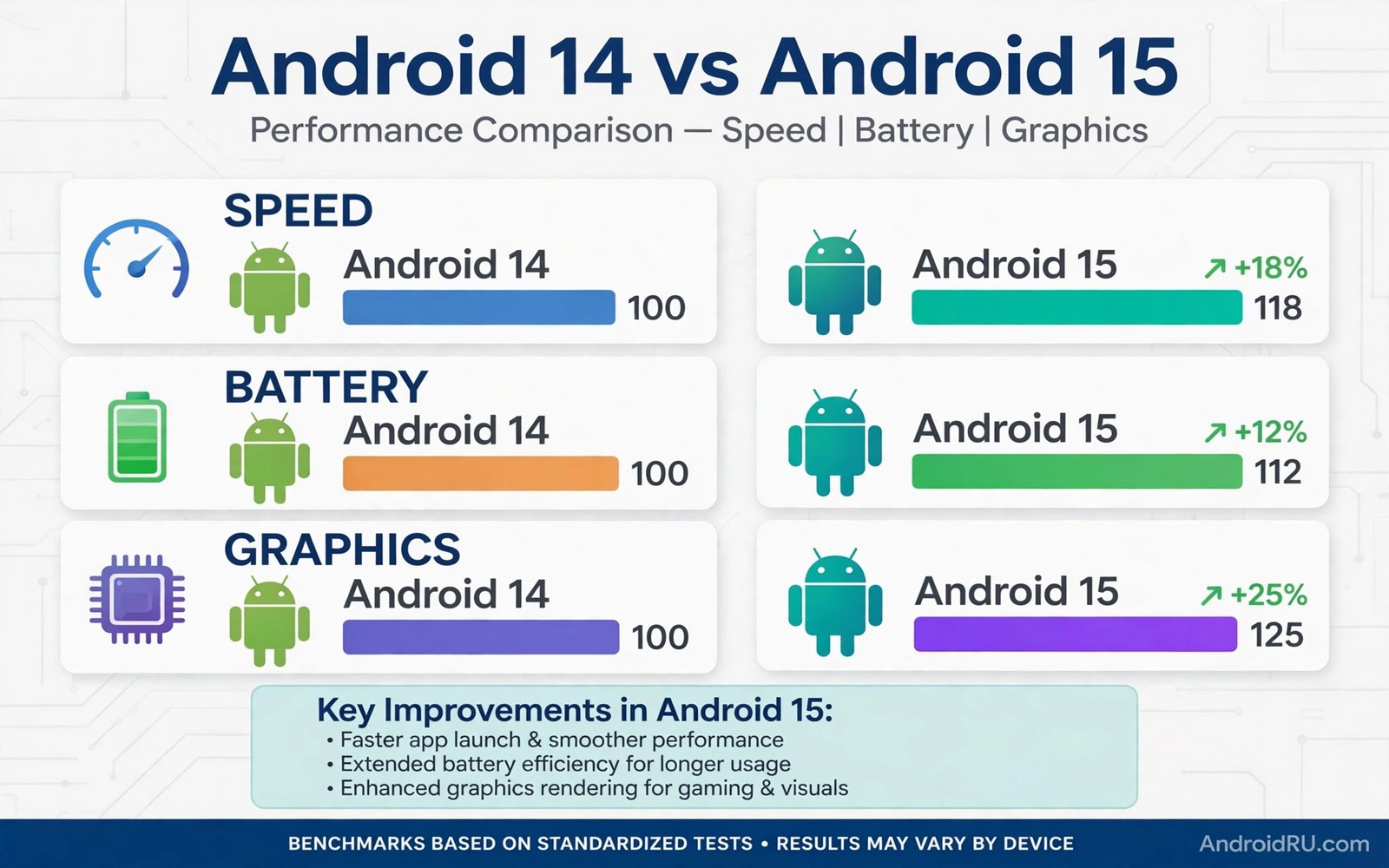
Android 14 vs Android 15 performance is a practical question rather than a benchmark contest. Most owners care about app launch speed and battery life and smooth scrolling. Android 15 improves several under the surface systems that affect those daily measures. The gains are modest on strong hardware and more noticeable on midrange phones in some tasks.
Performance also depends on the phone and its processor and its memory. The same Android version can feel fast on a flagship and sluggish on an old budget phone. This guide separates system improvements from hardware effects. If you are still deciding on eligibility then top features of the next Android generation gives the feature side of the same upgrade.
App launch and responsiveness
Android 15 improves how the system handles background work and memory pressure. Apps that were recently used can resume faster because the system manages cached processes more carefully. Scrolling feels smoother when the system avoids sudden work spikes during animations. These changes are subtle but they add up across a day of use.
App launch speed also depends on storage speed and app design. A well optimised app launches fast on both versions. A heavy app with slow startup code will stay slow after an upgrade. Owners should therefore judge performance by their own most used apps rather than by a single benchmark score.
Battery life changes
Android 15 tightens rules for background activity and it gives the system better tools to pause wasteful work. Apps that wake the phone too often face stricter limits. That change can extend standby time especially overnight. Screen on battery life depends more on display brightness and app use than on the system version.
Battery results vary by usage pattern. Heavy gamers may see little change because the screen and processor dominate power use. Light users with many background apps may see a clearer gain. Measuring battery life over a full week gives a fairer result than judging a single day after an update.
Gaming and graphics
Android 15 brings improvements to graphics handling and to how games use the processor. Frame pacing can feel steadier in games that support the new tools. Thermal behaviour also matters because a phone that overheats will throttle performance regardless of version. A good cooling design helps more than a version number in long gaming sessions.
adb shell cmd package list packages | wc -l
adb shell dumpsys meminfo | head -30
adb shell cat /proc/meminfo | head -10
These commands follow the approach described in the official Android developer documentation for inspecting memory use and installed packages on a device.
Older phones may not gain gaming speed from Android 15. Their processors and graphics hardware set a hard ceiling. Newer phones with modern processors benefit more from system level graphics work. Owners should set expectations from hardware first and version second.
Memory and storage behaviour
Android 15 manages memory with more care for large apps and multitasking. Switching between several apps can feel smoother when memory pressure is handled well. Storage performance also affects how fast apps install and update. A phone with nearly full storage will feel slow on either version.
Freeing storage before an upgrade helps performance more than any single system tweak. Delete unused apps and large videos before you judge a new version. Reading about how to force a system update helps you install cleanly when the upgrade reaches your model.
Who benefits most from upgrading
Midrange owners often benefit most because system efficiency gains matter more on limited hardware. Flagship owners gain polish and new features rather than dramatic speed. Owners of very old phones may see mixed results if hardware limits dominate. In that case a new phone delivers more than a software upgrade alone.
Owners who value privacy and security should upgrade regardless of speed gains. Android 15 adds controls that Android 14 lacks. Performance alone rarely justifies delaying a security improvement. Learning understanding Android desktop mode shows another area where newer versions expand what a phone can do.
Benchmarks versus real experience
Benchmark scores measure peak performance under ideal conditions for a short period. Real experience measures sustained performance during browsing and messaging and gaming over hours. A phone can score highly in a benchmark yet throttle quickly during a long gaming session. Owners should therefore treat benchmarks as one signal rather than a verdict. Real owner reviews that describe daily use often predict satisfaction better than a benchmark chart.
Thermal design explains much of the gap between benchmark and real experience. A phone with a powerful processor but weak cooling will slow down as heat builds. A phone with a modest processor and good cooling may sustain performance longer. Android version improvements cannot fix a thermal design limit. Buyers should therefore consider cooling and body design alongside processor names when they care about sustained gaming.
Storage speed also affects real experience in ways benchmarks may hide. App installs and photo saving and game loading all depend on storage speed. A phone with fast storage feels responsive even with a midrange processor. A phone with slow storage feels sluggish even with a flagship processor. Android updates cannot change storage hardware. Owners judging an upgrade should therefore separate storage effects from system effects.
Network speed shapes perceived performance for many modern apps. A social app that loads slowly may suffer from network limits rather than Android performance. A video call that stutters may reflect connection quality rather than system speed. Owners should test performance on Wi-Fi and on mobile data separately before blaming an Android version. That separation prevents mistaken conclusions about an upgrade.
Performance tuning after an upgrade
Performance tuning after an upgrade starts with storage cleanup and app review. Remove apps that run constantly in the background without benefit. Disable background activity for social apps that wake the phone too often. Those steps reduce processor load and improve battery life on either Android version. Tuning apps often delivers a larger gain than the version change itself.
Display settings also affect perceived smoothness and battery life. A high refresh rate display feels smoother but uses more power. Lowering refresh rate can extend battery life for owners who value endurance over animation smoothness. Animation scale settings in developer options can also change perceived speed. Owners should adjust those settings to match personal preference rather than chasing a benchmark number.
Restarting the phone weekly helps maintain performance after an upgrade. A restart clears temporary processes that accumulate over days. It also allows the system to complete background optimisation tasks cleanly. Weekly restarts are a simple habit with a real benefit. Owners who never restart may blame an Android version for slowness caused by accumulated background state.
Factory reset as a performance cure deserves caution after an upgrade. A reset can improve performance by removing accumulated clutter. It also costs hours of restoration time and it risks data loss without a perfect backup. Owners should try storage cleanup and app tuning first. A reset should remain a last resort for persistent performance problems that resist simpler fixes.
Measuring performance fairly after an upgrade
Fair performance measurement after an upgrade requires consistent test conditions across versions. Owners should test the same apps and the same tasks before and after upgrade. They should also use the same network and the same battery level for comparison. Changing several variables at once makes results meaningless. A fair test isolates the Android version effect from network and battery effects.
Owners should also allow a settling period after upgrade before measuring. The system optimises apps and rebuilds caches during the first days. Those background tasks affect speed and battery temporarily. Measuring after a week of normal use gives a fairer result than measuring on day one. Patience in measurement prevents false conclusions about a new version.
Subjective feel matters alongside objective measurement because owners experience a phone through daily tasks rather than benchmarks. A phone that feels smooth during messaging and browsing satisfies most owners even if a benchmark score looks modest. A phone that stutters during scrolling frustrates owners even if benchmarks look strong. Owners should therefore trust their own daily experience more than a single benchmark number.
Sharing fair performance results helps other owners with the same model make decisions. A useful report includes the model and the before and after versions and the test conditions. It also includes the settling period allowed before measurement. Reports with those details help readers judge credibility. Vague claims that a version feels faster or slower without details help no one.
Common mistakes
Many owners judge performance on the first day after an update when the system is still optimising apps in the background. That first day often feels slower and warmer than normal. Another mistake is comparing two different phones and blaming the version for a hardware gap. Fair comparisons use the same phone before and after the upgrade.
- Judging speed on day one ignores background optimisation that temporarily slows the phone after an update.
- Comparing different phones and blaming Android version alone confuses hardware differences with system changes.
- Leaving storage nearly full before an upgrade hides any real performance gain behind storage pressure.
Frequently asked questions
Is Android 15 faster than Android 14?
In most daily tasks it feels slightly faster and smoother especially on midrange phones. The gain is modest rather than dramatic. Hardware and app design still set the main speed limits.
Does Android 15 improve battery life?
Standby battery often improves thanks to stricter background rules. Screen on battery depends mainly on brightness and app use. A full week of normal use gives the fairest comparison.
Should I upgrade for performance alone?
Performance alone is a weak reason to rush. Privacy and security improvements make a stronger case. If your phone runs well on Android 14 you can wait for the stable rollout for your model.
Conclusion
Android 15 offers modest performance gains over Android 14 through better memory handling and background rules and graphics polish. Battery standby often improves while gaming gains depend on hardware. Midrange owners tend to notice the difference most.
Your next step is to back up your data and free storage before upgrading. Then measure your own app launch speed and battery life for a week after the update. Your own results matter more than any benchmark chart.

