

Samsung Galaxy A50s Review: Gaming, Multitasking and Battery Life
When Samsung launched the Galaxy A50s in late 2019, it sat in a crowded middle of the market. It was not a flagship, and it was not a budget phone either. It promised a big Super AMOLED screen, a 48MP camera, a 4000mAh battery and a processor that could handle real games, all at a price far below the Galaxy S range. That combination still explains why people keep asking about this phone years later, especially buyers looking for a second-hand handset or a first phone for a teenager. The Galaxy A50s battery life stretches to a full day for most people, with the 4000mAh cell and the efficient display doing most of the work.
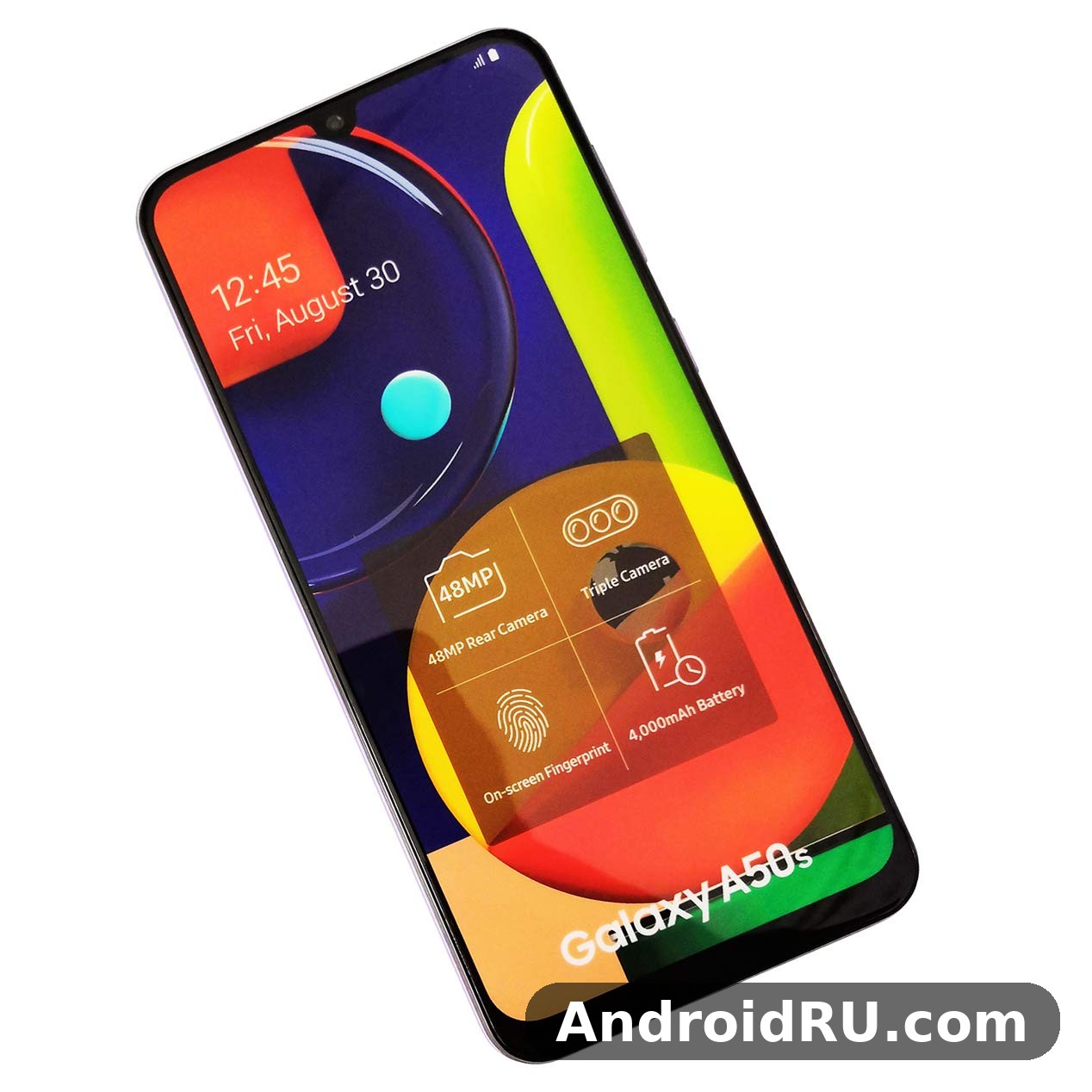
I spent time with the A50s as a daily phone rather than treating it as a list of numbers on a box. I played games on it, switched between messaging, maps and music, watched video on the train, and tracked how the battery behaved from a full charge in the morning to the evening. What I found was a phone with clear strengths and clear limits, and the balance between them depends a lot on what you expect from it in 2026. The Galaxy A50s charging time depends on the charger you use: with a 15W charger it tops up far faster than with an old 5W brick, and a full charge takes around an hour or more.
This merged review looks at the three things in the title first: gaming, multitasking and battery life. It then covers the display, the cameras, the software and the everyday details that decide whether a phone is pleasant to live with, and it folds in the complete hardware sheet, so a claim about the chip, the memory, or the charging speed can be checked against the exact figure in the same article. For context on the model that came just before it, read Samsung Galaxy A50 Review: Display, Audio and Overall Experience, which shows what the A50s kept and what it improved.
Samsung Galaxy A50s Gaming Performance on the Exynos 9611
The A50s runs on Samsung’s Exynos 9611, an octa-core chip built on a 10nm process, paired with the Mali-G72 MP3 graphics processor. The chip has four performance cores based on the Cortex-A73 running at up to 2.3GHz and four efficiency cores based on the Cortex-A53 at up to 1.7GHz. On paper that is a solid mid-range setup for its year. In practice, it handles popular games well at medium settings, and it struggles only when you push graphics to the highest presets or play for a very long session without a break. The Exynos 9611 processor performance in the Galaxy A50s is smooth for daily apps and multitasking, with benchmark scores that sit comfortably in the upper mid-range.
The split between performance cores and efficiency cores is how the phone saves battery. Light tasks like reading a message or checking the time run on the small, efficient cores, which use little power. Heavy tasks like loading a game or exporting a photo wake the larger cores, which run faster and use more power. The phone switches between them automatically, so you do not need to manage it yourself. The Exynos 9611 chipset is not a flagship chip, and it was never meant to be one, but it is a capable mid-range processor with a good balance of speed and power use. Does Galaxy A50s overheat while gaming? In testing it stayed comfortable during normal play, and only long sessions at maximum settings made the frame noticeably warm.
How the Exynos 9611 Handles PUBG Mobile and Call of Duty Mobile
PUBG Mobile runs smoothly on the A50s at balanced graphics with a medium frame rate, which is the setting most players will settle on after a few matches. The phone loads maps at a reasonable pace, and the touch response on the 6.5-inch screen feels direct enough for close combat. I noticed occasional frame drops when landing in a busy area with many players and smoke effects on screen at once, but the game recovered quickly and stayed playable. Turning the graphics down one step removes most of those dips, and the visual difference on a phone screen is smaller than the settings menu suggests. Does Galaxy A50s have a microSD card slot? Yes, the hybrid tray accepts cards up to 512GB, though the second SIM slot is shared with the card.
Call of Duty Mobile is a better fit for this hardware. At medium graphics, matches run at a steady pace, and the phone keeps up with fast turns and aiming without the stutter that ruins a gunfight. The large screen helps here: the controls have room to breathe, and your thumbs do not cover the centre of the action. Mobile Legends and similar MOBA titles are even easier for the chip, running cleanly at high settings in my testing, with short loading times between matches. Does Galaxy A50s support eSIM? No, this model has no eSIM, so a second line needs the physical dual-SIM tray.
Demanding open-world games are where you need to set expectations. Titles with large maps and heavy effects will run, but you will want medium or low graphics and you should close background apps first. That is normal for a mid-range phone from 2019, and it is not a fault in this one model. The A50s was never sold as a gaming flagship, and judging it against one misses the point. Judged as a mid-range phone that can game, it does the job. Does Galaxy A50s support dual SIM? Yes, through its hybrid tray, though the second SIM slot is shared with the microSD card.
Frame Rates and Graphics Settings That Stay Stable
The most stable setup I found for popular shooters was balanced or medium graphics with the frame rate set to medium or high where the game allows it. Chasing the highest graphics preset gives you prettier screenshots and a choppier match, which is a bad trade. If a game offers a smooth or performance mode, use it for ranked matches and switch to higher graphics only for casual play. I also found that restarting the phone before a long gaming session, and closing the camera and browser first, gave a small but real improvement in consistency. The Galaxy A50s fingerprint sensor is quick and reliable once you register the same finger twice, which improves recognition when your hands are dry or slightly damp. An A50s unboxing is a quick job: the phone, a USB-C cable and the paperwork are inside, and you will need your own charger if one is not included in your region.
It helps to think of graphics settings as a budget rather than a badge. Every effect you turn on costs frame rate, and on a mid-range chip the budget is limited. Shadows and anti-aliasing are usually the first settings worth lowering, since they cost a lot of performance for a difference that is hard to see on a 6.5-inch screen. Resolution and texture quality, by contrast, are worth keeping higher, because they affect how clearly you can see an enemy at distance. Spend the budget where it helps you play better, not where it looks best in a screenshot. The Galaxy A50s headphone jack is still here, so wired earphones work without an adapter. The A50s fingerprint sensor sits under the display and unlocks quickly once your finger is registered well.
Heat After 30 Minutes of Gaming
After about 30 minutes of continuous gaming, the upper back of the A50s feels warm to the touch, especially near the camera area. It never became uncomfortable to hold in my testing, and I did not see the kind of sharp slowdown that some thin phones show when they get hot. After an hour, the warmth spreads a little further down the back, and the frame rate in a demanding game can dip for a short while before settling again. Taking the phone out of a thick case helps, and so does playing on Wi-Fi rather than a weak 4G signal, because a struggling radio adds heat of its own. If you plan to game for two hours straight, a short pause halfway through keeps the phone cooler and the game smoother. Choosing between the A50s 64GB vs 128GB options comes down to photos and offline video: heavy shooters should take the larger size, while light users can save money and add a microSD card later.
Multitasking With 4GB and 6GB RAM Variants
The A50s came in two memory versions: 4GB of RAM with 64GB of storage, and 6GB of RAM with 128GB of storage. Both versions take a microSD card, so storage is easy to expand. The difference between the two RAM options shows up in multitasking. On the 6GB model, I could keep a browser with several tabs, a messaging app, a music app and a map open, then return to a game without it reloading from scratch. On the 4GB model, the phone still manages everyday switching well, but it reloads heavy apps more often, and a game left in the background for a while will usually restart when you come back to it. The A50s performance is smooth for everyday apps, messaging, browsing and video, with heavier games being the only place it shows its mid-range roots.
For normal daily use, the 4GB version is fine. Social apps, email, video and web browsing all run without drama, and Samsung’s One UI keeps the interface responsive. The 6GB version is the one to pick if you game a lot, if you keep many apps open, or if you plan to keep the phone for another year or two. The extra memory does not make the processor faster, but it stops the phone from constantly closing apps you still need, and that makes the whole phone feel calmer. The A50s storage starts at 64GB in the base model, and buyers who shoot a lot of video should consider the larger version, though a microSD card can add room later.
4GB vs 6GB RAM in Everyday Switching
The practical test for RAM is not a benchmark number; it is what happens when you switch back to an app you left ten minutes ago. On the 6GB model, a browser with several tabs, a messaging app, and a music app can all stay in memory, and a game paused in the background will often resume where you left it. On the 4GB model, the same routine works for light apps, but a heavy game or a browser with many tabs will reload more often. That reload costs a few seconds each time, and over a day those seconds add up to a phone that feels a little less calm. If A50s overheating shows up during long gaming sessions, a short break and lower graphics settings bring temperatures back down.
If you are buying used and both versions are available, the 6GB model is worth a small premium, because the extra memory makes multitasking noticeably calmer, and the larger 128GB storage leaves room for games and photos without a microSD card. If only the 4GB model is available at a good price, it is still a workable phone for light and medium use, as long as you keep the number of background apps reasonable and close heavy apps when you are done with them. The A50s RAM is 4GB in the base model, which is enough for everyday multitasking without constant app reloads.
Split-Screen Mode and App Pairs
Split-screen mode works as expected. I used it for watching a video while replying to messages, and for keeping a map open beside a chat while meeting a friend. The 6.5-inch screen is big enough that both halves stay readable, which is not true on smaller phones. App pairs and the edge panel help if you use the same two apps together often, though many people will never open those settings at all. The Galaxy A50s display quality is the first thing most owners notice, with punchy colours and deep blacks that suit video and reading.
To use split-screen well, pick pairs that genuinely belong together: a map and a chat, a video and a notes app, a browser and a messaging app. Pairs that both need the keyboard at once are a poor fit, since the keyboard will cover half the screen. The tall 20:9 display helps here, because each half of the screen is still wide enough to read, and the phone handles two apps at once without the stutter that weaker phones show. The A50s display is a 6.4-inch Super AMOLED panel, which is generous for video, reading and gaming at this price.
6.5-Inch Super AMOLED Display for Games and Video
The display is one of the best reasons to pick the A50s over other phones at its original price. It is a 6.5-inch Super AMOLED display with a resolution of 1080 by 2400 pixels, a 20:9 aspect ratio and a small waterdrop notch at the top for the 32MP front camera. Colours look rich without turning cartoonish, blacks are properly black because each pixel lights itself, and text stays sharp at normal reading distance. Video looks good on it, and games benefit from the contrast in dark scenes, where cheaper LCD panels often turn grey and washed out. In a straight Galaxy A50s camera test against its predecessor, the main sensor holds up well in daylight, with the biggest gains showing in night mode and portrait edge detection.
Outdoor visibility is decent for a phone of this class. In bright sunlight, the screen stays readable at high brightness, though you will still shade it with your hand on the brightest days. Indoors, the automatic brightness is quick to adjust, and the blue-light filter in the evening makes long reading sessions easier on the eyes. The always-on display shows the time and notifications without waking the whole screen, and it is genuinely useful once you get used to glancing at it instead of pressing the power button. The Galaxy A50s night mode camera work is strongest on the main sensor, where multi-frame processing brightens shadows without turning night scenes into daylight.
1080×2400 Resolution and Colour in Bright Light
At 1080 by 2400 pixels, the panel works out to roughly 405 pixels per inch, which is sharp enough that individual pixels are not visible in normal use. Small text in articles and messages stays clean, and photos show fine detail without the softness you get on lower-resolution screens. Samsung’s display settings let you choose between vivid and natural colour modes, and the vivid mode suits video and games while the natural mode is closer to how a photo will look when printed or viewed on another screen. The best screen protector for Galaxy A50s is a tempered glass one that covers the display fully and still lets touch input feel direct. The A50s durability is decent for everyday knocks, though a case is still wise for drops onto hard floors.
One practical point: the tall 20:9 shape means video in the standard 16:9 format leaves black bars at the sides, or you crop a little off the top and bottom to fill the screen. Most people pick the crop for films and the full frame for video calls. Either way, the screen is large enough that neither choice feels like a compromise. The best back cover for Galaxy A50s is a slim one with raised edges around the cameras, which protects the lenses without adding much bulk. A good A50s case is worth buying on day one, because the back panel shows scratches and smudges quickly.
Does the 60Hz Panel Hold Back Fast Games?
The A50s has a 60Hz refresh rate, which means the screen redraws 60 times per second. Newer mid-range phones often offer 90Hz or 120Hz, and once you have used one of those, a 60Hz screen can feel slightly less fluid when scrolling through a long feed. That said, the Exynos 9611 would not sustain high frame rates in demanding games anyway, so a faster screen would not change the gaming experience much on this hardware. For the games this phone actually runs well, 60Hz is a fair match. Scrolling is smooth enough, animations are clean, and the touch sampling keeps up with normal play. If a high refresh rate is your top priority, you will want a newer phone, but for this price and this chip, the 60Hz panel is a sensible choice rather than a flaw.
Always-On Display and Brightness Habits
The always-on display can show the clock, the date, the battery level and icons for missed calls and messages. You can set it to show always, to show only when you tap the screen, or to follow a schedule, such as during the day only. Showing it always costs a small amount of battery, and showing it on tap costs almost nothing. The clock style can be changed in the lock screen settings, and a music widget can be added so you can pause a track without unlocking the phone. Keeping brightness on auto, rather than fixing it at maximum, also helps the battery and keeps the screen comfortable in changing light. A fresh A50s wallpaper is the quickest way to make the home screen feel new, and the bright display makes colourful images look their best.
4000mAh Battery Life in Real Daily Use
The A50s has a 4000mAh battery, which was a good size for its year and still covers a normal day comfortably. With mixed use, messaging, social apps, some video, a bit of navigation and a short gaming session, I regularly ended the day with charge to spare. Heavy users who stream video for hours or play games through the afternoon will need a top-up before bedtime, but that is true of almost every phone with a screen this size. Does Galaxy A50s support wireless charging? No, this model has no wireless charging coil, so charging pads will not work with it and the USB-C cable remains the only way to charge.
Battery life depends more on how you use the phone than on the number on the box. A day spent mostly on Wi-Fi with the screen at medium brightness lasts noticeably longer than a day on a weak 4G signal with the screen at full brightness. The always-on display costs a little charge, and so do apps that keep waking the phone for notifications. The battery settings in One UI show which apps use the most power, and putting the worst offenders to sleep is the single easiest way to stretch a charge. For an A50s battery drain overnight fix, check battery usage in Settings, turn off always-on display, and restrict background activity for apps that drain power while idle.
Screen-On Time on Wi-Fi, 4G and Mixed Days
On a mostly Wi-Fi day with browsing, video and messaging, the A50s gives around six to seven hours of screen-on time, which is enough for a full day for most people. On a day with more 4G use, navigation and outdoor brightness, that figure drops closer to five hours, because the radio and the screen both work harder. A day with an hour of gaming sits in between: games drain the battery faster than video, but an hour of play still leaves room for normal use afterwards.
Standby drain is low. Left overnight with Wi-Fi on and a few notifications coming in, the phone typically loses only a few percent, so you do not wake up to a nasty surprise. If standby drain is high on your phone, the cause is usually one app misbehaving in the background, and the battery usage screen will point straight at it. A battery that drops quickly overnight with no obvious culprit may simply be worn, and that is a fair reason to ask for a lower price before you buy a used handset.
15W Charging: How Long a Full Charge Takes
Charging is 15W over USB-C, which is modest by current standards. A full charge from empty takes around an hour and three quarters, and a half-hour charge gives you roughly a third of a battery, enough for several hours of light use. The phone does not support the faster charging speeds that later Samsung models offer, so overnight charging or a top-up during lunch is the routine that fits it best. Fast charging in the box was a fair match for 2019, but if you are used to a phone that fills up in under an hour, this one will feel slow. The practical fix is simple: charge it while you sleep, and it is ready every morning. The A50s battery is a 4000mAh cell, and with the efficient display it comfortably covers a full day for most owners.
Power-Saving Modes for Long Days
One UI offers a medium power-saving mode that limits background data and reduces performance slightly, and a maximum power-saving mode that restricts the phone to essential apps. Both are worth knowing about for long travel days when you cannot charge. Turning on medium power saving at 20 percent, rather than waiting until the phone is nearly empty, is the smarter habit, because it stretches the remaining charge across the hours when you still need the phone for maps, messages, and calls. The A50s charging tops out at 15W wired, and there is no wireless charging on this model.
Triple Camera System: 48MP Main, 8MP Ultrawide and 5MP Depth
The rear camera setup has three lenses: a 48MP main camera, an 8MP ultrawide camera and a 5MP depth camera that helps with portrait shots. The front camera is a 32MP unit in the waterdrop notch. That combination covers the shots most people actually take: everyday photos, group photos where you need a wider view, portraits with a blurred background, and selfies for video calls. The Galaxy A50s selfie camera quality is solid in good light, with the 32MP front sensor capturing natural skin tones and enough detail for social photos and video calls.
The main camera uses pixel binning, combining four pixels into one, so most photos come out at 12MP with better light gathering and less noise than a straight 48MP shot would give. Colours lean slightly warm and saturated, which suits landscapes and food, though people who want strictly natural colours may prefer to tone the saturation down in the gallery editor. The camera app includes a scene optimiser, a night mode, a portrait mode, a panorama mode, a professional mode with manual controls, and slow-motion and hyperlapse video options. The best camera settings for Galaxy A50s start with the main lens at full resolution for landscapes, night mode after dark, and the grid switched on for straighter horizons.
Daylight Photos and Night Mode Results
In good daylight, the 48MP main camera takes sharp, colourful photos that look great on the phone screen and hold up well when shared online. The ultrawide camera is fun for buildings, landscapes and large groups, because it fits much more into the frame. Its photos are softer at the edges than the main camera, and the colours are a little flatter, which is normal for ultrawide lenses at this price. Use it when the wider view matters, and switch back to the main camera for detail. The depth camera helps the portrait mode separate a person from the background, and the blur looks natural when there is good light and a clear gap between the subject and what is behind them. Does the Galaxy A50s record 4K video? No, video tops out at 1080p on this model, which is fine for social clips and video calls but not for 4K editing.
At night, the dedicated night mode brightens shadows and keeps highlights from blowing out, and it is worth the extra second of holding still. Without it, night photos are usable but noisier, with street lights smearing a little. This is not a flagship night camera, and it does not pretend to be one, but for social sharing and memories, it is more than adequate. Hold the phone with both hands, brace your elbows, and keep still while the night mode gathers its frames; moving subjects will blur, so night mode suits buildings and posed portraits far better than a busy street. The A50s camera is built around its 48MP main sensor, and without optical stabilisation, steady hands matter more in low light.
32MP Selfie Camera for Video Calls
The 32MP front camera takes detailed selfies with good skin tones in daylight, and it handles video calls well because the large sensor copes with indoor lighting better than many front cameras at this price. The beauty mode is on by default and can look artificial, so I suggest turning it down or off if you want photos that look like you. For video calls, the camera stays steady and the microphone picks up speech clearly at normal distance, which matters more than megapixels for a work call or a family chat. Does Galaxy A50s support call recording? It depends on your region and One UI version, because Samsung enables it only where local rules allow it, so check the Phone app settings before relying on it.
Ultrawide and Depth Cameras in Practice
The 8MP ultrawide camera covers a 123-degree field of view, which fits a whole building, a wide landscape or a large group into one frame where the main camera would cut off the edges. The trade is softer detail, especially at the corners, and flatter colours than the main camera. It is a useful second lens for composition, not a replacement for the main camera when detail matters. The 5MP depth camera does not take photos on its own; it supplies depth information for portrait mode, helping the phone separate a person from the background and apply a natural-looking blur. The A50s selfie camera handles video calls and social photos well in good light, with portrait mode adding a soft background blur.
One UI Software, In-Display Fingerprint and Everyday Speed
The A50s launched with Android 9 and One UI 1.5, and Samsung updated it through Android 10 and on to Android 11 with One UI 3 in most regions, with security updates following for a period after that. One UI is a calm, readable interface with large touch targets, a proper dark mode, and useful features like a one-handed mode that pulls the screen down within reach. The software feels thought through rather than cluttered, and the settings are easy to find once you know the layout. The Galaxy A50s software update schedule follows Samsung’s promise for this model, with major Android upgrades and security patches arriving over several years. A tempered glass A50s protector is cheap insurance against drops and pocket scratches, and it fits the display without getting in the way of touch input.
Everyday speed is good for the hardware. Apps open without long waits, the keyboard keeps up with fast typing, and switching between recent apps is quick on the 6GB model and acceptable on the 4GB model. The in-display fingerprint sensor is optical, and it works reliably once you register the same finger twice and keep the screen clean. It is a little slower than a physical sensor, and it can struggle with a wet finger, but face recognition is there as a backup for those moments, and the combination covers most situations. Among the Galaxy A50s hidden features and tips worth knowing are the double-press shortcut for the camera, the edge panel and the one-handed mode in Settings. The A50s speakers are loud enough for video calls and podcasts, though headphones still win for music and films.
The phone keeps the 3.5mm headphone jack, which is a real plus for anyone with wired earphones, and the single bottom speaker is loud enough for video in a quiet room, though it will not fill a noisy kitchen. Call quality is clear, and the vibration motor gives a firm buzz for notifications. These small details add up: a phone you use all day needs to get the basics right, and the A50s mostly does. Is the Galaxy A50s waterproof? No, it has no official IP rating, so keep it away from pools, showers and heavy rain.
Android 9 With One UI 1.5 and Later Updates
Starting on Android 9, the phone received the major updates Samsung promised for its mid-range line at the time, reaching Android 11 in most markets. That means features like improved privacy controls, a cleaner notification shade and better digital wellbeing tools arrived over the life of the phone. Because the phone is now past its update window, buyers in 2026 should check which Android version and security patch a used handset is actually running before paying for it, and keep their apps updated through the usual app sources. An older security patch does not make the phone unusable, but it is something to weigh when you compare it with a newer budget phone. Each A50s update arrives through Settings, then Software update, and installing it promptly keeps security patches current.
Storage, microSD and the Headphone Jack
Storage starts at 64GB on the 4GB model and 128GB on the 6GB model, and both take a microSD card in a dedicated slot, so you do not have to choose between a second SIM and extra storage. That dedicated slot is a genuine advantage over phones that force a shared tray. The 3.5mm jack sits on the bottom edge beside the USB-C port, and it works with ordinary wired earphones without an adapter. If you carry a large music or photo library, a microSD card is cheap insurance, and the phone handles cards well for media and documents. The A50s processor is the Exynos 9611, an octa-core chip that handles daily apps and multitasking without fuss.
Fingerprint Tips That Make Unlocking Reliable
The fingerprint sensor is optical: it lights the part of the screen under your finger and reads the pattern. It is slower than the ultrasonic sensors on Samsung’s flagships of the same period, and slower than a physical rear sensor, but it is reliable once you register the same finger twice and keep the screen clean. A wet finger or a dirty screen will cause a failed read, and face recognition is the practical backup in those moments. Registering a thumb and an index finger from each hand gives you options for how you pick the phone up, and re-registering prints after fitting a thick screen protector helps the sensor read through the extra layer. The A50s colours are Prism Crush Black, Prism Crush White, Prism Crush Green and Prism Crush Violet, with the darker shades hiding fingerprints best.
Full Specifications
This section gathers the complete hardware sheet for the Galaxy A50s in one place, so every claim in the review above can be checked against the exact figure. Every figure here comes from the phone’s official specification sheet and from the hardware as sold, with the model name SM-A507F used for the international version. Where a feature varied by region or by seller, this guide says so, and where the exact detail depends on your country or carrier, it tells you to check the official Samsung page for your variant before you buy. That matters most for network bands and for NFC, which Samsung did not include in every market. The Galaxy A50s full specifications are listed in the specs section below, covering display, processor, cameras, battery and connectivity in one place.
| Area | Specification |
|---|---|
| Launch | September 2019 |
| Display | 6.5-inch Super AMOLED, 1080 x 2400 pixels, 20:9, 60Hz |
| Processor | Exynos 9611, octa-core, 10nm |
| Graphics | Mali-G72 MP3 |
| RAM | 4GB or 6GB |
| Storage | 64GB or 128GB, microSD slot (dedicated) |
| Rear cameras | 48MP main + 8MP ultrawide + 5MP depth |
| Front camera | 32MP |
| Battery | 4000mAh, 15W charging over USB-C |
| Operating system | Android 9 with One UI 1.5 at launch, upgradable to Android 11 |
| Security | In-display fingerprint sensor, face recognition |
| Audio | 3.5mm headphone jack, single bottom speaker |
| Connectivity | 4G LTE, Wi-Fi dual-band, Bluetooth 5.0, NFC in many markets, GPS |
| Dimensions | 164.2 x 76.7 x 7.9 mm, 169 g |
| SIM | Dual Nano-SIM plus dedicated microSD slot |
Those numbers place the A50s firmly in the upper mid-range of its year. The screen resolution and the 48MP camera were flagship-style features at the time, while the processor, the charging speed and the 60Hz refresh rate were typical mid-range choices. Keep that balance in mind as you read the detail: this is a phone that spends its budget on the parts you see and touch most often. The A50s specs are summarised in the specifications section below, with the display, chipset, cameras and battery listed together.
6.5-Inch Super AMOLED Display Specifications
The display is a 6.5-inch Super AMOLED panel with a resolution of 1080 by 2400 pixels and a 20:9 aspect ratio, which works out to about 405 pixels per inch. It has a small waterdrop notch at the top centre for the front camera, slim bezels on the sides, and a slightly thicker chin at the bottom. The panel supports an always-on display, so the time, date and notification icons can stay visible without waking the full screen.
Super AMOLED means each pixel produces its own light, so black pixels are truly off and the contrast is far higher than on an LCD panel. That is why dark scenes in films look deep rather than grey, and why the always-on display costs so little battery. Samsung’s vivid colour mode makes photos and video look rich, while the natural mode is closer to a calibrated screen. Both modes are available in the display settings, and you can switch between them in seconds. The screen is protected by a flat glass panel, and the phone ships with a screen protector fitted in many markets.
Exynos 9611 Chipset, RAM and Storage Hardware
The processor is the Exynos 9611, built on a 10nm process. It has eight cores: four Cortex-A73 performance cores running at up to 2.3GHz and four Cortex-A53 efficiency cores running at up to 1.7GHz. The graphics processor is the Mali-G72 MP3. The chip handles everyday apps, video and casual games comfortably, and it manages popular shooters at medium settings, as the review explains in detail.
In practice, the chip’s limits show up in two places: demanding games at high graphics settings, and heavy multitasking on the 4GB model, where apps reload more often. Neither is a surprise for the class of chip, and both are manageable by lowering graphics one step and by keeping the number of background apps reasonable. The phone does not throttle sharply under normal use, and it stays comfortable to hold during a typical gaming session, warming up only after extended play.
What the 10nm Process Means for Battery Life
A smaller manufacturing process generally means the chip uses less power for the same work, and the 10nm process in the Exynos 9611 helps the 4000mAh battery last through a full day. It is one reason the phone’s standby drain is low: the efficiency cores sip power while the phone waits for notifications. The process is not as advanced as the chips in newer phones, which is part of why a newer mid-range phone can do more work on a similar battery, but for its year, the balance was competitive. Some A50s heating during charging is normal, especially with fast charging, and the phone cools down once the battery passes 80 percent.
4GB vs 6GB RAM and 64GB vs 128GB Storage
The A50s was sold in two configurations: 4GB of RAM with 64GB of storage, and 6GB of RAM with 128GB of storage. The 6GB version keeps more apps in memory, so switching back to a game or a browser with many tabs is faster, and it is the version to choose if the price difference is small. The 4GB version is fine for light and medium use, but it will reload heavy apps more often.
Storage is expandable in both versions through a dedicated microSD slot, which accepts cards up to 512GB. Because the slot is dedicated, you can use two Nano-SIM cards and a microSD card at the same time, with no need to choose between them. That is a real advantage over phones with a shared tray. Internal storage uses a standard flash type for its class, so app installs and photo saves are quick enough, though not as fast as the storage in a flagship phone.
Triple Rear Camera Specifications: 48MP, 8MP and 5MP
The rear camera system has three lenses arranged vertically on the upper left of the back panel. The main camera is 48MP with an f/2.0 aperture and phase detection autofocus. The ultrawide camera is 8MP with an f/2.2 aperture and a 123-degree field of view. The depth camera is 5MP with an f/2.2 aperture, and its job is to measure distance so portrait mode can blur the background cleanly. The front camera is 32MP with an f/2.0 aperture, set in the waterdrop notch. The A50s portrait mode works best with a clear subject and some distance behind them, which keeps edge detection clean.
Video recording from the rear camera reaches Full HD at 30 frames per second, with electronic stabilisation helping to keep handheld clips steady. The camera app includes a scene optimiser, a night mode, a portrait mode, a panorama mode, a professional mode with manual controls, and slow-motion and hyperlapse video options. Flash is a single LED beside the camera module.
48MP Main Camera With Pixel Binning
The 48MP sensor uses pixel binning, combining four neighbouring pixels into one larger pixel for most photos. The result is a 12MP image with better light gathering and less noise than a full-resolution shot would produce in the same light. That is the right trade for a phone camera: a cleaner 12MP photo is more useful than a noisy 48MP one. You can switch to the full 48MP mode in the camera settings for a brightly lit landscape where you want the most detail, but for everyday photos, the binned mode is the better default, and it is the mode the phone uses unless you change it. Autofocus uses phase detection, which locks onto a subject quickly in good light and tracks it reasonably well when it moves slowly. In low light, focus takes longer, and the night mode helps by taking several frames and combining them. The main camera has no optical image stabilisation, so steady hands matter for night shots.
Battery, Network Bands, Connectivity and Sensors
The battery is a 4000mAh lithium-ion unit, charged over USB-C at up to 15W with the charger supplied in the box. There is no wireless charging. A full charge from empty takes around an hour and three quarters, and a half-hour charge restores roughly a third of the battery. The phone supports power-saving modes in One UI that limit background activity, reduce brightness and cap the processor speed to stretch a low battery further. The A50s eSIM option is not available on this model, so a second line needs the physical dual-SIM tray.
The A50s is a 4G LTE phone with dual Nano-SIM support, dual-band Wi-Fi, Bluetooth 5.0, GPS with GLONASS and other satellite systems, and a USB-C 2.0 port. It has an FM radio in some markets, and NFC for contactless payments in many markets, though not in all of them. The exact LTE band list and the presence of NFC depend on the variant and the region where the phone was sold, so the figures above describe the international model in general terms, and buyers should check the official Samsung page for their exact model number. The A50s NFC chip covers contactless payments and tap-to-pair accessories, though availability can vary by region.
4G LTE Bands, Wi-Fi, Bluetooth and NFC
The international model supports 4G LTE on the common bands used in Europe and Asia, including the low bands that carry signal indoors and into rural areas, and the higher bands that give faster speeds in cities. Because Samsung sold several regional variants, the full band list differs between them, and a phone bought in one region may miss a band that matters in another. Before buying a used handset for use abroad, check the model number on the back of the phone or in the settings, then compare its band list with the bands your carrier uses in your area. Wi-Fi is dual-band 802.11 a/b/g/n/ac, which means it connects to both 2.4GHz and 5GHz networks, with 5GHz giving faster speeds at short range and 2.4GHz reaching further through walls. Wi-Fi Direct and a mobile hotspot are supported. Bluetooth 5.0 gives a stable connection to earphones, speakers and wearables, with better range and lower power use than older Bluetooth versions. NFC, where fitted, supports contactless payment and quick pairing, and it can be checked in the settings under connections. The A50s microSD slot accepts cards up to 512GB, which is the cheapest way to add room for photos and offline video.
The sensor set includes an in-display fingerprint sensor, an accelerometer, a gyroscope, a proximity sensor and a compass. There is no barometer and no dedicated heart-rate sensor. The phone measures 164.2 by 76.7 by 7.9 millimetres and weighs 169 grams. The back is a glossy plastic with a prism-style finish that catches the light in a diamond pattern, and the frame is plastic as well. The phone is light for its screen size, and it is comfortable to hold for long reading and video sessions, though the glossy back is slippery and shows fingerprints quickly, so a case is a sensible addition. There is no official water-resistance rating, so the phone should be kept away from water and dust as far as possible. The A50s VoLTE support keeps calls on the 4G network, so voice quality stays clear without dropping to 2G or 3G.
Features, Pros, Cons and Who Should Buy the Galaxy A50s
After using the phone across games, work days and travel, the picture is consistent. The A50s is a balanced mid-range phone whose best features are the ones you touch every day: the screen, the battery and the cameras. Its limits are also the ones you feel every day if you push it hard: the processor, the charging speed and the update window, which has now closed. The Galaxy A50s price in India varies by storage and by seller, so check a few large retailers before buying rather than trusting the first listing you see. Is Galaxy A50s worth buying? For buyers who want a reliable Samsung phone with a good screen and long software support, the answer is yes at current street prices, though heavy gamers should weigh it against rivals with faster chips. A direct Galaxy A50s vs Galaxy A50 comparison shows the newer phone’s faster chip and brighter display, while the older model remains good value at discounted prices. The Galaxy A50s pros and cons come down to this: a good screen, dependable cameras and long software support on the plus side, against no wireless charging and performance that stays mid-range rather than flagship. The A50s price varies by retailer and storage, so compare a few listings before you buy.
Features
The feature list covers the essentials well. You get a 6.5-inch Super AMOLED display with an in-display fingerprint sensor, a triple rear camera with a 48MP main lens, a 32MP front camera, a 4000mAh battery with 15W charging, a 3.5mm headphone jack, a dedicated microSD slot, and dual SIM support in most regions. The phone also has an always-on display, face recognition, Samsung’s One UI software with dark mode and one-handed mode, and a USB-C port. NFC is present in many markets, though buyers should confirm it for their exact variant, because Samsung varied some connectivity features by region. The A50s features worth learning first are the fingerprint sensor, the quick settings layout and the camera modes tucked behind the More tab.
One feature that deserves a mention is the camera software. Scene optimiser adjusts settings for food, landscapes and pets, and the wide-angle and portrait modes are easy to find in the camera app rather than buried in a menu. Super slow motion and hyperlapse are there for fun, though they are not the reason to buy the phone. The gallery app has a decent editor built in, so quick crops and colour fixes do not need a separate app. The 6GB RAM version with 128GB of storage is the one to pick if you can find it at a small premium, because the extra memory makes multitasking noticeably calmer, and the larger storage leaves room for games and photos without a microSD card.
Pros
- Bright, colourful Super AMOLED screen that makes video and games look good, with deep blacks and sharp text at 1080 by 2400 pixels.
- Versatile triple camera that handles daylight, portraits and wide group shots, plus a detailed 32MP front camera for selfies and calls.
- 4000mAh battery that covers a full day of mixed use, with low standby drain overnight.
- Headphone jack and dedicated microSD slot, two practical features that many newer phones have dropped.
- Clean, readable One UI software with dark mode, one-handed mode and an always-on display.
Cons
- Exynos 9611 needs medium graphics settings in demanding games, and it warms up during long gaming sessions.
- 15W charging is slow next to newer phones, taking close to two hours for a full charge.
- 60Hz display feels less fluid than the 90Hz and 120Hz screens on newer mid-range phones.
- The phone is past its major Android update window, so buyers should check the security patch level on any used handset.
- Single bottom speaker is fine for video in a quiet room but thin for music and noisy places.
Who It Is For
The A50s suits a buyer who wants a large, good-looking screen, a reliable camera and a full day of battery at a low second-hand price, and who plays games at medium settings rather than chasing the highest graphics. It suits a first phone for a teenager, a second phone for travel, or a backup phone that still does everything. It also suits anyone who values a headphone jack and a microSD slot, and who would rather spend less on a proven phone than pay more for features they will not use.
It is a weaker fit for someone who plays demanding games for hours every day, who needs the fastest charging, or who wants the latest Android version with years of updates ahead. That buyer should look at a newer mid-range Samsung instead.
Galaxy A50s vs Galaxy S26 Ultra and Galaxy S26+ in Daily Use
Comparing a 2019 mid-range phone with Samsung’s latest flagships is not a fair fight on performance, and it is not meant to be one. The comparison is useful because it shows what you give up and what you keep when you choose the cheaper, older phone. The newer phones are faster, have better cameras and longer update support, but the A50s still covers the basics, and for some buyers that is enough.
| Area | Galaxy A50s | Galaxy S26 Ultra | Galaxy S26+ |
|---|---|---|---|
| Display | 6.5-inch Super AMOLED, 1080×2400, 60Hz | Larger high-refresh display with higher brightness | Larger high-refresh display, between A50s and Ultra |
| Processor | Exynos 9611, mid-range, medium game settings | Current flagship chip, high settings in demanding games | Current flagship-class chip, smooth high settings |
| Cameras | 48MP + 8MP ultrawide + 5MP depth, 32MP front | Flagship multi-lens system with stronger zoom and night photos | Flagship-class cameras with stronger low-light results |
| Battery and charging | 4000mAh, 15W charging | Larger battery with much faster charging | Larger battery with faster charging than the A50s |
| Software updates | Android 9 up to Android 11, update window now closed | Current Android with years of updates ahead | Current Android with years of updates ahead |
| Headphone jack and microSD | Yes, both present | No headphone jack, no microSD slot | No headphone jack, no microSD slot |
| Best for | Low-cost daily phone, casual gaming, media | Top performance, cameras and long-term use | Flagship speed and cameras in a plus-size body |
The verdict depends on your budget and your habits. If you play demanding games daily, shoot a lot of photos at night, or want a phone that will still get updates in three years, a newer flagship is the right choice, and the price difference buys real capability. If your day is messaging, browsing, video, calls and casual games, and you would rather keep the money, the A50s still does that day well. The 4000mAh battery and Super AMOLED screen remain its strongest arguments, and they are the two things you notice most often.
A closer comparison inside the A-series shows how Samsung moved the formula on. The 5G successor to this generation is covered in Samsung Galaxy A51 5G Review: Display Quality, Speed and Daily Use, which adds an integrated 5G modem, a larger 4,500 mAh battery, and a fourth camera lens. Newer still, Samsung Galaxy A36 5G Review: Screen Quality, Cameras and Charging shows what a current mid-range phone does with screen quality and charging, and Samsung Galaxy A35 5G Review: Display Quality, Speed and Daily Use covers the model just below it in the same spirit.
What You Keep When You Choose the Older Phone
You keep a large, pleasant screen, a headphone jack, expandable storage, and a camera that is good in daylight. You also keep a phone that is light and comfortable to hold for long calls and reading sessions. What you give up is speed under heavy load, night camera quality, fast charging and future updates. For many people, that trade is acceptable at a second-hand price, and unacceptable at anything close to the price of a new mid-range phone. Price is the deciding factor: the A50s makes sense as a bargain, not as a premium purchase.
Frequently Asked Questions About the Galaxy A50s
Is the Galaxy A50s still good for gaming in 2026?
Yes, for casual and mid-level gaming. Popular titles like PUBG Mobile, Call of Duty Mobile and Mobile Legends run well at medium or balanced settings, and the 6.5-inch AMOLED screen makes games look good. Demanding open-world games will need low or medium graphics, and the phone warms up during long sessions. If you play competitively every day, a newer phone with a faster chip and a high-refresh screen will serve you better.
How long does the 4000mAh battery last on the Galaxy A50s?
With mixed daily use on Wi-Fi, expect around six to seven hours of screen-on time, which covers a full day for most people. A day with heavy 4G use, navigation and gaming will be closer to five hours of screen-on time. Standby drain overnight is low, usually only a few percent. Charging from empty to full at 15W takes close to two hours, so overnight charging is the easiest routine.
Can the Galaxy A50s run two apps at once smoothly?
Yes, split-screen works well on the large display, and the 6GB RAM version handles it best, keeping both apps in memory without reloading. The 4GB version manages split-screen for light apps like messaging and video, but it may reload a heavy app when you switch away and back. For everyday multitasking with messaging, browser, music and maps, both versions are usable, with the 6GB model feeling calmer under load.
Does the Galaxy A50s have a headphone jack and a microSD slot?
Yes to both. The 3.5mm headphone jack is on the bottom edge next to the USB-C port, and the microSD slot is dedicated, so you can expand storage without giving up a second SIM card. The phone also has an in-display fingerprint sensor, face recognition, an always-on display and a 32MP front camera, which together cover the daily features most buyers ask about.
Does the Galaxy A50s support 5G?
No. The Galaxy A50s is a 4G LTE phone, and it does not support 5G networks. It supports 4G LTE on the bands used by its regional variant, dual-band Wi-Fi, Bluetooth 5.0 and GPS. Buyers who need 5G should look at a newer Samsung model, and buyers who use a 4G network will find the A50s connects normally. Check the exact band list for your variant on the official Samsung page for your model number before buying a phone for use abroad.
If you want a low-cost phone with a great screen, a dependable camera and a battery that lasts the day, the Galaxy A50s is still worth a look at the right price. Check the condition of any used handset, confirm it is the 6GB version if you game or multitask a lot, and test the fingerprint sensor and cameras before you pay. Then set the graphics to medium, charge it overnight, and enjoy a phone that does the everyday things well.
Before you decide, compare the A50s with the newer 5G model in the same family. Read Samsung Galaxy A52 5G Review: Design, Battery Life and Usability to see how much screen smoothness, charging speed, and camera quality improved in the generation after this phone, and judge whether those improvements are worth the extra money for the way you use a phone.

