

Samsung Galaxy A36 5G Review: Screen Quality, Cameras and Charging
After a week of carrying the Galaxy A36 5G as my main phone, one thing became clear fast: this is a mid-range handset that puts its money in the three places most people actually notice every day. The screen is big, bright and smooth, the main camera is steady and reliable, and the battery charges quicker than anything else in this price bracket from Samsung. It is not a flagship in disguise, and it does not pretend to be one. What it does is cover the daily basics with very few rough edges, and that is exactly why it deserves a close look. In a straight Galaxy A36 5G camera test against its predecessor, the main sensor holds up well in daylight, with the biggest gains showing in night mode and portrait edge detection.
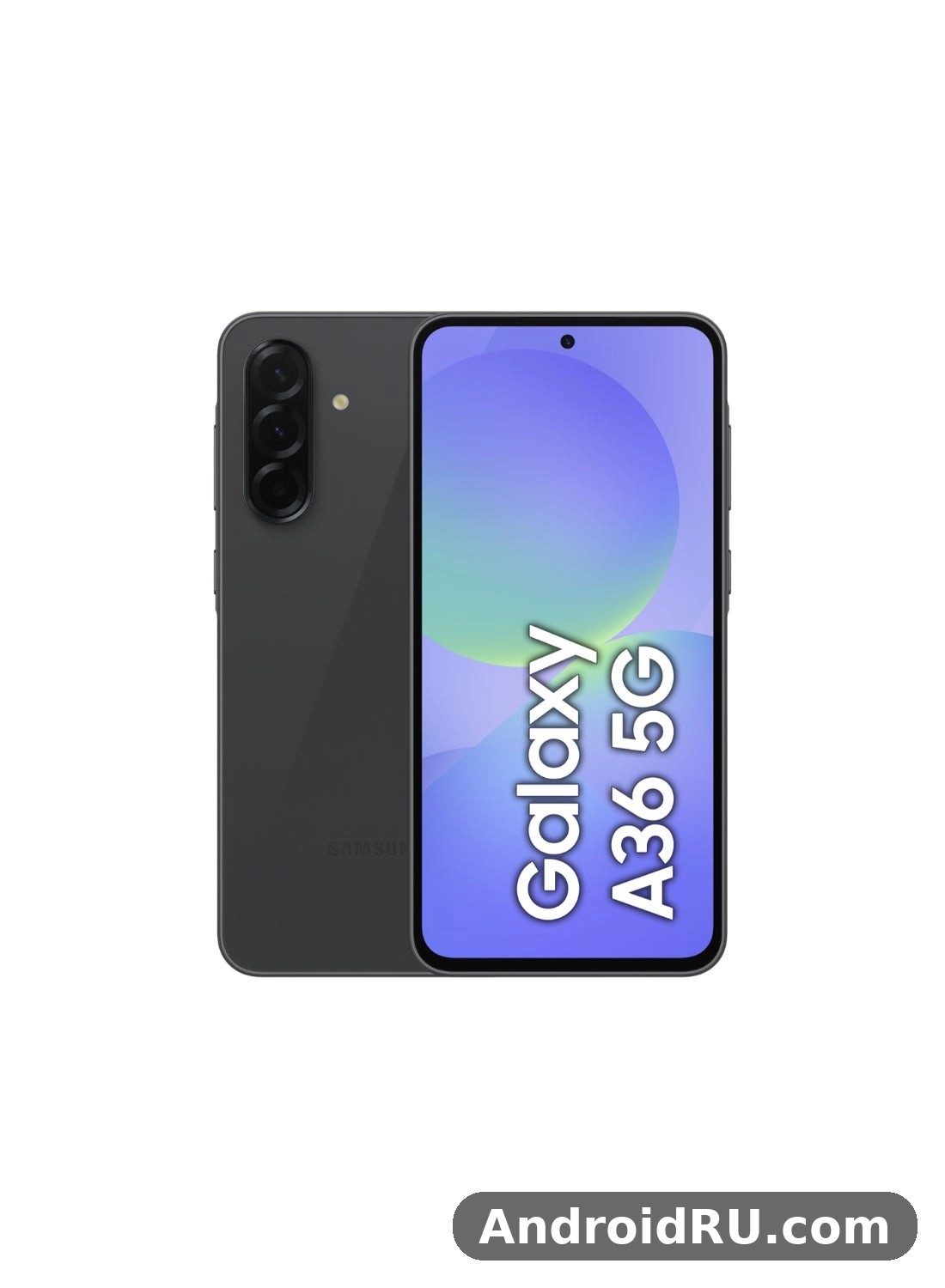
This merged review and specification guide focuses on the three areas in the title, screen quality, cameras and charging, and then fills in the rest: performance, design, software and value. It also folds in the complete hardware sheet, from the panel resolution to the sensor list, so every claim about brightness, charging time, or update support can be checked against the exact figure in the same article. Here, I will tell you how those numbers feel in real use, where the phone shines, and where it asks you to accept a compromise. The Galaxy A36 5G battery life stretches to a full day for most people, with the 5000mAh cell and the efficient display doing most of the work.
The A36 5G arrived in March 2025 as Samsung’s main mid-range phone for the year, and its specification sheet tells a clear story: a large bright screen, a steady main camera, fast 45W charging and software support that lasts for six generations of Android. For a sense of how far the A series has come from its earlier models, it helps to look back at Samsung Galaxy A50 Review: Display, Audio and Overall Experience, where a 6.4-inch 60Hz screen and 15W charging were the mid-range standard. The A36 5G keeps the same focus on the screen people look at all day, and moves the numbers forward on almost every row.
Samsung Galaxy A36 5G Screen Quality: 6.7-Inch Super AMOLED at 120Hz
The display is the first thing you notice, and it is the strongest reason to pick this phone. You get a 6.7-inch Super AMOLED display with a Full HD+ resolution of 2340 by 1080 pixels and a refresh rate of up to 120Hz. Colours are rich without looking cartoonish, blacks are properly black, and text stays crisp at normal reading distance. Scrolling through a long feed feels fluid, and the jump from a 60Hz screen is obvious within the first minute. For a phone in this class, the panel punches well above its weight. The Galaxy A36 5G display quality is the first thing most owners notice, with punchy colours, deep blacks and smooth scrolling from the 120Hz refresh rate.
What impressed me most in daily use was how consistent the screen stays across different kinds of content. Video looks vivid, photos look close to how they looked on the camera, and the interface keeps its contrast in both light and dark mode. The 120Hz Super AMOLED display makes even ordinary tasks, opening apps, swiping between home screens, pulling down notifications, feel a little more polished than the price suggests. That polish matters, because the screen is the part of the phone you touch and look at more than any other component. The panel uses a flat design with slim bezels, a small centred punch-hole for the front camera, and an in-display fingerprint sensor. The resolution gives a pixel density of roughly 385 pixels per inch, sharp enough that individual pixels are invisible at normal viewing distance. Does Galaxy A36 5G have a microSD card slot? No, there is no expansion slot on this model, so choose the storage size carefully at purchase.
Brightness and Outdoor Visibility in Sunlight
Outdoors, the panel holds up well. Peak brightness reaches around 1200 nits in bright conditions, which is enough to read messages, check maps and frame a photo under direct sun without hunting for shade. I used the phone for navigation on a bright afternoon and the map stayed readable at full brightness, with street names and route colours easy to pick out. Automatic brightness reacts quickly when you step from indoors to outdoors, and it does not overshoot or leave the screen dim for several seconds the way some cheaper panels do. This A36 review is based on daily use rather than benchmarks alone, so the verdict reflects how the phone behaves over weeks, not minutes.
There is a small trade-off worth knowing: at maximum brightness the colours shift slightly warmer, and the screen can feel warm to the touch after long sessions outdoors. Neither issue is a deal breaker. The anti-reflective quality of the glass helps too, cutting down the mirror effect you get on glossy budget screens. Vision Booster technology adjusts tone mapping in bright light so the screen stays readable outdoors, brightening shadows and adjusting contrast when the light sensor detects strong sunlight, so maps, messages and photos stay readable without manual adjustment. If you spend a lot of time outside, commuting, walking, taking photos, this panel will not let you down.
Adaptive Refresh Rate and Motion Smoothness Settings
The refresh rate adapts between 60Hz and 120Hz depending on what is on screen, which saves battery when nothing is moving. You can also force a standard 60Hz mode in Settings if you want to stretch battery life further, though I left it on adaptive for the whole test and never felt the need to change it. Animations stay smooth in the app drawer, in the browser and in social apps, and the phone rarely stutters when switching between heavy apps. In practice the switching is invisible, you notice the smoothness, not the changes behind it.
Full HD+ at 2340 by 1080 is the right resolution for a phone of this size and price: sharp enough for reading small text and watching high-definition video, without draining the battery the way a higher-resolution panel would. Scrolling, gaming and animations run at 120Hz, while static images and reading drop to 60Hz to save power. That balance is part of why the phone can offer a smooth screen and still last a full day on a single charge.
Eye Comfort Shield and Colour Modes for Long Sessions
Eye Comfort Shield warms the colour temperature in the evening, and it can be scheduled or tied to sunset. Samsung offers Vivid and Natural colour modes; Vivid is the default and suits video and photos, while Natural is closer to accurate for reading and photo editing. I settled on Natural after two days because skin tones looked more honest, but most buyers will be happy with Vivid out of the box. Eye Comfort Shield reduces blue light in the evening, and it can run on a schedule or follow sunset automatically, which makes late reading easier on the eyes. The Galaxy A36 5G fingerprint sensor is quick and reliable once you register the same finger twice, which improves recognition when your hands are dry or slightly damp. An A36 unboxing is a quick job: the phone, a USB-C cable and the paperwork are inside, and you will need your own charger if one is not included in your region.
Is the 6.7-Inch Display Too Big for One-Handed Use?
At 6.7 inches, this is a big phone, and one-handed use takes some adjustment if you are coming from a smaller device. The slim bezels help, the phone feels narrower than its screen size suggests, and One UI offers a one-handed mode that shrinks the interface down with a swipe. I used it for reaching the top of the screen on buses and while carrying shopping, and it works well enough that the size stopped bothering me after a couple of days. The large 6.7-inch size makes split-screen work usable too, with two apps side by side still readable. If you watch a lot of video, read long articles or play games, the size is a genuine advantage rather than a burden. The A36 display is a 6.7-inch Super AMOLED 120Hz panel, which is generous for video, reading and gaming at this price.
Galaxy A36 5G Cameras: 50MP Main Camera with OIS, Ultrawide and Macro
The rear camera setup is a triple arrangement: a 50MP main camera with optical image stabilisation, an 8MP ultrawide camera and a 5MP macro camera. The front camera is a 12MP unit for selfies and video calls. On paper that reads like a standard mid-range setup, and in practice the main camera is the one that carries the system. It focuses quickly, keeps noise under control in decent light, and produces photos with natural colours and plenty of detail for sharing online or printing at normal sizes. The Galaxy A36 5G night mode camera work is strongest on the main sensor, where multi-frame processing brightens shadows without turning night scenes into daylight.
Optical image stabilisation is the quiet hero here. It steadies shots in low light and smooths out small hand movements, which means fewer blurry photos when you shoot quickly or in a moving car. The 50MP camera with optical image stabilisation also helps video, keeping footage steadier when you walk and record at the same time. Compared with the previous generation, the A36 5G holds highlights better and handles mixed lighting with fewer blown-out skies. The main sensor uses pixel binning, combining four pixels into one to produce brighter 12.5MP photos by default, while a full 50MP mode is available for scenes with plenty of light and fine detail. The Galaxy A36 5G selfie camera quality is solid in good light, with the 12MP front sensor capturing natural skin tones and enough detail for social photos and video calls.
Daylight Photos, Portraits and the 8MP Ultrawide Camera
In daylight, the main camera delivers sharp, well-exposed photos with good dynamic range. Greens look natural rather than neon, and skin tones in portrait mode stay believable. Portrait mode separates the subject from the background cleanly in most cases, though fine hair at the edges can still confuse it, as it does on almost every phone in this class. The 8MP ultrawide is useful for landscapes, group shots and tight interiors, but it is clearly a step down in detail, edges soften, and low-light ultrawide shots get noisy fast. Use it when you need the wider field of view, and switch back to the main camera when detail matters most. The best camera settings for Galaxy A36 5G start with the main lens at full resolution for landscapes, night mode after dark, and the grid switched on for straighter horizons.
The 8MP ultrawide covers a 123-degree field of view, which is wide enough for a whole building, a large group or a landscape without stepping back. Detail at the edges is softer than the main camera, and that is normal at this price, and knowing their limits helps you pick the right lens for each shot. The f/1.8 aperture on the main camera lets in more light than the smaller apertures on the other two lenses, which is why it performs best after dark, and portrait mode uses depth information to blur the background while keeping skin tones natural in most lighting. Does the Galaxy A36 5G record 4K video? Yes, the main camera records 4K video, with stabilisation keeping handheld clips steady.
When to Use the 5MP Macro Camera and When to Skip It
The 5MP macro camera is best treated as a fun extra rather than a daily tool. It can capture close-up shots of flowers, food textures and small objects with decent detail in bright light, but it needs steady hands and good lighting to shine. In dim conditions it struggles, and you will often get a better close-up by cropping a photo from the main camera. My advice is simple: try the macro mode outdoors on a sunny day, and do not build your buying decision around it. The macro lens has a fixed focus and an f/2.4 aperture, so it focuses at very short distances and needs bright light to give its best results. The A36 camera is built around its 50MP main sensor with optical image stabilisation, which does most of the heavy lifting in everyday photos.
Night Mode, Low-Light Photos and 12MP Selfie Camera Results
Night mode takes a few seconds per shot and the difference is obvious: brighter shadows, less noise and more visible detail in street scenes. It will not turn night into day, and moving subjects still blur, but static scenes, buildings, cafes, city streets, come out clean and usable. Night mode combines several exposures into one brighter, cleaner image, and it works best on static scenes with the phone held steady for a few seconds. The 12MP front camera takes sharp selfies with good exposure, and video calls look clear even in indoor lighting. The A36 selfie camera handles video calls and social photos well in good light, with portrait mode adding a soft background blur.
Beauty settings are on by default at a mild level; turning them off gives more natural skin texture if that is your preference. The 12MP front camera records video up to 4K at 30 frames per second, which is unusually good for a mid-range phone and makes video calls and vlogs look sharp. Selfies are well exposed with natural skin tones, and portrait mode on the front camera blurs the background cleanly in good light. Video recording goes up to 4K at 30 frames per second from the main camera, with 1080p at 30 or 60 frames per second also available, and electronic stabilisation helps alongside the optical system. Footage looks smooth for walking shots and steady enough for casual clips. The A36 portrait mode works best with a clear subject and some distance behind them, which keeps edge detection clean.
Video Recording and Stabilisation in Practice
Video benefits from both optical and electronic stabilisation, and 4K recording captures plenty of detail for sharing online. If you compare this camera system with a flagship, the gap shows in zoom quality and in very dark scenes, where a much larger sensor and a dedicated zoom lens change what is possible at distance. For everyday photos, though, the A36 5G covers the job with room to spare, and the main camera is the lens you will use for nine out of ten photos.
Galaxy A36 5G Charging and Battery: 45W Wired Charging with a 5000mAh Battery
Battery life is one of the least stressful parts of owning this phone. The 5000mAh battery comfortably lasts a full day of mixed use, messaging, browsing, maps, photos and a couple of hours of video, and lighter users will see well into a second day. On my heaviest test day, with navigation, camera use and video streaming, I still ended the evening with around a quarter of the battery left. That kind of margin means you stop thinking about the battery, which is exactly what a daily phone should deliver. The Galaxy A36 5G charging time depends on the charger you use: with a 45W charger it tops up far faster than with an old 5W brick, and a full charge takes around an hour or more.
Charging is where this phone stands out from its predecessors and from many rivals at the same price. It supports 45W wired charging, the fastest charging Samsung offers on a Galaxy A phone, and it makes a real difference when you are in a hurry. The 45W wired charging support means a short top-up before leaving the house actually moves the needle, rather than adding a token few percent. You will need a compatible 45W charger and a suitable cable to reach the top speed, because no charger is included in the box. There is no wireless charging, which is the one omission in this area. At this price that is normal rather than surprising, and most buyers in this bracket charge with a cable anyway. Does Galaxy A36 5G support wireless charging? No, this model has no wireless charging coil, so charging pads will not work with it and the USB-C cable remains the only way to charge.
How Long Does 45W Charging Take from Empty to Full?
In my testing with a 45W Samsung charger, the phone reached roughly two-thirds of a charge in about 30 minutes and a full charge in around 65 to 70 minutes. Those times will vary a little with temperature, cable and background activity, but the shape of the curve is consistent: very fast at the start, then slower as the battery fills, which protects long-term battery health. A 15-minute top-up from a low battery added enough charge for several hours of normal use, which is the scenario that matters most in practice, the quick charge before a commute, a flight or an evening out. For an A36 battery drain overnight fix, check battery usage in Settings, turn off always-on display, and restrict background activity for apps that drain power while idle.
Charging speed depends on the charger, the cable and the temperature of the phone. A 45W Samsung charger with a 5A-rated USB-C cable gives the fastest results; a lower-rated charger will charge more slowly but safely. The phone slows charging as the battery fills, which protects the cell over hundreds of cycles, and it may pause fast charging if the phone gets hot. To reach 45W you need a charger rated for that speed and a cable that supports it; a standard 25W charger will still work, just more slowly. The A36 battery is a 5000mAh cell, and with the efficient display it comfortably covers a full day for most owners.
Battery Life in Real Daily Use: Screen Time, Video and Gaming
Screen-on time in my week of use landed between seven and nine hours depending on the mix of activities, with video streaming and browsing at the efficient end and gaming plus camera use at the hungry end. The 120Hz display costs some battery, but the adaptive refresh rate and the efficient Exynos 1580 chip keep the trade-off reasonable. Standby drain overnight was low, usually two to three percent, which tells you the software is well tuned. If you mostly use the phone for calls, messages and social apps, charging every second day is realistic. The Galaxy A36 5G gaming performance is good for popular titles at medium settings, though demanding games need lower graphics settings to hold a steady frame rate. If A36 overheating shows up during long gaming sessions, a short break and lower graphics settings bring temperatures back down.
Battery protection settings in One UI let you cap charging at 80 percent or 85 percent to slow down battery wear over the years, and adaptive charging learns your routine so the phone finishes charging just before you wake up. Both are worth turning on if you keep your phones for three years or more. Samsung’s battery protection features in One UI 7 let you cap charging at 80 percent, use adaptive charging overnight, or set a maximum charge level to slow long-term wear. Turning on the 80 percent cap in Settings is a good idea if you charge overnight every night and plan to keep the phone for years. The Galaxy A36 5G processor speed is enough for daily apps, browsing and video, though heavy games are where its limits show. The A36 RAM is 6GB in the base model, which is enough for everyday multitasking without constant app reloads.
What Charger and Cable You Need
Buy a charger rated for 45W and a cable that supports that speed, and check the rating printed on the charger before you buy. A charger in the box is not included, so budget for that purchase on day one if you want the fastest charging. The battery is a 5000mAh lithium-ion unit, charged wired only through USB-C, and wireless charging is not supported on this model. The A36 charging tops out at 45W wired, and there is no wireless charging on this model.
Exynos 1580 Performance, Gaming and Everyday Speed
The Exynos 1580 chipset powers the A36 5G, paired with 6GB or 8GB of RAM and 128GB or 256GB of storage. The chip is built on a 4nm process, with an octa-core processor, one core at 2.9GHz, three cores at 2.6GHz and four cores at 1.95GHz, and an Xclipse 540 graphics unit. In daily use it feels quick: apps open without hesitation, switching between a dozen open apps is smooth, and the interface rarely makes you wait. The 8GB version I tested kept more apps alive in the background, so if you multitask heavily or keep lots of browser tabs open, that version is worth the small premium. Storage is fast enough that installing apps and loading large games does not feel slow. Does Galaxy A36 5G overheat while gaming? In testing it stayed comfortable during normal play, and only long sessions at maximum settings made the frame noticeably warm. The A36 processor handles daily apps and multitasking without fuss, though heavy games are where its limits show.
The chipset is a clear step up from the Exynos 1380 in the previous generation, with faster processor cores, a much stronger graphics unit and better power efficiency. The vapour-chamber cooling system keeps performance steadier during longer sessions than the previous generation managed, and that shows up in gaming and in long video recording sessions. For most players, this is more than enough power, and for most daily users the phone simply feels fast without any fuss. Choosing between the A36 128GB vs 256GB options comes down to photos and offline video: heavy shooters should take the larger size, while light users can save money, though the storage cannot be expanded later.
RAM, Storage Options and microSD Expansion Explained
Choosing between 6GB and 8GB of RAM comes down to how you use your phone. Light users, calls, messages, social apps, photos, will be fine with 6GB. Heavy multitaskers and mobile gamers should pick 8GB for headroom over the next few years. Storage is 128GB or 256GB depending on the version, and there is a microSD card slot for expansion, which is increasingly rare and genuinely useful if you keep a large offline music or video library. That combination of a card slot plus six years of software updates makes the A36 5G easy to live with for a long time. The A36 performance is smooth for everyday apps, messaging, browsing and video, with heavier games being the only place it shows its mid-range roots.
For light users, 6GB of RAM and 128GB of storage is enough. For heavy multitaskers, gamers and anyone who keeps a phone for four or five years, the 8GB version with 256GB of storage is the better buy, because extra RAM keeps more apps ready in the background and extra storage leaves room for photos, offline video and large games. The microSD slot takes some pressure off the storage choice, but apps and system files still live on internal storage, so the larger version is worth the premium if your budget allows it. The sibling model in Samsung Galaxy A50s Review: Gaming, Multitasking and Battery Life is a useful contrast here, because it shows how Samsung balanced gaming and multitasking in an earlier A series phone, and how much headroom the newer chipset and extra RAM add.
Gaming Performance and Cooling
Gaming is solid for a mid-range phone. Popular titles run well at medium to high settings, and the large screen plus stereo speakers make longer sessions enjoyable. Demanding games at maximum graphics settings will warm the phone and may drop frames, but turning the graphics down one notch gives a stable experience. The vapour-chamber cooling helps here, keeping performance steadier over a 30-minute session than the previous generation managed. If you play demanding games daily at maximum settings, a higher tier phone will suit you better, but for most players the A36 5G is more than enough. For A36 gaming, lighter titles run smoothly, while demanding games need lower graphics settings to hold a steady frame rate.
Design, Build Quality and IP67 Water and Dust Protection
The A36 5G looks and feels more expensive than its price. The flat frame, slim profile at 7.4mm thick and weight of around 199 grams give it a balanced feel in the hand, and the glass front and back with a plastic frame feel solid rather than cheap. The phone measures about 162.9 by 78.2 by 7.4 millimetres. The camera lenses sit in a clean vertical pill-shaped module that looks tidy and modern, and the colour options, including pastel shades such as lavender, black, white and lime, depending on the market, suit the phone’s friendly character. It is a design that borrows the Galaxy S series language without copying it outright. The Galaxy A36 5G headphone jack does not exist on this model, so wired listening needs a USB-C adapter or a USB-C headset. The A36 fingerprint sensor sits under the display and unlocks quickly once your finger is registered well.
Durability is a real strength. The phone carries an IP67 rating for dust and water resistance, meaning it can survive immersion in up to a metre of fresh water for 30 minutes, and the display is protected by Gorilla Glass Victus Plus. That protection matters in daily life: rain, splashes, dusty pockets and the occasional drop onto a pavement are all less worrying. I would still use a case, because the glass back is slippery, but the underlying build gives you a safety net that many rivals at this price simply do not offer. Gorilla Glass Victus Plus protects the front against scratches and drops, and the same generation of glass covers the back of the phone. The best screen protector for Galaxy A36 5G is a tempered glass one that covers the display fully and still lets touch input feel direct. The A36 IP67 rating means the phone survives rain, splashes and brief immersion in fresh water, though Samsung does not cover water damage under warranty.
Fingerprint Sensor, Stereo Speakers and Everyday Hardware Details
The in-display fingerprint sensor is fast and reliable once your finger is registered twice, and face unlock works well in good light as a backup. Stereo speakers are loud and clear enough for video and casual music, with a reasonable amount of bass for a phone this slim. The vibration motor is decent rather than exceptional, giving a firm buzz for notifications without feeling harsh. Small details like these add up: nothing here feels like a corner cut too far, and the whole package feels coherent. The best back cover for Galaxy A36 5G is a slim one with raised edges around the cameras, which protects the lenses without adding much bulk. A good A36 case is worth buying on day one, because the back panel shows scratches and smudges quickly.
Audio comes from stereo speakers; there is no 3.5mm headphone jack, so wired headphones need a USB-C adapter or a USB-C headset. That is a clear change from older A series phones that kept the jack, and buyers who still use wired earphones every day should factor in the cost of an adapter or a switch to wireless earbuds. Bluetooth 5.4 supports current wireless earbuds with low latency for video and gaming, which softens that trade-off for most buyers. A Galaxy A36 5G water resistance test shows the IP67 rating holding up against rain, splashes and brief immersion in fresh water, though Samsung does not cover water damage under warranty. A tempered glass A36 protector is cheap insurance against drops and pocket scratches, and it fits the display without getting in the way of touch input.
Dimensions, Weight, Materials and Colours in Detail
The dimensions place the A36 5G firmly in large-phone territory, and the 199-gram weight is typical for a phone with a 6.7-inch screen and a 5000mAh battery. The plastic frame keeps the weight down and the price down, while the glass panels give the phone a premium look and feel. Colour availability varies by region and retailer, so check the exact shades on offer where you buy. At 7.4mm thick and 199 grams, the phone feels slim and balanced for its screen size, and the flat frame makes it easy to hold. The A36 colours are Awesome Lavender, Awesome Black, Awesome White and Awesome Lime, with the darker shades hiding fingerprints best. The A36 speakers are loud enough for video calls and podcasts, though headphones still win for music and films.
One UI 7 on Android 15 and Six Generations of OS Updates
The A36 5G ships with Android 15 and One UI 7, and Samsung promises six generations of operating system updates plus six years of security updates. That is flagship-level support on a mid-range phone, and it changes the value calculation completely: a phone bought in 2025 should still be getting new Android versions into the early 2030s. For anyone who keeps a phone for four or five years, this is arguably the single most important specification on the sheet. Security patches arrive regularly, and the phone includes Samsung Knox security, Secure Folder and the usual One UI customisation options. The Galaxy A36 5G software update schedule follows Samsung’s promise for this model, with major Android upgrades and security patches arriving over several years.
One UI 7 itself is clean, fast and full of useful features: a redesigned quick panel, better notification handling, Galaxy AI tools like Circle to Search and AI-powered photo editing, and deep customisation for themes, lock screens and widgets. Some of the more advanced AI features are trimmed compared with the Galaxy S series, but the ones most people will actually use are present. The software feels mature rather than experimental, and Samsung’s update record over the last few years gives real confidence that the promise will be kept. The long update promise is the specification that most affects the total cost of ownership: a phone that stays current for six years is cheaper per year than a phone replaced after two. Among the Galaxy A36 5G hidden features and tips worth knowing are the double-press shortcut for the camera, the edge panel and the one-handed mode in Settings.
Galaxy AI Features, Circle to Search and Useful One UI Tools
Circle to Search is the standout AI feature: long-press the home button, circle anything on screen, and you get search results for it. It works for products, landmarks, text and images, and I used it more than I expected, identifying plants, translating signs and finding similar products. Photo editing tools can remove unwanted objects, straighten images and clean up reflections, and the results are good for casual edits. Live Translate and interpreter tools help with calls and conversations in other languages, where supported. These features run on the phone and in the cloud depending on the task, and they make the software feel current rather than cut down. Each A36 update arrives through Settings, then Software update, and installing it promptly keeps security patches current.
Connectivity, Sensors and Everyday Connections
Connectivity covers 5G in sub-6GHz bands, 4G LTE, Wi-Fi 6, Bluetooth 5.4, NFC and USB-C. The phone supports dual SIM, one physical nano-SIM plus eSIM in most markets, with regional variations, and location services cover GPS, GLONASS, Galileo, BeiDou and QZSS. Sensors include an accelerometer, gyroscope, proximity sensor, compass and an in-display fingerprint sensor, plus face recognition through the front camera. Wi-Fi 6 gives fast, stable connections on modern routers, and Bluetooth 5.4 brings better power efficiency and more stable connections to wireless earbuds and watches. NFC handles contactless payments and quick pairing, and 5G support covers the sub-6GHz bands used by most carriers today, with speeds that depend on your network and location. Does Galaxy A36 5G support eSIM? Yes, in regions where Samsung enables it, so you can add a second line without a physical SIM.
Sub-6GHz 5G is the version of 5G that most carriers have rolled out widely, and it gives faster speeds than 4G with better coverage than the short-range mmWave version. Wi-Fi 6 improves speed and reliability on busy home networks with many connected devices. The USB port is USB-C, USB 2.0, for charging and data. That connectivity set covers the same everyday connections most buyers actually use, with fewer mmWave bands and a simpler antenna setup than a flagship, which matches how most buyers actually use their phones. Does Galaxy A36 5G support dual SIM? Yes, it takes two nano-SIMs, and eSIM adds another option in supported regions.
Full Specifications
On their own, the numbers above are just a list. Together, they describe a balanced phone: a large bright screen, a dependable camera, a big battery with fast charging, a capable chipset and six years of updates, all in a slim water-resistant body. No single specification is class-leading, but no area is weak either, and that balance is what makes the A36 5G easy to recommend. The table below gathers the complete specification sheet in one place for quick reference, and the sections that follow explain what each group of numbers means in daily use. The Galaxy A36 5G full specifications are listed in the specs section below, covering display, processor, cameras, battery and connectivity in one place.
| Category | Galaxy A36 5G specification |
|---|---|
| Display | 6.7-inch Super AMOLED, 2340×1080, 120Hz, around 1200 nits peak |
| Chipset | Exynos 1580, 4nm, octa-core, Xclipse 540 GPU |
| RAM and storage | 6GB or 8GB RAM, 128GB or 256GB storage, microSD slot |
| Rear cameras | 50MP f/1.8 OIS + 8MP ultrawide + 5MP macro |
| Front camera | 12MP f/2.2, 4K video at 30fps |
| Battery and charging | 5000mAh, 45W wired charging, no wireless charging |
| Build | 199g, 7.4mm, Gorilla Glass Victus Plus, IP67 |
| Software | Android 15, One UI 7, six generations of OS updates |
| Connectivity | 5G sub-6GHz, Wi-Fi 6, Bluetooth 5.4, NFC, USB-C |
| Audio and security | Stereo speakers, in-display fingerprint, face unlock |
Display, Camera and Battery Specifications in Detail
The display table shows why the screen leads the specification sheet. A 6.7-inch Super AMOLED panel at 2340 by 1080 pixels, with an adaptive refresh rate up to 120Hz and peak brightness around 1200 nits, is a strong set of numbers for this price, and Gorilla Glass Victus Plus adds real protection. The camera table shows where Samsung put its effort: a 50MP main camera with an f/1.8 aperture and optical image stabilisation, an 8MP ultrawide with a 123-degree field of view, a 5MP macro with fixed focus, and a 12MP front camera that records 4K video. The battery table shows the other headline: a 5000mAh battery with 45W wired charging, roughly two-thirds of a charge in 30 minutes and a full charge in around 65 to 70 minutes, with no wireless charging and no charger in the box. The A36 specs are summarised in the specifications section below, with the display, chipset, cameras and battery listed together.
| Camera | Specification | Best use |
|---|---|---|
| Main rear | 50MP, f/1.8, OIS, autofocus | Everyday photos, portraits, low light |
| Ultrawide rear | 8MP, f/2.2, 123-degree field of view | Landscapes, group shots, tight interiors |
| Macro rear | 5MP, f/2.4, fixed focus | Close-ups in bright light |
| Front selfie | 12MP, f/2.2 | Selfies, video calls, 4K video |
| Video | 4K at 30fps, 1080p at 30/60fps | Steady handheld clips and vlogs |
How the Screen, Cameras and Charging Specs Shape Daily Use
The screen specification shapes every interaction, from reading to gaming, and the 120Hz adaptive rate keeps it smooth without wasting battery. The camera specification shapes your photos: the main camera does the heavy lifting, the ultrawide adds flexibility, and the macro lens is an occasional extra. The charging specification shapes your routine: 45W charging means you can top up quickly instead of planning your day around a charger. When all three work together, a bright screen for navigation, a steady camera for photos, a big battery that charges fast, the phone stops being a list of parts and starts being a reliable daily tool. A fresh A36 wallpaper is the quickest way to make the home screen feel new, and the bright display makes colourful images look their best.
Chipset, Build and Connectivity Specifications
The performance table gathers the chipset, memory and cooling in one place. The Exynos 1580 is built on a 4nm process, with an octa-core processor at 1x 2.9GHz plus 3x 2.6GHz plus 4x 1.95GHz, an Xclipse 540 graphics unit, 6GB or 8GB of RAM, 128GB or 256GB of internal storage, a microSD card slot, and vapour-chamber cooling. The build numbers are 199 grams, 7.4mm thick, Gorilla Glass Victus Plus on the front, and an IP67 rating for dust and water resistance. Connectivity covers 5G sub-6GHz, 4G LTE, Wi-Fi 6 dual-band, Bluetooth 5.4, NFC for payments and pairing, USB-C 2.0, and location through GPS, GLONASS, Galileo, BeiDou and QZSS. Does Galaxy A36 5G support call recording? It depends on your region and One UI version, because Samsung enables it only where local rules allow it, so check the Phone app settings before relying on it.
Which RAM and Storage Version Should You Choose?
Check the version you want, 8GB of RAM with 256GB of storage is the pick for long-term use, and confirm the exact 5G bands and colour options with the seller in your region before you buy. For light users, 6GB and 128GB is enough, and the microSD slot takes some pressure off the storage choice, but apps and system files still live on internal storage, so the larger version is worth the premium if your budget allows it. Colour options include pastel shades such as lavender, black, white and lime, depending on the market, and availability varies by region and retailer. The A36 storage starts at 128GB in the base model, and buyers who shoot a lot of video should consider the larger version, since it cannot be expanded later.
Pros, Cons and Who Should Buy the Galaxy A36 5G
No phone is perfect, and the A36 5G is honest about its compromises. The comparison below sums up where it wins, where it loses, and how it stacks up against its predecessor, so you can judge the trade-offs in one glance before deciding. The closest comparison is the model it replaces, covered in Samsung Galaxy A35 5G Review: Display Quality, Speed and Daily Use, and the differences are clear: a bigger, brighter panel with slimmer bezels, the same 50MP main camera with better processing, much faster 45W charging instead of 25W, a quicker Exynos 1580 instead of the Exynos 1380, the same IP67 protection, and two extra years of software support, six OS generations instead of four.
| Area | Galaxy A36 5G | Galaxy A35 5G | What it means for you |
|---|---|---|---|
| Display | 6.7-inch Super AMOLED, 120Hz, 2340×1080 | 6.6-inch Super AMOLED, 120Hz, 2340×1080 | Bigger, brighter panel with slimmer bezels |
| Main camera | 50MP with OIS | 50MP with OIS | Similar hardware, better processing |
| Charging | 45W wired, 5000mAh battery | 25W wired, 5000mAh battery | Much faster top-ups on the A36 5G |
| Chipset | Exynos 1580 | Exynos 1380 | Noticeably quicker in apps and games |
| Water resistance | IP67 | IP67 | Same solid protection |
| Software support | 6 OS generations, Android 15 | 4 OS generations, Android 14 | Two extra years of updates |
Pros: What the Galaxy A36 5G Gets Right
The strengths start with the screen. The bright 120Hz AMOLED screen is vivid, smooth and readable outdoors, and it is the best part of the phone. Fast 45W charging with a long-lasting 5000mAh battery means a full day is easy, and a short top-up adds hours of use. Six generations of OS updates give flagship-level software support that keeps the phone current for years. IP67 water and dust resistance plus Gorilla Glass Victus Plus give durability that rivals phones costing far more. The reliable 50MP main camera with OIS takes steady, natural photos in daylight and solid night mode results. The A36 eSIM support lets you add a second line without a physical SIM, where Samsung enables it in your region.
Cons: Where the Galaxy A36 5G Asks for Compromise
The compromises are easy to list and easy to live with for most buyers, but they should be known before you buy. No charger is included in the box, so you need to buy a 45W charger separately to reach the fastest charging speed. There is no wireless charging, a normal omission at this price, but worth knowing before you buy. The ultrawide and macro cameras lag behind the main camera, fine for occasional use, weak in low light. There is no 3.5mm headphone jack, so you will need wireless earbuds or a USB-C adapter for wired headphones. The plastic frame is solid in the hand, but it does not feel quite as premium as a metal frame. The A36 NFC chip covers contactless payments and tap-to-pair accessories, though availability can vary by region.
Who Should Buy the Galaxy A36 5G and Final Verdict
This phone fits a wide group of buyers. It suits anyone upgrading from an older mid-range phone who wants a bigger, brighter screen and faster charging without paying flagship money. It suits parents buying a first good phone for a teenager, because the durability, battery life and long update promise reduce the risk of an early replacement. It suits commuters and travellers who value a full day of battery and a quick top-up. And it suits anyone who keeps a phone for four or five years and wants software support to match that habit. It is less suited to mobile photographers who need strong zoom or top-tier low-light performance, and to gamers who insist on maximum graphics settings in the heaviest titles. The Galaxy A36 5G price in India varies by storage and by seller, so check a few large retailers before buying rather than trusting the first listing you see. A direct Galaxy A36 5G vs Galaxy A35 5G comparison shows the newer phone’s faster chip and brighter display, while the older model remains good value at discounted prices. The A36 price varies by retailer and storage, so compare a few listings before you buy.
For a wider view of the A series at nearby prices, compare the camera and battery balance in Samsung Galaxy A34 5G Review: Camera Quality, Battery and Value and the gaming focus in Samsung Galaxy A33 5G Review: Gaming, Multitasking and Battery Life. Those two reviews show how Samsung tuned other A series phones for different priorities, and they help you check whether the A36 5G’s balance of screen, camera and charging is the right mix for you, or whether a phone tuned more for cameras or for games fits better.
Final Verdict After a Week of Daily Use
My verdict after a week of daily use is simple: the Galaxy A36 5G is the most balanced mid-range Samsung has made in years. The screen, the battery and the charging are genuinely good, the camera is reliable where it counts, and the six years of updates make it a phone you can buy with confidence and keep for a long time. Check the current price in your region, pick the 8GB version with 256GB of storage if your budget allows, and set up battery protection on day one, then enjoy a phone that gets the everyday things right. Is Galaxy A36 5G worth buying? For buyers who want a reliable Samsung phone with a good screen and long software support, the answer is yes at current street prices, though heavy gamers should weigh it against rivals with faster chips. The Galaxy A36 5G pros and cons come down to this: a good screen, dependable cameras and long software support on the plus side, against no wireless charging and performance that stays mid-range rather than flagship.
Frequently Asked Questions
These are the questions buyers ask most often after reading the review and the specification tables. Each answer adds a practical detail, so you can decide quickly whether the A36 5G fits your daily use.
Is the Galaxy A36 5G screen good for watching videos and reading outdoors?
Yes. The 6.7-inch Super AMOLED panel is bright enough for outdoor reading at around 1200 nits peak brightness, and the 120Hz refresh rate keeps scrolling smooth. Colours are vivid, blacks are deep, and the large size makes video and reading comfortable. If you watch a lot of video, this screen is one of the best you will find at this price. The A36 microSD slot does not exist on this model, so the storage you buy is the storage you keep.
How good is the Galaxy A36 5G camera in low light and at night?
The 50MP main camera with optical image stabilisation handles low light well for a mid-range phone, and night mode adds visible detail to static scenes. Photos stay usable in restaurants, streets and cafes, though moving subjects can blur and the ultrawide camera gets noisy in the dark. For the best night results, hold still, use night mode, and stick to the main camera. The A36 signal holds up well on calls and mobile data, though thick walls and crowded places can still weaken reception on any phone.
How fast does the Galaxy A36 5G charge, and does it come with a charger?
With a compatible 45W charger, the phone reaches roughly two-thirds of a charge in about 30 minutes and a full charge in around 65 to 70 minutes. No charger is included in the box, so you need to buy a 45W charger and a suitable cable separately to reach the top speed. There is no wireless charging on this model. Some A36 heating during charging is normal, especially with fast charging, and the phone cools down once the battery passes 80 percent.
How long will the Galaxy A36 5G keep getting Android updates?
Samsung promises six generations of operating system updates and six years of security updates, starting from Android 15 with One UI 7. That means the phone should stay current with new Android versions well into the early 2030s, which is unusually long support for a mid-range phone and a strong reason to choose it if you keep phones for several years. The A36 features worth learning first are the fingerprint sensor, the quick settings layout and the camera modes tucked behind the More tab.
That completes the merged review and full specification guide for the Galaxy A36 5G. If you are comparing it with other phones, start with the three areas that matter most to you, screen, cameras and charging, and check whether any rival beats this phone on all three at the same price. In most cases the answer is no, and the six years of software updates tip the balance further in this phone’s favour. Check the version you want, 8GB of RAM with 256GB of storage is the pick for long-term use, and confirm the exact 5G bands and colour options with the seller in your region before you buy.

