

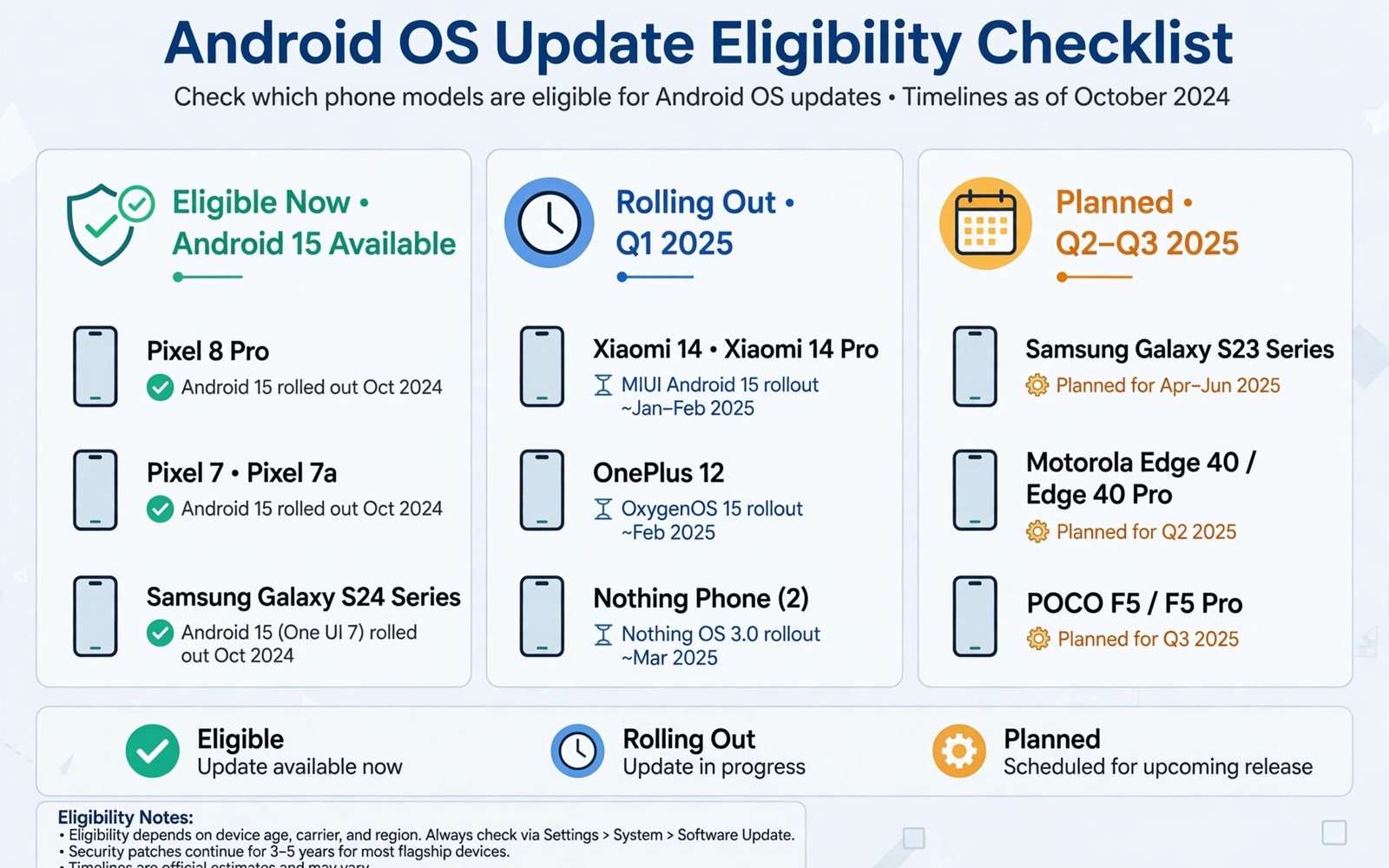
Waiting for the next Android OS update raises one anxious question for every owner. Will my phone actually receive it, or has support quietly ended. Eligibility depends on manufacturer policy and hardware age and model tier, not only on how new the phone feels. This guide explains how to check your status with confidence. The overview of massive Android features coming to your phone this year helps you see what an update might actually bring.
Manufacturers publish update policies that promise a number of major updates and years of security patches. Those promises start from launch date, not from purchase date, so a phone bought late may have less support left than it appears. Always check the launch date alongside the policy. A two year old model with a four year promise still has time, while a four year old model with the same promise may be near its end.
Read the manufacturer policy correctly
Find the official update page for your exact model, because policies differ even within one brand. Flagship models usually receive longer support than budget models from the same manufacturer. Regional variants may also differ, so confirm the policy for your region. A generic brand promise does not guarantee your specific model.
Distinguish major OS updates from security patches, because they end at different times. A phone may stop receiving major versions while still receiving security patches for another year. Security patches keep a phone safe even without new features. Knowing both end dates prevents unnecessary panic when major updates stop.
Hardware limits that end eligibility
Hardware limits eventually block major updates, even when a manufacturer wishes to continue support. New OS versions may require more memory or a newer chip feature that older hardware lacks. When a requirement becomes mandatory, older models drop off the list regardless of policy. Hardware limits explain why some popular older phones miss an update despite strong sales.
Storage also matters during major updates, because installation needs free space beyond the download size. A phone with a full storage may fail an update that it is otherwise eligible for. Free up space before update season to avoid a false impression of ineligibility. Eligibility plus storage together determine success.
Check your phone in minutes
Open system settings and note your current Android version and your security patch date. Compare those details with the manufacturer policy for your model. If your patch date lags several months behind the latest release, your device may be near the end of its window or may need a manual check. A lagging patch date deserves investigation, not immediate replacement.
Use the built in update checker manually rather than waiting for a notification. Notifications can be delayed by carrier approval or by staged rollouts. A manual check often reveals an update that notification has not yet announced. The processor outlook in future mobile processors and 3nm chip benchmarks also hints at hardware shifts that affect future eligibility. Manual checks plus policy knowledge give a clear answer.
What to do when support ends
When major updates end, focus on security patches and on app compatibility rather than on missing features. Many apps continue to support older Android versions for years after major updates stop. Keep apps updated and review permissions regularly to maintain safety. An unsupported phone is not instantly unsafe, but it needs more careful habits.
Plan replacement timing around security patch end rather than major update end, because patches protect against known flaws. A phone with patches remaining can serve safely for months after its last major version. Budget for replacement before patches end, so the switch happens on your schedule rather than in a crisis.
Extend the life of an eligible phone
Extend life by freeing storage and removing unused apps before each major update. A lean phone updates more reliably and runs new software more smoothly. Replace a worn battery when capacity drops sharply, because a fresh battery improves daily usability more than a new feature. Maintenance extends practical life beyond the spec sheet.
Avoid heavy custom modifications solely to chase an unsupported major version, unless you accept the risks. Custom software can bring new features but it may break banking apps and security features. For most users, official support plus careful habits beats unofficial novelty. Stability matters for a daily phone.
An eligibility check in plain steps
Follow these steps in order to answer the eligibility question for your own phone without guessing.
Step 1: note exact model, region, launch date
Step 2: find manufacturer policy for that exact model
Step 3: compare current version and patch date with policy
Step 4: run manual update check, free storage if needed
Step 5: plan replacement before security patches end
The code above is an original example written for this guide. It shows one practical way to apply the idea in this article. You can adapt the wording and the values to fit your own phone and your own routine.
Carrier approval can delay your update
Carrier approval adds a stage to rollouts for phones sold through mobile networks. A manufacturer may finish an update, yet a carrier may test it for network compatibility before release. That testing protects network stability, but it delays the update for carrier customers compared with unlocked phones. Carrier delay does not mean ineligibility, and it usually resolves within weeks.
Check whether your phone is carrier locked or unlocked, because that status affects who controls the rollout timeline. Unlocked phones usually receive updates directly from the manufacturer. Carrier phones wait for both manufacturer and carrier approval. Knowing your status explains timing differences between identical models owned by friends.
Security patches after major updates end
Security patches after major updates end deserve attention, because they determine how long a phone remains safe for daily use. Patches fix known flaws without adding new features, and they arrive monthly or quarterly depending on policy. A phone receiving regular patches can handle banking and messaging safely, even without the newest interface. Patch cadence matters more than feature novelty for safety.
When patches become quarterly rather than monthly, risk rises slightly because flaws wait longer for fixes. Users on quarterly patches should be extra careful with downloads and permissions. Careful habits compensate for slower patching to a large degree. A quarterly patched phone with good habits can still serve well.
Leaks and rumours about eligibility
Leaks about future updates often circulate before official announcements, and they can mislead owners about eligibility. A leaked list may include models that later drop out, or omit models that later gain support. Treat leaks as hints, not as promises, until the manufacturer confirms. The discussion of Android leaks that show software changes ahead illustrates how leak excitement can outrun official facts. Patience for official confirmation prevents disappointment.
When a leak contradicts the official policy, trust the official policy and note the leak as unverified. Official pages update when plans change, while leak posts rarely correct themselves. A habit of checking official sources first saves you from planning a replacement based on a rumour. Official confirmation is the only eligibility proof that matters.
Common mistakes
The most common mistake is assuming that a recent purchase guarantees long support. Support clocks start at launch, not at purchase. Another mistake is confusing a delayed rollout with ineligibility. Staged rollouts can delay an update by weeks.
- Do not judge eligibility from a generic brand promise without checking your exact model.
- Do not ignore storage when an eligible update fails to install.
- Do not replace a phone immediately when major updates end but patches continue.
- Do not install unofficial software solely to chase a new version number.
A final mistake is checking only once a year. Policies and rollout schedules change, and a quarterly check keeps your information current. Regular checks prevent surprises.
Frequently asked questions
How do I find my phone exact update policy?
Search the manufacturer official support page for your exact model and region. Policies differ by model tier and by region, so exact matching matters. Note both major update years and security patch years separately.
Does a delayed update mean my phone is ineligible?
Not necessarily, because rollouts stagger by region and by carrier. Run a manual update check and compare your version with the manufacturer rollout notes. A delay of weeks is normal during staged releases.
Is a phone unsafe after major updates end?
Not immediately, especially while security patches continue. Keep apps updated and review permissions to maintain safety. Plan replacement before security patches end for the safest transition.
Check beta programs carefully
Beta programs offer early access to the next OS version, but they carry risks that stable updates do not. Beta software may drain battery faster and break apps that you rely upon daily. Join a beta only on a secondary device or when you accept those risks on your main phone. Early access is exciting, yet it is not the same as eligibility for the stable release.
Leaving a beta program can also be complicated, because returning to stable software may require a factory reset. Read exit instructions before joining, so you know the cost of leaving. A beta that traps you until the stable release is a commitment, not a trial. Informed beta participation respects both curiosity and daily reliability.
Note the end dates for both major updates and security patches in your calendar when you first check eligibility. Calendar reminders turn a one time check into an ongoing plan. A reminder six months before patches end gives you time to research a replacement without rushing. Planning ahead is the quiet benefit of knowing eligibility early.
Conclusion
Eligibility for the next Android OS update depends on launch date and manufacturer policy and hardware limits together. A manual check against the exact model policy gives a clear answer without guesswork.
Your concrete next step is to note your exact model and patch date today and compare them with the manufacturer policy. Set a reminder to recheck before security patches end.

