

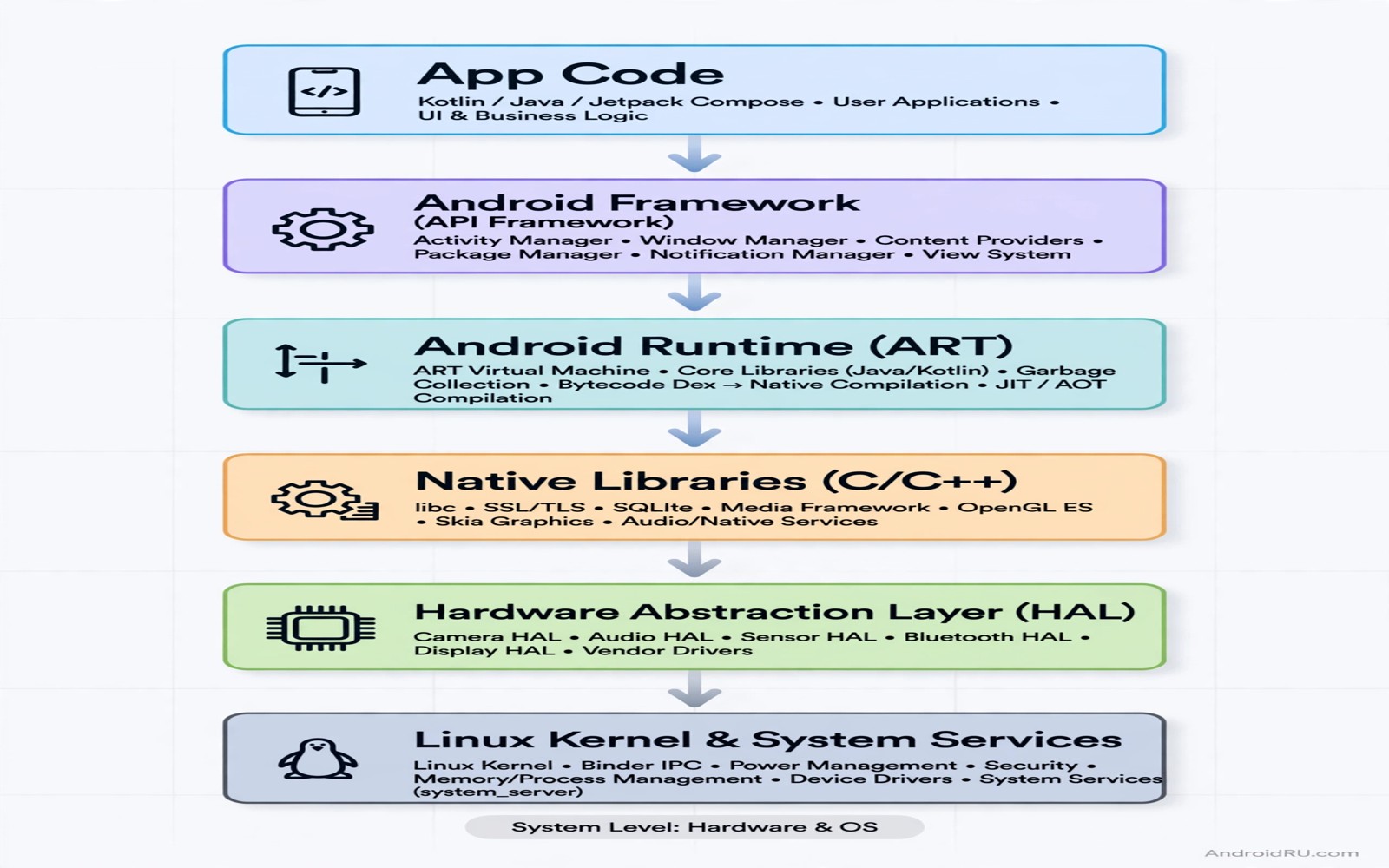
The Android Runtime is the engine that runs app code on modern Android devices. It loads classes and executes methods and manages memory. When an app calls a system method the runtime resolves that call and runs the code. A hook can observe that call or run extra code around it. That observation is powerful for testing and for research on your own apps.
System callbacks are methods that Android calls when something happens. A lifecycle callback runs when an activity starts or stops. A system service callback runs when a broadcast arrives or when a setting changes. Hooking those callbacks lets a developer see the exact order of events during a test. That order often explains a bug that a static reading of code cannot explain.
This guide explains ART runtime hooks for your own test apps on devices that you own. It does not encourage hooking apps that belong to other people. Use a dedicated test device and keep backups before you experiment. A bad hook can crash an app or destabilise the device until you remove it.
How ART executes a method call
ART compiles app code ahead of time or just in time depending on the device and the app state. It keeps a method object for each method with a pointer to the compiled code. When an app calls a method ART jumps to that code through the method object. A hook changes that path so extra code runs before or after the original code.
Hooks can work at several levels. A framework hook uses a tool such as LSPosed to attach to a Java method. A native hook changes a function pointer in native code. An ART level hook changes the runtime structure itself. Each level has different power and different risk. Framework hooks are the safest starting point for most developers.
Understanding the method object helps you debug a hook that fails. A method that has not been loaded yet cannot be hooked by name alone. A method that is inlined by the compiler may not appear as a separate call. Those details explain why a hook works in one build and fails in another build with different optimisation settings.
Choosing a callback to observe
Start with a callback in your own test app. A lifecycle callback such as onResume is easy to observe and easy to understand. Log the time and the activity name each time it runs. That log shows the real sequence of events when a user navigates through the app. It often reveals a double call or a missing call that causes a state bug.
System callbacks need more care because they affect many apps. A callback for a broadcast may fire for several apps at once. A hook on that callback should log only and should not change data on a first test. Logging first proves that the hook works and it shows how often the callback fires. Changing data too early can cause side effects that are hard to trace.
Choose callbacks that answer a specific question. A question about startup order needs a different callback than a question about permission changes. A focused hook gives a clear answer. A broad hook that logs everything gives a large log file and a vague answer. Write the question down before you write the hook.
Writing a hook that does not break the app
A safe hook saves the original arguments and the original result. It logs what it needs and then returns control to the original code. It does not change a return value on a first test. It does not throw an exception. Those rules keep the app behaviour intact while you learn how often the callback runs and what values it carries.
Handle threading with care. Some callbacks run on the main thread and some run on a background thread. A hook that touches user interface code from a background thread can crash the app. A hook that does heavy work on the main thread can cause a freeze. Keep hook work light and move heavy analysis to a log file that you read later.
Test the hook under different app states. Test with the app in the foreground and after rotation and after returning from another app. A callback may behave differently in each state. A hook that passes one state test may fail in another state. Cover the states that real users will reach in daily use.
Debugging hook failures and crashes
A hook failure often shows as a missing log entry. Check whether the class loaded before the hook tried to attach. Check whether the method signature matches the real method. Check whether the hook scope includes the target app. Those three checks solve most missing hook problems without deeper investigation.
A crash after a hook points to a different set of causes. The hook may have changed a value that later code depends on. The hook may have run on the wrong thread. The hook may have called a method that is not safe in that context. Remove the hook change step by step until the crash stops. The last change that you removed is the likely cause.
Use the device log to separate hook errors from app errors. A hook error often appears near the hook log entry. An app error may appear later when the changed value causes a failure. Compare a log run with the hook enabled and a log run with the hook disabled. The difference between those logs points to the hook effect.
- Check class loading and method signature first.
- Confirm that the hook scope includes the target app.
- Compare logs with the hook enabled and disabled.
- Remove hook changes step by step to find a crash cause.
Code you can adapt
// Observe a lifecycle callback in your own test app
// Log only on the first test and do not change the result
@Override
protected void onResume() {
    super.onResume();
    Log.d("HookTest", "onResume activity=" + getClass().getSimpleName());
    // Analysis of this log reveals the real event order.
}
The snippet above is an original example written for this guide. It shows a logging only observation of a lifecycle callback in a test app that you own.
Logging only is the safest first step for any hook experiment. It proves that the hook fires and it shows the event order without changing behaviour. Once logging works you can add a small controlled change in a later test. That gradual method keeps failures easy to explain.
Keep hook experiments separate from production code. A hook belongs in a test module or a test build. It should not ship in a release app that users install. A release app with a leftover hook can behave strangely and it can confuse support staff who do not know about the hook.
How this topic connects to nearby work
Layered observation at the audio level uses a similar checkpoint method to the one in the guide to intercept audio input streams.
A practical way to attach framework hooks is built step by step in the guide to custom LSPosed modules from scratch.
Hook logs become useful only when you can filter them with the tricks in the guide to Logcat advanced filtering.
Putting it into practice
ART profiles and ahead of time compilation change hook behaviour in subtle ways. A method that is compiled ahead of time may be optimised in a way that removes a separate call site. A hook that expects a call site may then miss the method entirely. Test hooks on a device with a realistic profile rather than only on a freshly installed app. A realistic profile reflects how users actually run the app after several sessions.
Method inlining is a related optimisation that can hide a call. A small method may be inlined into its caller by the compiler. A hook on the small method will not fire because the call no longer exists as a separate step. Hook the caller method in that case or disable the optimisation for a test build. Understanding inlining prevents a long search for a hook that never had a chance to run.
A final hook check should run the test app through a full user journey rather than only through the hooked screen. A hook can affect a later screen through a changed state value that the hooked screen set. Walk through login and main navigation and settings after the hook test. Note any behaviour that differs from the baseline journey. A full journey test catches side effects that a single screen test misses. That extra walkthrough takes minutes and it prevents a hook surprise in production testing. Repeat the journey after a device reboot because a hook that loads at startup can behave differently from a hook that loads later.
Common mistakes
A common mistake is to hook a system callback for all apps at once. A broad hook affects apps that you did not intend to test. It can cause crashes in unrelated apps and it makes the log hard to read. Limit the hook to one test app until it works reliably.
Another mistake is to change a return value before understanding the callback. A return value may feed into security checks or state machines. Changing it early can cause a failure far from the hook. Log the value first and study its use before you change it.
A third mistake is to ignore threading. A hook that updates the interface from a background thread will crash at random times. A hook that does heavy work on the main thread will freeze the app. Keep hook code light and thread safe from the first version.
Frequently asked questions
What is the safest first ART hook to try?
A logging only hook on a lifecycle callback in your own test app. It shows event order without changing behaviour. It also teaches the hook setup with low risk of a crash.
Why does a hook work in debug but not in release?
Release builds may obfuscate names or inline methods or optimise code differently. Test hooks against a debug build first. Then check names and signatures in the release build before you judge a failure.
Can ART hooks break a device?
A bad system hook can destabilise apps until you remove the module. Use a dedicated test device and keep a backup. Remove the module from recovery or from safe mode if an app crashes in a loop.
Conclusion
ART runtime hooks turn invisible event order into visible logs. A developer who logs first and changes later learns faster and breaks less. Framework hooks are a good starting point. Native and runtime level hooks need deeper knowledge and a dedicated test device. Keep hooks narrow and test in several app states.
Your concrete next step is to add a logging only onResume hook to your own test app today and run through three screens. Read the log order and compare it with the order that you expected. That comparison will teach you more than any theory about callbacks.

