

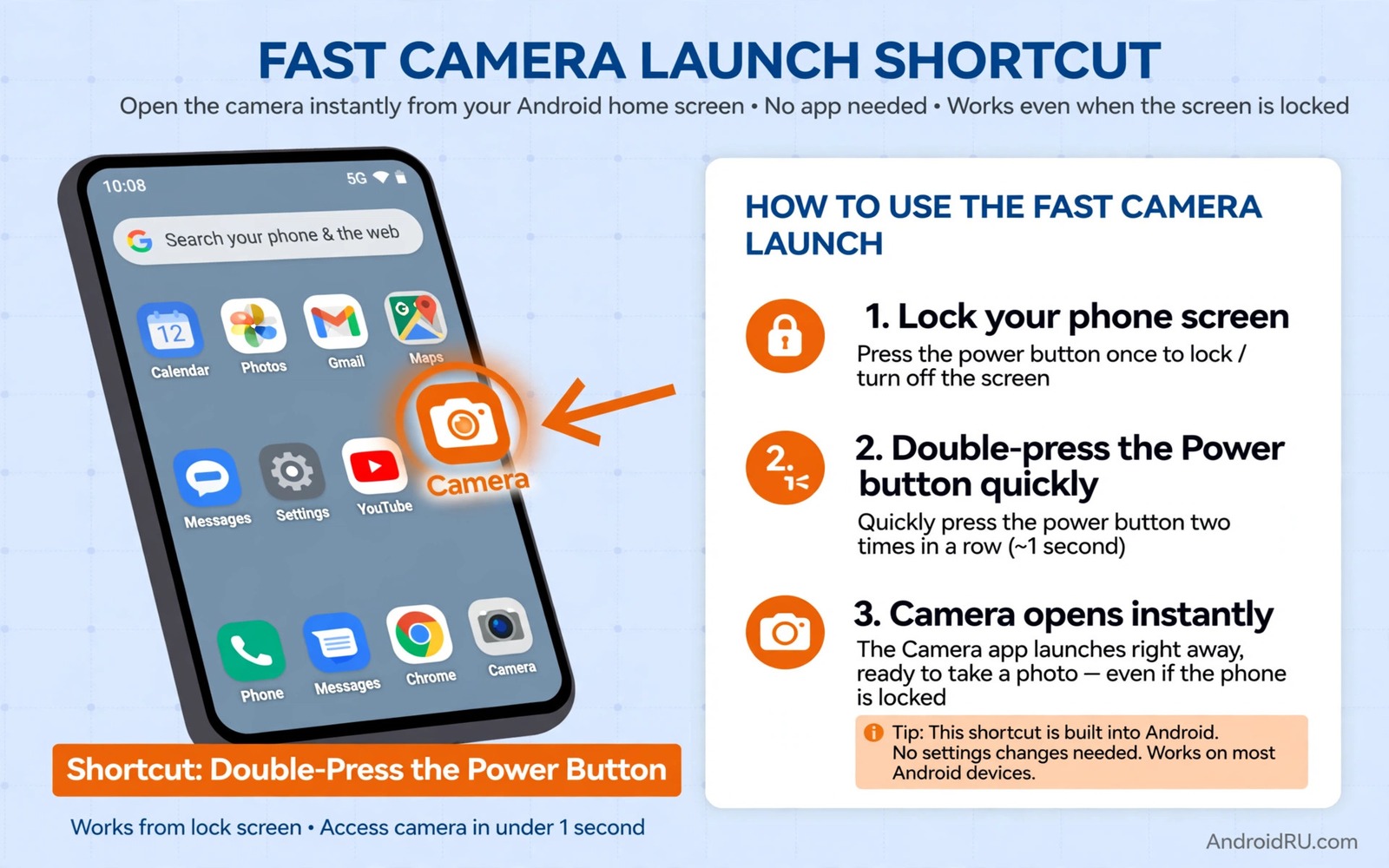
The best photo moments rarely wait for a menu. A child laughs and the expression passes in a second. A bird lands and then lifts off. A street scene aligns for a heartbeat and then dissolves. A camera that takes three seconds to open will miss most of those moments. A camera that opens in under a second turns fleeting life into keepers.
Speed comes from a chain of small delays. The phone must wake and the camera app must load and focus must lock and the shutter must respond. Each link adds time. Shortening the chain matters more than buying a faster phone because even a fast phone feels slow when the camera sits behind a lock screen and a folder. This guide shortens every link in that chain with settings you can set once.
Start by measuring your current time honestly. Lock the phone and time how long it takes from pressing the power button to capturing a photo. Many owners discover a four second chain that felt like one second in memory. A baseline measurement makes improvements visible and motivates the small setup steps that follow.
Set a hardware shortcut you can use blind
Double press of the power button is the fastest reliable shortcut on many Android phones. It works from a locked screen and it opens the camera directly without unlocking first. Enable it in camera settings or in system gestures depending on your phone brand. Practise the double press until it feels automatic in your pocket.
Some phones offer a volume button shortcut or a lock screen camera icon. Test each option with the phone locked and in your pocket. The best shortcut is the one your hand finds without looking. A shortcut that needs precise aiming on a small icon fails under pressure. A physical button press succeeds even when your eyes stay on the subject.
Keep the camera app as the default for that shortcut. A shortcut that opens a gallery or a different app adds a tap that costs the moment. Check the shortcut after a system update because updates sometimes reset gesture settings. A monthly check keeps the fast path ready for the moment you actually need it.
Make the lock screen work for photography
A lock screen camera shortcut lets you shoot without unlocking the phone fully. That saves the time spent entering a PIN or waiting for face recognition. Enable the camera shortcut on the lock screen if your phone offers it. Swipe or tap it and the camera opens in a restricted mode that still captures and saves photos normally.
Face unlock can slow camera access when it fails in bright light or with sunglasses. A hardware shortcut bypasses that uncertainty because it opens the camera directly. Fingerprint unlock also helps when the phone is already awake. Combine methods so you always have a fast path regardless of light or gloves or wet hands.
Disable lock screen features that compete for the same gesture. A swipe gesture that opens a different panel can intercept your camera swipe. Simplify the lock screen to the essentials you actually use. A clean lock screen reduces the chance of a wrong swipe at the critical moment. Readers who want instant response will also benefit from fixing camera shutter lag for instant shots because launch speed and shutter speed work together.
Prepare the camera app before the moment
A camera app that opens to the last used mode may open to video or panorama when you need a photo. Set the default mode to photo so the first frame is a still image. That single setting prevents a mode switch during a fleeting moment. Check the default after using video mode for a project because the app may remember the last mode.
Turn off a long startup animation or a tips screen if your camera app offers that choice. Keep resolution at a sensible level rather than maximum for everyday shooting. Maximum resolution slows processing and storage on some budget phones. A slightly lower resolution still prints well and it keeps the camera responsive for bursts.
Keep the lens clean and the battery charged and storage free. A full storage warning at the moment of capture is a painful way to miss a shot. A dirty lens softens every fast shot no matter how quickly the camera opens. A weekly routine of cleaning the lens and clearing old bursts keeps the fast path truly fast.
Train focus and shutter reflexes
Focus speed depends on light and distance and subject contrast. A subject in bright light with clear edges focuses faster than a subject in shade with low contrast. Tap to focus on a nearby edge before the action peaks when possible. Pre focusing on a doorway or a garden gate lets you shoot instantly when a subject enters that zone.
Use burst mode for unpredictable action rather than a single tap. A burst captures a sequence around the peak moment and increases the chance of a sharp expressive frame. Release the burst as soon as the action passes to avoid filling storage. Review and delete rejects promptly so the camera stays ready for the next moment.
Practise the whole chain in a low pressure setting. Walk around your home and practise double press and shoot ten times. Time the chain and note where hesitation appears. Muscle memory built at home transfers to a street scene where thinking time costs the shot. Speed is a habit as much as a setting.
A small script to log camera launch times
The script below logs launch times you measure by hand. It helps you track whether a shortcut change actually improves speed over a week. Enter each measured time and the script prints an average and a best time.
times = [1.8, 1.2, 0.9, 1.1, 0.8]
average = sum(times) / len(times)
best = min(times)
print(f"Average launch time: {average:.2f} seconds")
print(f"Best launch time: {best:.2f} seconds")
The code above was written for this guide as an original launch time tracker. It uses a small list of measured times as an example and it calculates only an average and a best value. Replace the example list with your own measured times after each practise session. The script never accesses your phone and it never changes any camera setting.
Keep a spare battery plan for photo days
A fast camera is useless when the battery dies before the moment arrives. Photo days drain power through the screen and the camera sensor and repeated focusing. Carry a small power bank on days when photography matters. A power bank in a pocket keeps the fast camera ready through a long outing.
Reduce battery drain without slowing the camera by lowering screen brightness slightly and closing heavy background apps. A dimmer screen still shows composition clearly outdoors when you shade it with your hand. A phone with power left at sunset captures the golden light that a dead phone misses entirely. Battery planning is part of speed planning.
Check storage before leaving home on a photo day as well. A phone with free space captures bursts without hesitation. A phone that warns about storage during a burst may stop mid sequence. A morning check of battery and storage takes thirty seconds and it protects every fast launch that follows.
Keep the camera icon on the first home screen page even when you rely on a hardware shortcut. A visible icon gives you a backup path when a shortcut fails after an update. A backup path that takes two taps still beats a folder hunt that takes six taps. Redundancy in access methods protects speed when one method breaks.
Test the shortcut after every major system update as part of your update routine. Updates can reset gestures without a clear warning. A thirty second test after an update catches a reset before a real moment arrives. A tested shortcut is a reliable shortcut.
Common mistakes
The biggest mistake is relying on a home screen folder for the camera. Opening a folder and finding the icon adds taps and visual search time. Move the camera icon to a thumb reachable spot or rely on the hardware shortcut instead. A folder may look tidy but it costs moments that matter.
Another mistake is leaving the camera in a slow mode such as night mode or high resolution video. Night mode needs a long capture sequence and video mode needs a mode switch back to photo. Reset the camera to photo mode after special shoots. A camera left in a slow mode will miss the next fast moment even if launch itself is quick.
People also ignore storage warnings until the camera refuses to shoot. A phone with almost no free space slows down and may fail to save a burst. Keep at least a few gigabytes free for photography. Delete rejected bursts weekly and move keepers to backup so the phone stays ready.
Finally avoid practising only in good conditions. A shortcut that works at home with dry hands may fail with gloves or wet hands outdoors. Test the shortcut in the conditions where you actually shoot. A method that fails in real conditions is not a fast method at all.
Frequently asked questions
Can any Android phone launch the camera in under one second?
Many modern phones can with a hardware shortcut and a prepared camera app. Older budget phones may need closer to one and a half seconds even with optimisation. Measure your own phone after setup rather than trusting a marketing claim. A consistent one and a half seconds still beats a chaotic four second chain.
Does double press power button work when the screen is off?
Yes on most phones that support the gesture. The double press wakes the phone and opens the camera directly. Test it with the screen off and with the phone locked to confirm behaviour on your model. Some brands place the toggle under gestures and some place it under camera settings.
Will a faster launch drain battery?
A hardware shortcut itself uses negligible power. The camera app uses power only while it is open. Close the camera after shooting to save battery. Keeping the camera app running in the background for instant access may use more power than launching it fresh with a shortcut.
Conclusion
Missing the shot usually comes from a slow chain rather than a slow photographer. A hardware shortcut and a clean lock screen and a photo default mode shorten that chain dramatically. A clean lens and free storage and practised focus habits keep the chain fast in real conditions. Speed becomes a habit when the setup is done once and practised often.
Your concrete next step is to enable double press power for camera today and time ten locked launches in your home. Note the average and the best time with the tracker above. If the average stays above two seconds then check the default mode and storage next. Readers who want sharper action results will also like action shots without motion blur and camera hacks that upgrade mobile photos as follow-ups.

