

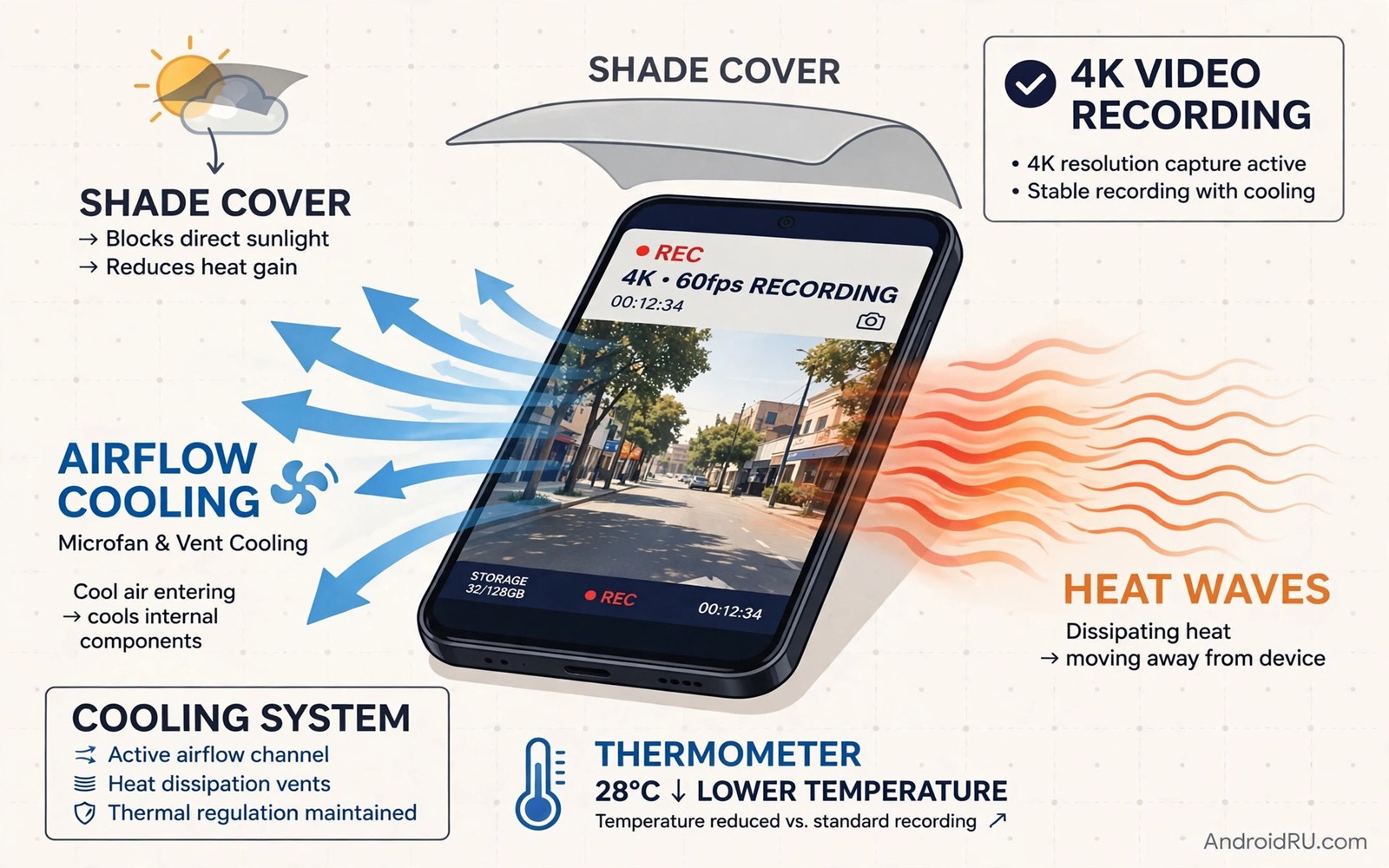
4K video demands a huge amount of processing power. The camera sensor and the image processor and the storage chip all work at full speed. That work creates heat inside a sealed phone body. Most phones warn you when heat climbs too high. Some phones stop recording without warning to protect the battery. The good news is that heat is manageable. Small changes to settings and habits can double your safe recording time.
Start by understanding your phone’s heat limit. A phone in direct sun heats far faster than a phone in shade. A phone with a thick case traps heat against the body. A phone charging while recording adds charging heat to processing heat. Remove those extra heat sources first. Shade and airflow and a cool start matter more than any single setting tweak.
Plan long clips in shorter takes when you can. A ten minute interview can become three shorter takes with brief pauses. Pauses let the phone shed heat between takes. Editors join short takes without visible seams. A single forty minute take invites a heat shutdown at the worst moment. Short takes also protect you from losing everything if a clip fails.
Lower The Settings That Create Most Heat
Frame rate creates more heat than resolution in many phones. 4K at 60 frames per second pushes the processor much harder than 4K at 30 frames per second. Use 30 frames per second for interviews and travel clips. Save 60 frames per second for fast action that truly needs slow motion. That one change often adds many minutes of safe recording. Viewers rarely notice the frame rate change in a calm scene.
Turn off extra processing that you do not need for a clip. Heavy stabilisation and high dynamic range video both add processor load. Use standard stabilisation for a tripod shot. Save enhanced stabilisation for walking shots. Test each mode in a short clip before a long shoot. A mode that looks only slightly better may cost a large amount of heat. Choose the lighter mode when the gain is small.
Lower screen brightness during recording. The screen is a major heat source and a major battery drain. Set brightness to a level you can just see outdoors. Use a sun shade or stand in shade to read the screen. Turn off always on display features during a shoot. Close background apps that refresh feeds and maps. A quiet phone stays cooler for longer.
Give The Phone Air And Shade
Airflow is the cheapest cooling system you own. Hold the phone where air can move around it. Avoid gripping the whole back tightly for a long take. Use a tripod or a handle that exposes the back panel. A handle also steadies the shot and reduces hand fatigue. A phone mounted on a tripod in a breeze cools far better than a phone in a warm hand.
Shade the phone without shading the scene. A small umbrella or a hat brim over the phone works well. A white cloth draped loosely behind the phone reflects sun away. Do not wrap the phone tightly in a cloth. Tight wrapping traps heat instead of releasing it. Shade plus airflow beats shade alone every time.
Remove a thick case for long 4K takes. A rugged case insulates the phone like a blanket. A thin case or no case lets heat escape through the back panel. Place the phone on a cool surface between takes. A stone bench or a metal rail draws heat away faster than a warm pocket. Never place a hot phone in a fridge or a freezer. Sudden cold can cause condensation inside the phone. Enabling cinematic 24fps video also lowers processor load for a filmic look.
Manage Battery And Storage Heat
Start a long clip with a cool and partly charged battery. A phone that just finished fast charging starts hot. Let it cool for ten minutes after charging before you record. Avoid charging during 4K recording when you can. If you must charge then use a slow charger rather than a fast charger. Slow charging adds less heat while it tops up the battery.
Free storage before a long shoot. A nearly full storage chip works harder and can throttle writes. Delete old clips or move them to a computer the night before. Use internal storage for 4K when your phone supports it. Some memory cards write slower and heat more under sustained 4K load. Test a short 4K clip on your card before a critical shoot. A card that drops frames will ruin a take regardless of heat.
Watch for early heat signs instead of waiting for a warning. A warm back panel and a dimming screen signal rising heat. A frame rate that stutters after ten minutes signals throttling. Pause at the first sign and let the phone cool. A five minute pause saves a lost take. A forced continuation risks a shutdown and a corrupted file. Shooting smooth handheld video without a gimbal pairs steady technique with cooler shorter takes.
Split Long Shoots Into Safe Takes
Plan a shot list with natural break points. An interview can pause between questions. A travel walk can pause at each viewpoint. A cooking video can pause between steps. These pauses look natural in an edit. They also give the phone time to cool. Tell your subject about the pause plan in advance. Subjects relax when they know a pause is coming.
Record a short test clip in the exact location first. Record for two minutes and feel the back panel. Check the clip for dropped frames and focus hunting. If the phone already feels hot after two minutes then change a setting. Lower the frame rate or move into shade. A two minute test prevents a ruined thirty minute shoot. It also reveals audio problems before they matter.
Keep a second phone or a power bank plan for critical shoots. A second phone lets you rotate devices during cooling pauses. A power bank lets you recharge during a long break rather than during a take. Label your clips by take number as you go. Clear labels save editing time and prevent mix ups between devices. A calm rotation plan beats a frantic swap during a heat warning.
Cool Down Safely Between Takes
Cool down in shade with airflow between takes. Stand the phone upright so air touches both faces. Remove the case during the break. Close the camera app so the sensor stops working. Let the screen sleep rather than leaving a bright preview running. Five minutes of true rest cools more than fifteen minutes of idle preview.
Avoid ice packs pressed directly against a hot phone. Direct cold can shock the battery and create condensation. A cool damp cloth placed nearby is safer than ice on the body. A small USB fan aimed at the phone from a short distance works well. Fans are cheap and quiet and easy to carry. Use a fan for indoor shoots under hot lights.
Check battery temperature in a system app if your phone shows it. A battery near forty degrees Celsius deserves a break. A battery climbing fast deserves a setting change. Do not rely on feel alone in cold weather. Hands in cold air feel less heat than the phone body holds. Trust the warning system when it appears. A warning is a request for a pause rather than a challenge to ignore.
Plan a shoot schedule around heat rather than around convenience alone. Schedule long outdoor takes for early morning or late afternoon. Schedule short indoor takes for midday heat. Share the schedule with everyone involved so pauses feel planned. A schedule that respects heat keeps morale high. A schedule that ignores heat ends with rushed takes and lost clips.
video_resolution = 4K
video_frame_rate = 30
video_stabilisation = standard
video_brightness = medium
video_take_length = short takes
The snippet above is an original recording setup note written for this guide. It lists only standard camera settings for your own Android phone. It does not copy settings from any outside source.
Monitor audio heat as well as video heat during a long take. A phone that runs hot can throttle audio processing too. Listen for crackle or dropouts in a test clip. Use an external microphone when audio matters most. A wired lavalier keeps audio clean even if the phone throttles slightly. Clean audio saves a clip that video heat might otherwise weaken. Plan audio gear as part of the heat plan rather than as an afterthought.
Verify long clips on location before you leave a shoot. Play back the start and the middle and the end of each long take. Check for frozen frames and audio dropouts and focus drift. A corrupted take discovered at home cannot be reshot. A corrupted take discovered on location can be reshot in minutes. Build playback checks into your wrap up routine. That routine protects every long shoot from silent failure.
Common Mistakes
One common mistake is to record 4K at 60 frames per second for every clip. That setting doubles processor load for little visible gain in calm scenes. Use 30 frames per second as the default. Another mistake is to charge with a fast charger during recording. Fast charging heat plus processing heat triggers warnings fast. Record on battery or use slow charging only.
A third mistake is to keep a thick case on during a long take in the sun. The case traps heat and hides early warning warmth. Remove the case for long takes. A fourth mistake is to ignore a dimming screen. Dimming often signals thermal protection starting. Pause at once rather than pushing through. Stabilizing shaky mobile videos for free offers lighter stabilisation options that run cooler.
Frequently Asked Questions
Does 4K recording damage a phone battery?
Occasional 4K recording does not damage a healthy battery. Repeated heat shutdowns shorten battery life over time. Keep takes shorter and keep the phone cool. A cool phone protects both the battery and the clip.
Why does my phone stop 4K recording after a few minutes?
Heat protection stops recording when internal temperature climbs too high. Sun and cases and fast charging speed up that climb. Lower the frame rate and move into shade. Short takes with cooling pauses solve most shutdowns.
Is 4K at 30 frames per second good enough for most videos?
Yes for interviews and travel and family videos. Thirty frames per second looks smooth on phones and televisions. Sixty frames per second suits fast sports and slow motion only. Use the lower rate to gain recording time and cooler operation.
Conclusion
Set your camera to 4K at 30 frames per second today and remove the case for your next long clip. Record a two minute test in shade and feel the back panel after it. If the phone stays comfortable then you have a safe baseline. Use short takes and cooling pauses from that baseline on every long shoot.

