

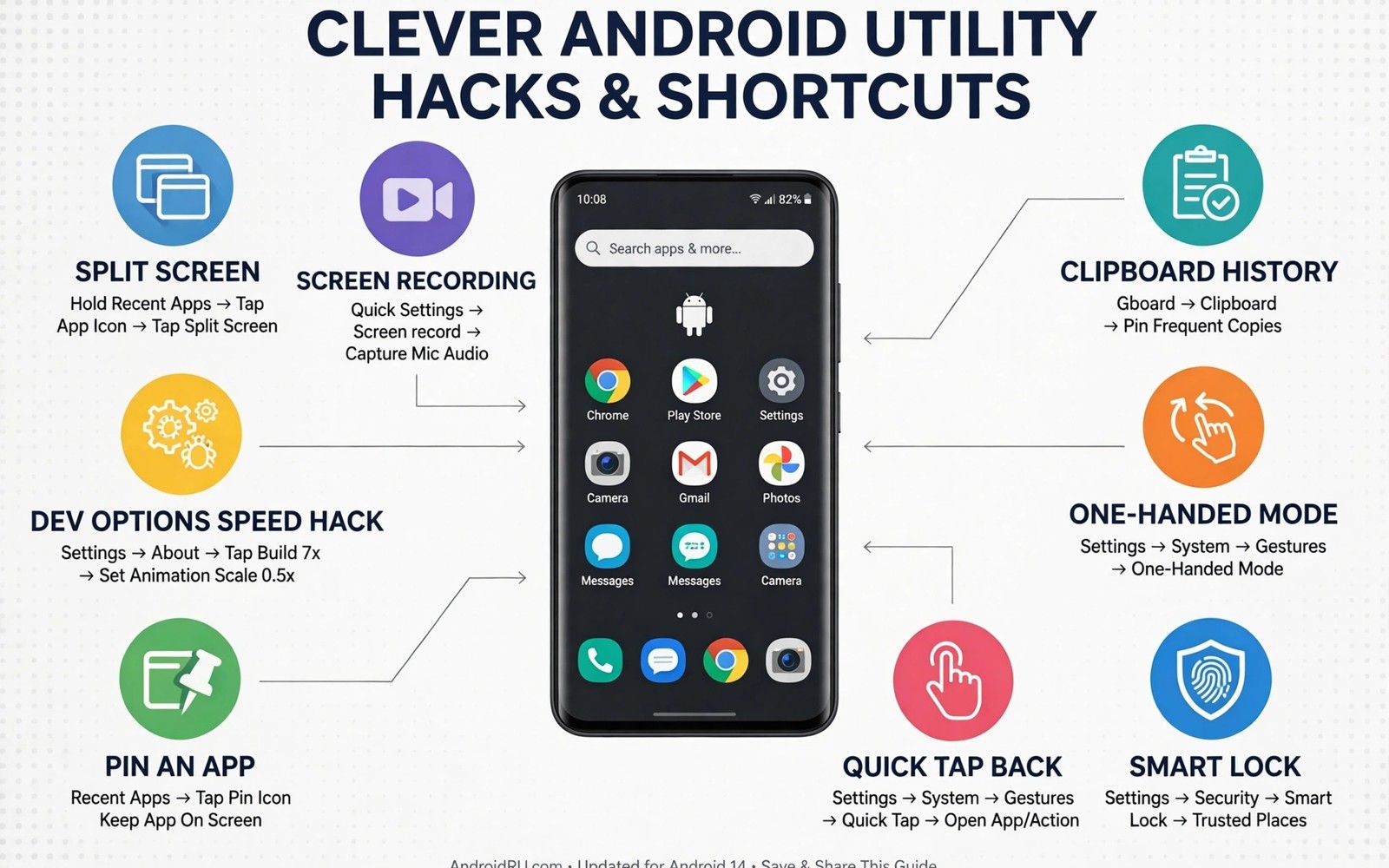
Utility hacks earn admiration when they solve a real problem in seconds. A friend watches you silence a phone with a flip. A colleague watches you share a file without a cable. A family member watches you find a lost phone with a simple command. Those moments impress because they look like magic. The magic comes from knowing a feature that others overlook. This guide collects genius utility hacks that are practical rather than flashy. Each hack saves time or solves a problem that most users accept as normal.
A utility hack should pass a simple test before you show it off. It should work on a normal phone without exotic tools. It should save at least a minute compared with the normal method. It should work reliably on the first try in front of others. A hack that fails during a demonstration embarrasses rather than impresses. Test each hack privately three times before showing it. A reliable hack builds a reputation for competence. An unreliable hack builds a reputation for gimmicks.
Choose hacks that match your daily life rather than hacks that look impressive in a video. A hack for travellers impresses only if you travel. A hack for photographers impresses only if you photograph. A hack for parents impresses only if you manage a family phone. Personal relevance turns a trick into a tool. A tool that you use daily impresses through results rather than through performance. Results over time beat a single demonstration.
Hacks That Save Time Every Day
Use a home screen widget for a note that you update daily. A shopping list widget saves opening an app and searching for a note. A widget on the home screen shows the list at a glance. A widget edit takes seconds from the home screen. A list that lives on the home screen gets used. A list buried in an app gets forgotten. Visibility drives use for daily lists.
Use text expansion for phrases that you type repeatedly. An address or an email signature or a common reply can expand from a short code. Typing three letters can produce a full paragraph. Text expansion saves minutes across a week of messages. It also reduces typing errors for long phrases. A consistent phrase typed by expansion always looks professional. A phrase typed manually varies with haste and fatigue.
Use a QR code for Wi-Fi sharing instead of reading a long password aloud. A guest scans a code and connects without typing. A code avoids spelling errors and password exposure. A printed code in a guest room works for every visitor. A code generated from the Wi-Fi settings stays accurate after a password change only if you regenerate it. Regenerate the code whenever the password changes. A current code saves a tedious password recital.
Hacks That Solve Annoying Problems
Find a phone by asking a smart speaker or another device to ring it even in silent mode. A find device feature can override silent mode for a located phone. A ringing phone in a couch cushion solves a daily search. A silent phone hidden under a blanket becomes findable again. Test the find feature before you need it urgently. A tested feature works under stress. An untested feature adds stress during a search.
Recover a recently deleted photo from a trash folder before it expires. Most gallery apps keep deleted photos for thirty days. A trash folder acts as a safety net for accidental deletions. Open the trash folder promptly after a mistaken deletion. A photo recovered within days returns fully. A photo recovered after expiry may be gone forever. Prompt action turns a mistake into a minor delay.
Use a phone as a document scanner with a built in camera feature. A scanner mode straightens pages and improves contrast automatically. A scanned document looks professional without a dedicated scanner. A receipt scanned at purchase time avoids a pile of paper. A document scanned immediately is easier to file than a document scanned later. Immediate scanning prevents paper chaos.
adb shell cmd device_config get
adb shell settings list system
adb shell dumpsys location
The commands above follow standard Android tooling practice for personal devices and they are included here as practical examples for inspecting device state rather than as a recipe for changing hidden settings. The first command reads device configuration values. The second command lists system settings for review. The third command reports location service state. Use the output to understand what your phone already offers. Do not change values from this output without understanding their purpose. Inspection precedes modification for any utility hack.
Hacks That Impress Through Results
Automate a morning routine that prepares the phone before you wake. A morning routine can disable silent mode and open a weather widget. A prepared phone saves a minute of morning fumbling. A minute saved every morning adds up to hours across a year. A routine that runs reliably impresses through consistency. Consistency over months beats a single flashy demonstration. A calm morning is a visible result.
Create a focus mode that silences social apps during work blocks. A focus mode that activates on a schedule needs no willpower. A scheduled focus mode protects deep work from notifications. A colleague who notices your steady focus may ask how you manage it. A simple schedule answers the question. Discipline supported by automation looks like natural focus. Automation turns intention into habit.
Share a large file through a local network method when a cable is missing. A local transfer impresses in a meeting because it solves a problem on the spot. A file shared without a cable or a cloud upload feels modern. A local method also works without internet access. A solution that works offline impresses more than a solution that needs perfect connectivity. Offline capability is a genuine utility advantage.
Common Mistakes
One common mistake is showing a hack before testing it thoroughly. A hack that works at home may fail in a different network or lighting condition. Test hacks in varied conditions before demonstrating them. A hack tested in three conditions is ready for an audience. A hack tested once is ready only for private use. Testing breadth protects your reputation.
Another mistake is collecting hacks without using them daily. A collection of fifty hacks that you never use is a trivia list. A collection of five hacks that you use daily is a toolkit. Choose five hacks and integrate them into daily life for a month. A toolkit built from use beats a list built from reading. Use decides value for utility hacks.
A third mistake is using a hack that compromises security for convenience. A hack that disables a lock screen for speed creates risk. A hack that shares a password openly creates risk. A hack that grants broad permissions creates risk. Evaluate security before adopting any hack. A hack that trades safety for speed is a poor trade. Safe hacks impress without creating exposure.
Frequently Asked Questions
Are utility hacks safe for a normal phone?
Most utility hacks use built in features and standard settings. Those hacks carry low risk when you understand each step. A hack that requires unknown apps or broad permissions needs extra scrutiny. Test a hack on a secondary device if possible. A cautious approach keeps utility hacks safe. Built in features are the safest source of hacks.
Why does a hack work on one phone but not another?
Manufacturers customise Android with different menus and features. A hack tied to a specific brand menu may not exist on another brand. A hack tied to a standard Android feature usually works across brands. Check the feature name on your own phone before assuming it exists. Brand variation explains most hack failures. A personal test resolves brand uncertainty.
How do I remember hacks that I use rarely?
Write rare hacks in a short note with the exact steps. A note with five rare hacks is easy to search when needed. A note prevents relearning from scratch after months. Update the note when a system update changes a menu. A maintained note turns rare hacks into reliable tools. Documentation preserves infrequent knowledge.
Build A Personal Hack Library Over Time
A personal hack library grows one useful hack at a time. Add a hack only after a month of daily use proves its value. A library built slowly contains only proven tools. A library built quickly contains many untested ideas. Slow growth creates a toolkit that you trust completely. Trust matters when you rely on a hack during a busy day.
Organise the library by situation rather than by app name. A travel section and a work section and a home section suit real life better than an alphabetical list. A situation based library answers the question of what helps right now. An app based library answers a different question that matters less during a task. Situation organisation matches how people actually search for help.
Share one hack from your library with a friend each month. Teaching a hack forces you to explain it clearly. A clear explanation reveals gaps in your own understanding. A friend who uses the hack gives feedback that improves it. Sharing turns a private toolkit into a social resource. A shared hack also creates a reason to keep the library current.
Retire Hacks That No Longer Help
A hack that once saved time can become obsolete after a system update. A built in feature may replace a workaround completely. A changed menu may break a shortcut that once worked. Review the library yearly and retire hacks that no longer help. A retired hack leaves space for a new tool that fits current software. Retirement is not failure. It shows that the library evolves with the phone.
A hack tied to an old app should go when that app leaves your phone. A hack tied to an old routine should go when the routine changes. A library that keeps obsolete hacks becomes confusing. A library that retires obsolete hacks stays sharp. Sharp tools serve better than a large dull collection. Prune yearly to keep the toolkit relevant.
Conclusion
Pick three hacks from this guide today and test each one three times in private. Keep the hacks that work reliably and use them daily for a month. Show one hack to a friend only after a month of reliable use. Readers who enjoy practical shortcuts may also like ADB tweaks for a faster system UI for deeper control, and custom quick tiles for advanced functions for one tap controls, plus a master approach to Android power automation for a full system. Your next step is three hacks tested three times each.

