

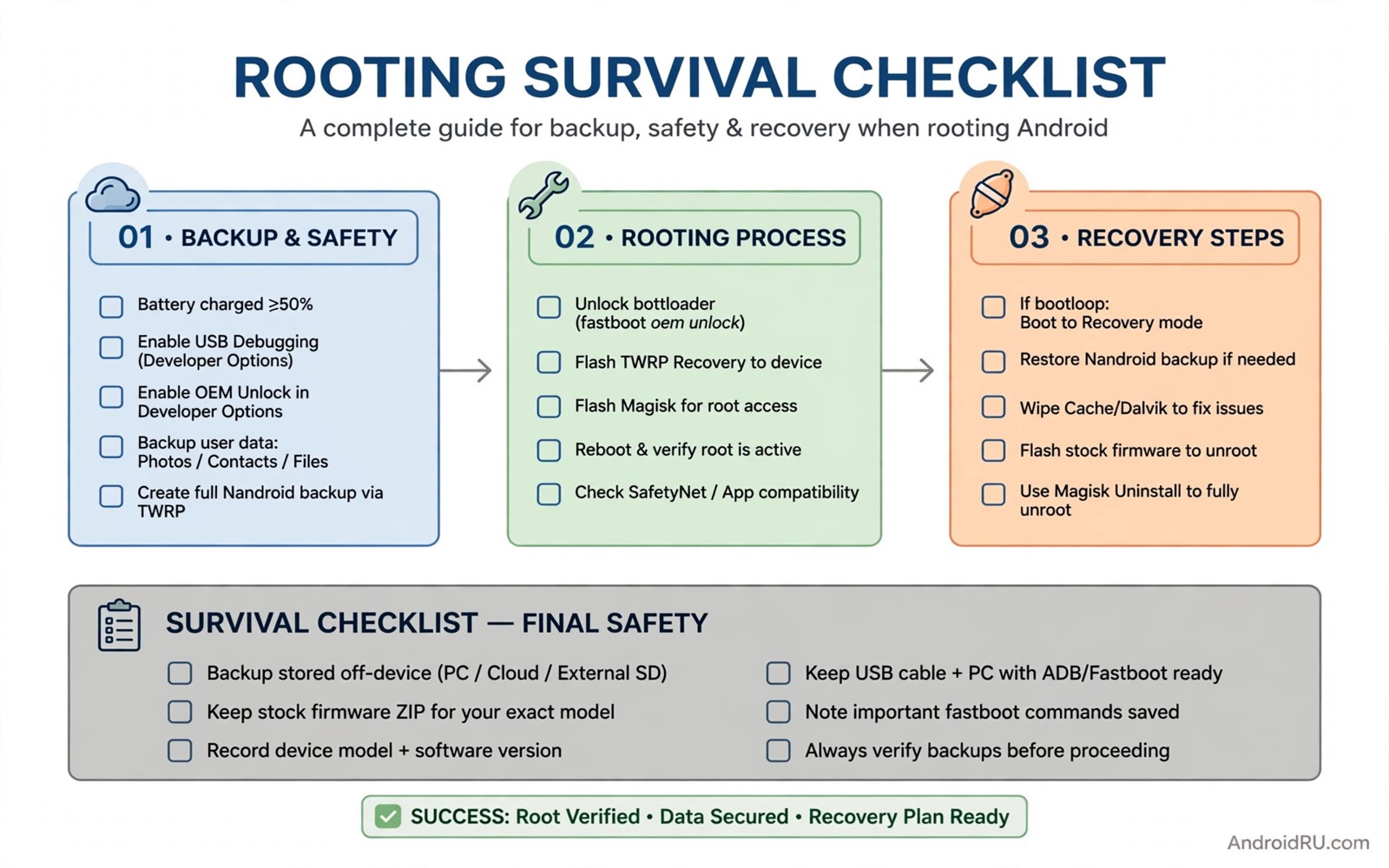
Rooting gives control. It also removes safety nets that stock Android provides. A rooted phone can break in ways a stock phone cannot. A bad module can boot loop it. A bad update can unroot it. A bad flash can wipe it. Survival means preparing for those failures before they happen. It does not mean avoiding root. It means rooting with a plan.
This guide is a complete survival routine. It covers backups and recovery and manager choice and updates and rollback. It ties together the specific guides in this series. It gives a checklist you can follow before any major change. A checklist turns panic into procedure. Procedure saves phones.
Think of survival in layers. A backup is one layer. A recovery tool is another layer. A stock boot image is another layer. A written note of settings is another layer. One layer can fail. Multiple layers rarely fail together. Build all layers before you need any of them.
Start with a full inventory today. Note your model and build number. Note your root manager and version. Note your module list with versions. Note your recovery version. Store that inventory outside the phone. An inventory on the phone helps only if the phone boots.
Backups that cover every failure
A full backup includes data and boot and system state. Data backup covers photos and messages and app data. Boot backup covers the patched boot image. System backup covers the current ROM state. Each piece restores a different failure. Together they restore almost anything short of hardware damage.
Store backups in two places. Keep one copy on external storage. Keep another copy on a computer. A backup only on the phone fails when the phone fails to boot. A backup only on a computer fails when the computer is unavailable. Two places cover both cases. Sync the computer copy after major changes.
Test backup visibility regularly. Boot into recovery monthly. Check that recovery sees the backup folder. Check that backup files are not corrupt. A backup that recovery cannot see is not a backup. A monthly check takes minutes. It prevents a crisis discovery.
Photos and messages deserve separate sync as well. A full backup may miss a recent chat. A cloud or local sync for photos adds a layer. A separate sync costs little. It protects the files users mourn most after a loss. Prioritise irreplaceable data over app settings.
Recovery and boot image readiness
Recovery is your on-device rescue tool. It must support your partition layout and encryption. Old recovery fails on modern layouts. Modern recovery handles dynamic partitions and current encryption. Upgrade recovery before you need it. Test it before you need it.
The guide on moving to modern custom recovery tools explains recovery upgrades. Follow it if your recovery cannot see data. A recovery upgrade is a survival step not an optional tweak. Do it early in your root journey.
Stock boot images are your fastboot rescue path. Save the stock image for your exact build. Save the patched image too. Label both clearly. A stock image restores normal boot after a bad patch. A patched image restores root after a stock flash. Both belong in your rescue folder.
Boot patching skill completes the rescue set. The guide on patching a boot image manually with fastboot teaches manual patching. Learn it on a calm day. A calm-day skill becomes a crisis-day rescue. A crisis is a poor classroom.
Choosing and maintaining a manager
Manager choice affects every other survival step. A manager with broad module support suits most users. A manager with kernel-level control suits supported devices. A manager with easy patching suits frequent updaters. Choose based on device support and module needs. Revisit the choice only with a backup ready.
The comparison guide on comparing Magisk KernelSU and APatch covers manager differences. Use it before switching. A switch without a backup is a gamble. A switch with a backup is an experiment. Experiments are safe. Gambles are not.
Maintain a minimal module set. Each module adds a failure surface. A minimal set fails less often. It also troubleshoots faster. Review modules monthly. Remove modules you no longer use. Update modules that you keep. A clean module list is a survival habit.
Keep a module change log. Note each install and update with a date. Note any crash that followed. That log turns a mystery crash into a timeline. A timeline points to the suspect quickly. A log costs seconds per change. It saves hours per crash.
Updates without losing root or data
System updates need a planned sequence on rooted phones. Download the update. Install it to the inactive slot where supported. Patch the inactive slot before rebooting. Verify root after reboot. Re-enable modules one by one. That sequence preserves root and data together.
The guide on updating a rooted device over the air explains that sequence in detail. Follow it for every update. An unplanned update that reboots early loses root. A planned update keeps root with little extra effort.
App updates need attention too. An app update can change a hook target. A module that worked yesterday may crash today. Test key apps after major updates. Disable a crashing module until its author updates it. App update caution prevents surprise crashes.
Attestation changes after updates deserve early testing. A new build can change integrity results. Test banking and payment apps early after an update. Early testing gives time to fix or to plan an alternative. Late discovery during a payment is stressful.
Rollback plan for any change
Define rollback before you change anything. A rollback answers three questions. How do I disable the change. How do I restore the previous state. How long will rollback take. Answer those questions in writing for major changes. A written rollback beats an improvised rollback.
Disable steps come first. Most module changes roll back by disabling the module and rebooting. Most property changes roll back by removing the property and rebooting. Most manager changes roll back by flashing the previous boot image. Know the disable step for each change type.
Restore steps come second. A recovery backup restores a full state. A stock boot flash restores normal boot. A data restore restores app state. Choose the smallest restore that fixes the problem. A full restore for a small problem wastes time. A small restore for a big problem wastes a second attempt.
Practice rollback once on a non-critical change. Disable a module and re-enable it. Restore a small backup if possible. Practice builds confidence. Confidence prevents panic during a real failure. A practiced user recovers calmly. An unpracticed user recovers frantically.
Monthly maintenance routine for rooted phones
Run a monthly maintenance check on the first weekend of each month. Check backup visibility in recovery. Check module updates. Check manager version. Check system update notes. A monthly routine catches drift early. Drift causes most long-term root problems. Routine prevents drift.
Review the module list monthly. Remove modules you have not used in a month. Update modules you still use. Note any module with no update for a long time. A stale module may fail after the next system update. Proactive removal beats reactive troubleshooting.
Review storage monthly as part of maintenance. Check free space. Clean downloads. Review messaging media. Storage health affects speed and swap. A monthly storage check keeps the phone responsive. It also prevents update failures due to full storage.
Review permissions monthly as well. Check which apps gained new permissions after updates. Revoke permissions that no longer serve a feature. A monthly permission review prevents creep. It also reminds you why each grant exists. Privacy needs routine not one-time effort.
Review battery behaviour monthly. Check overnight drain averages. Check wakelock leaders. Check whether a new app drains excessively. A monthly battery review catches a rogue app early. Early catches save weeks of poor battery life.
Update your inventory note monthly. Record new build numbers and module versions. Record recovery test results. Record any change in manager or recovery. An updated inventory makes the next crisis faster to solve. It also makes support questions easier to answer.
Practice one rollback step monthly. Disable a non-critical module and re-enable it. Boot into recovery and list backups. That practice keeps skills fresh. Fresh skills turn a crisis into a procedure. Procedure is the core of survival.
Common mistakes
- Rooting without a tested recovery that can see encrypted data.
- Keeping backups only on the phone that fails to boot.
- Switching managers without a module list or a stock boot image.
- Updating the system without patching the inactive slot first.
- Running a large module set with no change log to trace crashes.
Frequently asked questions
How much backup storage do I need?
A full backup needs space for data plus system images. External storage or a computer folder suits that size. Keep at least two full backups if space allows. One recent and one older backup cover different failures.
Should I root a daily driver phone?
Yes if you accept the maintenance routine in this guide. Root on a daily driver needs backups and update planning. A user who skips that routine should use a secondary device for root experiments.
What is the single most important survival habit?
A tested backup outside the phone is the most important habit. Recovery and boot images help only with a backup to restore. Test backup visibility monthly. That habit alone prevents most permanent losses.
adb shell su -c "ls /data/adb/modules && getprop ro.build.version.incremental"
# List modules and build number on your own device for inventory.
# Store the output outside the phone as part of your survival note.
The commands above are generic inventory examples written for this guide. They list modules and the build number. They do not change the device. They do not share data anywhere.
Conclusion
Survival is a routine not a single tool. Back up data and boot in two places. Keep modern recovery tested. Save stock and patched boot images. Choose a manager for your device. Update with the inactive-slot sequence. Log module changes. Define rollback before each change.
Your concrete next step is to write your inventory today. Record model and build and manager and modules and recovery. Store it outside the phone. That inventory is the foundation of every other survival step.

