

How Reverse Wireless Charging Secretly Degrades Your Primary Battery
Reverse wireless charging sounds generous. Your phone shares power with earbuds or a watch, and it rescues a friend phone at dinner when the battery icon turns red. That generosity has a hidden cost, and the host phone pays it. The host gives up roughly twice what the guest receives, it heats up while it shares, and it burns through its own battery cycles for someone else benefit. Occasional rescue use is fine. Daily sharing is costly in a way that only shows up months later, when the host battery holds less charge than it should for its age.
I first noticed the cost after a month of topping up my earbuds from my phone every afternoon. The earbuds were always ready, and my phone battery health dropped faster than it had in the previous year. One measured session explained everything: the host lost 18 percent while the guest gained 9 percent. This guide quantifies that cost with real numbers, shows when reverse charging is worth it, and shows when a cable or a power bank is the smarter choice. It also gives you a simple log you can run in one session to see your own phone cost in plain percentages.
The key idea is simple. Wireless transfer loses energy as heat at every step, and the host battery pays for all of it. The guest benefits visibly, with a rising percentage on its screen. The host pays invisibly, with heat and extra cycles that only show up as faster aging over months. Once you see the numbers, the decision becomes easy: rescue tool yes, daily charger no.
How Reverse Wireless Charging Works and Why It Loses Energy
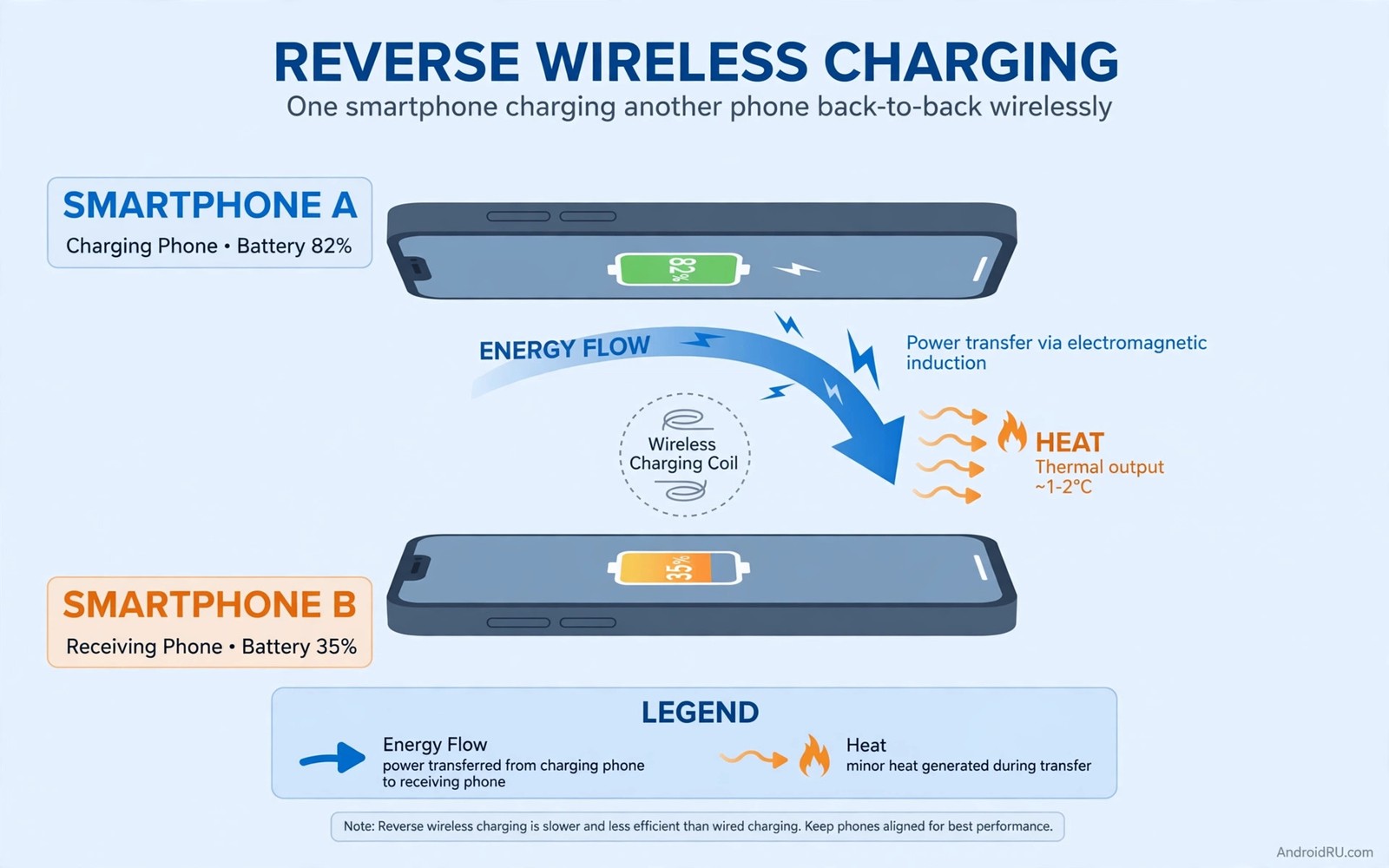
Reverse charging turns the phone coil into a transmitter. The phone battery sends current to its coil, the coil creates a magnetic field, and the guest device coil converts that field back into current. Each conversion loses energy, and the air gap between the two devices loses more. Total efficiency often sits near 50 to 60 percent, which means the host gives up roughly twice what the guest gains. A guest gaining 10 percent may cost the host 20 percent. The missing energy becomes heat in both devices, and the host heats more because it also powers its own systems during the transfer.
That heat is the main aging factor, and efficiency loss is the second factor. Together they make reverse charging expensive per percent delivered. A wired transfer avoids most of this loss: wired efficiency sits near 90 percent, because the cable carries current directly with almost no conversion. A power bank transfer also uses a cable, and it keeps the host battery untouched. Those alternatives matter for frequent sharing, because the gap between 50 percent and 90 percent efficiency is the gap between a battery that lasts two years and one that feels old after eighteen months.
Phones that support the feature include Samsung Galaxy flagships with Wireless PowerShare, Google Pixel phones with Battery Share, and Huawei phones with reverse wireless charging. The feature usually delivers only 5 watts or less, which is slow even by wireless standards. A guest phone may need hours for a full charge at that rate, and hours of heat for a small gain is poor value. The feature was designed for small accessories, not for filling another phone.
Alignment makes the loss worse
Two phones back to back rarely align perfectly. A watch or an earbuds case aligns better on a dedicated spot marked on the host back, but a phone on a phone often sits off-center. Off-center transfer drops efficiency further, and it may drop below 40 percent. The host then gives up far more for a small guest gain, heat rises with the misalignment, and the system may slow the transfer to control heat. Slow transfer extends the time both devices stay warm, and longer warm time adds more wear. Reposition the guest until the transfer is steady, because a steady transfer wastes less heat and finishes sooner.
Why small guests cost less than big guests
An earbuds case holds a tiny battery, often under 500 mAh, so a full top-up costs the host only a few percent. A watch is similar. A guest phone holds a battery ten times larger, so a meaningful top-up costs the host 15 to 25 percent. The efficiency is the same in both cases, but the absolute cost scales with the guest battery size. That is why topping up earbuds is a reasonable use of reverse charging while filling a friend phone is not: the same inefficiency applied to a much larger battery produces a much larger host loss.
The 5-watt ceiling and what it means for your time
Reverse wireless charging typically delivers 4.5 to 5 watts, while a wired charger delivers 25 watts or more. At 5 watts, a guest phone gains roughly 10 percent per hour under good conditions, and less when alignment is poor. A full guest charge can take an entire afternoon. During all those hours the host stays warm and its battery drains. Use reverse charging for minutes, not hours, and stop when the guest reaches enough to function. Enough is the goal in an emergency. Full is the goal at a wall charger.
The Heat and Cycle Cost to the Host Battery
Reverse charging heats the host in two ways. Discharge itself generates heat, and wireless transmission generates additional heat. The host battery experiences both at once, and temperature may rise several degrees during a session. A session long enough to charge earbuds fully may keep the host warm for 30 minutes. That warm period ages the cell, and it also reduces efficiency further, because a warm cell delivers less usable energy. The host may lose extra percent to heat alone, on top of the energy the guest receives.
Deep discharge adds another cost. Sharing until the host falls below 20 percent pushes it into the stress zone, where the cell chemistry degrades fastest. Low charge plus heat is the worst combination for a lithium-ion battery, and it accelerates wear more than either factor alone. Start sharing from a high host charge, and stop well before the host gets low. A host at 80 percent handles a top-up far better than a host at 30 percent.
Cycle cost follows the same logic. A reverse session consumes host cycles without giving the host owner any screen time in return. The energy simply leaves the phone inefficiently. Frequent sharing therefore adds cycles faster: a phone shared daily may add an extra partial cycle per day, and over a year that adds hundreds of cycles. Hundreds of cycles translate into measurable capacity loss. A phone used normally for two years may behave like a three-year phone, holding noticeably less charge and draining faster. That hidden aging is why reverse charging earns its reputation. The guest benefits visibly, and the host pays invisibly over months.
How lithium-ion batteries actually age
A lithium-ion cell ages through chemical side reactions that build up a layer inside the cell and trap lithium that could otherwise carry charge. Heat speeds those reactions, high voltage speeds them, and deep discharge speeds them. Reverse charging combines heat with discharge, and sometimes with a low state of charge, which is why it ages a battery faster than normal use at the same energy level. Normal wireless charging already adds heat, and reverse charging adds heat plus inefficiency plus host discharge on top. You can review that baseline in what science says about wireless charging and battery health, and the pattern is the same: heat is the enemy, and anything that adds heat without adding value shortens battery life.
Temperature thresholds that matter
Battery aging accelerates sharply above about 35 degrees Celsius, and it climbs steeply past 40 degrees. A phone that feels warm to the touch is usually around 38 to 42 degrees inside, which is already in the accelerated aging zone. A phone that feels hot is past it. The goal during any reverse session is to keep the host as cool as possible: remove the case, place both devices on a cool hard surface, and stop sharing the moment the host feels hot. A cool host loses less energy to heat and ages more slowly, even during the same transfer.
Counting the cycles a daily habit adds
A full charge cycle means using 100 percent of the battery capacity, whether in one go or across several partial charges. Sharing 20 percent with a guest every day adds roughly one extra full cycle every five days, or about 70 extra cycles per year. A typical phone battery is rated for around 500 full cycles before capacity drops to 80 percent. Seventy extra cycles a year means reaching that threshold months earlier. The numbers are not dramatic in a single week, and that is exactly why the damage feels secret: it accumulates quietly until the battery health reading drops.
When Reverse Charging Is Still Worth It
Emergencies justify the cost. A dead watch before a run is an emergency. Dead earbuds before a flight are an emergency. A friend phone dying during navigation is an emergency. In those moments the convenience outweighs the wear, because one session does not ruin a battery. The damage comes from routine use, not from a single rescue. Use reverse charging as a rescue tool, and do not use it as a daily charger for earbuds. Charge earbuds from a wall charger at home, charge a watch from its own cable overnight, and reserve reverse charging for moments away from other power. That reservation keeps the cost rare, and rare costs do not affect long-term health in any meaningful way.
Short top-ups are better than long sessions. A five-minute top-up to get earbuds through a call is efficient in human terms, and it costs the host little. A full charge of a guest phone is inefficient: it costs the host a lot, and it takes a long time due to the low power output. Set a mental limit before you start sharing. Stop when the guest reaches enough to function, and do not aim for full. Enough is the goal in an emergency, and full is the goal at a wall charger.
Think about the trade-off in plain terms. A five-minute earbuds rescue might cost the host 2 or 3 percent. That is a fair price for a working pair of earbuds on a flight. A two-hour phone-to-phone session might cost the host 40 percent and leave it warm for the rest of the afternoon. That is a poor price for a guest gain of 20 percent. The feature is at its best when the guest is small, the session is short, and no other power source exists.
The emergency test: three questions before you share
Ask three questions before turning the feature on. First, does the guest actually need power right now, or can it wait until you reach a charger? Second, is the host above 50 percent, so the session will not push it into the stress zone? Third, is there really no cable or power bank available? If the answer to the first question is no, wait. If the host is low, charge the host first. If a cable exists, use the cable. Only when all three answers point to sharing should you turn the feature on.
How long is too long for one session
Ten minutes is a sensible limit for a phone-to-phone top-up, and five minutes is enough for earbuds in most cases. Beyond ten minutes, the host heat builds up and the efficiency drops, so each extra guest percent costs more than the one before it. Set a timer on the host or simply watch the host percentage: stop when the host has lost 10 percent, whatever the guest has gained. That rule keeps every session small and keeps the cost predictable.
Smarter Alternatives for Regular Sharing
A small power bank beats reverse charging for regular sharing. A power bank delivers power by cable efficiently, it keeps the host battery untouched, and it charges faster. A 10,000 mAh bank costs little, fits in a pocket, charges earbuds many times, and charges a phone partially in an emergency. Carrying a bank removes the need for daily reverse sharing, and it protects the host phone from heat. Think of a bank as a dedicated sharing battery: it takes the wear so your phone does not have to. That separation is smart engineering, because the right battery does the job it was built for.
A cable between phones is another alternative when both phones support it. Wired reverse charging through USB is far more efficient than wireless, it still drains the host, but it wastes less as heat and it charges faster. Use a short USB-C cable for phone-to-phone sharing when possible. That method still costs host cycles, but it costs fewer cycles per guest percent, and it avoids alignment loss entirely. Keep a short cable in your bag for that purpose. It weighs almost nothing, and it saves host health over time. Wireless reverse charging is convenient. Wired reverse charging is efficient. Choose efficiency when you have a cable handy.
Charge accessories at home as a habit. Place earbuds on their charger each night, and place a watch on its charger each night. That routine prevents daytime emergencies, and it removes the temptation to share from a phone. Home charging is efficient and cool, it uses wall power, and it does not touch phone cycles. A nightly accessory routine is a small habit, and it pays by preserving phone health while ensuring accessories are ready each morning. Prevention beats rescue. A charged accessory never needs a host rescue.
Comparing every sharing method head to head
| Sharing method | Efficiency | Host heat | Host cycles used | Best for |
|---|---|---|---|---|
| Reverse wireless charging | About 50 to 60 percent | High | High, about double the guest gain | Emergency top-ups of small accessories |
| Wired phone-to-phone USB-C | About 85 to 90 percent | Low | Moderate, close to the guest gain | Phone-to-phone sharing when a cable is handy |
| Power bank over cable | About 85 to 90 percent | None on the host | None on the host | Regular sharing and travel |
| Wall charger at home | About 90 percent or more | Low | None on the host | Nightly accessory charging |
| Wireless charging pad | About 70 to 75 percent | Moderate | None, host is the guest | Convenient home charging of the phone itself |
The table makes the choice obvious. Reverse wireless charging is the worst option on every measure except convenience, and convenience is the one measure that matters least when the battery health is at stake. A power bank wins for regular sharing, a cable wins for phone-to-phone emergencies, and a wall charger wins at home. Keep reverse charging for the narrow case where nothing else exists.
Choosing a power bank that actually helps
Pick a bank with at least 10,000 mAh, USB-C Power Delivery output of 18W or more, and a cable that matches your devices. Avoid ultra-cheap banks with no brand name, because their real capacity is often far below the label and their output sags under load. A good bank charges a phone from empty to half in about 30 minutes, and it does so without touching your phone battery at all. Care for the bank as you would any battery: keep it cool, do not leave it in a hot car, and avoid power bank habits that damage the charging port, because a bank is better than reverse charging only when you use a good cable and a clean port. A frayed cable or a dirty port wastes the bank advantage and can damage the phone connector over time.
Protect the Host Battery If You Must Share
Start sharing from a high host charge. A host at 80 percent handles a top-up better than a host at 30 percent, because the cell stays in its comfortable middle range. Avoid sharing below 40 percent host charge, because below that point the host enters stress territory quickly and every extra percent costs more wear. Stop sharing if the host feels hot, because heat is a warning, not a minor side effect. Move both devices to a cool surface, remove cases if they trap heat, and let the host cool before you judge anything else.
Align the devices carefully. Center the guest on the host coil spot, which is usually in the upper middle of the phone back, and check that charging actually starts. A misaligned pair may show a charging icon but transfer poorly, wasting most energy as heat. Reposition until the transfer is steady, because a steady transfer wastes less heat and finishes sooner. Shorter warm time means less wear, so alignment is not a detail: it is the difference between a 50 percent efficient session and a 35 percent one.
Do not use the host heavily during sharing. Gaming or navigation during reverse charging adds load and heat, and the host already handles discharge and transmission at the same time. Adding a game pushes the temperature higher and the efficiency lower. Let the host idle during sharing: put it down and wait. That patience reduces total heat, and it lets you notice overheating early. A host left idle cools faster after sharing ends, while a host used heavily stays warm longer. Idle sharing is the gentlest form of a costly feature, and gentle is the best you can do when no alternative exists.
Settings to check before and after a session
On Samsung phones, Wireless PowerShare lives under Settings, then Battery and device care, then Battery, then Wireless power sharing, or in the quick settings panel as a tile. On Pixel phones, Battery Share lives under Settings, then Battery, then Battery Share. Turn the feature on only for the session, and turn it off the moment you finish. Some phones keep the transmitter active after the guest is removed, and that standby transmitter wastes power and can heat the phone in a pocket or bag. Check the setting after every session, and make switching it off part of the habit.
Case, surface, and position checklist
Remove thick cases before sharing, because a case adds distance between the coils and traps heat at the same time. Place both devices on a hard, cool surface such as a table, never on a bed or a sofa where heat builds up underneath. Line up the guest coil with the host coil, and do not stack anything else on top. If the guest keeps sliding off, hold both devices still for a minute rather than letting them sit misaligned for half an hour.
A Reverse Charging Cost Log You Can Run in One Session
Log one reverse session to see the cost in numbers. Note the host start and end percent, the guest start and end percent, the time, and how warm the host feels. A typical result surprises owners: the host may drop 18 percent while the guest gains 9 percent, and that ratio shows inefficiency clearly. A second session with better alignment may improve the ratio slightly, but it will not reach cable efficiency. Data makes the cost concrete, and concrete costs change habits faster than warnings. Log one session, then decide your personal limit from that log. A limit like no sharing below 50 percent host charge is a good rule, and a limit like ten minutes maximum per session is also good.
Reverse charging session log
Host start: 82%  Host end: 64%  Host loss: 18%
Guest start: 12%  Guest end: 21%  Guest gain: 9%
Time: 35 min  Host feel: warm
Reading: host paid double what guest gained
The log above follows a simple session tracking pattern used by many Android power users to judge reverse charging without any paid tool. It records only start and end percents, time, and warmth, and it reveals efficiency directly. A 2 to 1 ratio is typical for phone-to-phone wireless sharing. A better ratio may appear with a small accessory guest, and a worse ratio may appear with poor alignment. Use the log to set limits, and do not rely on feeling. Feeling underestimates the cost because the guest gain looks satisfying on its screen, while the host price hides in a falling percentage. Numbers show the host price, and reverse wireless charging efficiency is the number that decides whether a session was worth it.
What your log ratio tells you
Divide the host loss by the guest gain. A ratio near 1.5 to 1 means good alignment and a small guest, and that is about as good as wireless sharing gets. A ratio near 2 to 1 is typical for phone-to-phone sharing. A ratio of 3 to 1 or worse means poor alignment, a hot host, or a guest that barely accepts charge, and that session should have been a cable session instead. Run the log twice with different guests if you share often: once with earbuds and once with a phone, because the two ratios will teach you more than any article can.
Common Mistakes That Speed Up Host Battery Wear
Many owners use reverse charging daily for earbuds, and daily use adds cycles and heat routinely. Many owners share until the host dies, and that deep discharge plus heat is the worst outcome for the cell. Many owners share while gaming on the host, which adds load to an already warm phone. Many owners ignore misalignment, and a poorly aligned pair wastes most energy as heat. Many owners think reverse charging is free because no cable is involved, but energy always comes from somewhere, and here it comes from host health. Many owners charge a guest phone fully via reverse charging, and full guest charges take hours and cost the host dearly. Use reverse charging for top-ups only, and keep it rare.
Another mistake is leaving reverse charging on unnecessarily. Some phones keep the transmitter active after the guest is removed, and that standby transmitter wastes power. Turn off reverse charging when done, check settings after a session, and ensure the feature is off. A transmitter left on can drain overnight, and that drain adds to the session cost without helping anyone. Long-term battery habits matter here too: you can review long term tricks to keep batteries alive for five years, and reverse charging contradicts those longevity habits when used daily. It fits them only as a rare emergency tool, and that framing helps every decision. Emergency yes. Daily no.
- Sharing daily for earbuds instead of charging them at home overnight.
- Sharing until the host falls below 20 percent, which pushes the cell into its stress zone.
- Sharing while gaming or navigating on the host, which adds load and heat.
- Ignoring misalignment and letting a poorly aligned pair waste energy as heat.
- Leaving the transmitter on after the guest is removed, which drains the host overnight.
- Charging a guest phone fully instead of stopping at a useful top-up.
Frequently Asked Questions About Reverse Wireless Charging
Does reverse wireless charging damage my phone?
Occasional use causes negligible wear, because one short session adds little heat and a fraction of a cycle. Daily use adds heat and cycles that accelerate aging, and the effect compounds over months. Treat it as an emergency tool, not a daily charger, and the wear stays too small to notice. The host battery cycle cost is the part most owners miss: every shared percent is a percent the host battery spent without giving its owner any use in return.
Why does my phone lose more than the other device gains?
Wireless transfer loses roughly half the energy as heat, and alignment loss increases that waste. The host pays double for the guest gain in typical phone-to-phone sharing, because each conversion from battery to coil to air to coil to battery throws energy away. A cable transfer loses only about 10 percent, which is why wired sharing feels so much more efficient in practice.
Should I turn off reverse charging after use?
Yes. Ensure the transmitter is off when done, because a transmitter left active wastes power and may heat the phone in a pocket or bag. Check the quick settings tile or the Battery settings after every session. A transmitter left on overnight can drain several percent for nothing, and that drain adds to the session cost.
Is reverse charging safe for my earbuds and watch?
Yes, the guest device is safe, because it receives power the same way it does from any wireless pad, just more slowly. The guest battery does not degrade faster than it would on a normal charger. The cost falls almost entirely on the host, which is why the decision should focus on the host battery, not the guest. Small guests are the safest use case, because a full earbuds top-up costs the host only a few percent.
Does reverse charging work through a phone case?
It sometimes works through a thin case, but a thick case adds distance between the coils and drops efficiency further, while also trapping heat. Remove the case for the best transfer and the least wear. If the guest keeps disconnecting with the case on, the case is the cause, not the feature.
The Bottom Line on Reverse Wireless Charging
Reverse wireless charging degrades the host through heat and inefficiency. The host pays about double what the guest gains, and daily sharing accelerates aging in a way that only shows up months later. Occasional emergency use is fine, and it is exactly what the feature was built for. Charge accessories at home nightly, carry a small power bank for regular sharing, and use a cable for phone-to-phone transfer when possible.
If you must share wirelessly, start above 50 percent host charge, limit the session to a top-up, and turn the feature off when done. Log one session this week with the simple format above, and let the numbers set your personal limit. Once you have seen your own 2 to 1 ratio in black and white, you will never treat the feature as free power again.

