

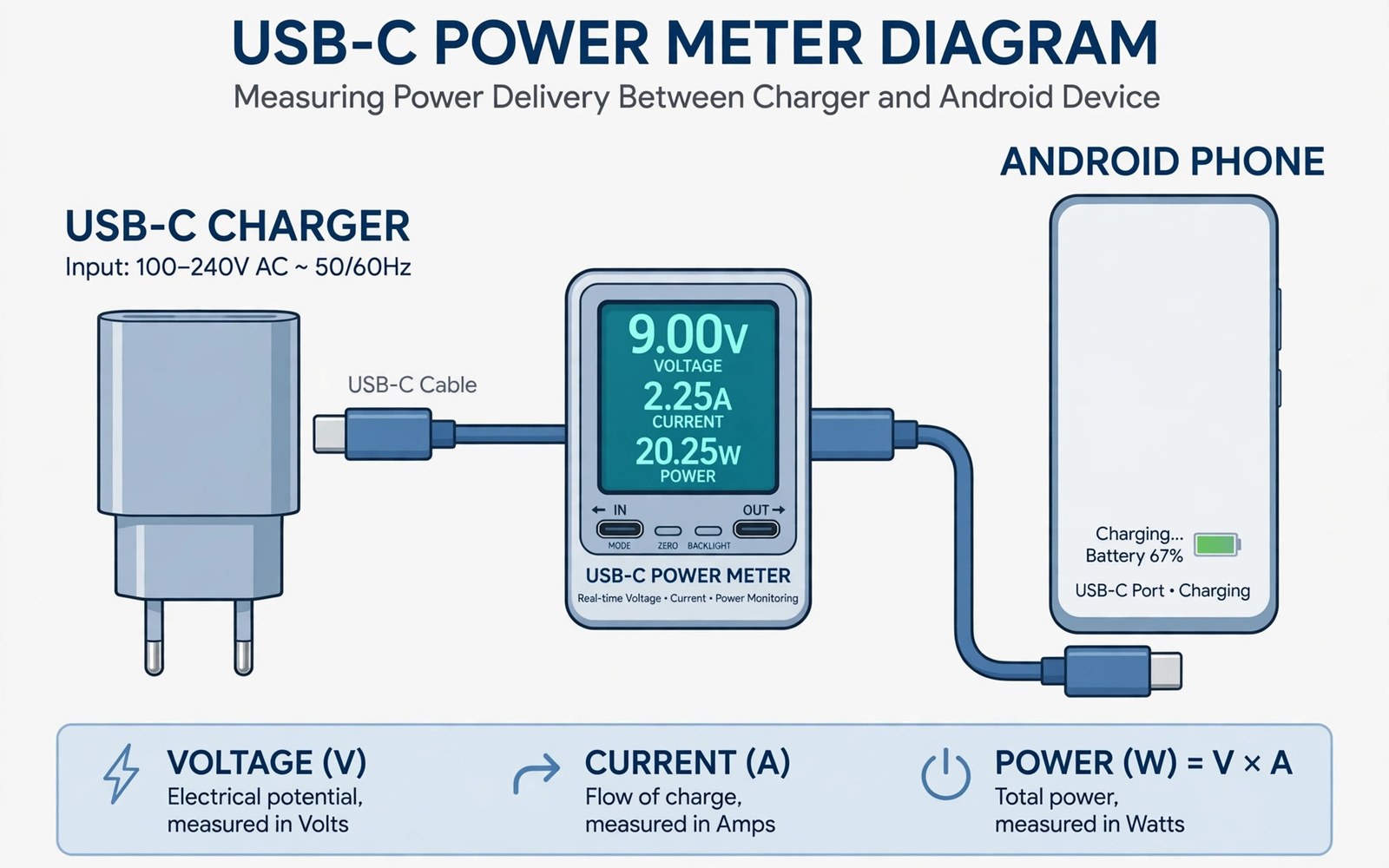
Charging speed claims are easy to print and hard to trust. A USB-C power meter turns claims into numbers. It sits between charger and phone and shows voltage and current live. Multiplying those figures gives real wattage at that moment. That number reveals whether fast charging is actually happening. A meter costs little and it settles many charging arguments.
Meters come in several forms for different users. Inline dongles plug between cable and charger with a small screen. Cable meters build the display into the cable itself. Bluetooth meters send readings to a phone app for logging. Each form suits a different testing style. Inline dongles suit quick checks at a desk. Logging meters suit long tests across a full charge.
Reading a meter needs context about battery state. A phone at low battery accepts high power eagerly. A phone near full accepts far less power by design. A single reading at high battery can mislead badly. Test from a low level for a fair speed picture. This guide explains readings and test methods step by step.
What A Power Meter Measures
A meter measures voltage across the charging line. It measures current flowing through the line at the same time. Wattage is voltage multiplied by current. That product is the power reaching the phone at that instant. Some meters also track total energy over a session. Total energy shows how much power entered the phone across the whole test.
Advanced meters show charging protocol details. They may name the negotiated standard in use. That name confirms whether fast charging engaged or fell back. A meter showing basic power with a fast charger signals a mismatch. Cable or charger or phone limits could cause that fallback. Protocol data narrows the suspect list fast.
Meter accuracy varies by price and design. Cheap meters may read with a small error margin. That error matters little for comparing chargers relatively. Use the same meter for all comparisons in a test. Consistent tools give consistent comparisons even with small errors. A laboratory meter is unnecessary for home charger checks.
- Use the same meter for every comparison
- Note voltage and current together
- Record readings at set battery levels
Setting Up A Fair Test
Start tests from a similar battery level each time. A low level near one fifth gives a strong fast charging window. Keep the phone idle with the screen off during the test. Screen use draws power and it skews readings. Note room temperature because heat throttles charging. Similar conditions make comparisons meaningful.
Test one variable at a time for clear results. Change only the charger while keeping cable and phone constant. Then change only the cable while keeping charger constant. That isolation reveals which part limits speed. Changing two parts at once muddles the result. Patient single-variable tests give trustworthy answers.
Record readings at intervals rather than once. Note wattage at the start and after ten minutes and after thirty minutes. A charger that starts fast and throttles early shows up in interval data. A single peak reading would hide that throttle. Interval records build a charging curve for each setup. Curves beat peaks for real buying decisions.
Reading Voltage Current And Wattage
Voltage readings show the negotiated level for the session. Modern fast charging uses higher voltage levels than basic charging. A low voltage reading with a fast charger suggests a fallback. Current readings show how much flow the phone accepts. High current with low voltage still gives modest wattage. Both figures matter together for a full picture.
Wattage swings during a charge are normal. Power peaks early and tapers as the battery fills. Heat can cause sudden drops mid-session. A drop after heavy phone use may reflect thermal limits. A drop after moving the cable may reflect a loose connection. Context helps interpret every swing in the data.
Total energy over a session adds another view. It shows how much power entered the phone overall. Divide total energy by time for an average power figure. Average power compares chargers better than peak power. A charger with a high peak but early throttle may lose on average. A steady charger often wins the average race.
Testing Chargers With A Meter
Test a new charger against the old charger with the same cable. Charge from a low level for thirty minutes each time. Note battery gain as well as meter wattage. Battery gain confirms that meter power actually reached the battery. A charger may show high wattage while the phone wastes power as heat. Gain plus wattage together give the truth.
Test multi-port chargers with one device and with two devices. Shared power rules appear clearly in meter data. A port that drops sharply when a second device joins shares power. That sharing may be acceptable for overnight use. It may disappoint for urgent daytime charging. Meter data reveals sharing before a trip exposes it.
Test chargers at different battery levels for a curve. A charger may excel at low battery and fade near full. Another may hold steadier across the whole range. The steadier charger may finish a full charge sooner despite a lower peak. Full curve testing prevents peak-only marketing traps.
Testing Cables With A Meter
Cable testing uses the same swap method as charger testing. Keep the charger and phone constant across cable tests. Note wattage and stability for each cable. A good cable holds wattage steady without flicker. A weak cable shows lower wattage or unstable readings. A damaged cable may reset the handshake repeatedly.
Length effects appear clearly with a meter. A long thin cable shows lower current than a short quality cable. That difference quantifies the length penalty. Users can decide whether length is worth the speed cost. A bedside long cable may be acceptable despite lower speed. A desk cable should be short for best results.
Connector fit also shows in meter data. Wiggle the connector gently during a test and watch readings. A solid connector holds readings steady during movement. A loose connector causes drops or resets. That test reveals wear before a cable fails completely. Replace loose cables promptly to protect phone ports.
Limits And Mistakes To Avoid
A meter itself adds a small resistance to the chain. That resistance can slightly lower readings versus a direct cable. The effect is small for quality meters. It matters only when comparing meter readings with direct cable claims. Use meter readings for relative comparisons rather than absolute claims. Relative data still ranks chargers and cables reliably.
Do not test with a hot phone or a busy phone. Heat and background use distort every reading. Let the phone cool and idle before testing. Do not test during a software update or a large download. Those tasks draw power and heat the phone. Clean test conditions give clean meter data.
Avoid cheap meters with vague accuracy claims for critical decisions. A meter that misreads badly can mislead a warranty claim. Choose a meter with clear specifications and good user reports. Keep the meter firmware updated when the maker offers updates. A trustworthy meter is a long term tool for many charger checks.
Power Meters And Wireless Charging Tests
Power meters can test wireless pads indirectly through wall power. Plug the pad brick into a wall meter and note input power. Compare wall input with phone battery gain over time. That comparison reveals total wireless system loss. It cannot separate pad loss from brick loss precisely. It still ranks pads by overall efficiency usefully.
Wireless tests need longer durations than cable tests. Wireless charging runs slower so gains accumulate gradually. A thirty minute test may show only a modest gain. An hour test gives clearer separation between pads. Keep the phone idle throughout wireless tests. Idle conditions prevent app drain from masking pad differences.
Alignment effects appear clearly in wall meter data. A misaligned phone draws wall power while gaining little battery. That pattern signals wasted field energy as heat. A well aligned phone gains battery steadily for similar wall power. Wall meter data therefore diagnoses alignment problems. It turns a vague slow wireless complaint into evidence.
Pad brick quality also appears in wireless wall tests. A weak brick caps pad input regardless of pad quality. Test pads with their matched bricks for fair results. Swap bricks only to isolate brick effects deliberately. Controlled brick use keeps pad comparisons honest. Wireless testing rewards the same discipline as cable testing.
Choosing A Power Meter For Home Use
Home users should choose a meter that matches their testing needs. A basic inline meter suits occasional charger checks. It shows voltage and current on a small screen. That simplicity suits quick desk tests well. Users need no app or logging for basic comparisons. Basic meters cost little and they last years.
Logging meters suit users who test many chargers. They record readings over a full charge session. Logged curves reveal throttling patterns clearly. Bluetooth logging to a phone app makes analysis easy. Logged data can be exported for notes or sharing. Enthusiasts gain the most from logging features.
Meter power ratings must exceed the chargers tested. A meter rated below a charger output may throttle or fail. Check meter voltage and current limits before high power tests. A meter for laptop chargers needs higher ratings than a phone meter. Buying a meter with headroom future-proofs testing. Headroom prevents meter limits from skewing results.
Build quality matters for meters used frequently. A meter plugged daily suffers port wear like any adapter. Solid ports and a clear screen survive daily use better. A fragile meter with a dim screen frustrates testing. Read user reports on meter durability before buying. A durable meter becomes a trusted long term tool.
Start from a low battery level
Keep the phone idle and cool
Record voltage current and wattage
Change only one part per test
Compare average power not just peak
Readers who want more context on portable power can read Rugged Waterproof Power Banks Designed for Extreme Outdoor Use for a related view on the same topic.
Readers who want more context on portable power can read Why Phone Displays Show “Charging Slowly” and How to Fix It for a related view on the same topic.
Readers who want more context on portable power can read The Future of Qi2 Wireless Charging Standard Across All Smartphones for a related view on the same topic.
The steps above follow the approach described in the official developer documentation and standard industry guidance for safe charging practice.
USB-C power meters replace charging guesswork with numbers. Voltage and current together reveal real wattage. Interval tests reveal throttling that peak claims hide. Single-variable swaps isolate faulty chargers and cables. A small meter therefore saves money on needless replacements.
Buy one reliable meter and learn its readings. Test new gear in the first week after purchase. Keep notes on chargers and cables that perform well. Those notes guide future purchases without repeat testing. Numbers make charging choices calmer and more accurate. Your next charger purchase can rest on data rather than hope.
Wireless tests and meter choice extend power meter usefulness. Wall meters rank wireless pads by total system efficiency. Logging meters reveal throttling across full sessions. Meter ratings must exceed tested charger outputs. A well chosen meter serves cable and wireless testing alike.
Pick a meter that fits your testing frequency and power levels. Use controlled tests with idle phones and similar battery levels. Log curves for chargers that claim high peaks. Those practices turn meter numbers into buying confidence. A small meter investment prevents many wasted charger purchases.

