

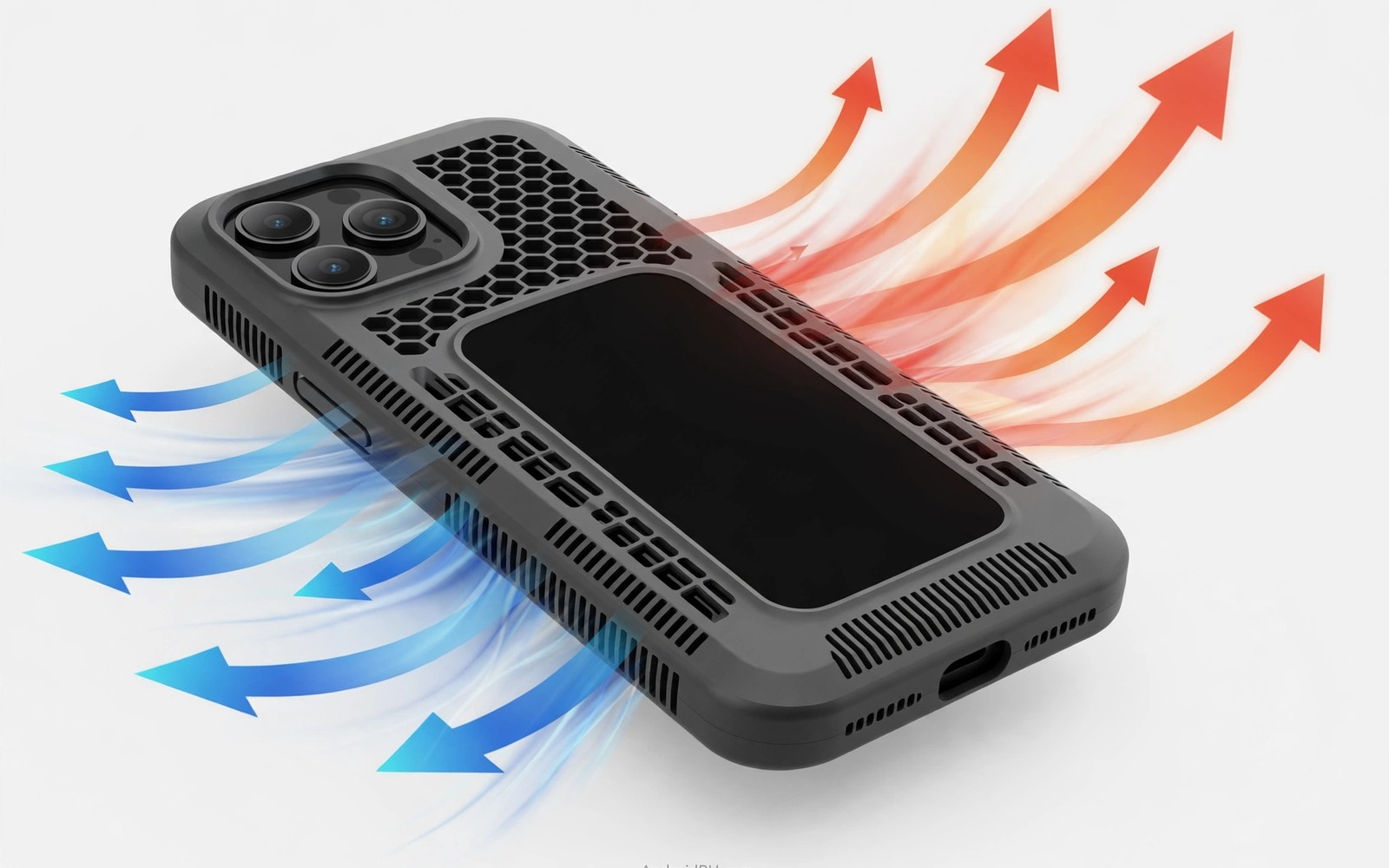
Heat Dissipation Cases: Protecting Phones from Thermal Throttling
My phone used to turn into a hand warmer twenty minutes into a gaming session. The frame rate would dip, the screen would dim on its own, and the back of the phone felt hot enough to make me put it down. I blamed the game at first. Then I blamed the summer weather. The real culprit was simpler: my thick rubber case was trapping heat against the phone, and the processor was slowing itself down to survive.
That slowdown has a name, and every Android gamer meets it sooner or later. Once I understood what was happening inside the phone, picking a case stopped being about colour and grip and started being about airflow, materials, and how heat actually leaves a sealed glass slab. This guide covers all of it: why phones throttle, how a case makes it worse, which materials genuinely move heat, and seven case types worth your money, each with honest pros, cons, and a verdict.
If you play demanding games, record long 4K videos, or charge while you play, this is for you. You will finish knowing exactly which case design fits your phone and your habits, and which cooling claims are marketing fluff.
How thermal throttling actually works on Android phones
A modern phone processor can sprint, but it cannot sprint forever. Under a heavy load it draws several watts of power, and almost all of that power turns into heat inside a chip the size of a fingernail. With no fan and almost no empty space inside the phone, that heat has only one way out: through the metal frame and the glass back, into the air around it.
When the chip temperature crosses a safety threshold, usually somewhere around 43 to 45 degrees Celsius at the surface, the system steps in. It lowers the clock speed, dims the display, and sometimes caps the charging rate. Your game drops from 120 frames per second to 60, then to 45, and the stutter you feel is the processor protecting itself from damage. That is thermal throttling in action, and it is a feature, not a defect.
The catch is that throttling is triggered by temperature, not by workload alone. Two phones running the same game can throttle at very different times depending on the room temperature, the case, and whether the phone is charging at the same time. A case that insulates the back of the phone raises the temperature at which the whole system settles, so throttling starts earlier and lasts longer.
What happens inside the chip when temperatures climb
Inside the processor, billions of transistors switch on and off billions of times a second. Each switch leaks a tiny amount of energy as heat, and at full speed the total adds up fast. The chip spreads that heat into a copper vapour chamber or a graphite sheet, which carries it toward the frame. From there it has to cross into the air, and air is a poor conductor, which is why a phone feels warm long after you stop playing.
Android manages this with a thermal daemon that watches several sensors at once: the processor, the battery, the modem, and the skin temperature you actually feel. When any of them crosses its limit, the daemon trims performance in steps rather than shutting the phone down. You notice it first as dropped frames, then as a dimmer screen, and in extreme heat the camera app may refuse to record video at all.
Signs your phone is throttling right now
The most obvious sign is a game that starts smooth and turns choppy after ten or fifteen minutes, even though nothing changed on screen. Another is the display dimming by itself outdoors, which is the phone cutting the brightest heat source it controls. A third is charging that suddenly slows to a crawl while you play, because the battery management system refuses to add charging heat on top of gaming heat.
I tested this on my own phone with a simple frame rate counter running over a game. The first ten minutes held a steady 119 frames per second. By minute twenty it was bouncing between 55 and 70. Taking the case off bought me another five minutes of smooth play before the same dip appeared, which told me the case was worth roughly a third of my throttling problem.
Why sustained performance matters more than peak speed
Benchmark scores measure a sprint of a few seconds, but games and video recording are marathons. A phone that holds 80 percent of its peak speed for an hour gives you a better experience than one that hits 100 percent for three minutes and then collapses to 50 percent. Cooling cases are judged on this sustained number, not on the headline benchmark.
How a phone case traps heat and how cooling cases fight back
A normal case is an insulator. Thick silicone and soft TPU are poor heat conductors, and a case adds a layer of still air between the phone back and the outside world. Still air is one of the best insulators there is, which is exactly what you do not want when you are trying to shed heat. The phone ends up cooking inside its own jacket, and the temperature sensors react by throttling sooner.
Cooling cases attack this problem from three directions. Some use materials that conduct heat away from the phone and spread it over a larger surface. Some cut vents and channels so warm air can escape and cooler air can reach the back. A few add active cooling, usually a small fan, that forces air across the hot spots. The best designs combine at least two of these approaches, because no single trick moves enough heat on its own.
Wireless charging adds another layer to the problem. A charging coil generates its own heat, and a magnetic ring sitting between the coil and the charger makes the alignment better but can also add a thin insulating layer. If you charge wirelessly every night, read up on magnetic ring compatibility on Android cases before you pick a cooling case, because a ring that blocks airflow or sits over the hottest part of the back can undo some of the cooling benefit you paid for.
The air gap problem in thick cases
Many rugged cases hold the phone a millimetre or two away from the case shell so that drops are absorbed by the gap. That gap is dead air, and dead air traps heat. A case with a snug fit and a thermally conductive inner layer performs far better than a loose case with a thick air cushion, even if the loose case feels more protective in your hand.
Some cooling cases solve this with a thin graphite or copper sheet laminated to the inside of the back panel. The sheet touches the phone directly and pulls heat sideways across the whole case, turning the entire back into a radiator instead of letting one hot spot build up behind the processor.
Heat spreaders, vents and fins explained
A heat spreader does not remove heat by itself. It moves heat from a small hot area to a large cool area, where the air can carry it away more easily. Graphene and copper are the usual choices because they conduct heat hundreds of times better than plastic. A vent does the opposite job: it lets warm air out and cooler air in, which matters most when the phone is propped up and air can flow across the back.
Fins and ridges on the outside of a case work the same way a heatsink works on a computer chip. They increase the surface area that touches the air, so more heat escapes per second. The effect is modest on a phone, a few degrees at best, but a few degrees is often the difference between holding 60 frames per second and sliding down to 45.
Heat dissipation case materials compared
Materials decide most of what a cooling case can do. A clever shape cannot rescue a bad material, and a good material in a bad shape still traps heat. The table below compares the materials you will actually meet when shopping, with honest numbers about what each one does well and where it falls short.
| Material | Heat conduction | Weight and feel | Drop protection | Best for |
|---|---|---|---|---|
| Graphene composite | Very high, spreads heat fast | Light, smooth, slightly slick | Moderate, needs a bumper | Daily gaming in a slim case |
| Aluminium alloy | High, acts as a heatsink | Heavier, cool to the touch | Good, dents instead of cracking | Long sessions and hot rooms |
| Vapour chamber plate | Highest, moves heat evenly | Medium, adds some thickness | Good with a TPU frame | Flagship gaming phones |
| Copper sheet lining | Very high, cheap to add | Light, hidden inside the case | Depends on the outer shell | Budget cooling upgrades |
| Vented polycarbonate | Low, relies on airflow | Light, rigid, easy to grip | Good, stiff shell resists cracks | Outdoor use and video calls |
| TPU and silicone | Very low, insulates heat | Light, soft, grippy | Excellent shock absorption | Drop protection, not cooling |
| Aramid fibre | Low to moderate | Very light, premium feel | Moderate, thin by design | Slim cases that run warm |
Read the table with a sceptical eye. A case that advertises graphene may contain a tiny graphene patch that covers a tenth of the back, while the rest is ordinary plastic. Ask how much of the back the conductive layer actually covers, and look for teardown photos or reviews that show the inside of the case. Coverage matters more than the brand name of the material.
Aluminium deserves a special note because it behaves differently from every other material here. It feels cold when you pick the phone up, because it pulls heat from your hand quickly, and it keeps pulling heat from the phone all day. The trade-off is weight and signal: a full metal back can weaken cellular and Wi-Fi reception, so good aluminium cases leave the antenna bands open or use a metal frame with a non-metal back panel.
Seven heat dissipation case types that actually help
Each type below is a real design you can buy today, not a concept. I have grouped them by how they move heat, because that is what decides whether they help your specific problem. A gamer who plays for an hour needs a different case from someone who records 4K video in the sun.
1. Graphene-lined slim cases
A graphene heat spreader looks like an ordinary thin case from the outside. Inside, a graphene sheet sits against the phone back and spreads heat sideways so no single hot spot builds up behind the processor. The phone still feels slim in a pocket, and the case adds almost no weight.
Pros: barely thicker than a normal slim case, no fan noise, no battery drain, works with wireless charging in most designs. Cons: cooling effect is modest, usually two to four degrees at the hot spot, and cheap versions use so little graphene that the effect is hard to measure. Verdict: the best first step if you want cooler running without changing how your phone feels in your hand.
2. Aluminium bumper and frame cases
An aluminium bumper wraps the edges of the phone in metal while leaving the back mostly open or covered by a thin panel. The metal frame acts as a heatsink for the processor heat that reaches the edges, and the open back lets the glass shed heat directly into the air.
Pros: strong heat conduction, excellent drop protection for corners, premium feel, no moving parts. Cons: heavier than plastic, can interfere with signal if the design covers antenna lines, and the metal edges feel cold in winter. Verdict: a strong choice for heavy users who want cooling and protection in one purchase and do not mind the extra weight.
3. Vapour chamber cases
A vapour chamber case hides a sealed flat chamber filled with a small amount of liquid behind the phone. Heat turns the liquid into vapour, the vapour spreads across the chamber, condenses on the cooler side, and the cycle repeats. It is the same technology inside flagship gaming phones, moved into the case.
Pros: the most even heat spreading of any passive design, keeps the hot spot several degrees cooler during long sessions, silent. Cons: thicker and pricier than other passive cases, and the benefit fades if the outside of the case cannot shed heat into the air. Verdict: the best passive cooling money can buy, worth it for competitive mobile gaming and long video recording.
4. Vented and perforated cases
Vented cases cut holes, slots, or a mesh pattern into the back panel so air can reach the phone directly. Some add raised channels that guide air across the back when the phone is held or propped up. They are the simplest cooling idea, and they work because they remove the insulating air gap entirely.
Pros: cheap, light, no electronics to fail, and the airflow benefit is real when the phone is propped up or held loosely. Cons: dust and pocket lint get in through the holes, drop protection is weaker at the vents, and a tight grip can block the airflow you are paying for. Verdict: a smart budget pick, especially if you often prop the phone up; speaking of propping it up, kickstand cases for hands-free viewing pair well with vented backs because the raised angle lets warm air rise away from the phone instead of pooling behind it.
5. Fan-cooled gaming cases
Fan-cooled cases clip a small turbine fan to the back of the phone, sometimes with a thermoelectric cooling plate that can drop the surface temperature below room temperature. They are loud, they need power from a cable or a small battery, and they are the only case type that can genuinely hold a phone at full speed for an hour.
Pros: the largest temperature drop of any case type, often eight to twelve degrees, which can hold peak frame rates through a whole session. Cons: fan noise, extra bulk, a cable or battery to manage, and condensation risk with thermoelectric plates in humid rooms. Verdict: the right tool for serious mobile gaming and benchmarking, overkill for everyday use.
6. Magnetic ring cooling cases
These cases build a magnetic ring into a thermally conductive back, so the phone snaps onto a magnetic charger or a magnetic cooler without a separate attachment. The ring aligns the charger precisely, which reduces the wasted energy that turns into heat, and the conductive back spreads whatever heat remains.
Pros: perfect alignment every time, works with magnetic accessories and car mounts, and the conductive back helps more than a plain plastic case. Cons: the ring itself can block airflow over the centre of the back, and cheap rings add thickness without adding cooling. Verdict: the best option if you already live in a magnetic accessory setup and want cooling as a bonus rather than as the main feature.
7. Hybrid TPU and graphite cases
A hybrid case pairs a shock-absorbing TPU bumper with a rigid back that carries a graphite or copper heat spreader. The TPU handles drops, the back handles heat, and the two materials meet at a seam that keeps the case slim. This is the design most mainstream brands sell when they advertise a cooling case.
Pros: good balance of protection and cooling, widely available, reasonable prices, and the graphite layer is usually large enough to matter. Cons: cooling is moderate rather than dramatic, and the graphite layer does nothing if the outer shell is a thick insulator. Verdict: the safest all-round buy for most people, and the one I recommend when someone asks for a single case that does everything reasonably well.
What to look for before you buy a cooling case
Start with fit, not marketing. A cooling case that does not touch the phone back evenly cannot conduct heat away from it, so look for a snug fit with a conductive inner layer that covers the area behind the processor, which on most Android phones sits near the top third of the back. If you can see a gap between the case and the phone when you press the centre, heat will pool there.
Next, weigh cooling against protection honestly. A slim graphite case cools well but will not survive a hard drop onto concrete the way a thick rugged case will, and a thick rugged case will run hotter. The honest comparison is laid out in our guide to heavy-duty cases compared with slim covers, which walks through the same trade-off from the protection side. Decide which risk matters more to you: a cracked screen or a throttled game, and buy accordingly.
Check wireless charging and signal before you commit. Metal backs and thick vapour chambers can slow wireless charging or block it entirely, and full metal shells can weaken reception. Look for cases that state their wireless charging compatibility clearly, and read user reviews from people with your exact phone model, because a case designed for one model may fit another badly and lose the contact that makes its cooling work.
Cooling tips beyond the case
A case is only one part of the thermal picture. The habits around it often matter more, and they cost nothing. These tips stack with a good cooling case, and together they can add up to a phone that holds its speed through a whole evening.
Charge smarter while you play
Charging and gaming at the same time is the fastest way to heat a phone, because the battery generates heat while the processor does too. If you must play while plugged in, use a slower charger or a cable that delivers less power, and keep the phone out of its case while it charges. I also turn on any battery protection setting that caps charging at 80 percent, since a battery near full charge generates more heat than one at half charge.
Lower the workload before the heat builds
Drop the game resolution one step, cap the frame rate at 60 instead of 120, and turn off shadows and anti-aliasing first. These three changes cut processor load more than any case can, and most games still look good at the lower settings. Close background apps that use the camera or location, since a navigation app running behind your game is quietly adding heat you cannot see.
Use your environment to help the phone shed heat
Airflow is free cooling. Play near a fan, keep the phone off soft surfaces like beds and sofas that insulate the back, and never leave it in direct sun while recording video. A hard table in a cool room is worth more than a fancy case in a hot car.
Keep the phone out of direct sun
Sunlight adds heat faster than any game can. A phone on a car dashboard in summer can pass its thermal limit before you even open an app, and no case can fix that because the heat is coming from outside. Shade the phone or move it into the car cabin before you start recording or navigating.
A cool room beats a cold shock
Do not put a hot phone in a fridge or press ice against it. Rapid cooling can cause condensation inside the phone, which is far worse than throttling. Let the phone cool gradually in room-temperature air, and if you use a fan-cooled case with a cold plate, wipe the back dry before you put the phone away.
Common mistakes that make your phone hotter
The most common mistake is buying the thickest case for protection and then wondering why games stutter. Thick silicone is a blanket, and a blanket is the opposite of cooling. If you need heavy protection, accept the thermal cost and compensate with lower game settings and shorter sessions.
Another mistake is trusting a case because it says graphene or cooling on the box. Some cases contain a decorative strip of conductive material that covers a tiny area and does nothing measurable. Look for teardown photos, temperature measurements in reviews, and a conductive layer that covers most of the back before you believe the label.
People also forget that a case keeps working after the game ends. A phone left in a hot car inside its case will stay hot longer than a bare phone, because the case slows cooling as well as heating. Take the phone out of the case when you are charging it overnight in a warm room, and give it a few minutes of bare airflow after a long session.
Frequently asked questions about heat dissipation cases
Do heat dissipation cases really stop throttling?
They reduce it, they do not remove it. A good passive case typically buys you a few extra degrees of headroom, which can mean five to fifteen more minutes of smooth play before throttling begins. A fan-cooled case can hold full speed much longer, but no case changes the fact that a phone has no fan and limited space to shed heat. Expect a delay, not a cure.
Will a cooling case make my phone charge faster?
Indirectly, yes. Phones slow their charging rate when the battery gets hot, so a case that keeps the battery cooler can let fast charging stay fast for longer. The effect is most noticeable with wireless charging, where the coil heat adds to the problem. Do not expect a case to raise the maximum charging speed, because that limit is set by the phone and the charger, not by temperature alone.
Can I use a cooling case with wireless charging?
Most graphene, graphite, and vented cases work fine with wireless charging, because they are thin and non-metallic. Aluminium and vapour chamber cases are the risky ones, since metal and thickness both reduce charging efficiency. Check the case listing for an explicit wireless charging claim, and test it yourself in the first week so you can return the case if charging slows to a crawl.
How do I know if my case is trapping heat?
Run the same game for twenty minutes with the case on and note when the frame rate dips or the screen dims. Repeat the test with the case off on a different day at a similar room temperature. If the case-on test throttles noticeably earlier, your case is part of the problem. A simple skin temperature check works too: if the case back feels much hotter than the phone frame, heat is pooling inside instead of escaping.
Picking the right cooling case for your phone
For most people, a hybrid TPU and graphite case is the right answer. It cools enough to matter, protects enough to trust, and costs little enough to replace when you change phones. Gamers who play ranked matches for an hour at a time should look at vapour chamber cases, and competitive players who need every frame should add a fan-cooled case for serious sessions.
Your next step is simple and takes ten minutes. Run your heaviest game with your current case on, note when it starts to stutter, then repeat the test with the case off. That single comparison tells you how much of your throttling problem is the case, and it tells you whether a graphene slim case, a vapour chamber case, or a fan is the right fix for your phone.

