

Are AirTriggers and Physical Shoulder Buttons Worth It for Mobile Gaming?
There is a moment in every competitive mobile shooter when your thumbs run out of jobs. One thumb drives movement, the other aims, and then the game asks you to fire, scope, jump, and reload at the same time. Something has to give, and what usually gives is your aim, because your right thumb leaves the aim stick to tap the fire button. Shoulder buttons exist to fix exactly that problem. They move one or two actions off the glass and onto the frame of the phone, where your index fingers are already resting, doing nothing.
I spent three weeks playing ranked matches on a phone with ultrasonic shoulder triggers, then switched back to a regular flagship for a week to compare, and the difference was not subtle. My firing stayed on target during strafes, my scope-and-fire timing tightened up, and my hands hurt less after long sessions. That said, shoulder buttons are not a magic upgrade for everyone. They cost money, they change how you hold the phone, and they are close to useless in games that never needed a fourth finger in the first place.
This article answers the question honestly: what AirTriggers and physical shoulder buttons actually do, how the two types differ, which games gain the most, which real phones and accessories offer them, and who should spend the money. If you mainly play shooters and ranked matches, the answer is probably yes. If you play casual puzzle games in ten-minute bursts, the answer is almost certainly no. The sections below will help you decide with a test you can run in one evening, not a marketing claim.
What AirTriggers and Shoulder Buttons Actually Do in a Match
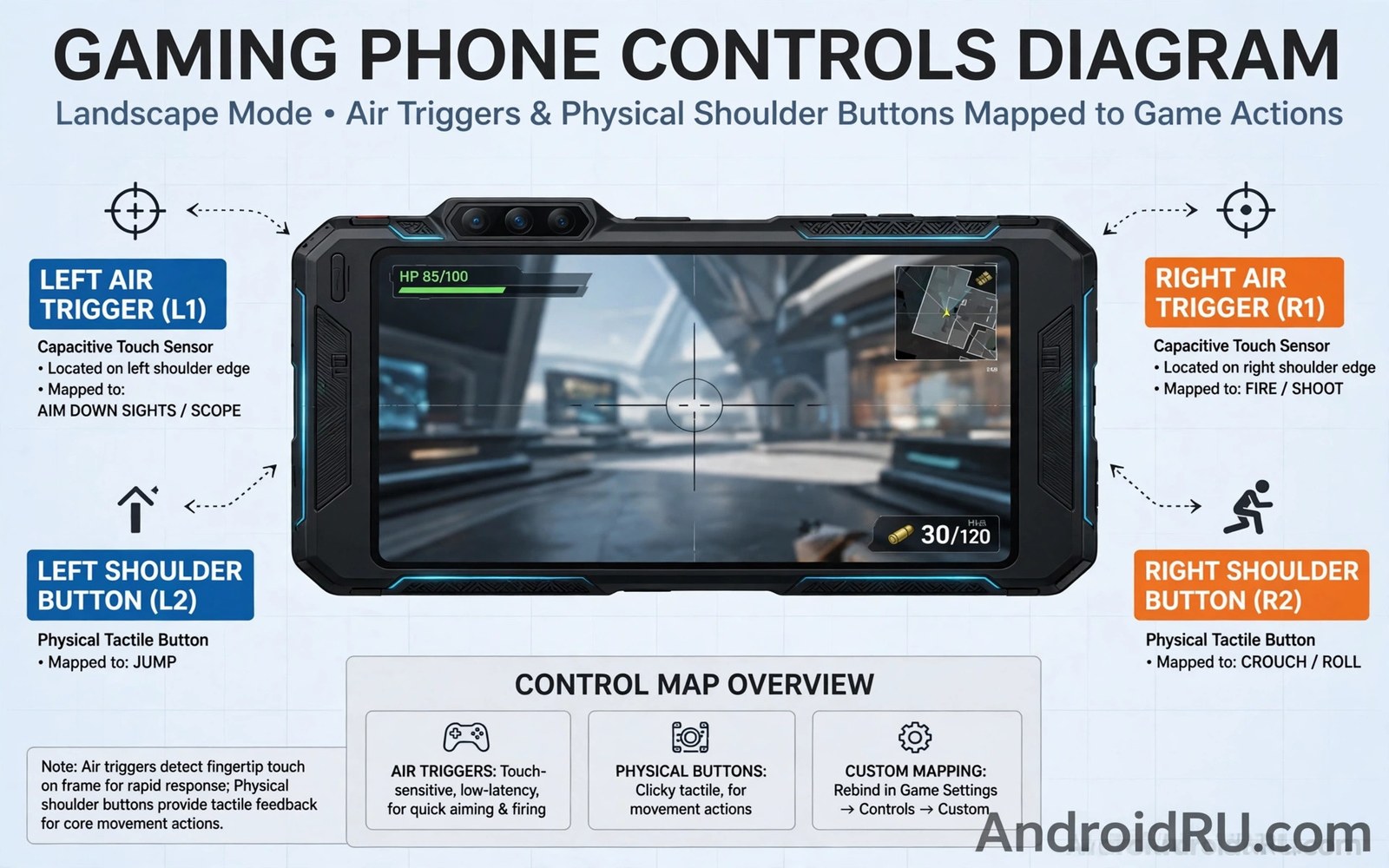
A shoulder button is a mapped input. Press it, and the phone sends a tap to a fixed spot on the screen, exactly as if your thumb had touched that spot. On the ASUS ROG Phone, the AirTriggers are ultrasonic pressure sensors built into the frame; on the RedMagic series, they are physical shoulder triggers that click; on the Black Shark line, they were pop-up mechanical triggers that rose out of the frame. Different hardware, same idea: an extra finger joins the game without covering the screen.
The practical gain is finger economy. In a shooter like PUBG Mobile or Call of Duty: Mobile, the standard four-finger claw layout asks your index fingers to handle fire and aim-down-sights while your thumbs handle movement and camera. Without shoulder buttons, most players use two thumbs and tap fire with the same thumb that aims, which means they stop aiming precisely while they shoot. With triggers mapped to fire and scope, the thumbs never leave their sticks, and the shot stays on target through the whole burst. That is a real, measurable advantage in close fights, where the player who keeps their crosshair moving while firing usually wins.
There is a second gain that gets less attention: screen space. Every on-screen button you move to a shoulder is a button that no longer covers the game view. On a 6.8-inch display that sounds trivial, but in a firefight the fire button, scope button, jump button, and crouch button together cover a serious chunk of the right side of the screen. Moving two of them to the frame opens up your view of the enemy and the terrain around them. Players who switch often say the game simply looks clearer, and that is why.
How mapping turns a frame press into a screen tap
Mapping works through the phone’s gaming software. On a ROG Phone you open Armoury Crate, launch the game, swipe in the game toolbar, and drag the trigger icons onto the on-screen buttons you want them to press. You can set a press action and, on newer AirTriggers, a slide or a long-press action, so one trigger can do two things depending on how you touch it. RedMagic’s Game Space offers the same idea with its own mapping screen, and Black Shark’s Shark Space did likewise. The profile is saved per game, so your PUBG Mobile layout does not interfere with your Genshin Impact layout, and you can export a profile before a game update moves buttons around.
The four-finger claw layout, explained simply
The claw is the grip that makes shoulder buttons pay off. Your thumbs stay on the virtual sticks, your left index finger rests on the left trigger, and your right index finger rests on the right trigger. It feels awkward for the first few days, like learning to type with new finger positions, and most players need about a week of daily play before it feels natural. The players who give up usually quit on day two, before the muscle memory forms. Give it seven days, one action on one trigger to start, and judge it after that, not before.
AirTriggers vs Physical Shoulder Buttons: The Real Differences
AirTriggers and physical buttons solve the same problem with different hardware, and the difference matters more than the spec sheets suggest. AirTriggers are ultrasonic sensors under the frame. They detect pressure and, on newer ROG Phone models, the slide of a finger along the sensor. They have no moving parts, they make no sound, and they can sense how hard you press, which opens up pressure-sensitive actions like a half-press to aim and a full press to fire. Physical buttons are mechanical switches. They travel, they click, and they give your finger a definite end point that says the press registered.
Neither is better for everyone. Pressure sensors feel faster to some players because there is no travel distance: the lightest touch registers. They are also silent, which matters if you play in bed next to someone sleeping, and they never wear out mechanically because nothing moves. The trade-off is certainty. A sensor can misfire when you grip the phone tightly during a tense moment, and it can drift over time and need recalibration. A physical click removes that doubt entirely. You feel the press, you hear it, and you know it registered, even in a loud room where you cannot hear the game properly.
| Feature | ASUS AirTriggers (ultrasonic) | Physical shoulder buttons (RedMagic, Black Shark) |
|---|---|---|
| How it works | Ultrasonic pressure sensors in the frame, no moving parts | Mechanical switches that travel and click |
| Feedback | Vibration haptic only, no click sound | Clear tactile click and short travel |
| Extra gestures | Tap, slide, and long-press on newer models | Usually tap only, sometimes two-stage press |
| Accidental presses | Possible under a tight grip, needs sensitivity tuning | Rare, the click needs deliberate force |
| Durability | No mechanical wear, can need recalibration over time | Switches wear over years of heavy use |
| Noise | Silent | Audible click |
| Best for | Players who want speed and extra gestures | Players who want certainty in every press |
That table is the short version. The longer version is that your hands decide, not the table. If you have ever double-tapped a capacitive button by accident, you will want the physical click. If you have ever felt a mechanical button was a fraction too slow, you will love the sensor. Try both in a shop if you can, with a game open, not just on a home screen. A thirty-second test in a store tells you more than a week of reading reviews.
Pressure sensitivity and slide gestures on AirTriggers
The newest AirTriggers do more than tap. A light press can aim down sights while a full press fires, which mirrors how a real trigger works and removes one more on-screen button from the layout. A slide along the sensor can switch weapons, adjust a scope, or open a map, depending on how you map it. These gestures are powerful once learned, but they add a learning curve on top of the claw grip itself. My advice is to map tap only for the first week, then add one slide gesture at a time. Two new habits at once is how most players end up confused in a fight.
Why a click still matters in ranked matches
In a ranked match, doubt costs fights. When you press a physical button and feel the click, your brain moves on to the next decision. When you press a sensor and feel nothing, a small part of your brain waits for confirmation from the screen, and that hesitation, even a tenth of a second, adds up over a match. Haptic vibration helps close that gap on AirTriggers, and tuning the vibration strength in Armoury Crate makes a real difference. Still, players who come from console controllers usually prefer the click, because it matches what their fingers already know.
Gaming Phones With Shoulder Buttons Worth Knowing in 2026
Shoulder buttons are not available on every gaming phone, and the implementation differs enough that it should influence which phone you buy if triggers matter to you. The phones below are the real options, not a wish list, and each one takes a different approach to the same idea.
ASUS ROG Phone AirTriggers: the sensor approach
The ROG Phone line has carried AirTriggers since the first model, and the current generation refines them further: dual ultrasonic sensors with tap, slide, long-press, and pressure-sensitive input, plus a vibration motor tuned to confirm each press. The mapping software, Armoury Crate, is the most flexible of the bunch, with per-game profiles, macro support, and sensitivity sliders for each sensor. The ROG Phone is also the heaviest and most expensive option here, and its AirTriggers are part of a package that includes a high refresh rate display, a large battery, and an external cooler accessory. It suits players who want the deepest trigger system and are willing to pay flagship money for it.
Pros: the most flexible mapping software, pressure-sensitive and slide gestures, no mechanical wear, strong haptics. Cons: high price, heavy in the hand during long sessions, sensors can misfire until sensitivity is tuned, the phone is large for small hands. Who it is for: serious shooter players who want the most capable trigger system available and play ranked matches most days.
RedMagic shoulder triggers: the physical click
RedMagic phones, including the RedMagic 9 and 10 series, use physical shoulder triggers with a real click, plus a built-in cooling fan and a high refresh rate display. The triggers sit on the top edge of the frame and map through RedMagic’s Game Space software, with per-game profiles and adjustable sensitivity. The physical click is the selling point: it feels closer to a controller shoulder button than any sensor does. The fan is the bonus, because a cool phone holds its frame rate longer in a long session, and that matters as much as the triggers when a match runs long. For a closer look at keeping a gaming phone cool under load, see clip-on coolers for gaming phones, which covers the external option for phones without a built-in fan.
Pros: definite tactile click, built-in cooling fan, competitive price against other gaming flagships, simple mapping. Cons: triggers offer fewer gestures than AirTriggers, the fan adds noise and a moving part, software updates can be slower than mainstream flagships. Who it is for: players who want a physical click and active cooling without paying the highest gaming-phone price.
Black Shark pop-up triggers and where the brand stands now
Black Shark took the most dramatic approach: mechanical triggers that physically pop out of the frame when you enter a game and retract when you leave. The idea was brilliant in theory, because the triggers were there when you needed them and gone when you did not. In practice the mechanism added complexity, and the brand has gone quiet in many markets since its peak, which makes buying a Black Shark today a decision about availability and support as much as hardware. If you already own one, the triggers still work well and map through Shark Space. If you are buying now, check local availability and software support before committing, because a gaming phone without updates ages fast.
Pros: triggers that appear only in games, satisfying mechanical feel, strong value at launch. Cons: brand availability has shrunk in many regions, the pop-up mechanism is a moving part that can fail, software support is uncertain. Who it is for: existing owners and bargain hunters who find one at a steep discount and accept the support risk.
Clip-on triggers for regular phones: the budget route
If you do not own a gaming phone, clip-on triggers are the cheapest way to test the idea. These are small capacitive or mechanical add-ons that clamp to the frame of any phone and tap the screen when you press them. A decent pair costs a fraction of a gaming phone, needs no software, and works in any game that allows on-screen button mapping. The catch is fit and reliability: cheap clip-ons drift, press the wrong spot, or fall off mid-match, and they add bulk to the frame. They are a good experiment, not a permanent setup. Buy a well-reviewed pair, test it for a week, and if you find yourself using it every session, that is your evidence that a gaming phone with built-in triggers is worth the money.
What to check before buying clip-on triggers
Check the clamp range against your phone’s thickness with its case on, because a clip-on that fits a bare phone may not fit a rugged case. Check that the conductive pads line up with your game’s fire and scope buttons, and that they do not cover the speaker or the charging port. Play one full ranked match with them before judging: the first ten minutes feel strange on any new input, and only a full match shows whether they stay put when your hands get warm.
Which Games Gain Most From Shoulder Buttons
Not every game benefits equally, and this is where many buyers waste money. The games that gain the most are the ones where three or more actions compete for two thumbs at the same time. Shooters top the list, racing games come next, and MOBAs gain a smaller but real benefit. Puzzle games, idle games, and turn-based games gain almost nothing, because they never asked your thumbs to do two things at once.
In PUBG Mobile, map fire to the right trigger and scope to the left, and your aim stays live through the whole burst. In Call of Duty: Mobile, the same mapping covers hip-fire and aim-down-sights, and the left trigger can double as the jump or slide button depending on your loadout. In Fortnite mobile, triggers handle fire and build mode switching, which is the difference between building a wall in time and getting eliminated. In racing games like Asphalt 9, the triggers take brake and nitro, so your thumbs stay on steering. In MOBAs like Mobile Legends or Honor of Kings, a trigger can hold a skill or an item active while your thumb aims it, which is a smaller gain but a real one in team fights. For a closer look at the displays these games run on, see high refresh rate gaming screens, because a high touch sampling rate makes every trigger press register that fraction sooner.
Shooters: where triggers pay for themselves
Shooters are the clearest case. The core loop is move, aim, and fire at the same time, and two thumbs cannot do all three without compromise. Triggers remove the compromise. The gain shows up in measurable ways: tighter spray control while strafing, faster scope-and-fire timing, and fewer deaths to players who were already aiming when you started shooting. If shooters are your main genre, triggers are not a luxury; they are the single most useful hardware feature a gaming phone can offer, ahead of a faster chip or a brighter screen.
MOBAs and racing games: a smaller but real gain
MOBAs gain less because the action is less continuous: you aim a skill, release it, and reposition, rather than firing constantly while moving. A trigger for one skill or for the attack button still helps, especially in team fights where three abilities land in two seconds, but the gain is maybe a third of what shooters get. Racing games sit in between: brake and boost on the shoulders keep steering smooth, and the gain is obvious on tracks with frequent sharp corners. If you split your time between shooters and MOBAs, buy for the shooter benefit and treat the MOBA gain as a bonus.
Casual and puzzle games: save your money
If your main games are puzzles, match-three, idle games, or card battlers, shoulder buttons will sit unused. These games never need a fourth finger, and adding one will not make them more fun. The money is better spent on battery life, a better screen, or a comfortable case. The same applies if you play in short bursts on a commute: the learning curve alone, a week of daily play to build muscle memory, costs more time than the triggers will ever save you in ten-minute sessions.
Comfort, Grip, and Hand Fatigue Over Long Sessions
Triggers change your grip, and the change is not free. The claw grip spreads your hands wider, puts your index fingers on the frame instead of supporting the phone from behind, and shifts the phone’s weight onto your middle fingers and palms. For the first few days this feels tiring, and players with small hands feel it most. After a week the muscles adapt, and most players report less thumb strain than before, because the thumbs no longer stretch across the screen to reach the fire button. The net effect depends on your hands, your session length, and your case.
Case choice matters more than most people expect. A thick rugged case can push the triggers further from your fingers or cover the sensors entirely, and a slippery case makes the wider grip harder to hold. If you buy a gaming phone for its triggers, buy the case made for it, or test your existing case before you commit. A phone that is comfortable for twenty minutes and painful after an hour is not a gaming phone, whatever its spec sheet says.
Hand size and the claw grip
Players with smaller hands often struggle most with the claw, because the distance from the palm to the trigger is longer relative to their fingers. If that is you, try mapping only one trigger to start, use the lighter press setting, and rest the phone on your middle fingers rather than gripping it tightly. A phone with a narrower body, or a case with side grips, can close the gap. Do not force the grip through pain: hand strain is a signal, not a challenge, and no ranked match is worth a sore wrist the next morning.
Triggers vs an External Controller: Which Fits Your Life
An external controller gives you sticks, a D-pad, and a dozen buttons, which is more input than any phone frame can offer. It also needs pairing, charging, and a bag to carry it in, and it turns a pocketable phone into a two-piece kit. Triggers keep the phone self-contained: nothing to pair, nothing to charge, nothing to forget at home. The right choice depends on where you play, not on which device is technically better. For a closer look at the software side of gaming phones, including performance modes that pair well with triggers, see gaming phone software modes.
Controllers win for long home sessions, for games with native controller support, and for players who already own one for a console. Triggers win for travel, for the daily commute, for ranked matches played on a sofa, and for any moment when you want to play without setting up hardware. Many serious players own both and switch by context: triggers on the train, controller at the desk. That is a sensible split, and it is cheaper than buying a second phone to solve a problem a controller already solves at home.
Mapping profiles per game and keeping them updated
Save a profile for each game, and name it clearly, because a trigger map built for PUBG Mobile will press the wrong buttons in Call of Duty: Mobile. Update profiles after a game update moves buttons on screen, which happens more often than developers admit. Test a new map in casual play before ranked matches, and keep a backup of your profiles if the gaming software offers export. The mapping screen is where the feature lives or dies: a trigger you cannot map precisely is a decoration, not a tool.
Durability, drift, and repair notes
Physical buttons wear with heavy use over years, and the first sign is a mushy click or a double press. Pressure sensors avoid that wear but can drift and need recalibration, which is a thirty-second job in the gaming software but easy to forget. Check warranty terms for trigger parts before heavy daily use, and remember that a phone with built-in triggers is harder to repair than a regular phone if the frame hardware fails. A clip-on trigger, by contrast, costs almost nothing to replace. Factor that into the price: the gaming phone costs more up front, and the repair, if it ever comes, costs more too.
Verdict: Who Should Buy Shoulder Buttons and Who Should Skip Them
The honest answer is that shoulder buttons are worth it for a specific kind of player and a waste of money for everyone else. The dividing line is not budget or brand loyalty; it is how you play, what you play, and how long you play for. The table below is the short version of this whole article.
| Player type | Main games | Verdict | Best option |
|---|---|---|---|
| Ranked shooter player | PUBG Mobile, Call of Duty: Mobile, Fortnite | Yes, clearly worth it | ROG Phone AirTriggers or RedMagic triggers |
| Competitive MOBA player | Mobile Legends, Honor of Kings | Worth it, modest gain | Either type, buy for the rest of the phone |
| Racing game fan | Asphalt 9, Real Racing 3 | Worth it | RedMagic physical triggers |
| Casual player, short sessions | Puzzles, match-three, idle games | No, skip it | Regular phone, spend on battery or screen |
| Long-session home player | Any genre, mostly at home | Consider a controller instead | External controller plus regular phone |
| Budget tester | Unsure if triggers suit them | Try clip-ons first | Well-reviewed clip-on trigger pair |
If you play shooters for an hour or more a day, play ranked, and are willing to spend a week learning the claw, triggers are the best money you can spend on mobile gaming hardware. They improve aim, fire timing, and comfort at the same time, and no software setting on a regular phone reproduces them. If you play casually, in short bursts, or mostly at home where a controller lives, the money buys more happiness elsewhere. Test it first with clip-ons, give the claw a full week, and let your own hands decide. That single test gives you a clearer answer than any review, including this one.
Frequently Asked Questions About AirTriggers and Shoulder Buttons
Do triggers work in every mobile game?
They work in games that allow on-screen button mapping, which covers most shooters, racing games, and MOBAs. They do not work in games that block extra inputs or that use fixed touch zones the mapping software cannot reach. Some competitive games restrict mapped inputs in their rules, so check your game’s terms before using triggers in a tournament. Test your main game first, before you buy, because a trigger that does not work in your one game is useless no matter how good the hardware is.
Will shoulder buttons make me win more matches?
They can cut input time and keep your aim live while you fire, which wins close fights you used to lose. Wins still need aim, positioning, and game sense, and no input device replaces those. Treat triggers as a tool that removes a bottleneck, not as a shortcut to a higher rank. Most players see the gain after a week of practice, when the claw becomes automatic and the triggers stop needing conscious thought.
Are physical buttons better than AirTriggers?
Neither wins for all players. Clicks give certainty and a familiar feel, especially for players coming from console controllers. Sensors give speed, silence, and extra gestures like slide and pressure-sensitive press. Try both if you can, with a game open, and pick the one your fingers trust. If you cannot try both, pick physical buttons if you value feedback above all, and AirTriggers if you value speed and gestures.
How long does it take to learn the claw grip?
Most players need about a week of daily play to trust new triggers. Start with one action on one trigger, add a second action after a few days, and do not judge the setup from a single session. Your first days will feel slower, not faster, because your fingers are learning new positions. By day seven the presses become automatic, and that is the point where you can honestly judge whether triggers help your game.
Your One-Evening Test Before You Spend Anything
You do not need to trust this article, or any review, to answer the question for yourself. Borrow or buy a cheap pair of clip-on triggers, map fire to one and scope to the other, and play your main game for one full evening. Note the moment your aim holds steady through a burst, the moment you forget the triggers are there, and the moment your hands feel tired. Those three notes are your answer. If the triggers fade into the background and your fights feel smoother, buy the gaming phone with the trigger type your fingers preferred. If they stay awkward and your hands ache, spend the money on a better screen, a bigger battery, or a controller for home sessions instead.
The final word is simple: shoulder buttons are worth it when you play shooters often, play long sessions, and will train with them for at least a week. For everyone else they are an expensive feature that will sit unused, and the honest thing is to say so. Pick your main game, run the one-evening test, and let your hands make the decision your wallet will have to live with.

