

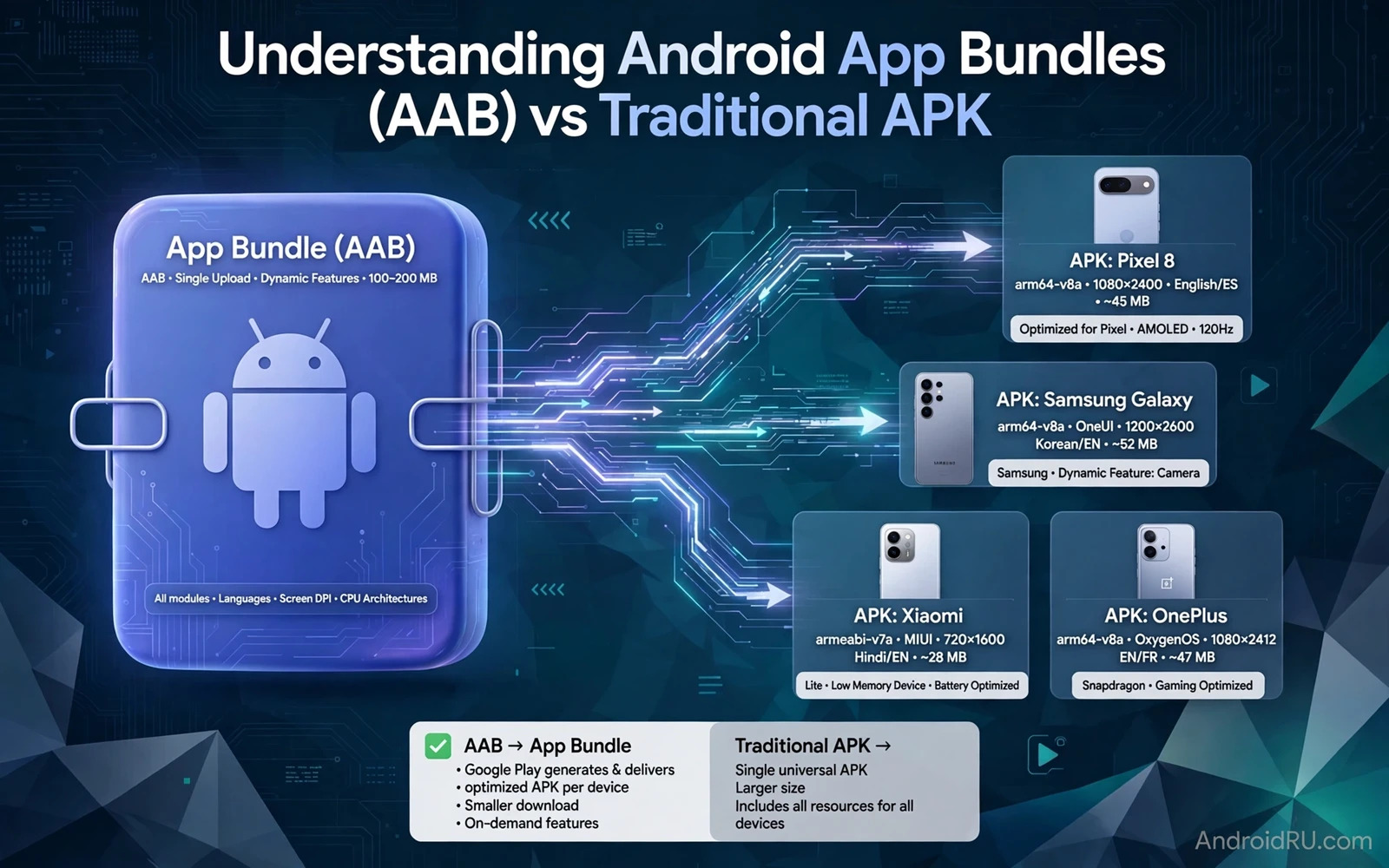
Android developers once shipped one APK file that contained everything for every device. That single file carried all screen densities and all processor architectures and all languages. Every user downloaded the full package even when the device needed only a fraction of it. Android App Bundles changed that model. A bundle holds the full app while the store generates a tailored APK for each device. This guide explains both formats and when each one fits.
A traditional APK is a complete installable package. It contains compiled code and resources and a manifest and a signature. A user can install it directly on a device that allows the source. A store can also distribute it unchanged to every device. Simplicity is its strength. The cost is size because one file serves devices with very different needs. A phone with a small screen still downloads assets meant for a large tablet when the APK bundles them all.
An app bundle is not itself installable. It is a publishing format that the store turns into installable APKs. The store selects the code and resources that match the device language and screen density and processor architecture. The user downloads a smaller tailored set. Updates also shrink because the store can deliver only the changed parts for that device. Smaller downloads help users on slow connections and on limited data plans.
bundletool build-apks --bundle=app.aab --output=app.apks
bundletool install-apks --apks=app.apks
How bundle delivery works
The developer builds a bundle that contains base code and feature modules and resource sets. The store processes the bundle and creates split APKs for each device configuration. A base APK carries the core code. Configuration APKs carry density resources and language resources and native libraries for that device. Feature modules can download on demand when the user opens a feature that needs them. The device installs the set as one app even though several APK files form it.
Dynamic delivery makes feature modules flexible. A large feature that few users need can stay out of the initial install. The app requests the module when the user opens that feature. The download happens in the background with a progress state the app controls. This design keeps the first install small while still offering rich features later. It also lets developers ship a feature to a subset of users for staged testing.
Language splits deserve attention during development. A bundle can deliver only the languages installed on the device. An app that changes language inside its own settings must handle a missing language pack. The app can request the language module on demand or fall back to a default language. Test language switching on a bundle install because a local debug install may include all languages and hide the issue.
When a traditional APK still fits
Direct distribution outside a store still relies on APK files. A developer who shares a test build with a small group sends an APK. A store alternative that hosts files directly also serves APK files. A bundle cannot install directly because no device installer accepts it as a package. Tools exist to generate APKs from a bundle for testing. Those generated APKs are useful for testing but the store generated set remains the production path for store users.
Enterprise distribution and device fleets may prefer a single known APK. A fleet manager can verify one file and push it to many identical devices. A bundle workflow adds a generation step that must match the fleet devices. For a fleet of identical hardware the size saving of a bundle may be small. Simplicity and a single verifiable file may outweigh the saving. Choose the format by distribution reality rather than by fashion.
A downloader tool that tracks app files must know which format it handles. A tool that expects a single APK may fail when the source serves a split set. Readers who build such tools can continue with the piece on building an APK downloader tool with Python and design storage around the formats they actually receive. Record the format beside every stored file so later audits can tell a single APK from a generated set.
Signing and verification
Signing proves who built the package and that the package did not change after signing. Bundle signing and APK signing follow related but distinct steps. The developer signs the bundle with an upload key. The store signs the generated APKs with the final app signing key. Losing the upload key creates a recovery problem even when the final key stays safe. Back up keys securely and keep the upload key separate from daily development credentials.
Verification matters for every file a user installs. A user who downloads an APK directly should check the source and the signature when the source provides verification data. A store install handles verification through the store itself. A direct install bypasses that store check. Teach users to install only from sources they trust and to treat an unexpected signature mismatch as a stop signal. Never instruct users to ignore a signature warning to force an install.
Code protection interacts with distribution because a widely shared APK is easier to inspect than a bundle that never reaches users directly. Readers who harden their code can continue with the piece on securing source code against decompilers and apply shrinking and obfuscation before building either format. Protection belongs in the build step regardless of the final package format.
Size and update behaviour
Bundle delivery usually reduces download size for diverse device fleets. The saving grows when the app supports many languages and many densities and several architectures. A small app with one language and one architecture may save little. Measure the saving for your own app before promising users a smaller download. Build both formats during testing and compare the installed size on several device profiles.
Updates behave differently too. A store update for a bundle device delivers a tailored patch for that configuration. A direct APK update replaces the whole file. Users on slow networks benefit most from tailored patches. Users who sideload updates benefit from a clear version record that shows which file they installed. Keep version names consistent across formats so support conversations never confuse a bundle version with an APK version.
Language support in a bundle also affects multi language apps. A language pack delivered on demand keeps the initial install small. Readers who build language features can continue with the piece on building multi-language app support in Android Studio and test language switching on a bundle install rather than only on a full local build. The bundle path reveals missing language handling early.
Choose the right format
Choose a bundle for store distribution when you want smaller downloads and dynamic features. Choose a single APK for direct distribution and for simple fleet deployment. Many teams use both. They publish a bundle to the store and generate APKs for testers and for direct channels. That dual path works when versioning and signing stay consistent across both outputs. Document which output serves which channel so a release manager never ships the wrong file to the wrong audience.
Test both paths before release. Install the store generated set on several device profiles. Install the direct APK on a test device with no store involvement. Compare behaviour including language and density and architecture specific resources. A resource that appears in one path but not the other signals a build configuration issue. Fix the configuration rather than adding a workaround in code.
Bundles and APKs are tools rather than rivals. A bundle optimises store delivery. An APK optimises direct handling. Understanding both lets a developer pick the right tool for each channel. It also helps support teams explain why two users may hold different file sets for the same app version. Clarity about formats reduces confusion for developers and for users alike.
Release checklist for bundle apps
A bundle release checklist differs from a single APK checklist. Build the bundle and generate APK sets for several device profiles. Install each set on a matching test device or emulator profile. Verify language and density and architecture resources on each profile. A resource that appears on one profile but not another signals a split configuration issue. Fix configuration before release rather than after users report missing assets.
Version naming across formats needs a single rule. Use the same version name and version code for the bundle and for any generated APK used in testing. Record which generated set served which test device. A support conversation that mixes bundle versions with APK versions wastes time. One version rule keeps support conversations short and accurate.
Staged rollout suits bundle releases well because the store can pause a rollout when a device profile shows errors. Monitor crash reports by device profile during rollout. A crash that affects only one density or one architecture points to a split resource problem. Pause and fix that profile rather than rolling back the whole release when the data supports a narrow fix.
Keep a direct APK path for testers and for channels that cannot use bundles. Generate test APKs from the same bundle that ships to the store. Verify that test APK behaviour matches store set behaviour on the same device. A test APK built from different code than the store bundle invalidates testing. One source build for both paths keeps testing honest.
Testing split installs
Split installs need testing on real store builds rather than only on local builds. Generate the APK set from the bundle and install it on a device profile that matches a target audience segment. Check language resources and density resources and native libraries separately. A missing density resource shows as a blurry image on one device class. A missing language resource shows as a fallback string on one language setting. Both problems hide on a local debug build that includes everything. Store generated testing catches split problems before store users meet them.

