

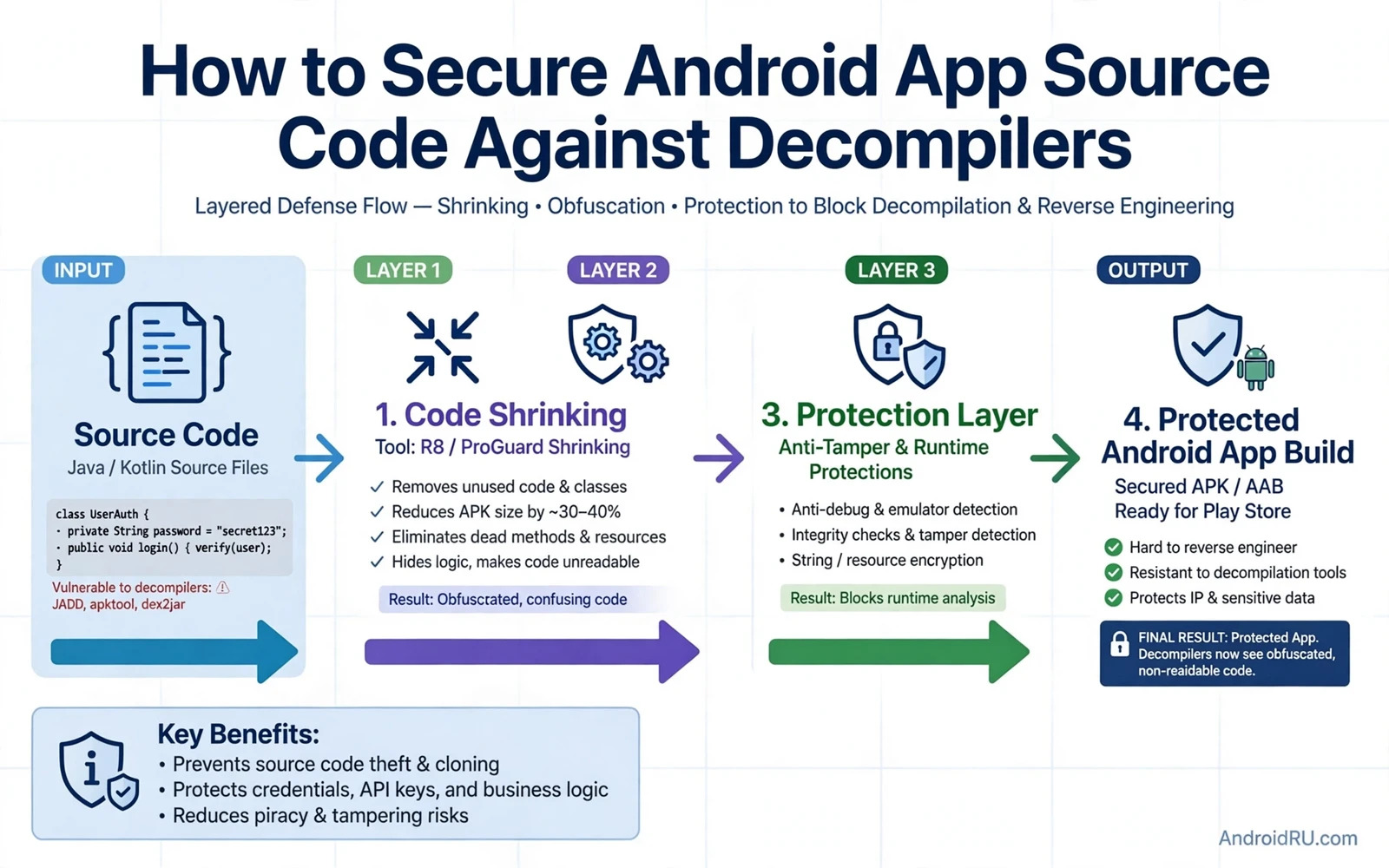
An Android app ships as compiled code that runs on user devices. Anyone with the app file can inspect that code with decompiler tools. Decompilers turn bytecode back into readable logic and reveal class names and string values and control flow. No protection makes inspection impossible. Good protection raises the cost and slows the attacker enough that casual copying becomes impractical. This guide explains layered protection that actually helps.
Start with a realistic threat model. Ask what an attacker gains from reading the code. API keys and secret algorithms and licence checks and payment logic all attract attention. UI layout code attracts little attention. Spend protection effort on the valuable parts. A team that tries to hide everything equally often hides nothing well. Prioritise secrets and sensitive logic first.
Understand that client side secrets are never truly secret. Any key shipped inside an app can be extracted by a determined attacker. Move sensitive operations to a server when possible. Keep only the minimum logic on the client that the feature requires. A server side check cannot be bypassed by editing client code. A client side check alone always can.
# R8 / ProGuard example
-keep class com.example.api.** { *; }
-dontwarn com.example.lib.**
-obfuscationdictionary dictionary.txt
Shrink and obfuscate the build
Code shrinking removes unused classes and methods from the release build. Smaller code ships faster and exposes less surface to inspection. Obfuscation renames classes and methods and fields to short meaningless names. A decompiled obfuscated app still runs but reads as a puzzle. Keep mapping files for each release so crash reports can be translated back to original names. Store mapping files securely because they undo obfuscation for anyone who obtains them.
Configure obfuscation rules carefully. Libraries and reflection based code need keep rules that preserve names the runtime looks up. A missing keep rule breaks a feature that worked in debug. Test the release build thoroughly because obfuscation changes only the release output. Debug builds stay readable for development. Never judge release behaviour from a debug build alone.
Resource shrinking removes unused resources and can shorten resource names. It reduces package size and removes clues about unused features. Test layouts and dynamic resource lookups after enabling it. Code that loads resources by constructed names can break when names change. Replace constructed name lookups with direct references where possible. Direct references survive shrinking safely.
Protect strings and keys
Plain text strings inside code are easy targets for decompilers. API endpoints and debug messages and error text all appear in a string table. Avoid embedding production secrets as plain strings. Use a server issued token flow where the app authenticates and receives a short lived token. Rotate tokens and scope them narrowly so a leaked token has limited value and a short life.
String encryption tools can obscure strings but they only delay a determined attacker. The decryption key must also live in the app for runtime use. An attacker who finds the decryption routine finds the key nearby. Treat string encryption as one layer among many rather than as a vault. Combine it with server side checks and with tamper detection for sensitive features.
Native code adds another layer because decompiling native libraries takes different tools and skills. Move a sensitive algorithm to native code only when the algorithm truly benefits from it. Native code still decompiles with the right tools. It raises cost but does not create invulnerability. Weigh the maintenance cost of native code against the protection gain for each feature.
Detect tampering and root risk
Tamper detection checks whether the app signature matches the expected release signature. A repackaged app with modified code fails the check. Respond to tampering by disabling sensitive features rather than by crashing with a revealing error. A graceful degradation keeps the app usable for low risk features while protecting high risk features. Log tamper events on the server to track repackaging attempts.
Root detection adds context but should not become a blanket block. Many legitimate power users run rooted devices for valid reasons. A banking feature may refuse to run on a rooted device. A news reader has no reason to refuse. Apply root checks per feature based on risk. Explain the restriction plainly when it triggers so users understand why a feature is unavailable.
Reverse engineering knowledge helps defenders too. Readers who want to understand the tools attackers use can continue with the piece on basic APK reverse engineering and code inspection and study how decompilers reveal structure. Knowing how inspection works helps a team choose protection layers that address real techniques rather than imagined ones.
Distribution and signing hygiene
Signing hygiene protects the app even after code protection. Keep the release keystore offline and backed up in a secure location. Limit access to the signing key to a small number of trusted people. Use a separate upload key for store submissions when the store supports it. A leaked upload key is recoverable. A leaked final signing key can force a new app identity for users.
Distribution format affects exposure. A direct APK reaches users as a single file that anyone can inspect. A bundle based store delivery still produces APKs on devices but the store controls generation. Readers who compare formats can continue with the piece on app bundles versus traditional APK files and plan protection for both channels. Protection belongs in the build step before either format is produced.
Downloader tools and indexers also handle app files at scale. Readers who build such tools can continue with the piece on building an APK downloader tool with Python and keep verification and storage hygiene in mind. A tool that handles files responsibly reduces the chance that a test build leaks into a public channel.
Authentication as a protection layer
Server side authentication protects features better than any client obfuscation. Require a valid account session for sensitive operations. Validate critical actions on the server with data the client cannot forge easily. A licence check that runs only on the client can be patched out. A licence check that the server enforces survives client tampering.
Biometric gates protect local access but do not replace server checks. Readers who add local gates can continue with the piece on implementing biometric authentication in Android apps and combine a strong local check with server validation for sensitive actions. Layers complement each other. No single layer carries the whole security design.
Monitor for abuse after release. Watch for unusual API patterns and for many accounts sharing one device fingerprint. Server logs reveal abuse patterns that client protection cannot see. Respond by rotating keys and tightening server checks. Protection is an ongoing practice rather than a build flag set once.
Ship a layered defence
Combine shrinking and obfuscation with server side checks and tamper detection and key hygiene. Each layer raises attacker cost a little. Together they deter casual copying and slow determined attackers. Document the layers and their limits honestly for the team. A team that believes obfuscation equals invulnerability will neglect server checks that actually matter.
Test protection on every release. Build the release APK and inspect it with the same tools an attacker would use. Confirm that secrets are absent and that sensitive logic reads as obfuscated. Confirm that keep rules preserve runtime behaviour. A release checklist that includes an inspection step catches regressions before users receive the build.
Security through obscurity alone fails. Security through layers and server enforcement lasts. Protect what matters and move secrets off the client and verify on the server. An app built on those principles stays maintainable and stays harder to copy with every release.
Auditing a release build
Audit every release build before it reaches users. Build the release APK and inspect its contents with the same tools an attacker would use. List the strings in the build and search for secrets and internal endpoints. A secret that appears in the string list must move to a server flow before release. An internal endpoint that appears in a release build should be removed or protected. Auditing the built artifact catches mistakes that source review misses.
Check obfuscation output for the sensitive classes first. Decompile the release build and read the sensitive logic. Confirm that class names read as short symbols and that method flow resists quick reading. Confirm that mapping files exist for crash translation. A release build that decompiles into clean original names signals a missing obfuscation step. Fix the build configuration rather than accepting a readable release.
Test the release build on a real device end to end. Debug builds and release builds differ in shrinking and in optimisation. A feature that works in debug may fail in release when a keep rule is missing. Run the full smoke suite on the release build before submission. Release only testing catches release only bugs while they are still cheap to fix.
Keep a release security record with the build version and the audit result and the mapping file location. A record lets a future team member verify which protections shipped in which version. It also supports incident response when a tampered build appears. A team that can state exactly what shipped in each version responds faster to abuse reports.
Incident response for copied apps
A copied app report needs a fast and calm response. Confirm the report by downloading the suspect app from the reported source on a test device. Compare its signature with the release signature and its behaviour with the genuine app. Report the copy to the hosting store with evidence of signature mismatch and copied assets. Warn users through official channels without naming unproven suspects. Keep a record of each incident with dates and evidence links. A clear incident record helps future reports move faster because the team already knows the evidence standard.

