

What GaN Changes Inside A Charger
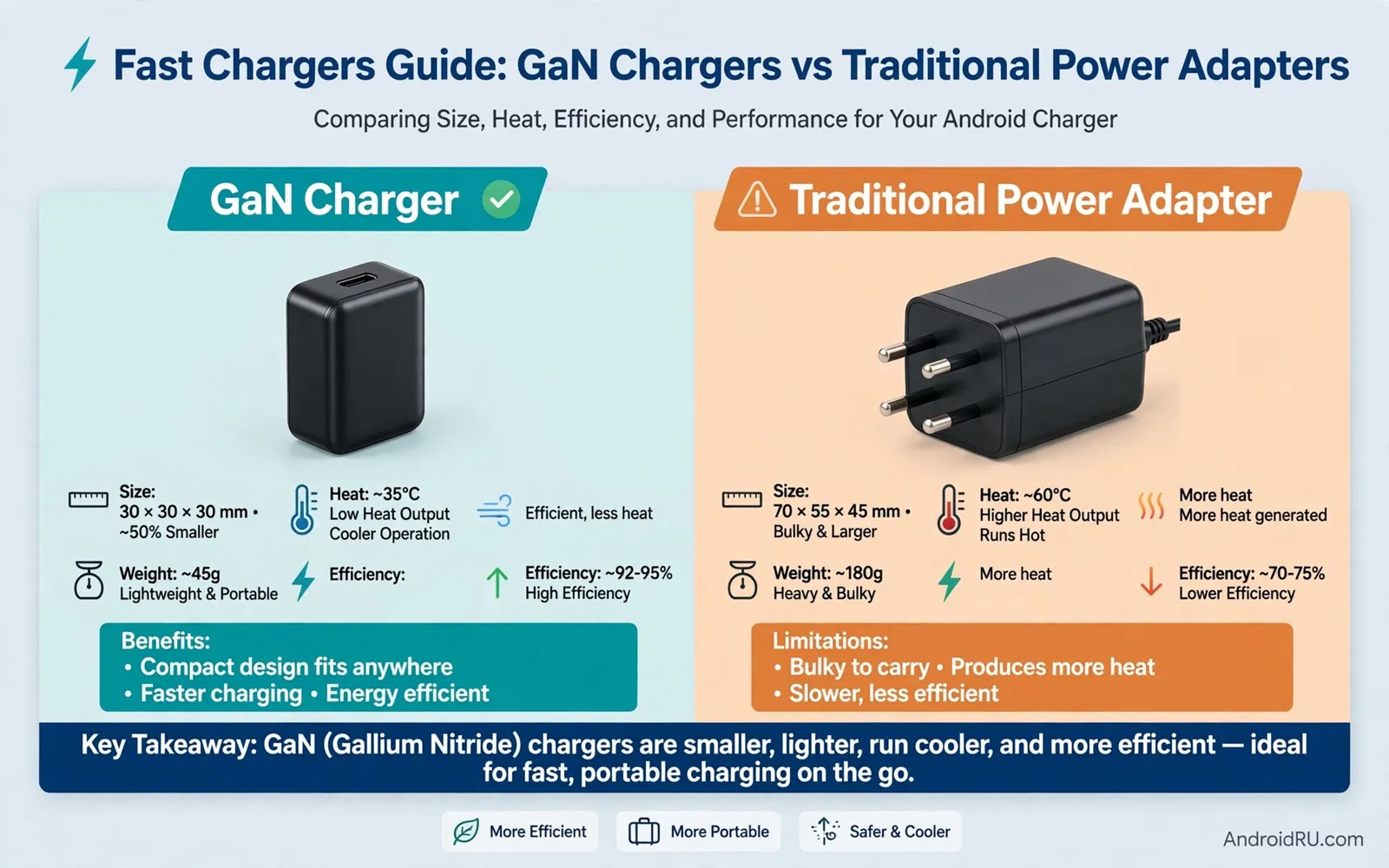
GaN stands for gallium nitride. It is a material used in charger circuits. It handles power with less wasted heat than older silicon parts. Less wasted heat allows a smaller charger body. A smaller body still delivers high wattage in many designs. That size advantage matters for travel bags. It also matters for crowded power strips. Traditional adapters use silicon parts that need more space. They need larger parts to shed heat safely. Their bodies often feel bulkier at the same wattage. Their weight also tends to run higher. Both designs can charge a phone well. The difference lies in size and heat and efficiency. A good charger protects the phone from voltage spikes. A good charger also negotiates power with the phone. That negotiation sets a safe charging speed. The phone controls the final speed at all times. The charger cannot force power past phone limits.
Charging speed depends on the phone and the charger and the cable together. A high wattage charger alone does not guarantee fast charging. The phone must support the same fast charging standard. The cable must carry the required wattage safely. A weak cable can limit speed even with a strong charger. A strong cable cannot raise speed past phone limits. Check your phone manual for supported wattage. Check the charger label for output profiles. Check the cable rating for wattage and data needs. These three checks prevent disappointment after purchase. They also prevent unsafe combinations in daily use. Keep the original charger for comparison during tests. Test new chargers with the same cable and phone. That method isolates the charger effect clearly.
Wattage Labels And What They Really Mean
A wattage label shows maximum output under ideal conditions. It does not promise that maximum at all times. A charger with two ports splits power between devices. A single port in use may reach full wattage. Two ports in use may share wattage across both. Check the label for per port output. Check the label for total output as well. A label that hides total output deserves caution. Reputable makers print both numbers clearly. They also print voltage and current profiles. Those profiles show how power adapts to different devices. A phone may request a specific voltage level. A laptop may request a different level. A multi device charger must handle both requests. It must also switch safely when a device unplugs. Sudden changes should not cause a power surge. Quality circuits manage those changes smoothly. Cheap circuits may struggle with rapid switching.
Fast charging standards vary across phone brands. Some phones use a widely shared standard. Some phones use a brand specific standard. A charger may support one standard well. It may support another standard only at basic speed. Read the supported standards list before buying. Look for the standard your phone actually uses. Do not assume that a high wattage number means full speed. A mismatch often leads to slower charging. It does not usually harm the phone. The phone simply negotiates a lower safe speed. That lower speed still charges the phone. It just takes longer than expected. Test charging time from a low battery level. Note the time to reach half charge. Note the time to reach full charge. Those two times tell the real story.
Heat Safety And Battery Health
Heat is the main enemy of battery health over time. Fast charging creates more heat than slow charging. A good charger manages heat with efficient circuits. A good phone manages heat by slowing charge when hot. Charging in a cool room helps both devices. Charging under a pillow harms heat dissipation. Charging in direct sunlight adds extra heat. Avoid those conditions for daily charging. Remove a thick case during very fast charging if the phone feels hot. A case can trap heat against the phone body. A cooler phone often charges faster in practice. Heat throttling can slow a hot phone more than a lower wattage charger would. That paradox surprises many users. A moderate charger in a cool room can beat a fast charger in a hot room. Think about environment as part of speed.
Battery health also depends on charge habits. Keeping a battery near full charge for long periods adds stress. Keeping it near empty for long periods adds stress too. A middle range suits daily use best for many people. Overnight charging with a smart limit helps. Many Android phones offer a charge limit option. That option stops charging near a set level. It can extend battery lifespan over years. Fast charging for every charge adds wear over time. Slow charging overnight adds less wear. Use fast charging when time matters. Use slower charging when time allows. That balance gives speed when needed and care when possible. Replace swollen batteries at once through a proper service. A swollen battery is a safety risk. Do not puncture or bend it.
Ports Cables And Everyday Compatibility
Port count shapes how a charger fits your life. A single port charger suits one phone well. A dual port charger suits a phone and earbuds together. A triple port charger suits family travel well. More ports mean more sharing of total power. Check total power before you assume full speed on all ports. USB C ports dominate modern Android charging. USB A ports still serve older cables and accessories. A charger with both types offers flexibility. It may also run larger than a pure USB C model. Check plug shape for your region before travel. Some chargers include foldable prongs for bags. Foldable prongs reduce snag risk in a bag. Fixed prongs feel sturdier in a wall socket. Choose based on travel frequency and socket tightness.
Cable choice can undo a good charger purchase. A cable rated for low wattage caps charging speed. A cable rated for high wattage lets the charger work fully. The USB C cable ratings for data speeds and wattage explains how to read cable ratings without guesswork. Match cable wattage to charger wattage at least. Match cable data speed to your transfer needs as well. A charging only cable may transfer data slowly. A full featured cable handles both tasks well. Inspect cables for fraying near connectors. Frayed cables can short or overheat. Replace damaged cables at once. Keep cables untangled to avoid internal wire damage.
GaN Versus Traditional In Real Rooms
GaN chargers shine in small spaces. A bedside table gains room with a compact charger. A travel bag gains weight savings with a compact charger. A power strip gains an extra free socket with a compact charger. Traditional chargers shine in price for basic needs. A simple low wattage adapter costs less in many shops. A user with one older phone may not need GaN benefits. A user with a slow charging phone may not notice GaN speed. The value of GaN grows with wattage needs. High wattage traditional chargers grow large and heavy. High wattage GaN chargers stay compact by comparison. Office desks benefit from that compact size. Shared workspaces benefit from smaller power bricks. Consider total cost across years of use. A durable charger outlasts several phones. A cheap charger that fails early costs more over time.
Noise and warmth also differ between designs. Some chargers emit a faint coil whine under load. That sound varies by unit and load level. It rarely signals danger by itself. A hot charger with a burning smell signals danger clearly. Unplug such a charger at once. Do not use it again. Check for certification marks on the charger body. Certification marks show testing against safety standards. Missing marks on a very cheap charger deserve caution. Buy from reputable sellers with clear return policies. Counterfeit chargers copy looks without safety circuits. They pose real risks to phones and homes. Price alone does not prove safety. Seller reputation and certification marks help more.
Travel Work And Multi Device Setups
Travel charging needs a compact and flexible setup. A GaN charger with two USB C ports covers phone and tablet. A small cable set covers different devices. A power bank covers gaps between sockets. Plan for socket types at your destination. Pack an adapter for plug shape if needed. Pack a short cable for bags and a long cable for hotel rooms. A long cable helps when sockets sit far from beds. A short cable reduces tangles during day trips. Keep chargers in a padded pouch for protection. Loose chargers in a bag can scratch other items. They can also bend prongs under heavy items. Check airline rules for power banks before flying. Power banks travel in cabin bags in most cases. Chargers without batteries face fewer travel limits.
Work desks benefit from a single strong charger. A phone and earbuds and a tablet can share one brick. A high capacity power bank for long distance travel covers the same devices away from desks. Compare desk and travel needs before you buy both items. A desk charger can stay plugged in all day. A travel charger must survive bags and sockets. One charger may serve both roles well. Two specialized chargers may serve better if budgets allow. Label your chargers if several look alike. Labels prevent mix ups in shared homes. Keep a spare charger at work for busy days. A spare removes panic when a main charger fails.
Safety Checks Before You Trust A New Charger
Run a short safety check on any new charger. Inspect the body for cracks or loose parts. Inspect prongs for bending or discoloration. Plug it into a socket without a device first. Listen for buzzing or crackling sounds. Feel for unusual heat after a few minutes. Connect the phone and watch charging behavior. Watch for repeated connect and disconnect cycles. Watch for error messages about charging. Watch for extreme heat on phone or charger. Stop use if any warning appears. Test the charger on a second socket as well. A faulty socket can mimic charger problems. A good charger behaves consistently across sockets. Keep the receipt for warranty claims. A warranty helps when a charger fails early.
Avoid charging in risky places as a habit. Avoid charging near water sources. Avoid charging on soft bedding that traps heat. Avoid charging with a damaged cable or port. Avoid using a charger that fell into water. Dry it fully and inspect it before any reuse. When in doubt replace the charger. A replacement costs far less than a damaged phone. Teach family members these checks as well. Children should use certified chargers only. Older adults benefit from simple single port designs. Safety habits matter more than charger brand loyalty. A careful user gets safe charging from either technology.
Final Choice By Charging Need
Choose GaN if you need high wattage in a small body. Choose GaN if you travel often with several devices. Choose GaN if desk space matters to you. Choose GaN if you plan to keep the charger for years. Choose traditional if you need a low cost basic charger. Choose traditional if your phone charges slowly by design. Choose traditional if size does not matter at home. Choose traditional if you already own a reliable adapter. Either choice works when standards and cables match. Either choice fails when cables or standards mismatch. Match phone standard and cable rating first. Then choose size and port count. Then check safety marks and seller reputation. That order prevents costly mistakes. It also keeps expectations realistic about speed.
Car charging extends the same logic to the road. A holder that charges while you drive saves a separate cable step. The car mounts and wireless charging holders for Android show how mount stability and charging alignment work together. Test any new charger for a full week before you judge it. Note speed and heat and reliability each day. A week of notes beats a single first impression. Keep the best charger as your daily tool. Keep a spare for travel or work. Good charging habits protect both phone and charger.

