

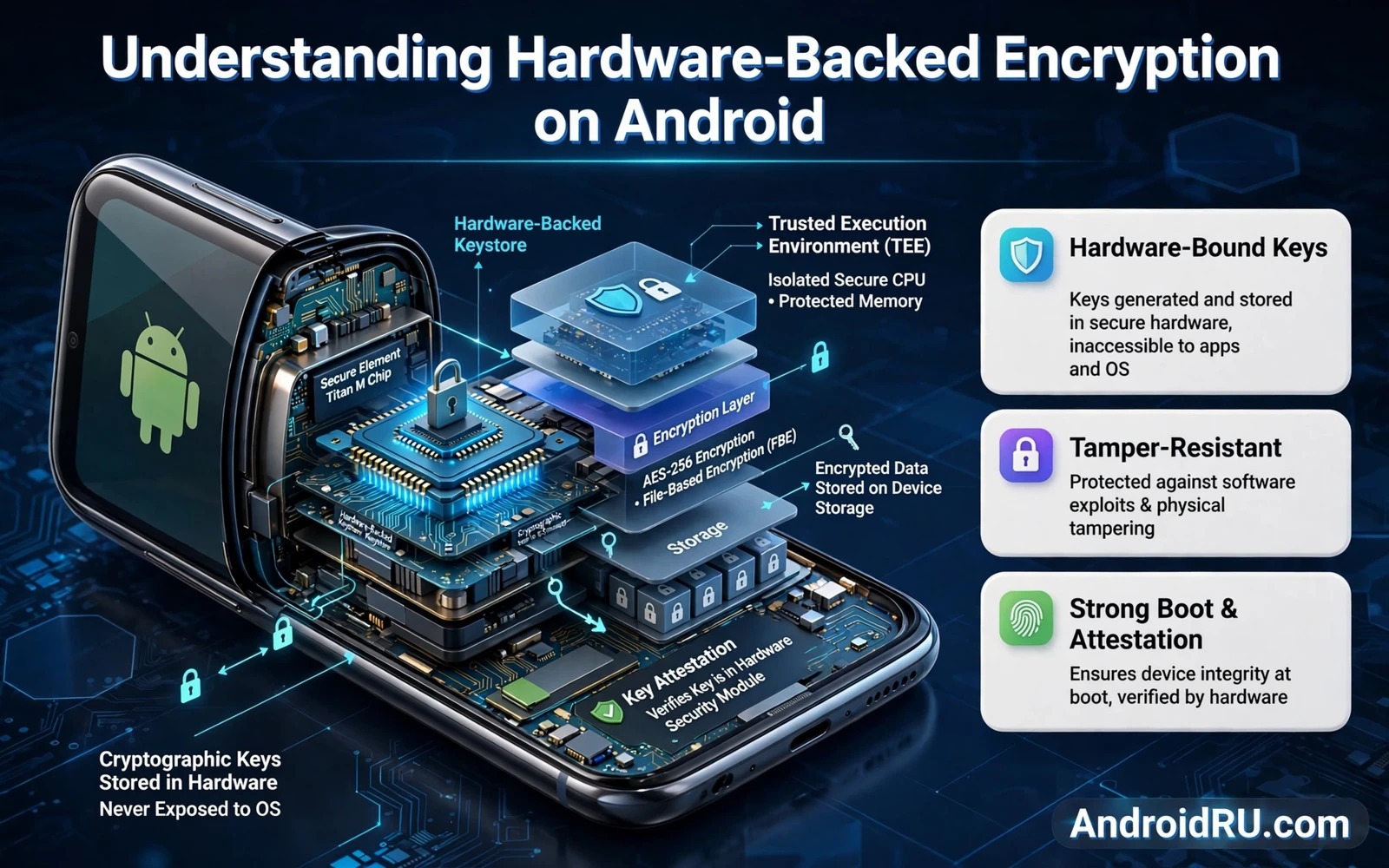
Hardware-backed encryption means that the cryptographic keys protecting your data live inside dedicated secure hardware rather than inside ordinary app storage that software alone guards. That hardware refuses to release raw key material even to the operating system itself. Apps ask the hardware to encrypt or decrypt or sign and the hardware performs the operation internally and returns only the result. An attacker who copies the phone storage still lacks the keys because the keys never left the secure chip in usable form.
Android phones implement this protection through a secure element or a trusted execution environment depending on the model and the chip. High end phones often include a dedicated security chip with its own processor and memory and tamper resistance. Other phones use an isolated area of the main processor that runs separately from the main operating system. Both designs share the same core idea. Keys are generated inside the protected area and key use is gated by authentication and usage rules that software cannot silently override.
This guide explains how hardware-backed keys are created and how they are bound to your lock screen and how they protect app data and payments and biometric templates and what limits remain even with strong hardware. Understanding those limits matters because hardware protection is powerful but it is not magic. A phone that is unlocked and handed to an attacker with your PIN still grants access through the normal authentication path and hardware cannot distinguish a legitimate owner from an attacker who knows the PIN.
How Keys Are Born Inside Secure Hardware
A hardware-backed key is generated inside the secure area and marked as non exportable at birth. That marking is enforced by hardware rather than by a software promise that malware could ignore. The key can be used for operations that the key policy allows and it can be deleted by an authorised wipe but it cannot be copied out for use on another device. That property changes the economics of theft because stealing a storage image no longer yields the keys that protect the data on that image.
Key policies add further rules that shape how and when a key may be used. A policy can require fresh lock screen authentication before each use or within a short window after authentication. A policy can require biometric authentication for a specific key rather than accepting any unlock method. A policy can limit a key to encryption only or to signing only so that a compromised app cannot repurpose a key for an operation that the owner never intended. Those policies turn a single key into a narrow tool rather than a master key.
Lock Screen Credentials And Data Protection
Your lock screen PIN or password or pattern feeds into the protection of hardware-backed keys through a derivation process that binds key use to successful authentication. When the phone restarts and remains locked the most sensitive keys stay unavailable until you authenticate for the first time. That state is why a freshly restarted phone asks for your PIN before biometric unlock becomes available. Biometric unlock is convenient after that first authentication but it does not replace the credential that unlocks the strongest key state.
File based encryption builds on hardware-backed keys by giving different files different protection levels. Device encrypted storage holds system data that must be available before first unlock. Credential encrypted storage holds your personal data and stays locked until first unlock. That split lets alarms and accessibility services run after a restart while your messages and photos and documents remain protected. A phone seized while locked therefore exposes far less than a phone seized while unlocked and running.
Biometrics Payments And App Secrets
Biometric templates never leave secure hardware on a properly designed Android phone. The sensor captures your fingerprint or face and the secure area compares it against a stored template and returns only a yes or no result to the app. Apps never receive your fingerprint image and they never receive a copy of the template. That design means that a breach of an app database cannot leak your biometric data because the app never held it. It also means that you cannot change a leaked biometric in the way that you can change a leaked password which is why template isolation matters so much.
Payment tokens and app signing keys benefit from the same isolation. A payment app can ask secure hardware to authorise a transaction without exposing the underlying card key to the app process or to other apps. A messaging app can store identity keys in hardware so that a malware infection that reads app files still cannot copy the identity. Hardware protection does not make the app itself trustworthy but it limits the damage when an app process is compromised because the most sensitive material stays behind a hardware boundary.
Attestation And Proof That Hardware Is Real
Key attestation lets an app or a service verify that a key truly lives in secure hardware and that the device runs a genuine operating system build. The secure hardware signs a certificate chain describing the key and the device security level. A banking app or a corporate app can check that chain before trusting the device with sensitive data. Attestation does not prove that the person holding the phone is the owner. It proves that the hardware and software claims about the device are genuine which is a different and still valuable guarantee.
Attestation checks also help services detect rooted or heavily modified devices that may have weakened the hardware boundary. A modified system can still claim hardware protection but attestation reveals the modification to a service that checks carefully. Users who modify their phones should understand that some apps will refuse sensitive operations when attestation fails. That refusal is a policy choice by the service rather than a failure of the hardware itself.
Limits Risks And Practical Habits
Hardware-backed encryption protects data at rest and it protects keys from extraction but it cannot protect data that you willingly decrypt and display. An attacker who watches you enter your PIN or who tricks you into approving a biometric prompt gains the same access that you enjoy. Phishing and social engineering therefore remain effective even on phones with excellent hardware. Strong hardware must sit beside careful authentication habits and scepticism toward unexpected prompts and links and calls that ask for codes or approvals.
Practical habits that preserve hardware protection are simple and worth repeating. Use a strong lock screen credential rather than a short guessable PIN. Restart the phone before a high risk border crossing or before handing it to a repair shop when possible so that it returns to the locked before first unlock state. Keep system updates installed because secure hardware firmware and trusted software also receive fixes. Back up encrypted data through a trusted backup method because hardware protection also means that a destroyed secure chip can make unbacked data unrecoverable.
The same hardware boundary supports everyday privacy tools so see how hiding photos and videos behind encrypted lockers uses app level protection and how understanding app sandboxing and Android memory protection isolates apps from each other while locking apps behind biometrics or PIN codes adds a second authentication gate for sensitive apps.
- Treat a strong lock screen credential as part of hardware protection rather than as a separate feature
- Restart the phone before high risk handover so sensitive keys return to the locked state
- Keep system and security updates installed so secure hardware firmware stays patched
- Back up important data because a destroyed secure chip can make data unrecoverable
- Never approve a biometric or key prompt that you did not deliberately trigger yourself
Checking Hardware Protection On Your Own Phone
You can check hardware protection on your own phone without special tools by examining security settings and key information. Open security settings and confirm that the phone uses file based encryption and that a lock screen credential is set. Check whether biometric enrolment is available and whether banking apps accept biometric authentication as a strong method. Those signals indicate that secure hardware is present and active even when the phone never names its security chip in marketing material. A phone without encryption or without a lock screen credential cannot benefit from hardware key protection.
Test the locked state behaviour that hardware protection creates. Restart the phone and notice that biometric unlock stays unavailable until you enter the PIN or password for the first time. That requirement proves that credential encrypted storage remains locked before first unlock. Try opening a sensitive app after restart before first unlock and notice that its data remains unavailable. Those everyday observations confirm the hardware boundary more convincingly than any specification sheet because they show the protection operating on your own device.
Maintain hardware protection through update discipline and backup discipline together. Install system updates promptly because secure hardware firmware and trusted software receive fixes through those updates. Back up data through a trusted method because hardware protection also means that a destroyed chip can make data unrecoverable. Record recovery credentials in a password manager that you can open from another device. Those three habits keep hardware strength practical rather than theoretical across the life of the phone.
Hardware-backed encryption turns your phone from a storage box with a software lock into a device where the most sensitive keys live behind a hardware wall. That wall protects locked data and biometric templates and payment keys from extraction even when software defences fail. Pair that hardware strength with a strong credential and careful prompt habits and your Android phone gains a defence that software alone could never provide.

