

7 Tricks to Turn an Old Android Phone into a Portable Powerstation
That old Android phone in your drawer still has a battery, a processor, a screen, radios, and a USB port. It is not dead weight; it is a small power station waiting for a job. I retired my previous phone two years ago, and instead of trading it in for almost nothing, I turned it into the backup power kit that now lives in my car. It has charged my earbuds on a train, kept a router alive through a blackout, and lit a campsite with its flashlight while my main phone stayed charged for calls.
The trick is to stop thinking of the old phone as a phone and start thinking of it as a battery with a brain. A phone battery holds between 3,000 and 5,000 mAh, which is enough to fully charge a pair of wireless earbuds several times, top up a smartwatch for a week, or give a dead main phone the 20 percent it needs to call a taxi. With the right cable and the right settings, that energy becomes useful instead of sitting in a drawer losing charge month after month.
This guide gives you seven named tricks, each with concrete steps you can follow tonight. No root, no special apps you have to pay for, and no hardware beyond a cable or two that you probably already own. Read the safety notes in each trick, because a lithium battery deserves respect, and then put the old phone to work.
Why your retired phone is already a power station
A dedicated power bank is a battery and a circuit board. Your old phone is a battery, a circuit board, a screen that shows exactly how much charge is left, and radios that can share internet while it charges other gear. That screen is the part people forget: a power bank gives you four vague dots, while a phone tells you it has 63 percent left and estimates how long a charge will take. That information matters when you are deciding whether to charge earbuds or save the energy for your main phone.
The other advantage is that the phone is already paid for. A decent 10,000 mAh power bank costs real money, while the phone in your drawer costs nothing and already has a battery of similar size. It will not replace a big power bank for a week-long trip, but for a day out, a commute, or a power cut, it covers the jobs that matter. The seven tricks below turn that idle battery into a kit you will actually reach for.
What to check before the first trick
Check the battery health first. Open Settings, then Battery, then Battery health or a battery health app, and look at the capacity figure. If the phone still holds 80 percent or more of its original capacity, it is a good candidate. Below 70 percent it still works, but expect shorter runtimes and plan for it. Check the charging port too: plug a cable in and wiggle it gently, because a loose port wastes energy and can drop the connection mid-charge. Clean lint from the port with a wooden toothpick, never a metal pin.
Next, check which charging features your phone actually has. Open Settings and search for “reverse charging” or “battery share” or “wireless power share” to see what the phone supports. Samsung phones call it Wireless PowerShare, Pixel phones call it Battery Share, and many other brands hide the wired version under “OTG” or “reverse charging” in the battery settings. Knowing the exact name on your phone saves you from hunting through menus during an emergency.
How to test the old phone safely the first time
Charge the old phone to 100 percent, then connect a low-value device first, such as a pair of earbuds or a smartwatch, and watch it for ten minutes. The old phone should stay cool to the touch, the percentage should fall slowly, and the receiving device should show that it is charging. If the old phone gets hot, if the percentage drops fast, or if the connection keeps dropping, stop and check the cable and the port before you try a larger device like another phone.
7 tricks that turn an old phone into a portable power station
These seven tricks are ordered from the simplest to the most capable. Start with the first two, because they need nothing but a cable and a setting, and work your way down the list as the kit grows. Each trick includes the steps, the gear, and the honest limits, so you know exactly what the old phone can and cannot do.
Trick 1: Reverse wired charging with a USB-C OTG cable
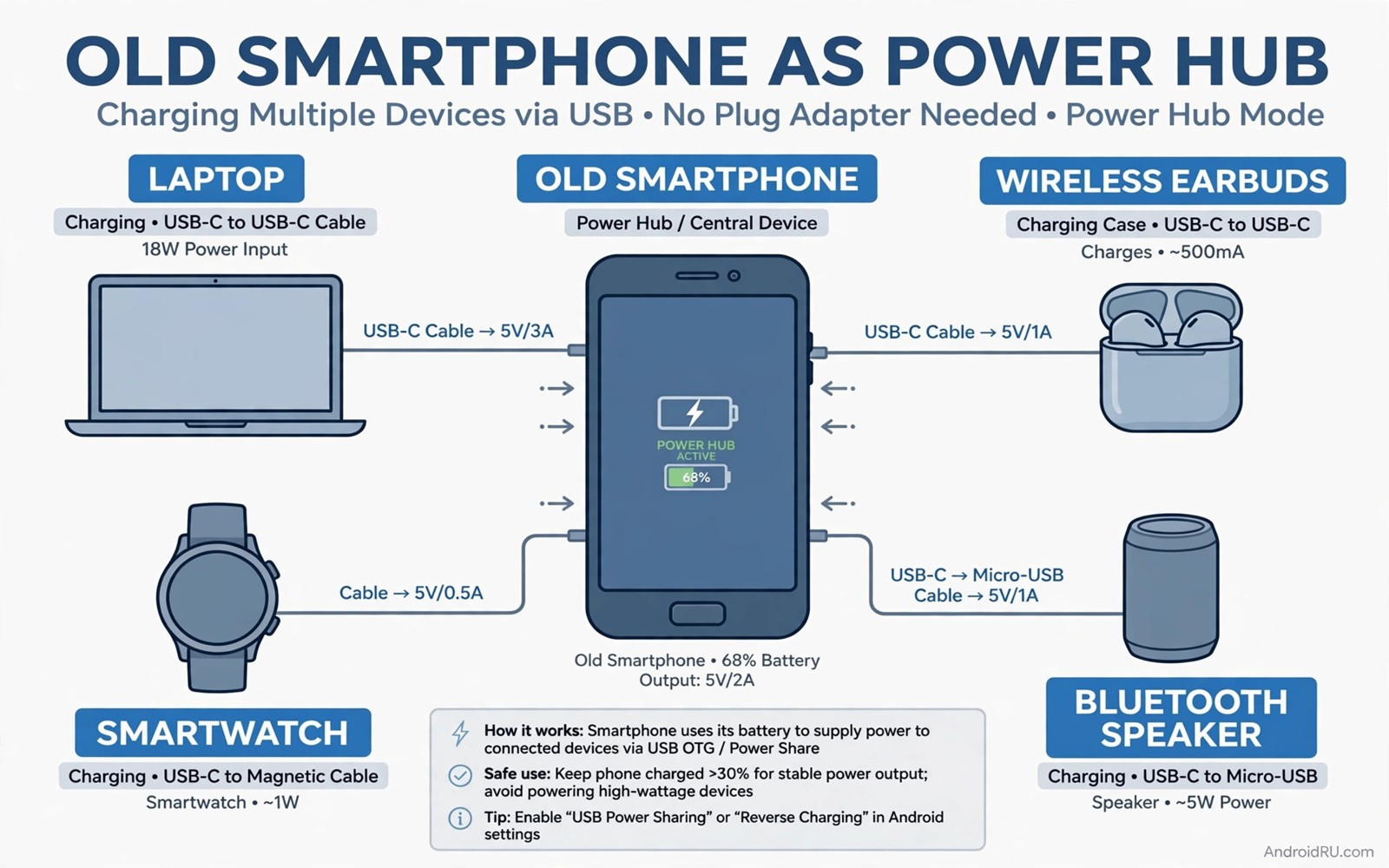
Reverse wired charging is the most reliable trick on this list, and it works on almost every Android phone made in the last six years. The old phone sends power out through its USB port to whatever you plug in, using a small adapter called an OTG cable. A USB-C OTG adapter is the one accessory that makes this trick work on nearly any phone, while newer phones can use a plain USB-C to USB-C cable directly.
- Charge the old phone to at least 80 percent, because reverse charging stops automatically when the source phone gets low.
- Plug the OTG adapter into the old phone, then plug your charging cable into the adapter and into the device that needs power.
- Wait for the notification on the old phone that says it is supplying power, and tap it if it asks you to confirm the direction of the charge.
- Check the receiving device shows the charging symbol, then leave both phones still, because movement can break the connection.
- Stop when the old phone reaches 20 percent, so it keeps enough charge to make a call if you need it.
In practice, a 4,000 mAh old phone gives a dead modern phone roughly 25 to 35 percent, which is enough for hours of calls and maps. The transfer is not perfectly efficient, and some energy is lost as heat, so expect about two-thirds of the battery to arrive as usable charge. Keep the phones out of direct sun while they charge, and use a short cable, because a long cable loses more energy on the way.
Trick 2: Reverse wireless charging for earbuds and watches
If your old phone supports reverse wireless charging, it becomes a charging pad for the small devices that always seem to die first. Earbuds and smartwatches are the perfect match, because their batteries are small and they charge slowly, so the old phone barely notices the drain. Samsung calls the feature Wireless PowerShare, Google calls it Battery Share, and other brands use names like reverse wireless charging in the battery menu.
- Open Settings, then Battery, and turn on Wireless PowerShare or Battery Share on the old phone.
- Place the old phone face down on a flat surface, so the back of the phone faces up.
- Put the earbud case or the watch on the centre of the phone’s back, where the charging coil sits, and wait for the charging sound or symbol.
- Leave both devices still for the whole charge, and keep the old phone above 30 percent so it does not shut the feature off.
A full earbud case takes about 20 percent of an old phone’s battery, and a smartwatch takes about 10 percent, so one old phone can rescue a whole pocket of gear on a long day. The feature is slower than a cable, and it stops if the devices slide apart, so use it on a table rather than in a moving car. If your old phone does not support wireless reverse charging, trick one with a cable covers the same devices just as well.
Trick 3: Keep your home router alive through a blackout
A router draws very little power, usually between 5 and 15 watts, which means an old phone plus a small inverter or a USB-powered router setup can keep your internet alive when the mains power fails. This is the trick that earns its place during a real blackout, because a mobile hotspot on the old phone can replace the router entirely, or the old phone can power a travel router that shares the connection with the whole house.
- Before a blackout, set the old phone up as a mobile hotspot with a strong password, and test that your laptop and other phones can join it.
- Plug the old phone into its own charger and keep it at 100 percent whenever it sits in its spot at home, so it is always ready.
- When the power fails, turn on the hotspot on the old phone and connect your main devices to it within a minute.
- Turn the screen brightness to minimum and close every app except the hotspot, so the battery lasts as long as possible.
- Switch the hotspot off when the mains power returns, and recharge the old phone to full again for the next outage.
A 5,000 mAh old phone running a hotspot lasts roughly four to six hours, depending on how many devices connect and how strong the mobile signal is. That is enough to finish work, send the important messages, and check the news while the power company fixes the fault. Keep the phone near a window for the best signal, and remember that a hotspot drains the battery faster when many devices stream video, so ask the household to stick to messages and browsing until the power returns.
Trick 4: Build a solar-fed charging station for trips and camping
Pair the old phone with a small folding solar panel and it becomes a charging station that refills itself outdoors. A 10 to 20 watt folding solar panel costs little, folds to the size of a book, and charges the old phone during the day while the old phone charges your gear at night. The old phone acts as the buffer: it stores solar energy in its battery, regulates the output, and shows you exactly how much charge is available, which a bare solar panel cannot do on its own.
- Buy a folding solar panel with a USB-A or USB-C output rated at 10 watts or more, and test it at home on a sunny windowsill first.
- Place the panel in direct sun and plug the old phone into it, then check that the phone shows the charging symbol.
- Leave the old phone in the shade while the panel sits in the sun, because a hot phone charges slower and ages faster.
- Charge your earbuds, watch, or main phone from the old phone in the evening, when the panel has done its work for the day.
- Pack the panel and the old phone together in a dry bag, so the kit is ready to grab for the next trip.
Solar charging is slow, and anyone who promises a full phone charge from a pocket panel in an hour is overselling it. In real sun, a 15 watt panel gives an old phone roughly 15 to 25 percent per hour, which is enough to keep earbuds and a watch alive indefinitely on a camping trip, and to add a useful top-up to a main phone each evening. Treat solar as a trickle that keeps the kit alive, not as a wall charger, and the system works beautifully.
Trick 5: Stretch every milliamp with a charging cap and power saving
A power station is only useful if its energy lasts, and the fastest way to waste an old phone’s battery is to let it run at full brightness with every radio on. This trick is about discipline: set the old phone up once so that every milliamp goes to charging other devices instead of to its own screen and background apps. The setup takes ten minutes and doubles the useful runtime of the kit.
- Turn on Battery Saver in Settings, then Battery, and set it to turn on automatically at 50 percent, so the phone never runs at full power by accident.
- Set the screen brightness to the lowest readable level, set the screen timeout to 15 seconds, and turn on dark mode, which saves power on OLED screens.
- Turn off Bluetooth, location, and mobile data when the phone is only acting as a charger, and turn them on only when you need the hotspot.
- Turn on the battery protection setting that caps charging at 85 percent, so the old battery ages slowly and stays healthy for years.
- Uninstall or disable every app you do not need, so nothing wakes the phone up in the background and drains the battery overnight.
The settings that make the biggest difference are the ones buried deepest in the menus, and the battery saving toggles hidden deep in settings cover them one by one, including the adaptive battery controls that most owners never find. A phone set up this way can sit in a drawer for a week and still have more than 90 percent charge when you need it, which is exactly what a backup power kit should do.
Trick 6: Pass-through charging so the kit never goes flat mid-charge
Pass-through charging means the old phone charges other devices while it is itself plugged into a wall charger or a power bank. The energy flows through the old phone to the device that needs it, and the old phone’s own battery stays topped up at the same time. This turns the old phone into a small hub: one wall socket, one old phone, and two or three devices charging from it, each with its own cable.
- Plug the old phone into a wall charger or a large power bank with a good cable, and confirm it shows the charging symbol.
- Plug the device that needs power into the old phone with an OTG adapter or a second cable, depending on the phone’s ports.
- Check that both devices show they are charging, and leave the setup still on a table until the device is done.
- Use a charger rated at 18 watts or more for the old phone, because a weak charger cannot feed both devices at once.
- Unplug the receiving device first when it is done, then unplug the old phone, so the hub shuts down cleanly.
Not every phone supports pass-through charging, and some phones pause the outgoing charge when the incoming charge is weak. Test it at home before you rely on it on a trip, and if your phone does not support it, charge the old phone first and then use it to charge the other device, which achieves the same result in two steps instead of one. Either way, the old phone becomes the hub that keeps a whole bag of gear alive from a single socket, which is a lifesaver in hotel rooms and airports with one outlet.
Trick 7: Build an emergency kit with maps, light, and radio in one device
The last trick is the one that matters most when things go wrong: turn the old phone into a complete emergency kit that needs no signal at all. A phone with offline maps, a flashlight, a radio app, and a charged battery is worth more in a real emergency than a power bank, because it gives you information and light as well as energy. The setup is free, it takes an evening, and it turns a drawer phone into something you will be glad to own.
- Install an offline maps app and save the maps for your home area and your usual travel routes, so navigation works with no signal.
- Save the phone numbers for family, your doctor, and local emergency services in the contacts, and write the most important two on a card in the case.
- Install a radio app that works with the phone’s FM receiver or with saved podcasts, and test it with the earphones plugged in as an antenna.
- Put the phone, a short charging cable, and a small power bank in a waterproof bag, and keep the bag by the door or in the car.
- Recharge the kit on the first day of every month, and check the offline maps are still saved after any app update.
The emergency kit only works if the old phone has room for the maps and the apps, and that is where a quick cleanup pays off. The storage hacks that instantly free up gigabytes show you how to clear the space in minutes, including the hidden cache and duplicate files that fill old phones first. Once the maps are saved and the kit is packed, the old phone stops being clutter and becomes the most useful device in the house during a crisis.
How much power you actually get from an old phone
Numbers keep this honest. A phone battery is rated in milliamp-hours, but the usable energy is always less than the label, because voltage conversion and heat eat a share of every transfer. As a working rule, expect about two-thirds of the old phone’s battery to arrive as usable charge in another device. A 4,000 mAh phone therefore delivers roughly 2,600 mAh of real charging, which is a full charge for most earbud cases, about half a charge for a modern flagship phone, and several charges for a smartwatch.
| Device you charge | Battery size | Method | Old phone energy used | Typical result |
|---|---|---|---|---|
| Wireless earbuds case | 500 mAh | Wireless or cable | About 15 percent | Full charge |
| Smartwatch | 300 mAh | Wireless or cable | About 10 percent | Full charge |
| Another phone, top-up | 4,500 mAh | Cable | About 35 percent | 25 to 35 percent gained |
| Another phone, full charge | 4,500 mAh | Cable | About 95 percent | Nearly full, slow |
| Portable speaker | 2,000 mAh | Cable | About 50 percent | Full charge |
| Travel router | USB powered | Cable | About 10 percent per hour | Hours of internet |
| LED camp light | USB powered | Cable | About 5 percent per hour | All-night light |
Use the table to plan. If the old phone is at 80 percent and you need to charge earbuds and a watch, you will finish with more than half the battery left. If you need to rescue a dead main phone, start with the cable, keep both phones still, and accept that the old phone will end the job nearly empty. That is a fair trade when the main phone is the one that makes the calls.
Cables, adapters, and safety gear for the kit
A power station is only as good as its cables, and cables are where most people go wrong. Cheap cables waste energy, drop the connection, and in the worst cases overheat. Buy two good short cables, one USB-C to USB-C and one USB-C to USB-A with an OTG adapter, and test both at home before you pack them. A short cable loses less energy than a long one, and a braided cable survives being coiled in a bag far better than a thin plastic one.
The cable kit that covers every device you own
Start with the USB-C to USB-C cable, because it covers most modern phones, earbuds, and watches, and it carries power in both directions. Add a USB-C OTG adapter, which turns the old phone’s port into a host port that can power older devices with a USB-A plug. Add a short USB-A to micro-USB cable if anyone in the house still uses an older device, and keep a Lightning cable in the kit if an iPhone ever needs a rescue charge. Label each cable with a small tag, so you grab the right one in the dark without a torch.
USB-C to USB-C for modern phones and earbuds
This is the cable you will use most, so buy a good one rated for at least 60 watts, even though the old phone will never push that much power. The higher rating means thicker wires and lower resistance, which means less energy lost as heat on the way to the device. A one-metre cable is the right length: long enough to keep the phones apart on a table, short enough to avoid tangles and losses.
USB-C to Lightning for iPhones and older Apple gear
Apple devices need their own cable, and a certified USB-C to Lightning cable is the safe choice. Uncertified Lightning cables can refuse to charge or, worse, damage the port on the old phone. Keep the Lightning cable in the same bag as the rest of the kit, and test it once with a real iPhone, because a cable that has never been tested is a cable you cannot trust in an emergency.
Safety rules that keep lithium batteries happy
Lithium batteries are safe when treated well and dangerous when abused, so the safety rules are short and worth following. Never charge a phone that is swollen, cracked, or smells odd; take it to a recycling point instead. Never leave a charging setup on a bed or under a pillow, where heat builds up with nowhere to go. Never use a cable with exposed wires or a melted connector. Check the old phone for swelling every few months by laying it face down on a table: if it rocks or the back has lifted, the battery is failing and the phone should be retired for good.
Keeping the old phone healthy between emergencies
A backup kit that is dead when you need it is worse than no kit at all, because it gives you false confidence. The fix is a monthly routine that takes five minutes. On the first day of each month, plug the old phone in, charge it to full, check the battery health, and confirm the hotspot and the reverse charging still work. Then put it back in its bag with the cables, and set a calendar reminder for next month. Five minutes a month is the whole maintenance cost of a kit that can save a trip, a work day, or a blackout.
Security matters too, because an old phone that holds your contacts and maps is a phone worth protecting. Turn on the screen lock, keep the software updated, and remove any banking apps or saved passwords you no longer need on that device. The single most important step is the one people skip: turn on the phone’s location feature before you ever need it. Read the setting you must enable before your phone gets lost and enable it on the old phone as well as your main one, because a lost backup phone is a lost kit, and the setting only helps if it was on before the phone went missing.
Monthly checks that take five minutes
Charge the phone to full and note the percentage after 24 hours untouched; if it has dropped more than 5 percent, an app is waking it up and needs to be disabled. Open the offline maps and confirm the saved areas are still there, because app updates sometimes clear saved data. Test reverse charging with an earbud case for two minutes, and test the hotspot by connecting your main phone for a minute. If all four checks pass, the kit is ready, and you can forget about it for another month.
Frequently asked questions about old phones as power stations
Can any old Android phone do reverse charging?
Almost every Android phone from the last six years supports reverse wired charging through an OTG adapter, but reverse wireless charging is limited to higher-end models such as Samsung’s Galaxy S and Google’s Pixel Pro phones. If your old phone does not support wireless sharing, the cable method works just as well for every device, and it is faster and more efficient. Check the battery settings for the exact feature name on your model before you buy any accessories.
Will reverse charging damage the old phone’s battery?
Normal use will not damage it, because reverse charging draws power at a low rate and the phone’s own protection circuits manage the flow. What ages a battery is heat and being left at 0 percent or 100 percent for weeks, so the real risk is storage, not use. Keep the old phone between 40 and 80 percent when it sits in a drawer, recharge it monthly, and it will serve as a power station for years without noticeable harm.
How long can an old phone run a hotspot in a blackout?
A phone with a 5,000 mAh battery typically runs a hotspot for four to six hours with two or three devices connected for browsing and messaging. Video streaming cuts that time sharply, and a weak mobile signal drains the battery faster because the radio works harder. For the longest runtime, keep the screen off, connect only the devices that need internet, and ask everyone to avoid video until the power returns.
Is it safe to leave an old phone charging overnight as a power hub?
Yes, provided the phone is in good condition, the cable is undamaged, and the phone sits on a hard surface where heat can escape. Use the phone’s battery protection setting to cap the charge at 85 percent, which reduces heat and slows battery ageing. Never leave a charging phone under bedding or inside a closed bag, and replace any phone whose battery has swollen, no matter how useful the kit has been.
Your first power-station test this weekend
You do not need to buy anything to start. Take the old phone out of the drawer tonight, charge it to full, and use a cable you already own to charge your earbuds from it. If that works, try the hotspot test tomorrow, and save the offline maps for your area on Sunday. By Monday you will have a working backup power kit, built from a device you already own, and the next time a battery dies at the wrong moment, you will have the answer in your bag instead of a dead screen.
The habit that makes it last is the monthly five-minute check. Charge it, test it, put it back. That is the whole system, and it costs nothing beyond the attention. Your old phone spent years serving you as a phone; give it a second career as the power station that saves the day, and it will keep earning its place in the drawer for years to come.

