

Why A Card Slot Still Matters
Internal storage fills faster than most buyers expect. Photos and videos and offline maps and downloaded shows and large games compete for the same space. A microSD slot gives you a cheap and simple way to add room without buying a whole new phone. It also lets you move media between devices without cables or cloud uploads.
A card slot also protects your flexibility over time. You can start with a modest internal size and add a card later when your library grows. You can swap a card between a phone and a camera or a tablet when you travel. You can keep a backup copy of precious photos on a card stored away from the phone itself. That freedom is why many buyers still treat a slot as a must have feature.
How Expandable Storage Works In Practice
Most phones with a slot accept the card as portable storage. Portable storage works like a removable drive for photos and videos and music and documents. Apps usually stay on internal storage while media moves to the card. That split keeps apps fast while freeing the most crowded part of internal space.
Some phones also allow adoptable storage where the card merges with internal space. Adoptable storage can help on phones with very small internal memory but it ties the card to that phone and it can slow app loading when the card itself is slow. Portable storage remains the safer choice for most users because the card stays readable elsewhere. Check how the phone treats the card before you rely on it for daily work. A clear storage strategy also helps readers of Best Value for Money Android Smartphones of the Year who weigh a lower internal size against a card slot.
Choosing The Right Card
Card speed matters as much as card size. A slow card can stutter during high quality video recording and can lag when opening large photo libraries. A fast card keeps recording smooth and keeps browsing a large gallery pleasant. Look for a card rated for video and app use rather than the cheapest card with the largest label.
Card size should match your real library rather than an imagined maximum. Music and photos need far less room than long offline video collections. A mid size card often serves daily life better than a huge card filled with files that you never open. Buy from a trusted seller because fake cards report a false size and lose data without warning. Keep a backup of anything that you cannot afford to lose because no card lasts forever.
Hybrid Slots And Dual SIM Trade Offs
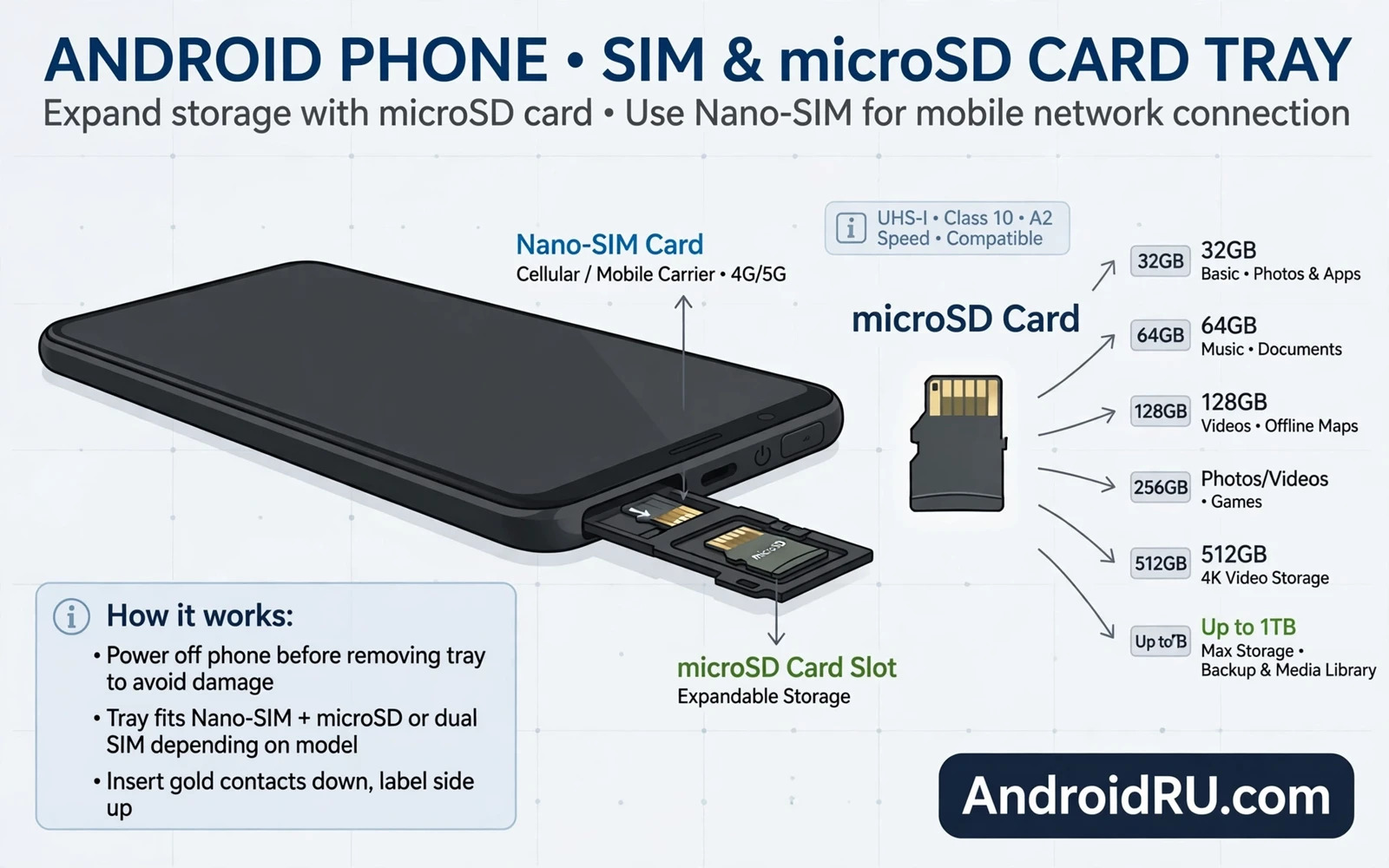
Many phones use a hybrid tray that holds either two SIM cards or one SIM card plus a memory card. That design forces a choice for travellers who need two numbers and extra storage at the same time. A dedicated slot avoids that compromise and lets you use two SIM cards and a card together. Check the tray design carefully when dual SIM use matters to you.
Some phones hide the slot behind a tool eject tray while others place it under a back cover or beside the SIM tray. The location rarely matters in daily use because you will swap cards only occasionally. What matters is whether the slot exists at all and whether it supports the card size that you plan to buy. Confirm both points from the maker specification rather than from a shop listing alone.
Photos Video And Offline Life
A card slot shines for creators and travellers. You can record long video sessions without worrying that internal space will run out at the worst moment. You can store offline maps for remote roads where mobile signal disappears. You can carry a music library and a show library for flights and long drives without paying for extra internal storage.
Organisation keeps a card useful rather than messy. Create clear folders for photos and video and music and documents. Move finished projects off the card to a computer backup on a regular schedule. Format a new card inside the phone before first use so the phone sets up the folder structure that it expects. These habits turn a simple slot into a reliable media system. The same creator mindset appears in Best Mobile Devices for Content Creators and Vloggers where storage freedom supports longer shoots.
What To Check Before You Buy
Confirm the maximum supported card size and the supported card speed class. Confirm whether the tray is dedicated or hybrid. Confirm whether the phone lets the camera save directly to the card because that single setting saves constant manual moves. Confirm whether downloaded streaming content can move to the card because some apps restrict offline files to internal storage.
Also check the rest of the phone with the same care. A slot cannot rescue a weak battery or a dim screen or a short support window. The best expandable storage phone pairs the slot with solid speed and a good camera and lasting software care. That balance is why Top Compact Android Phones for One-Handed Use still matters as a comparison point even for buyers who rank storage first.
Managing A Card For Years
Treat the card as a living part of the phone rather than a fit and forget extra. Eject it safely through system settings before removal. Avoid removing it during recording or file transfers. Replace a card that shows read errors or slow behaviour before it fails completely. Keep at least one backup copy of photos that matter because a card is storage and not a backup by itself.
When you upgrade phones you can often move the card straight across and keep your media library intact. That continuity saves hours of transfers and keeps your photos close at hand. A slot therefore adds value beyond the first purchase because it carries your library forward. For many buyers that lasting freedom is the strongest reason to keep the slot on the shortlist. The processor side of lasting speed is covered in Snapdragon vs MediaTek Dimensity: Processor Showdown for readers who want the full hardware picture.
The Bottom Line
A microSD slot gives cheap flexible room and easy media freedom and a simple path to carry a library across phones. Choose a fast trusted card and use portable storage and keep a real backup. Pair the slot with a phone that already serves your daily needs well. Then expandable storage becomes a quiet advantage that pays off every day rather than a line on a specification sheet.
Moving Media Without A Computer
A card slot lets you move media between devices with no computer in the middle. You can take a card from a phone and read it in a tablet or a camera or a laptop reader. That direct path helps travellers who need to share photos quickly. It helps creators who need to hand footage to an editor on set. It helps families who want to view holiday photos on a larger screen without uploads or cables.
Direct moves also help when internet access is limited or expensive. Uploading a large video library over a slow connection wastes time and data. Moving a card avoids that cost entirely. Keep a small card reader in your travel kit so any computer can read the card when needed. That simple accessory turns a phone card into a universal media shuttle for many situations.
Backups And Card Safety
A card is convenient storage but it is not a backup by itself. A lost card loses every file on it. A damaged card can corrupt files without warning. A stolen phone with a card inside loses both copies at once when photos live only on the card. Build a backup habit that copies important files to a computer or a trusted cloud service on a regular schedule. That habit protects memories far better than any card size.
Card safety also means handling cards with care. Store spare cards in a protective case rather than loose in a pocket. Label cards when you use several for different projects. Avoid bending cards and avoid touching the gold contacts. Replace cards that show errors promptly rather than hoping that errors disappear. A disciplined approach keeps a simple slot reliable for years.
App Data And Card Limits
Not every type of data moves to a card equally well. Photos and videos and music move easily. Downloaded streaming shows may stay locked to internal storage by app rules. Game data may stay internal for speed. Messaging databases usually stay internal for reliability. Understand these limits before you promise yourself that a card will solve every storage problem on a phone.
Check app settings one by one for storage options. Camera apps usually offer a card destination setting. Music apps often offer a download location setting. File manager apps let you move folders manually when automatic settings fall short. A short settings review after inserting a card saves confusion later and reveals which apps truly benefit from extra room.
Card Speed Classes In Plain Language
Card speed labels can confuse buyers with letters and numbers that look similar. Focus on sustained write speed for video recording because a card that writes slowly will drop frames during long recordings. Focus on read speed for gallery browsing because a fast read keeps large photo libraries responsive. A card built for video work usually serves phone use better than a card built only for basic storage.
Buy a card size and speed that match your heaviest use rather than your lightest use. A creator who records long video needs a faster card than a casual listener who stores music. A traveller who stores offline maps needs reliability more than extreme speed. Matching the card to the job prevents frustration and protects footage that cannot be recorded twice.
When Internal Storage Still Wins
Internal storage beats a card for speed critical tasks. Apps launch faster from internal storage. System files run more reliably from internal storage. High quality video recording to internal storage avoids card write bottlenecks. A phone with generous internal storage therefore suits heavy app users even when a card slot exists. Use the card for media and keep apps and system data internal for best performance.
Internal storage also simplifies backup and transfer because the whole phone backs up as one system. A card adds a second storage location that backup tools may handle separately. Check backup settings to confirm that card files join the main backup or schedule a separate card backup. A clear backup plan prevents a card full of memories from becoming a single point of failure.
Future Of Expandable Storage
Card slots have become rarer on flagship phones as makers push cloud storage and larger internal tiers. Mid range phones still offer slots more often because value buyers prize flexibility. That trend means slot hunters should check mid range models first rather than assuming that a flagship includes every feature. A mid range phone with a slot can serve media heavy users better than a flagship without one.
Cloud storage complements a card rather than replacing it fully. Cloud access needs a connection and a subscription for large libraries. A card works offline and costs once. Many users combine both paths by keeping daily media on a card and backing up precious files to the cloud. That hybrid approach gives offline freedom plus off device safety for the files that matter most.

