

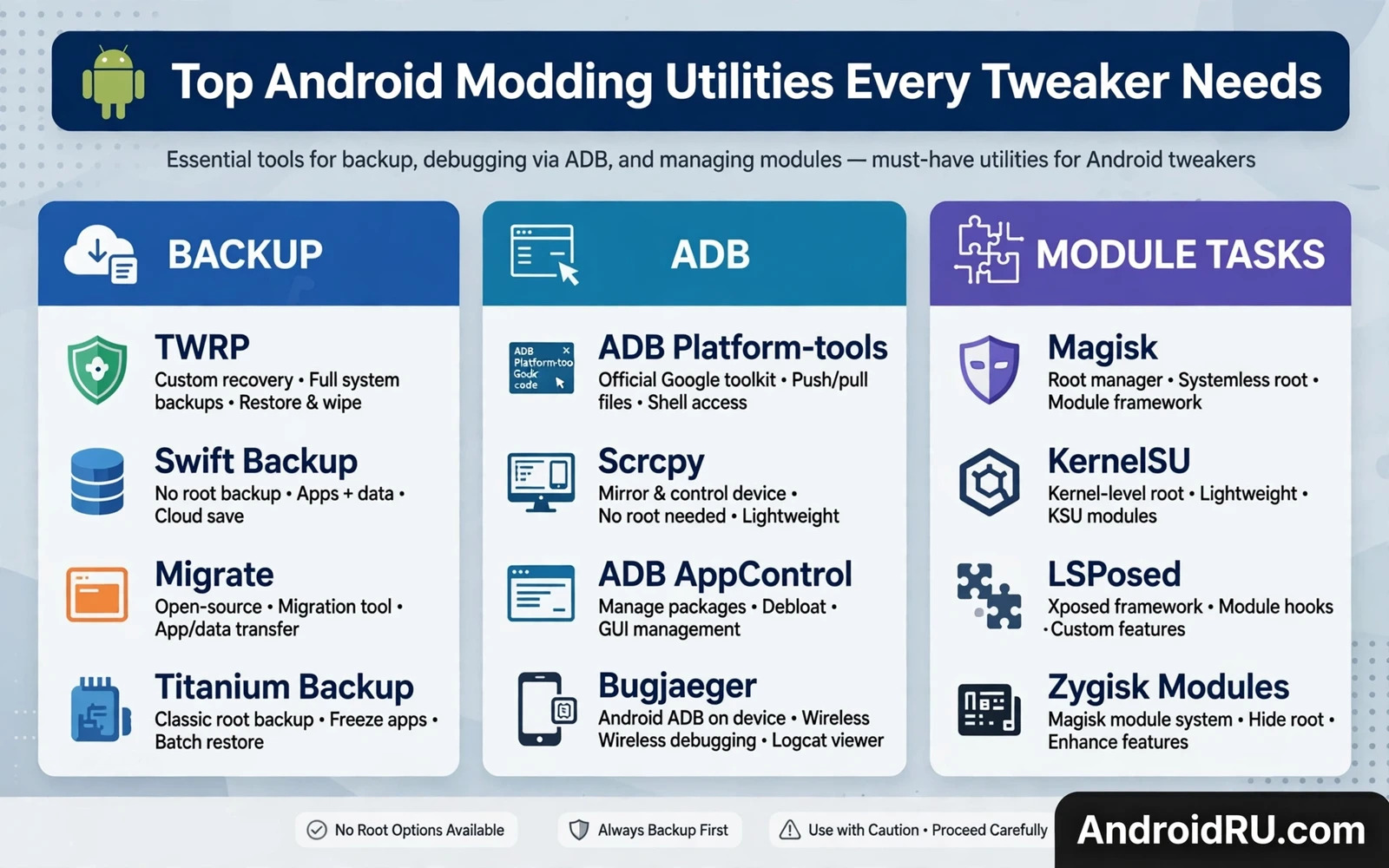
A Small Toolkit Beats A Large Collection
New tweakers often install every modding app they find. A large collection creates conflicts because multiple apps try to manage the same setting. A small toolkit with one tool per job is easier to troubleshoot. When something breaks the owner knows which tool manages that setting. A large collection turns troubleshooting into guesswork.
Choose tools by the job they do rather than by popularity alone. A backup tool should be judged on restore reliability. An ADB tool should be judged on connection stability. A module manager should be judged on clean disable behaviour. Popularity helps discover tools but it does not prove that a tool suits a particular device or a particular goal.
Keep tools updated through trusted sources. Modding tools interact with system internals that change across Android versions. An outdated tool may fail silently or may apply a setting that no longer exists. Update notes that mention a new Android version are a good sign. Silence about version support is a warning sign.
Remove tools that are no longer used. An unused tool with privileged access still presents risk if it becomes compromised later. A quarterly cleanup of modding tools keeps the privileged list short. Short lists are easier to audit after a system update.
Backup And Recovery Utilities First
Backup utilities belong at the top of every toolkit because every other modification depends on a safe return path. A recovery backup tool should create a restorable image of boot and system partitions. A data backup tool should copy user data to external storage in a format that can be restored without the original tool if possible. Test restores matter more than backup speed.
Recovery itself is a utility. A custom recovery provides the environment for backups and restores and module management. Keep the recovery version matched to the device and to the Android version. An outdated recovery may fail to decrypt data on a newer system. Recovery compatibility should be checked before a major system update.
Partition tools help owners understand storage layout before flashing. A tool that shows partition sizes and mount points prevents flashing errors. Understanding the layout also helps owners follow ROM guides that name specific partitions. Blind flashing without layout knowledge is a common beginner mistake.
Keep a copy of stock firmware and of the working boot image alongside backup tools. Tools without the right files cannot repair a broken system. Files without tools cannot be applied. The pair together forms a real recovery capability.
ADB Terminal And Module Utilities
ADB utilities let owners run commands from a computer or from the phone itself. A terminal app on the phone is useful for quick checks. A computer ADB setup is better for long sessions and for recovery work. Both should be tested before they are needed. An ADB setup tested during a crisis is already too late.
Module managers organise systemless modifications. A good manager shows which modules are enabled and provides a clean disable path. It should also show module descriptions and version information. A manager that hides module details makes troubleshooting harder. Transparency is a feature for power tools.
Hooking frameworks belong in the toolkit only when the owner actually uses hooks. Installing a hooking framework without a module that needs it adds privilege without benefit. Add the framework when a specific module requires it. Remove the framework if no enabled module uses it. Benefit should justify every privileged component.
System property editors and kernel tuning apps are advanced utilities that demand restraint. They expose settings that can improve performance or can destabilise the system. Change one setting at a time and test thoroughly. Bulk tuning with many changes at once hides the cause of any regression.
Choosing Tools Safely And Keeping Order
Check the developer reputation for every privileged tool. Open source tools with public code allow independent review. Closed tools from unknown developers should be treated with caution when they request root or ADB permissions. Reputation is not a guarantee but it is a useful filter.
Read recent user reports that discuss the current Android version. A tool that worked well on an older version may be broken on the current version. Reports from the last few months matter more than old praise. Version specific reports are the most useful of all.
Organise the toolkit by workflow. Backup tools together and ADB tools together and module tools together. A workflow view helps owners follow a repair sequence without hunting through unrelated apps. It also helps new tweakers learn the order of operations for a safe modification.
For deeper learning the display guide that explains how to change device screen resolution and DPI via ADB shows ADB in practical use. The Shizuku roundup that covers top Shizuku powered apps that do not require full root shows a no root alternative toolkit. The patching guide that explains how to patch Android apps to disable ads and tracking logs shows how tools combine for privacy work. Together they show that a toolkit is a system of complementary tools rather than a pile of unrelated apps.
Tool Trust And Supply Chain
Modding tools come from varied sources including open repositories and community forums and direct downloads. Supply chain trust matters because a compromised tool with root access can harm the whole device. Owners should prefer tools distributed through a public repository with visible history. Visible history allows the community to spot a malicious change. Opaque distribution hides history and therefore hides risk.
Checksum verification applies to modding tools just as it applies to firmware. A published checksum lets owners confirm that the downloaded tool matches the developer release. A tool without a checksum cannot be verified. Owners should treat unverified tools with extra caution especially when the tool requests root access. Verification is a small effort for a large risk reduction.
Forks of popular tools complicate trust because a fork may add features while also adding risk. A fork from a known maintainer with a clear changelog is reasonable. A fork from an unknown account with vague claims deserves scepticism. Fork reputation should be evaluated separately from original tool reputation. A trusted original does not automatically make every fork trusted.
Closed source modding tools require a different trust calculation. The owner cannot inspect code and must rely on developer reputation and community reports. Long standing closed tools with many users and no reported incidents earn more trust than new closed tools with no track record. Track record length matters when code inspection is impossible.
Update channels for modding tools should be consistent. A tool that updates through its own built in updater and through a repository should show the same version in both places. Inconsistent versions suggest a compromised update channel or a stale repository. Owners should investigate inconsistency before installing an update. An update is a new trust decision rather than a routine click.
Removing a tool should also remove its privileged access. Owners should check permission lists after uninstallation to confirm clean removal. Some tools leave helper components behind. Helper leftovers with privilege present ongoing risk. Clean removal verification closes the trust loop that installation opened.
Workflow Order For Safe Modding
Safe modding workflow starts with research before any download. Research identifies the correct tool version for the device and Android version. Research also reveals known conflicts with installed modules. Downloading before research creates a pile of untested tools. Research first keeps the toolkit lean and compatible.
Backup follows research and precedes any modification. A backup taken after research but before modification captures the known good state. That state is the return point if modification fails. Backups taken after modification has begun may already contain broken settings. Timing of backup relative to modification matters.
Modification proceeds one tool at a time with testing between tools. One tool testing isolates cause and effect. Bulk modification hides cause. Owners who value their time should invest it in sequential testing rather than in bulk troubleshooting later. Sequential work feels slower at first and finishes faster overall when trouble appears.
Testing after modification should cover daily functions rather than only the modified feature. A display tweak should be tested with messaging and calls and navigation. A module change should be tested with banking apps where relevant. Daily function testing catches side effects that feature only testing misses. Side effects are the real risk of modding.
Documentation of the workflow turns a single success into a repeatable process. A short note listing tools and versions and order and outcomes helps future updates. Future updates repeat the same workflow with new versions. A documented workflow reduces update anxiety because the steps are known. Unknown steps cause hesitation and mistakes.
Rollback planning completes the workflow. Every modification should have a known disable or restore step before it is applied. A modification without a rollback plan is a gamble. A modification with a tested rollback plan is an experiment. Experiments can be repeated safely. Gambles cannot.
Keeping The Toolkit Lean Over Years
A toolkit that grows without pruning becomes a liability because every additional privileged tool adds a new update to track and a new permission to audit and a new conflict to consider. Owners should review the toolkit at least twice a year and remove tools that have not been used since the last review. A tool that was useful for a single project in the past may have no role in current work. Keeping it installed out of nostalgia preserves risk without preserving benefit. Lean toolkits also make device migration easier because fewer tools need reinstalling and reconfiguring on a new phone. Migration effort is a hidden cost of a large toolkit that owners discover only when changing devices. A lean toolkit migrates in an afternoon while a bloated toolkit migrates over a weekend of troubleshooting. Owners who plan to keep a phone for years should therefore treat toolkit pruning as routine maintenance rather than as a rare cleanup event.

