

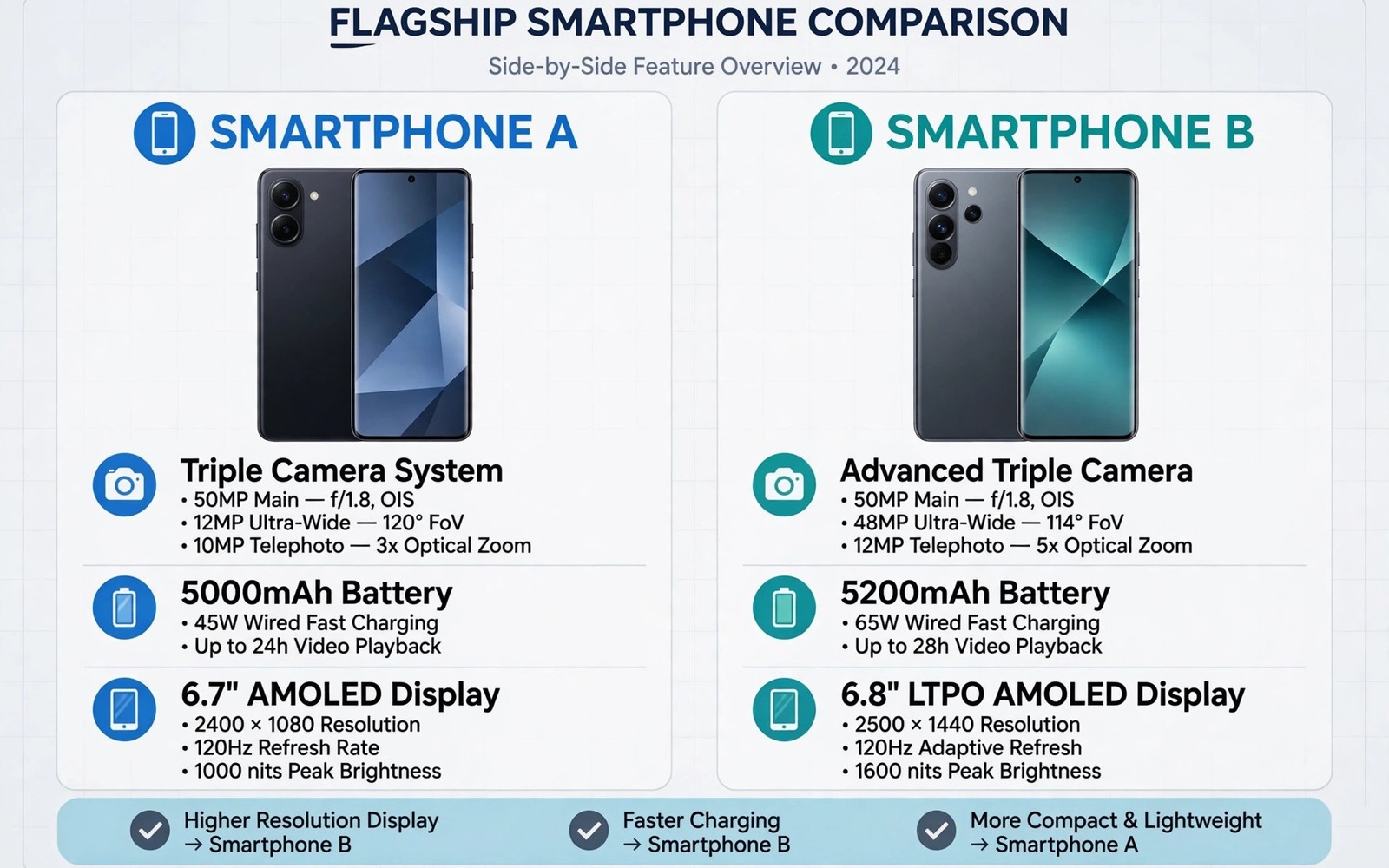
Switching between iPhone and Android feels less like changing a phone and more like moving house because your photos and messages and subscriptions and accessories all have to find a new home.
The iPhone 16 brings strong cameras and long software support and a polished ecosystem. Top Android flagships answer with larger customisation freedom and faster charging and wider hardware choice. Neither side wins on every measure. Your habits decide which trade offs hurt and which ones disappear within a week.
This review compares the areas that actually affect switchers. It covers cameras and battery and software and ecosystem lock in and the practical cost of moving your data.
Cameras in Real Light
Both platforms now shoot excellent daylight photos. Differences appear in skin tones and night processing and video stabilisation. iPhone video often looks consistent and natural. Android flagships often capture more detail in shadows and offer more manual control.
Test cameras with your own subjects. Photograph people indoors and food in a dim restaurant and a moving child in a park. Those scenes reveal processing choices that studio landscapes hide. Look at video as well as stills because video habits differ more than photo habits.
Zoom range also separates flagships. Some Android models offer long optical zoom that iPhone models cannot match. If you photograph concerts or wildlife or school sports then zoom may matter more than any other camera feature.
Battery and Charging Reality
iPhone battery life has improved greatly and many Android flagships now last a full heavy day as well. Screen size and refresh rate and signal strength affect results more than brand loyalty. A phone on weak signal drains faster regardless of its logo.
Charging speed remains an Android advantage for many models. Faster wired charging helps travellers who top up between meetings. Wireless charging convenience varies by accessory rather than by platform alone.
Check charging habits before you switch. If you charge overnight then charging speed matters little. If you rely on short top ups then the faster Android options save real time each week. That point links to the analysis of why 100W super fast chargers might not be worth buying because peak wattage alone does not decide daily benefit.
Software and Customisation
iOS feels consistent and predictable. Android feels flexible and personal. iOS limits home screen and default app choices more than Android. Android lets you change launchers and default apps and system behaviour in ways that iOS still restricts.
Software support now lasts many years on both sides for flagship models. Check the promised update period for the exact model you want rather than assuming that every flagship gets the same years. Security updates matter as much as major version updates.
Consider your other devices. An iPad and a Mac reward staying with iPhone through shared clipboard and calls and messages. A Windows PC and a Chromebook reward Android through easier file transfer and broader accessory support.
The True Cost of Switching
Moving photos and contacts has become easier through transfer tools. Moving chat history and paid apps and subscriptions takes more care. Some apps require repurchase on a new platform. Some subscriptions transfer while others need cancellation and renewal.
Accessories add hidden cost. Cases and chargers and mounts may not transfer. Smartwatch compatibility matters most because many watches pair fully with only one platform. Check watch and earbud features before you switch rather than after.
Give yourself two weeks to judge a switch. The first days feel awkward on any new system. Muscle memory returns quickly when the new phone fits your routine. Judge the switch after that adjustment period rather than on day one.
adb backup -apk -shared -all -f switch_backup.ab
adb shell pm list packages | grep -i -E "photos|messages|bank" | head -20
The commands above are an original illustration based on standard Android developer tools for listing installed packages before a platform move. They help a switcher inventory important apps rather than relying on memory alone.
Data Migration Step by Step
Start migration by listing accounts that use two factor authentication. Authentication apps and security keys need special care during a platform switch. Move authentication methods before you wipe the old phone or you may lock yourself out of important accounts. That step matters more than moving photos.
Next move photos and videos through a cloud service or a computer rather than through a single transfer app alone. A computer copy gives you a backup if the transfer app stalls. Verify that albums and favourites survived the move before you delete anything from the old phone.
Messages deserve a separate check. SMS history and chat app history follow different rules on each platform. Use official transfer tools for chat apps and test a few conversations after migration. Missing history often appears only when you search for an old message weeks later.
Finally reinstall apps one by one rather than restoring everything blindly. A fresh install lets you drop apps you no longer use. It also avoids carrying over broken settings from the old platform. That clean start often makes a new phone feel faster.
Daily Life After the Switch
Keyboard habits change more than most switchers expect. Autocorrect behaviour and gesture typing differ between platforms. Give yourself a week to adapt before judging typing speed. Custom keyboards can ease the transition when the default feels unfamiliar.
Notifications also behave differently. Grouping and priority settings vary by platform. Spend time tuning notification settings during the first week. A phone that buzzes constantly feels worse than a phone with slightly weaker hardware.
Voice assistants and smart home control may shift as well. A switcher who uses one assistant heavily should check smart home compatibility before switching. That check prevents daily friction with lights and speakers and routines.
After two weeks most switchers judge the new platform fairly. Early frustration fades when muscle memory returns. Judge battery and camera and daily comfort after that period rather than on the first confusing day.
Ecosystem Accessories After Switching
Smartwatches cause the most ecosystem pain after a switch because many watches lose features when paired across platforms. Health data and notifications and app support may change in subtle ways that only appear after weeks of use. Check watch compatibility in detail before switching rather than assuming that basic pairing means full functionality. A watch that worked perfectly on the old platform may become a simple notification device on the new one.
Earbuds usually transfer more easily than watches but features such as spatial audio and custom controls may differ across platforms. Test earbud controls and equaliser apps on the new phone before selling the old phone. That test prevents surprises during calls and workouts when controls matter most.
Smart home devices generally transfer well because they rely on cloud accounts rather than phone platforms. Routines and automations stored in the cloud survive a switch intact in most cases. Check any routines that depend on phone specific triggers because those triggers may need rebuilding after the move.
Software Habits That Ease Any Switch
Cloud based apps ease switching enormously because your data lives in an account rather than on a device. Email and photos and notes and documents stored in the cloud move instantly to any new phone. Prioritise cloud apps for important data long before you switch so migration becomes a login rather than a transfer project.
Password managers also ease switching by storing logins securely across platforms. A good password manager lets you sign into every app quickly on a new phone without resetting passwords. Set up a password manager well before switching day to avoid a stressful login marathon.
Regular backups protect you during any switch regardless of platform. A recent backup on a computer or in the cloud gives you a fallback when a transfer tool fails. Never wipe an old phone until you have verified that photos and messages and contacts all exist on the new phone.
Final Switch Checklist
Verify that your banking apps work fully on the new platform before you commit to a switch because banking apps sometimes limit features across platforms. Test login and payments with a small transaction when possible. That check prevents a nasty surprise after you have already sold the old phone.
Check photo backup settings on the new phone during the first day because default backup quality may differ from your old settings. A phone that backs up compressed photos by default can silently reduce quality for future prints. Set backup to full quality when storage allows it.
Test emergency SOS and medical ID features on the new platform because those features save lives and differ by system. Set up emergency contacts and medical details before you need them. That setup takes minutes and should never wait until an emergency.
Review subscription renewals after switching because some subscriptions renew through the old store even after you move. Cancel duplicates promptly to avoid double billing. A quick subscription audit during the first week saves money and confusion.
Keep the old phone charged and accessible for two weeks after switching as a safety net. That safety net lets you recover any missed data or codes without panic. Wipe the old phone only after two calm weeks on the new platform.
Common mistakes
The most common mistake is switching for one headline feature and ignoring daily friction. A better camera means little when your watch stops working fully or when your message history fragments. List your must keep tools before you choose a platform.
Another mistake is assuming that all Android phones feel the same. Software skins and update policies differ sharply between brands. The comparison of which brand has the cleanest bloatware free operating system shows why brand choice matters as much as platform choice.
FAQ
Can I move WhatsApp chats between iPhone and Android?
Official transfer tools now move many chats but the process needs care and a stable connection. Back up chats before you start and verify the transfer before you wipe the old phone.
Will my paid apps transfer?
Most paid apps do not transfer across stores. Budget for repurchasing essential paid apps when you switch platforms.
Is Android harder to use than iOS?
Android offers more choices which can feel complex at first. Once you set defaults and home screens to your taste the daily experience becomes just as simple.
Conclusion
Choose iPhone 16 when ecosystem simplicity and video consistency matter most. Choose a top Android flagship when customisation and charging speed and hardware variety matter more. Your concrete next step is to list your watch and earbuds and paid apps and check each one for cross platform support before you order. Shoppers should also compare the value ranking of smartphone brands ranked from worst to best value and the guide to value phones that deliver pro camera performance and the notes on Android tablets that are worth buying over iPads when planning a wider ecosystem move.

