

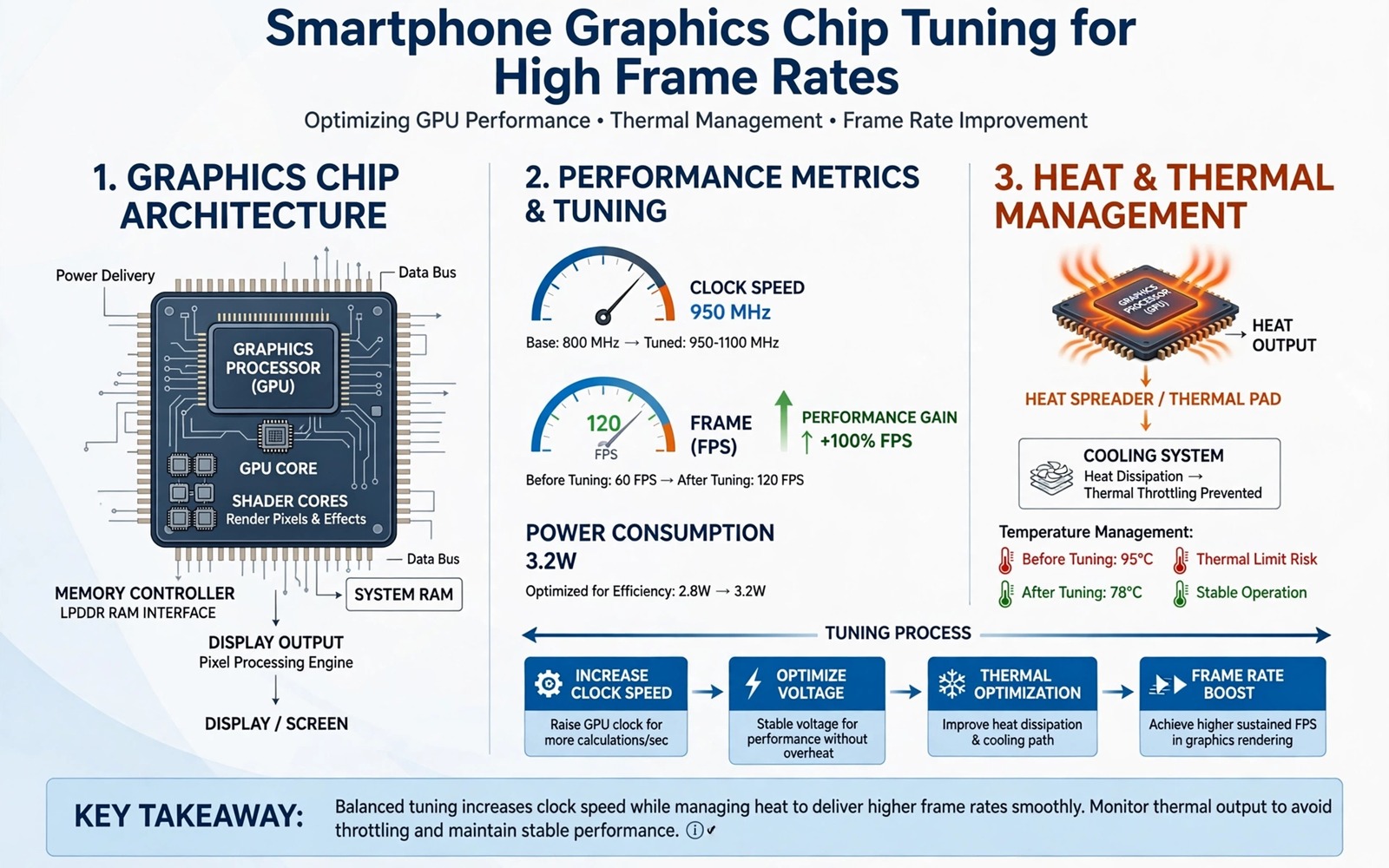
Overclocking a phone graphics chip promises the simplest gaming upgrade of all. Raise the clock speed and the frame rate follows. Reality is more interesting and more dangerous than that promise. A phone graphics chip lives in a tiny chassis with a small battery and no fan. Raising its clock raises heat and power draw at the same time. The win goes to the owner who raises the clock a little and cools the phone a lot and tests for stability over hours rather than minutes.
Start by learning what your chip already does under load. Stock clocks are not fixed numbers. They rise and fall with temperature and battery level and the game being played. A chip that already throttles at stock speed has no headroom for an overclock. A chip that holds its stock speed comfortably in a cool room has a small margin worth exploring. Measure first and overclock second. The measurement tells you whether the project is worth starting.
Overclocking also interacts with thermal tables and governors. A higher clock without a matching thermal plan simply reaches the throttle point sooner. The thermal work in hacking thermal limits for gaming without throttling pairs naturally with this guide because heat decides how long any overclock can survive. Treat clock and cooling as one system and never tune one without the other.
Find your stock clocks and your thermal headroom
Use a kernel manager or a system inspection tool to read the available graphics frequencies on your device. Note the stock maximum and the frequencies the chip actually sustains during a twenty minute game session. The sustained frequency matters more than the peak frequency. A chip that peaks high and sustains low will not gain much from a higher peak. A chip that sustains near its peak in a cool room has real room to grow.
Record the battery temperature at the end of that session and note whether the phone was charging. A session on battery in a cool room is your best case test. A session while charging in a warm room is your worst case test. Your overclock must survive the worst case without crashing because games do not pause for ideal conditions. If the worst case already throttles hard then fix cooling before you touch clocks.
Raise the clock in small steps
Raise the maximum graphics frequency by one step only and test with a demanding game for at least thirty minutes. Watch for frame gains and for visual artefacts such as flickering textures or coloured blocks. Artefacts mean the chip or its memory cannot hold the new speed reliably. Lower the clock at the first artefact rather than hoping it disappears. An artefact in a test is a crash waiting for a ranked match.
Do not raise voltage in the same step as the clock. Voltage changes add heat fast and they carry the highest hardware risk. Most phone overclocks gain their benefit from a modest clock rise at stock voltage. If the chip needs more voltage to hold a higher clock then the clock is too high for daily use. Accept the lower stable clock and enjoy the gain you can hold safely.
Cool the phone as part of the overclock
External cooling is not optional for a serious overclock. Remove the case and use a fan or a clip on cooler during overclocked sessions. Play in a cool room and avoid charging during play when possible. Each cooling step buys sustained speed that a clock step alone cannot buy. A modest overclock with good cooling beats an aggressive overclock in a hot case every time.
su
cat /sys/class/kgsl/kgsl-3d0/gpuclk
cat /sys/class/kgsl/kgsl-3d0/max_gpuclk
cat /sys/class/thermal/thermal_zone0/temp
cat /sys/devices/system/cpu/cpu0/cpufreq/scaling_cur_freq
Attribution: the commands above use the standard shell syntax of the platform toolset and the graphics driver files and they are shown here so you can read every step before you run it on your own device.
Read the inspection output carefully because graphics driver paths differ between chip makers. The paths in the block match one common driver family and your device may expose a different path. Find your device path through your kernel manager before you trust any number. A number read from the wrong file is worse than no number because it gives false confidence.
Test stability like a sceptic
Stability testing needs variety. Test a fast action game and a detailed open world game and a long session that crosses an hour. Different games stress the chip and its memory in different ways. A clock that survives one game can crash another game that uses a heavier shader load. Test the games you actually play and not only a benchmark that flatters the chip.
Watch the battery as well as the frames. An overclock that drains the battery twice as fast for a small frame gain is a bad trade for a portable device. Note the battery drop per hour at stock clocks and at the new clocks under the same game. If the cost outweighs the gain then step the clock back down. A phone that dies mid match helps nobody.
Common mistakes
The worst mistake is jumping straight to the maximum clock the tool allows. Maximum clocks exist for brief bursts on well cooled hardware and not for sustained phone gaming. The second mistake is overclocking while charging with a fast charger. The combined heat from charging and from the chip pushes the battery into a range that ages it quickly and risks swelling over time.
The third mistake is ignoring artefacts as a minor glitch. Artefacts are the chip telling you it cannot hold the speed. Listen to that warning before it becomes a freeze or a reboot during an important session. Readers who want the thermal side in depth should revisit hacking thermal limits for gaming without throttling and treat it as required reading for any overclock.
Frequently asked questions
How much frame gain can I expect?
Expect a modest gain in games that are graphics limited and little gain in games limited by the processor or by the network. A ten percent clock rise rarely gives a ten percent frame rise because other limits appear. Measure your own games rather than trusting a headline number.
Can overclocking permanently damage the chip?
Sustained heat and excess voltage can degrade a chip over time. A modest clock rise at stock voltage with good cooling carries far lower risk than an aggressive rise with raised voltage. Keep temperatures comfortable and keep voltage at stock for daily use.
Does overclocking work on every phone?
No. Some kernels lock the graphics frequencies and some chips expose no safe tuning path. A phone with a locked kernel cannot be overclocked without a custom kernel for that exact model. Do not force a tuning tool onto an unsupported chip.
Match the overclock to the game you play
Different games need different overclocks because they stress the chip in different ways. A fast action game needs sustained graphics speed with stable frame pacing. A detailed open world game needs memory bandwidth as much as raw clock speed. A simple puzzle game needs no overclock at all and gains nothing from extra heat. Profile each game separately and save a per game setting when your tuning tool supports it. A single aggressive setting for every game wastes battery on easy titles and still fails on hard titles. The benchmark discipline in Magisk hacks that boost benchmark scores instantly warns against the same one size mistake because peak numbers hide per game reality.
Measure frame time and not only average frame rate. Average rate hides stutters that ruin gameplay while frame time exposes them. A session with a high average but frequent long frames feels worse than a session with a slightly lower average and steady frames. Use a frame time overlay during testing and watch for spikes during busy scenes. An overclock that smooths spikes earns its place even when its average gain looks modest. Smoothness is the player experience and averages are only its shadow.
Set a hard temperature ceiling for overclocked sessions and stop playing when the phone crosses it. A ceiling protects the battery across months of gaming far better than any single session gain can repay. Write the ceiling down and check it during the first overclocked week until checking becomes habit. The thermal table guide in hacking Android thermal tables safely with root explains why the final safety limit must stay untouched even when a higher ceiling tempts you during a close match.
Document the exact clock values that proved stable for each game you play regularly. A stable value for one game may crash another game that stresses memory harder. Per game documentation prevents retesting from scratch after every kernel update. Store the values on a computer with the game name and the test duration and the peak temperature observed. That record becomes your personal tuning table for the phone. A table built from your own games beats any generic overclock chart because it reflects your chip and your cooling and your titles.
Record the exact game version alongside every overclock test because game updates change shader load and performance demands. A clock that proved stable on one game version may struggle after an update adds heavier effects. Version notes let you separate a failing overclock from a heavier game build. Without version notes every post update crash looks like a hardware problem. With version notes the cause becomes obvious within minutes. Test documentation is boring work that pays for itself the first time an update changes the game.
Conclusion
Graphics overclocking can lift frame rates when the chip has thermal headroom and the owner raises clocks slowly and cools the phone properly. The gain is modest and the testing burden is real. A stable small gain that survives hour long sessions beats a spectacular peak that crashes in ten minutes.
Your concrete next step is to measure your sustained graphics frequency and battery temperature during a twenty minute session tonight. If the chip holds its stock speed comfortably then raise the clock by one step tomorrow and repeat the same session. If frames rise without artefacts and without excess heat then keep the step. For the cooling plan that makes any overclock viable continue with hacking thermal limits for gaming without throttling as your next guide.

