

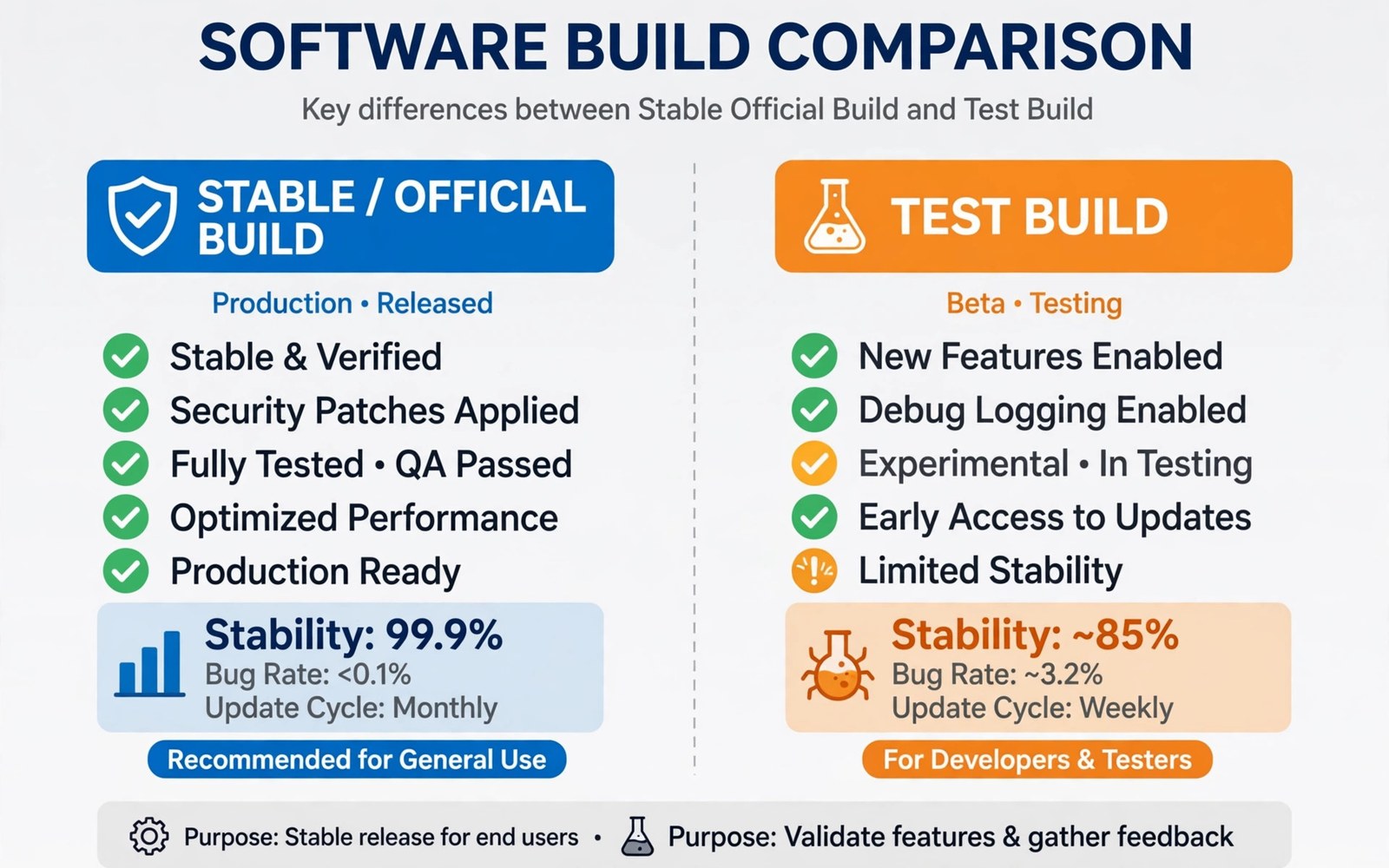
Official builds come from a project maintainer for your device. They pass project checks and appear on the official download page. Unofficial builds come from other developers who adapt the project for a device. Both can work well. Their support and update paths differ a lot. This article helps you choose with eyes open.
Stability means more than booting to the home screen. It means calls work and the camera works and battery use stays sane. It means updates arrive without breaking features. It means bugs get fixed by someone who still owns the device. Judge a build by that full picture.
Official status does not guarantee perfection. An official build can still have a device quirk. Unofficial status does not guarantee poor quality. A skilled developer can maintain an excellent unofficial build. The label tells you about process and support. It does not replace testing on your own phone.
Read device threads before choosing. Look for recent reports from users with your exact model. Look for maintainer replies to bug reports. A lively thread with honest bug lists beats a silent thread with bold claims. Choose the build whose support pattern you trust.
When you are ready to go further, read about fixing sensor and camera issues after flashing and compare it with the plan you made for your own phone.
What Official Status Actually Means
An official maintainer owns the device tree for the project. The project reviews changes before release. Builds appear on the official site with version history. Users can report bugs in a shared tracker. That structure helps long term maintenance.
Official builds usually receive regular updates on a schedule. Security fixes arrive with those updates. The maintainer tests builds on real hardware when possible. That testing catches device specific regressions. Official status thus signals a maintenance commitment.
What Unofficial Status Actually Means
An unofficial build is made by a developer outside the official maintainer list. The developer may be skilled and active. The build may support a device the project does not yet cover. That coverage is valuable for owners of less common models. It gives them a custom option they would otherwise lack.
Unofficial builds may update irregularly. The developer may move on without warning. Bug reports may go to a forum thread instead of a tracker. Users must judge the developer by thread activity. A recent update history is a good sign. Silence for months is a warning sign.
- Official builds offer review and regular updates
- Unofficial builds can cover unsupported models
- Check release dates and patch levels
- Test daily features for two days
- Revisit the choice as maintainers change
Compare Update And Security Support
Check the last three release dates for each build. Regular releases suggest active maintenance. Check whether security patches match recent months. An old patch level leaves known issues open. Check whether major version jumps are planned. A build stuck on an old Android version ages fast.
OTA support also differs. Official builds often include OTA updates. Unofficial builds often need manual flashing for each update. Manual updates are fine if you enjoy the process. They become a burden if you want a phone that just updates itself. Pick the workload you will actually sustain.
When you are ready to go further, read about how vendor boot images work in Treble ROMs and compare it with the plan you made for your own phone.
Compare Feature Completeness
Test hardware features on both build types when possible. Calls and VoLTE and camera quality matter most. Fingerprint and face unlock matter for daily use. Battery life over two days matters more than a benchmark score. A build that nails daily features beats a build with extra tweaks and broken basics.
Read the known issues list for each build. An honest list helps you decide. A build with no listed issues may simply lack testing. A build with a short list of minor issues may be very solid. Compare lists side by side for your model. Do not compare a list for one model with a list for another.
Judge The Maintainer And The Thread
Look at how the maintainer answers bug reports. Clear questions and timely fixes signal care. Defensive replies and silence signal risk. Look at whether the maintainer still uses the device. A maintainer who sold the phone cannot test new builds well.
Check thread age and post frequency. A thread with weekly posts is alive. A thread with a burst of posts and then silence may be abandoned. Check whether other users confirm fixes. Independent confirmations beat a single success story. Community health predicts future support.
Test Stability On Your Own Phone
Back up and flash the candidate build. Test it clean before restoring apps. Make calls and test data and camera use. Use it for two days of normal life. Note any crash or reboot or heat issue. A two day test reveals problems that a ten minute test hides.
Compare battery drain with your previous setup. Compare app launch speed and scrolling smoothness. Note any feature you miss from the old build. A build that feels good for two days is a keeper. A build that annoys you daily will not improve by itself.
When you are ready to go further, read about comparing custom ROM speed with stock firmware and compare it with the plan you made for your own phone.
Make A Decision You Can Live With
Choose official when you want regular updates and shared bug tracking. Choose unofficial when it is the only build for your model. Choose unofficial also when its maintainer is active and its thread is healthy. Either choice needs a backup and a rollback plan. Keep stock firmware ready in both cases.
Revisit your choice every few months. Maintainers change and projects evolve. An unofficial build may become official later. An official build may lose its maintainer. Staying aware keeps your phone stable over years. Stability is a habit and not a one time choice.
How Maintainers Earn Official Status Over Time
Developers usually start with unofficial builds. They test on their own device and share results. Users try the build and report bugs. The developer fixes bugs across several releases. That track record shows reliability. The project then reviews the device tree. Official status follows proven maintenance. It is earned through releases and not requested once.
Official status also requires device tree quality. Code must follow project standards. Build scripts must be reproducible. Known issues must be documented honestly. Reviewers check those details. A sloppy tree stays unofficial even if it boots. Quality gates protect users from hidden problems. They also protect the project reputation.
Maintainers can lose official status if maintenance stops. A device without updates for months may drop from the official list. Users should watch for that signal. A dropped device needs a new maintainer or an unofficial path. Status is a living signal. It reflects current care and not past glory.
Unofficial Builds Worth Trying: Green Flags
An unofficial build with frequent releases deserves attention. Weekly or monthly releases show active care. Detailed changelogs show thoughtful work. Prompt bug replies show user respect. Independent user confirmations show real testing. Those green flags together outweigh the unofficial label. A build with all four is often excellent.
Source availability is another green flag. A developer who publishes device sources invites review. Open sources let other developers help. They also let users verify claims. Closed unofficial builds deserve caution. You cannot audit what you cannot see. Transparency is a practical safety feature. It is not just a philosophy.
Device specific testing matters more than generic praise. Look for reports from your exact model and variant. A build praised on one model may fail on another. Hardware differences explain that gap. Trust reports that name codename and version. Vague praise without details helps nobody. Specific evidence beats enthusiasm.
Build Stability Across Android Version Generations
Stability changes when Android itself changes generations. A stable ROM on one Android version may struggle on the next. New framework features stress old device trees. Maintainers need time to adapt trees. Early builds of a new generation often carry regressions. Patient users wait for later builds. Early adopters accept regressions as testing cost. Generation jumps reward patience more than any other update type.
App compatibility also shifts across generations. Apps target new Android APIs over time. Old ROM versions lose app support gradually. New ROM versions gain app support. That pressure pushes users to update. Balance app needs against stability needs. A stable old version with working apps may beat a buggy new version. A buggy new version with required apps may still win. Priorities decide the balance.
Security support ends for old generations eventually. Patch backports stop after a point. Staying on an old generation then risks security. Plan generation jumps before support ends. Read project roadmaps for end dates. A planned jump beats a forced jump. Forced jumps happen under app or security pressure. Planned jumps happen on your schedule. Schedule control is valuable.
Community Signals Beyond Build Labels
Download counts can signal build popularity. High counts suggest many users trust the build. Low counts may mean a new build or a niche device. Popularity alone does not prove quality. A popular build can still have a device quirk. A niche build can be excellent for its few users. Use counts as one signal among many. Combine counts with thread activity and changelogs. Combined signals beat any single signal.
Bug tracker activity reveals maintainer responsiveness. Open bugs with recent comments show active triage. Open bugs without comments for months show neglect. Closed bugs with fix notes show progress. Read a sample of bugs before choosing. A tracker with honest open bugs beats a tracker with hidden bugs. Transparency about flaws signals confidence. Hidden flaws signal risk. Choose transparency.
User reviews in threads need careful reading. Enthusiastic reviews without details help little. Detailed reviews with versions and tests help a lot. Negative reviews without details also help little. Look for reviews that name codename and build date. Look for reviews that describe tests performed. Detailed evidence from strangers still beats vague praise from friends. Evidence quality matters everywhere.
adb shell getprop ro.build.version.security_patch
adb shell getprop ro.lineage.build.version
adb shell getprop ro.product.device
adb reboot recovery
The steps above follow the approach described in the official developer documentation for this platform and in the project guides that explain build status.

