

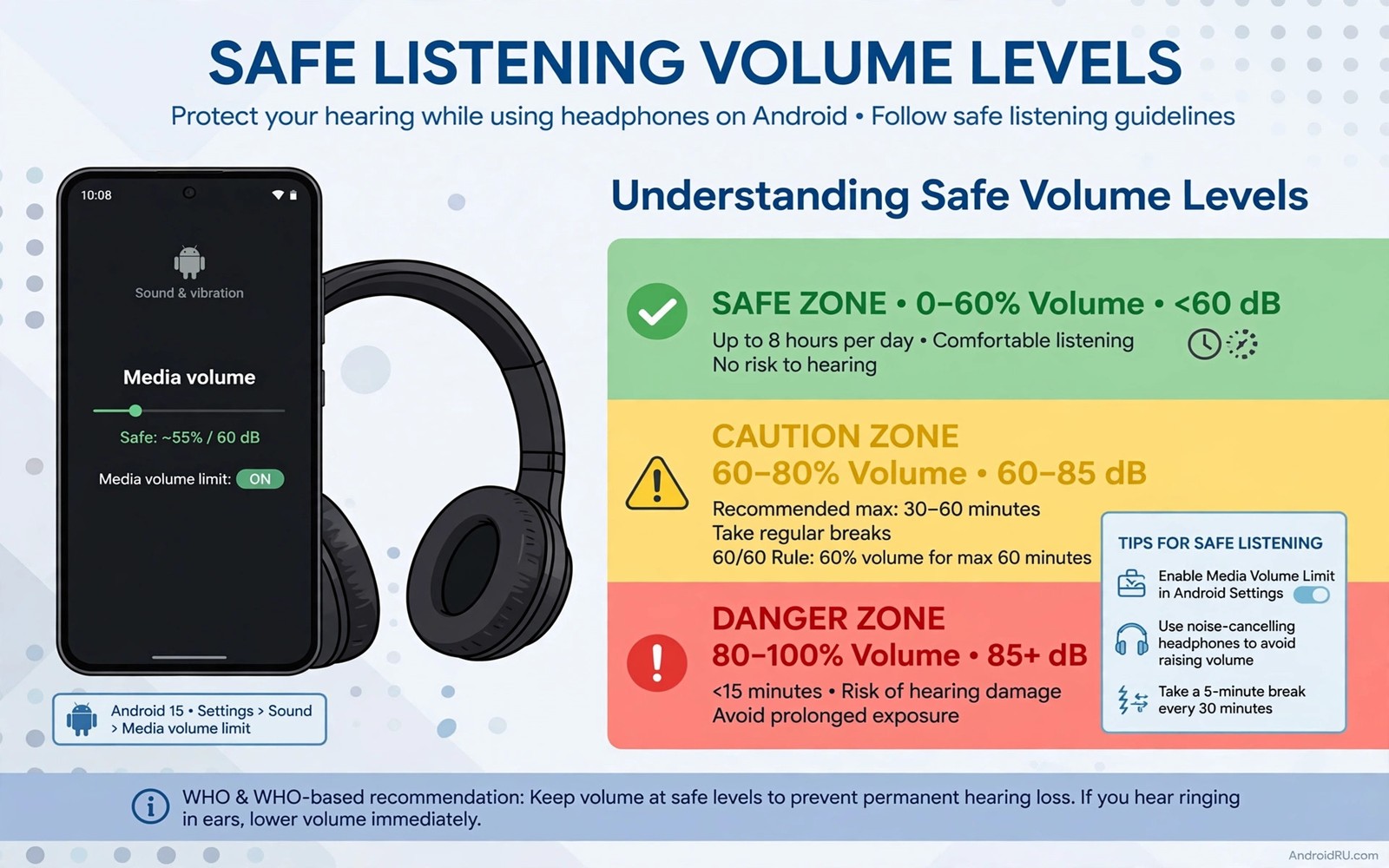
Sudden loud volume is the most damaging everyday audio event. A quiet song followed by a loud track can blast the ears without warning. A phone slider at maximum combined with a headphone slider at maximum can do the same. Absolute volume control helps prevent those surprises by linking the two sliders into one predictable control.
Hearing damage builds slowly from repeated loud exposure. A single loud burst rarely causes permanent harm alone. Daily loud listening over months and years does cause harm. Safe listening habits matter more than any single setting because they protect hearing across a lifetime of use.
This guide explains absolute volume in hearing terms rather than technical terms alone. You will learn how the link prevents surprises. You will learn how to set a safe daily ceiling. You will learn habits that keep listening enjoyable without risking long term damage.
How absolute volume protects your ears
Without absolute volume the phone and the headphones each keep a volume level. The phone may show half volume while the headphones sit at maximum. Switching tracks or apps can then reveal the hidden maximum suddenly. That surprise is uncomfortable and it can be harmful at high levels.
With absolute volume active one slider controls both devices. The level you see is the level you hear. There is no hidden second slider waiting to jump. That predictability is the core hearing benefit. You always know where you stand before you press play.
Absolute volume also makes volume changes smoother. A single step on the phone moves the headphone level by one predictable step. That smooth control helps you find a comfortable level quickly. It avoids the jumpy behaviour that comes from two sliders fighting each other.
Enable the link in developer options
Open Settings and then open About phone. Tap the build number seven times until developer mode activates. Return to Settings and open Developer options. Scroll to the networking section and find the switch named Disable absolute volume.
Keep that disable switch off for most modern headphones. Off means the link stays active and one slider controls both devices. Turn the disable switch on only if your headphones behave badly with the link active. Test both states with a quiet track before you decide.
After setting the link test the volume from silence upward. Start at zero and raise the slider slowly until the sound is comfortable. Note that comfortable level for daily use. That level becomes your personal ceiling for most listening.
Set a safe daily ceiling
A comfortable level for speech and music in a quiet room is a good daily ceiling. If you must raise your voice to talk over the music then the level is too high. If a nearby person can hear your headphones clearly then the level is also too high. Both signs point to a level that risks fatigue.
Use the sixty sixty rule as a starting guide. Listen at no more than sixty percent volume for no more than sixty minutes at a time. Take a break after an hour and let your ears rest. That rule is simple and it fits most daily listening without strict measurement.
Check the phone safe listening warning if it appears. That warning exists because the level has stayed high for a while. Do not dismiss it automatically. Lower the volume for a few minutes and let the warning clear naturally. A secret setting for low Bluetooth headphone volume explains the same link from the loudness side.
Build habits that protect hearing long term
Take listening breaks during long sessions. A ten minute break each hour gives ears time to recover. Breaks also improve judgement because the ear adapts to loud sound and stops noticing its own fatigue. Fresh ears hear detail at lower volumes.
Use noise isolating ear tips in noisy places instead of raising volume. A good seal blocks street noise and lets you listen lower. Raising volume to beat traffic noise is a losing battle that harms hearing. Isolation wins that battle without extra loudness.
Keep a separate lower profile for late night listening. Night listening often creeps upward as the house quiets. A saved quiet profile prevents that creep. For personal tuning read about custom tuning sound profiles for your ears.
Test the link with a safe routine
Start with both devices silent and the link active. Raise the phone slider one step at a time and listen for a smooth increase. The sound should rise evenly without sudden jumps. A jump suggests the link is not active or the headphone has its own volume memory.
Reconnect the headphones and repeat the test. Some headphones restore a saved level on reconnection. If the level jumps after reconnection then lower it at once and note the behaviour. That note helps you avoid the same surprise next time.
Link state: disable absolute volume off
Start level: zero before first track
Daily ceiling: comfortable speech level
Break rule: ten minutes each hour
Reconnect test: check level after pairing
The routine above is an original illustration created for this guide. It uses only general safe listening practice and standard Android setting names. It is meant as a quick hearing safety check rather than medical advice.
Recognise early signs of hearing fatigue
Hearing fatigue shows as a dull feeling after listening or a need to raise volume to hear detail. Tinnitus after a loud session is a warning sign that should not be ignored. Rest ears fully after such a session and lower the daily ceiling for the next week. Repeated warnings without change can lead to lasting harm.
Fatigue also affects judgement during tuning. A tired ear prefers brighter and louder sound because it has lost sensitivity temporarily. Avoid final tuning decisions after a long loud session. Wait until the next morning with fresh ears before saving a profile.
Keep a simple listening diary for a week if fatigue recurs. Note volume levels and session lengths and symptoms. A diary reveals patterns that memory hides. It may show that a particular commute or game session drives most of the fatigue.
Teach safe listening to family members
Children are especially vulnerable to loud headphone use because they may not notice gradual harm. Set a volume limit on a child phone when the device supports it. Explain why the limit exists in simple terms. A limit that feels like a rule without reason will be bypassed.
Model safe listening yourself by keeping volume moderate in shared spaces. Family members copy habits they see daily. A parent who listens at a comfortable level teaches more than a lecture about hearing. Shared quiet listening can become a family habit.
For volume step control that helps safe levels read about adjusting volume in smaller granular steps. Fine steps make it easier to land on a comfortable level. That precision supports the safe habits in this article.
Use volume limits for children and guests
A volume limit protects guests who borrow your headphones for a short listen. A guest may not know your comfortable level and may start playback at maximum. A preset moderate level prevents that surprise. Set the level before handing over headphones.
Children need a stricter approach because they may listen for hours without noticing fatigue. Use a device volume limit when available and explain it kindly. A limit framed as protection rather than punishment is easier to accept. Regular breaks also help children build healthy habits early.
Check volume after a guest returns headphones. A guest may have raised the level during their session. Reset to your personal comfortable level before your next listen. That check prevents a loud surprise at the start of your own session.
Use different profiles for guest listening when the player supports profiles. A guest profile with a lower ceiling and a balanced equalizer is a safe default. Switching back to your personal profile takes seconds after the guest leaves. That habit protects both guest and owner.
For fine step control that makes limits easier to set read about adjusting volume in smaller granular steps. Fine steps help you land exactly on a safe ceiling. Precision supports protection better than coarse jumps.
Common mistakes
The worst mistake is disabling absolute volume without understanding the result. Two independent sliders can hide a maximum level that appears suddenly. Keep the link active unless a specific headphone proves it works better separate. Predictability protects hearing.
Another mistake is ignoring the safe listening warning. That warning appears after sustained high volume. Dismissing it and continuing at the same level defeats its purpose. Lower the volume briefly and the warning becomes a useful reminder rather than an annoyance.
People also raise volume to beat poor ear tip fit. A loose tip leaks sound and invites higher volume. Fix the seal first and the comfortable level drops at once. A good fit is hearing protection that costs nothing.
Frequently asked questions
Does absolute volume limit maximum loudness?
Absolute volume links controls rather than capping the maximum directly. The maximum can still be loud when both devices are set high. The benefit is predictability and the removal of hidden levels. Combine the link with a personal ceiling for real protection.
Why does my volume jump after reconnecting?
Some headphones restore a saved volume level on reconnection. That saved level may be higher than the phone slider shows. Check the level after every reconnection and lower it before playing a loud track. That habit prevents most surprise bursts.
Is sixty percent volume safe for everyone?
Sixty percent is a useful guide rather than a guarantee. Headphone sensitivity varies and some models play louder at the same percentage. Judge by comfort and by whether you can hear nearby speech. If speech is hard to hear then the level is too high regardless of the number.
Conclusion
Hearing protection starts with predictable volume. Absolute volume links phone and headphone controls into one honest slider. A personal ceiling and regular breaks and a good ear tip seal complete the habit. Those steps keep listening enjoyable for years.
Your concrete next step is to check developer options today and confirm that the disable absolute volume switch is off. Then start your next track from zero and raise it slowly to a comfortable level. If Bluetooth loudness is still inconsistent then follow the secret setting that fixes low Bluetooth headphone volume.

