

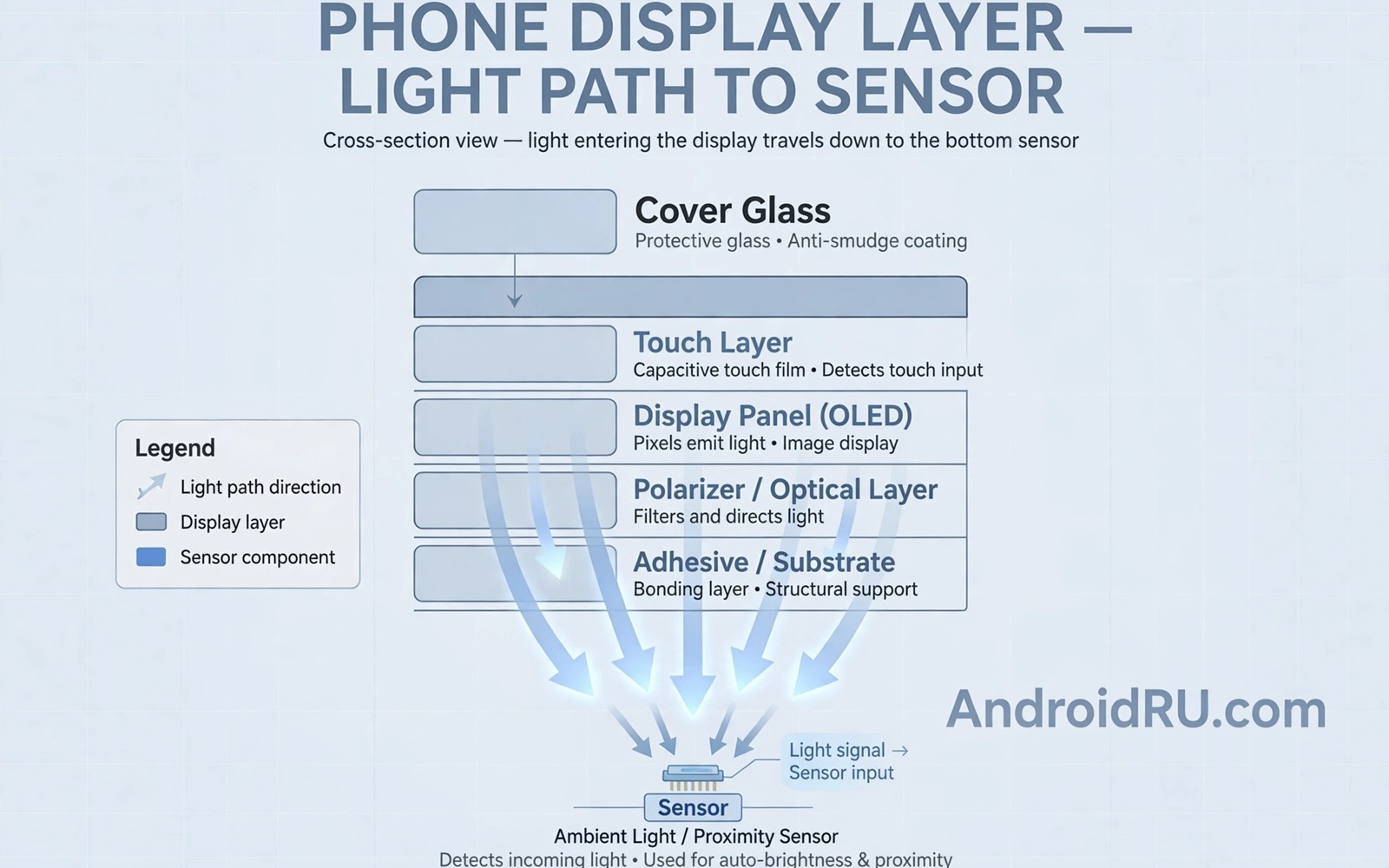
Under-display cameras hide a selfie camera beneath the screen so that a phone can offer a full display without a hole or notch. That clean look appeals to users who watch video and play games. The challenge is that light must pass through screen pixels before reaching the sensor. Those pixels scatter light and reduce sharpness and colour accuracy. A physical camera with a clear lens does not face that obstacle.
Early under-display cameras produced hazy photos with low detail in bright light and poor performance in low light. Software processing improved results by removing haze and sharpening edges. Those improvements helped but they could not fully restore light lost through the display. The question is whether hardware and software together can close the remaining gap.
How light loss affects image quality
A camera sensor needs clean light to capture detail and colour. A display above the sensor blocks part of that light and diffracts the rest. Diffraction creates a soft glow around bright objects and reduces contrast. A sensor with larger pixels can capture more light but it still receives scattered light. A display with a transparent zone above the camera helps but that zone can look different from the rest of the screen.
Manufacturers balance display quality and camera quality in that transparent zone. A zone with fewer pixels lets more light through but it can show a visible patch during normal use. A zone with normal pixel density looks seamless but starves the camera. Finding a balance that satisfies both display and camera users is the core engineering challenge.
Software processing and AI correction
Software can correct some diffraction effects by learning how light scatters through a specific display pattern. A neural model trained on that pattern can remove haze and restore contrast. That correction works best in good light where the sensor captures enough data. In low light, correction can amplify noise and create artificial textures that look unnatural.
Software also helps with colour because scattered light can shift white balance and skin tones. A tuned pipeline can restore natural skin tones for selfies. It cannot invent detail that the sensor never captured. A user who zooms into an under-display selfie will still see less fine detail than a user who zooms into a punch hole selfie from a similar sensor.
Display quality tradeoffs
A full screen without a hole looks clean for video and games. That benefit is real for users who prioritise media over selfies. A visible camera zone can distract during video playback if it shows a patch or a brightness difference. Manufacturers use pixel arrangements that try to hide the zone during normal use. That hiding works well for dark content but can fail for bright uniform backgrounds.
A punch hole camera offers a small visible dot but it delivers clear photos today. A user who takes many selfies may prefer that dot over a clean screen with hazy photos. A user who rarely takes selfies may prefer the clean screen and accept lower selfie quality. Personal priority decides which tradeoff feels acceptable.
Use cases where under-display cameras already work
Under-display cameras work well for video calls where resolution is limited by network compression. A video call at standard quality hides much of the haze that a still photo reveals. Face unlock also works because it needs shape and depth rather than photographic detail. Those use cases make under-display cameras viable for many users even before still photo quality matches a physical camera.
Social media selfies at small sizes also hide some quality loss because compression and filters reduce detail anyway. A selfie posted at a small size may look acceptable even if a full size crop shows softness. A user who prints selfies or crops tightly will notice the gap more. Use case matters as much as laboratory test scores.
What hardware advances could close the gap
Future displays may use transparent electrodes and new pixel layouts that let more light through without a visible patch. Sensors may use larger pixels and better low light sensitivity to compensate for light loss. A combination of both advances could bring under-display quality close to physical camera quality for most users. Full parity for professional level selfies remains harder because a clear lens will always pass cleaner light.
Another path is a camera that moves or a display that opens a window for the camera during capture. That mechanical approach could offer clear light during a photo and a clean screen otherwise. Mechanical parts add cost and durability risk. A solid state solution with better materials is more likely for mainstream phones.
How to test an under-display camera before buying
A buyer should test an under-display camera in bright light and low light and with skin tones. Take a selfie outdoors and indoors and in a dim room. Zoom into the photo and check hair detail and eye sharpness. Compare the result with a punch hole phone under the same light. That direct comparison reveals the gap better than a specification sheet.
Test video calls as well because many buyers use the front camera mainly for calls. A camera that looks hazy in photos may look fine in a call. A camera that fails in calls due to low light will disappoint daily. Test both use cases before deciding that a clean screen is worth the tradeoff.
Under-display cameras for security and unlock
Security uses for a front camera differ from photography uses because unlock systems need depth and shape rather than fine colour detail. An under-display camera can support face unlock even when its still photos look soft. That distinction explains why some phones with under-display cameras still offer reliable unlock. A buyer who values unlock speed over selfie detail may find the tradeoff acceptable.
Security also depends on infrared sensors and depth mapping that sit alongside the visible camera. Those sensors may not suffer the same light loss as the visible sensor. A phone with strong infrared support can unlock reliably in darkness even if its visible selfie looks hazy. Check unlock performance in darkness separately from photo performance.
Under-display cameras in future foldables
Foldable phones benefit from under-display cameras because they already use complex displays and hinges. A clean inner screen without a hole makes a foldable feel more like a tablet. That benefit may justify lower selfie quality for users who mainly use the inner screen for video and reading. A foldable user who takes many selfies can still use the rear cameras with a preview screen.
Future foldables may combine under-display cameras with improved display materials that let more light through. That combination could make the inner screen both clean and capable. Until then, a foldable buyer should test the inner camera as carefully as a standard phone buyer tests a front camera.
Common mistakes
People often judge an under-display camera only by its clean screen and ignore selfie quality until after purchase. That mistake leads to disappointment for users who take many selfies. A fair test checks both screen and camera before buying.
- Buying an under-display phone without testing selfies in low light.
- Assuming software updates will fully fix light loss through the display.
- Comparing a new under-display camera only with older under-display models.
- Ignoring video call quality when the front camera is mainly used for calls.
- Expecting a full screen phone to match a dedicated selfie camera in every condition.
A careful buyer weighs screen beauty against selfie needs. That balance leads to a phone that fits real use rather than a phone that looks perfect in a shop.
Frequently asked questions
Are under-display cameras good enough for video calls?
Under-display cameras are usually good enough for video calls because call compression hides much of the haze. Face unlock also works well with under-display cameras. Still photos show the quality gap more clearly than calls.
Test a call in low light before buying if you often call at night. Low light exposes sensor limits more than daylight.
Will under-display cameras ever match punch hole cameras?
Under-display cameras may approach punch hole quality for everyday selfies as displays and sensors improve. Full parity for detailed and low light photography remains difficult because a clear lens passes cleaner light. Most users may not notice the remaining gap in small social media photos.
Professional selfie users will likely prefer a physical camera for longer. Casual users may accept the tradeoff for a clean screen.
Should I choose a punch hole or under-display phone?
Choose a punch hole phone if selfies and video quality matter most to you. Choose an under-display phone if a clean full screen matters most and selfies are occasional. Test both in the same light before deciding.
Consider your main front camera use. Video calls favour under-display more than still photography does.
Conclusion
Under-display cameras offer a clean screen at the cost of light loss and softer selfies. Software and new materials are closing the gap for calls and casual photos. Full parity with a physical camera remains unlikely in the near term because physics favours a clear lens. Buyers should choose based on whether screen beauty or selfie quality matters more in daily life. Related coverage includes next generation display technologies and dynamic refresh rate displays and future wearable devices.
Take one concrete next step today. Take three selfies with your current phone in daylight and indoor light and low light. Decide how much detail you actually need and use that answer to judge whether an under-display camera would satisfy you.
A final check helps a buyer stay honest about priorities. Ask whether you would trade a small screen hole for sharper selfies every day. If the answer is yes, then a punch hole phone remains the better choice for now.
# Check front camera information on a connected Android device
adb shell dumpsys media.camera | grep -i -m 5 front
adb shell pm list features | grep camera
The commands above were written for this guide to show a simple way to check camera features on a connected device. They are general diagnostic examples and they do not modify the phone.

