

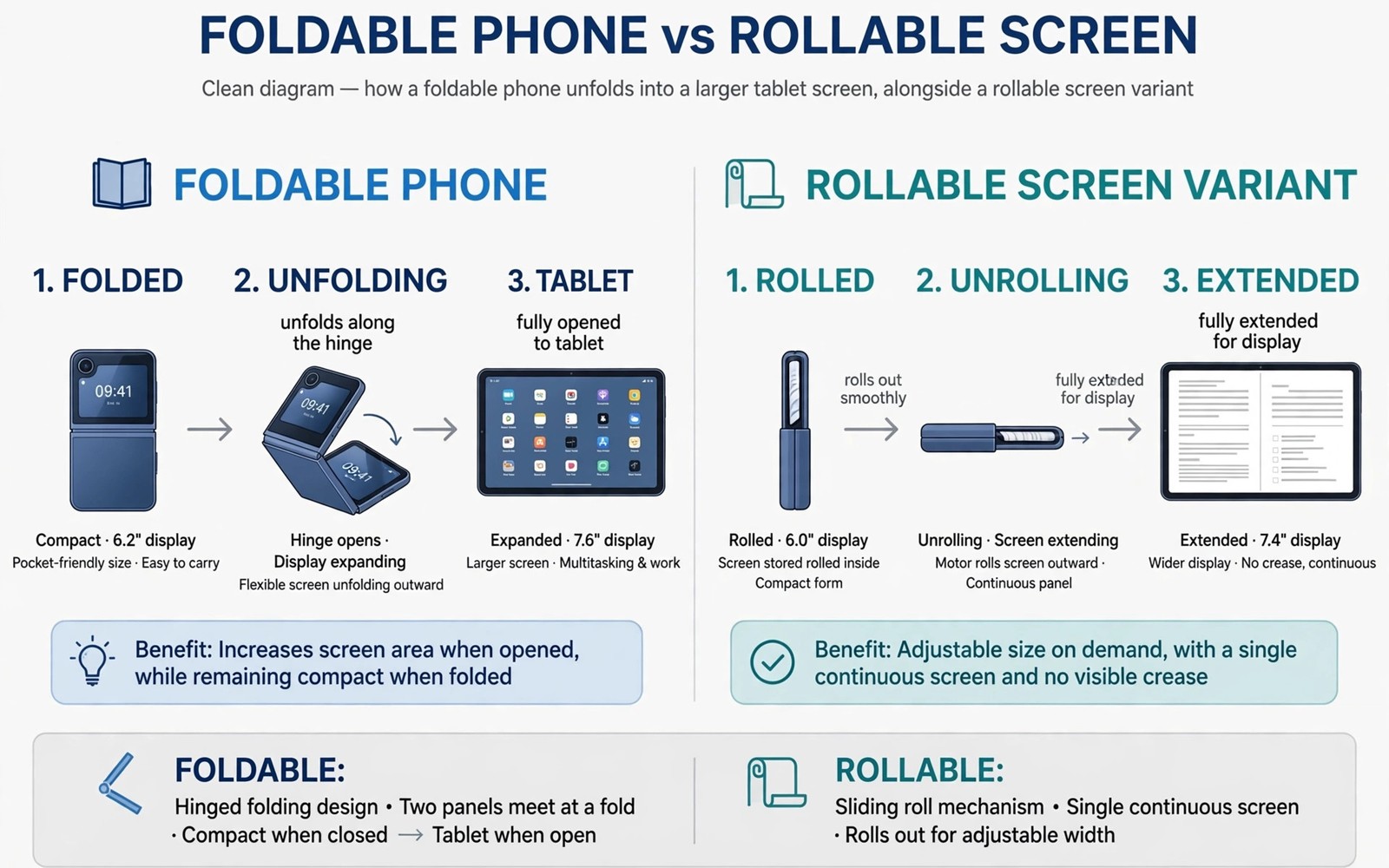
Foldable screens once felt like a novelty, yet rollable and tri fold designs now point toward a more flexible future. A phone that unfolds into a tablet offers a larger canvas without a larger pocket footprint. Rollable screens promise a similar benefit by extending rather than folding. Tri fold designs extend even further, turning a phone into a small tablet with two folds. This guide explores how these displays work and what they mean for users. The massive features overview in massive Android features coming to your phone this year places flexible displays among important hardware shifts.
Flexible displays rely on ultra thin glass or plastic layers that bend without breaking, combined with hinges that support the screen through thousands of folds. Hinge design matters as much as screen material, because a poor hinge creates creases and wear. Manufacturers have improved hinges substantially, yet crease visibility remains a topic for buyers. A foldable purchase should weigh hinge quality alongside screen size.
How foldable screens work today
Current foldables use a single fold that doubles screen area when unfolded. The folded state serves as a phone, while the unfolded state serves as a small tablet. Software must adapt layouts between states without losing user work. App continuity across fold states determines whether a foldable feels like one device or two awkward modes.
Crease visibility varies by model and by hinge design, with newer models reducing but not eliminating the central crease. Users notice creases most when scrolling across the fold line. Manufacturers reduce crease perception through hinge geometry and screen layers. A crease that fades in daily use matters less than a crease that distracts constantly.
What rollable screens add
Rollable screens extend by unrolling from a compact body, offering variable screen sizes rather than only two states. A rollable phone could extend slightly for video or further for reading, adapting size to task. Variable sizing is a genuine advantage over fixed fold states. Users gain a continuum of sizes rather than a binary choice.
Rollable durability faces unique challenges, because the rolling mechanism must protect the screen edge during extension and retraction. Dust and debris pose risks to a moving screen edge. Manufacturers must prove rollable durability through extensive testing before mass adoption. Rollable promise is exciting, but durability proof will decide its fate.
Tri fold designs and their trade-offs
Tri fold designs use two folds to create a larger unfolded area from a phone sized body. The larger area suits multitasking and document work better than a single fold. Two folds also add complexity, weight and thickness when folded. A tri fold phone may feel bulky in a pocket despite its unfolded advantage. Size trade-offs will determine whether tri folds suit mainstream users or remain niche tools.
Software for tri folds must handle three screen states and multiple aspect ratios, which challenges app developers. Apps that adapt poorly will look stretched or cramped in intermediate states. Developer support will decide whether tri fold hardware fulfils its promise. Hardware without software support feels like a demo rather than a daily tool.
Software continuity across flexible states
Software continuity is the key test for any flexible display, because users expect work to survive a fold or an unroll without restart. A document should stay open and a video should keep playing through a transition. Continuity failures frustrate users more than crease visibility. Test continuity with your most used apps before buying a flexible phone.
Multitasking benefits most from flexible displays, because a larger unfolded screen supports two or three apps side by side. A tri fold screen can show a document and a notes app and a chat simultaneously. That multitasking advantage appeals to professionals and students. The buttonless future discussion on how future smartphones will look without physical buttons also shows how interaction design evolves with new forms. Flexible hardware plus thoughtful software together create a new workflow.
Durability and daily life
Durability testing for flexible phones includes fold cycles and drop tests and dust exposure. Manufacturers quote fold cycle numbers in the hundreds of thousands, suggesting years of normal use. Real world durability also depends on user habits, such as pocket debris and case use. A protective case designed for a foldable helps, yet it may add bulk that defeats the slim promise.
Repair costs for flexible screens remain higher than for rigid screens, because the display assembly is more complex. A cracked flexible screen may cost substantially more to replace. Buyers should check repair pricing before committing to a flexible phone. Total ownership cost includes potential repair, not only launch price.
Who benefits most from flexible displays
Professionals who read documents and multitask benefit most, because a larger screen improves productivity without carrying a tablet. Travellers also benefit, because one device replaces a phone and a small tablet in a bag. Casual users who mainly message and browse may gain less, because a standard phone already serves those tasks well. Benefit depends on workflow, not on novelty alone.
Creators benefit from a larger canvas for editing photos and videos on the go, although colour accuracy and brightness still matter more than size alone. A flexible screen that sacrifices brightness for flexibility may disappoint creators. Check display quality metrics alongside flexibility claims. Size without quality is a poor trade for visual work.
A flexible display buying checklist
Use this checklist before buying a foldable or rollable phone, so novelty does not override daily usability.
Continuity: apps survive fold and unfold without restart
Crease: crease visibility checked during scrolling, not only in photos
Durability: fold cycles and repair pricing reviewed
Software: multitasking tested with your daily app pair
Pocket: folded thickness and weight tested with your case
The code above is an original example written for this guide. It shows one practical way to apply the idea in this article. You can adapt the wording and the values to fit your own phone and your own routine.
Flexible displays for reading and work
Reading benefits greatly from flexible displays, because a larger unfolded screen shows more text with less scrolling. A reader who unfolds a phone into a tablet shape gains a comfortable reading area without carrying a second device. Reading comfort improves further when software adapts font size and margins to the unfolded width. Flexible reading could replace dedicated e readers for some users, although battery and glare differences remain.
Work documents also benefit, because a larger screen shows full pages without constant zooming. A professional reviewing a contract on a tri fold screen can see context that a phone screen hides. Document work on a flexible phone still trails a laptop, yet it improves mobile productivity substantially. Flexible displays narrow the gap between phone and laptop for document tasks.
Flexible displays and battery life
Larger flexible screens consume more power when unfolded, because more pixels need lighting and driving. Battery life therefore depends on how often a user unfolds the device and for how long. A user who unfolds rarely will see little battery penalty, while a user who stays unfolded all day will drain faster. Usage pattern determines battery impact more than screen technology alone.
Manufacturers address battery impact with larger batteries and adaptive refresh rates that lower power when content is static. Adaptive rates help most during reading, where screen content changes slowly. The satellite connectivity discussion on whether satellite connectivity will become standard on every Android phone shows how new hardware features also face power trade-offs. Power management remains a central challenge for every new phone capability.
Choosing between foldable and rollable
Choosing between foldable and rollable designs depends on whether you prefer a simple two state device or a variable size device. Foldables offer a predictable phone to tablet transition that software already supports well. Rollables offer variable sizing that adapts to each task, but software support remains less mature. Predictability favours foldables today, while flexibility favours rollables in the future.
Test both form factors in a store when possible, focusing on pocket feel and one handed use in the compact state. A device that feels awkward folded will frustrate daily, regardless of its unfolded brilliance. Compact state comfort matters because phones spend most time folded or rolled. Daily comfort should outweigh unfolded spectacle in a purchase decision.
Common mistakes
The most common mistake is buying a flexible phone for novelty without testing continuity with daily apps. A device that restarts apps on folding will frustrate quickly. Another mistake is ignoring repair costs for flexible screens. Repair pricing can surprise buyers after an accident.
- Do not judge a foldable only by unfolded size without testing folded pocket feel.
- Do not ignore crease visibility during scrolling in real use.
- Do not assume every app adapts well to flexible screen states.
- Do not skip repair pricing checks before buying a flexible display.
A final mistake is expecting rollable phones to be mainstream immediately. Rollable durability proof will take time, and early models will carry premium prices. Patience may deliver better rollable value in later generations.
Frequently asked questions
Are foldable screens durable enough for daily use?
Modern foldables survive hundreds of thousands of folds in lab tests, suggesting years of normal use. Real world durability also depends on pocket debris and case use. Check repair pricing as part of the durability picture.
Will rollable phones replace foldables?
Not necessarily, because rollables and foldables offer different size trade-offs. Rollables offer variable sizes, while foldables offer a simple two state experience. Both may coexist for different user preferences.
Do all apps work well on tri fold screens?
No, because tri fold screens introduce multiple aspect ratios that apps must support. Well adapted apps work beautifully, while unadapted apps may look stretched. Test your most used apps before buying a tri fold device.
Conclusion
Foldable screens lead toward rollable and tri fold displays that offer larger canvases from pocket sized bodies. Software continuity and durability and repair costs will decide whether flexible displays become mainstream or remain premium niches.
Your concrete next step is to test a foldable phone with your two most used apps this week. Check continuity across folds and note crease visibility during scrolling before you consider a purchase.

