

Your phone restarts while you read a message and it restarts again while it sits untouched on a table. You lose unsaved work and you miss calls during each reboot. Random restarts feel serious because they suggest a hardware fault even when the cause is software.
A phone restarts when a critical process crashes or when power delivery fails for a moment. A faulty app can crash the system process that it depends on. A weak battery can dip under load and force a shutdown. A bad update can also leave system files in a state that triggers a reboot loop. Random restarts deserve attention early because the same instability can harden into a phone stuck on the boot logo, where recovery takes far longer.
This guide helps you isolate the trigger without wiping your data first. You will test in safe mode and check battery health and review recent changes. Keep a simple log of when restarts happen so patterns become visible.
Log the pattern before you change anything
Note the time and the app in use for each restart for two days if you can. A restart that happens only during gaming points to heat or battery load. A restart that happens only at night points to a scheduled task or an update. A restart with no pattern points to a deeper system or battery fault.
Check whether the phone feels hot just before it restarts. Heat can trigger a protective shutdown that looks like a random restart. If heat is present then stop gaming and charging at the same time and test again in a cool room.
Look at the battery percentage at each restart. A phone that restarts at thirty percent with a sudden drop to zero likely has a failing battery. A phone that restarts at ninety percent likely has a software trigger instead.
Test in safe mode to isolate apps
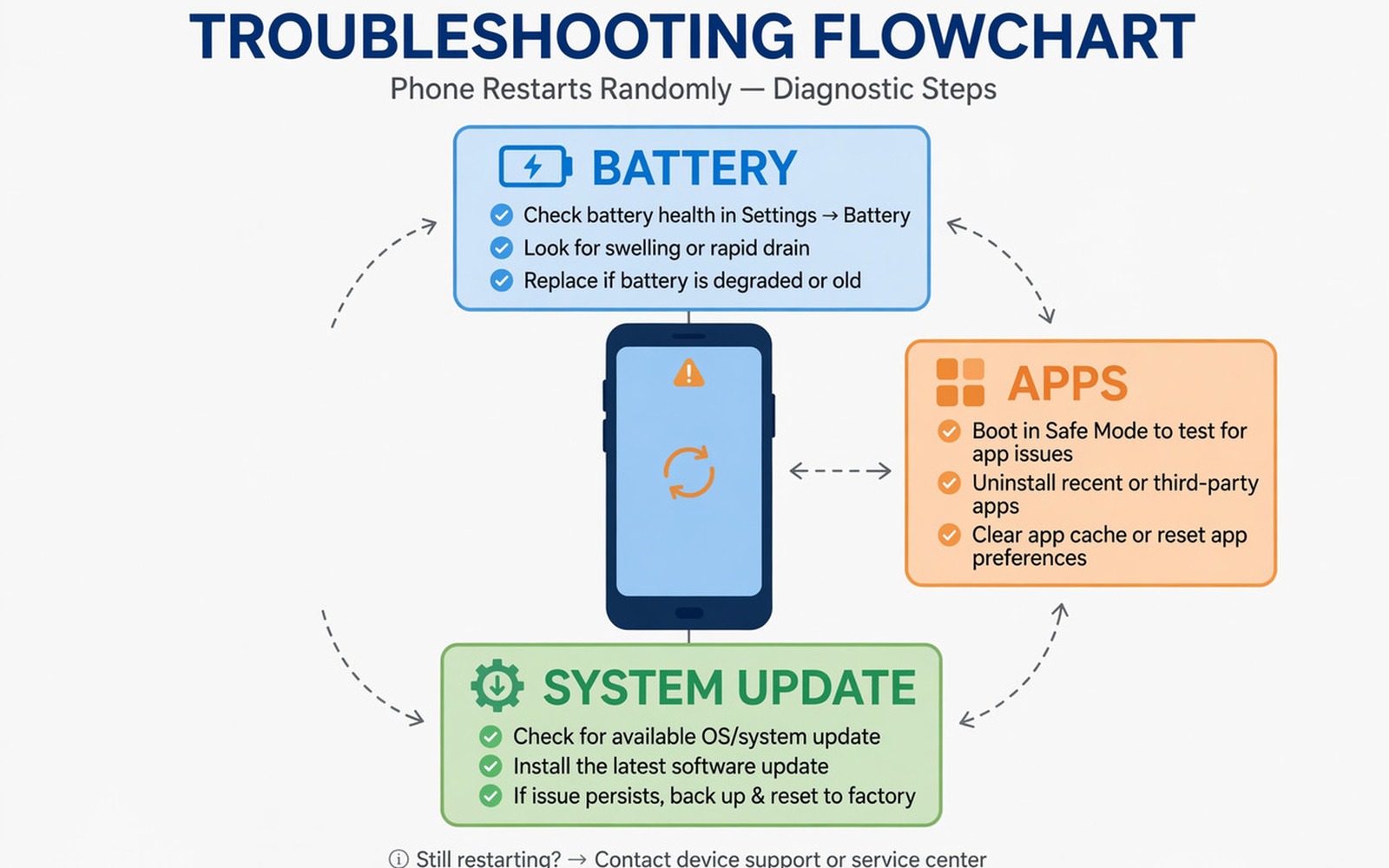
Boot into safe mode using the power menu option on most Android phones. Safe mode disables third-party apps and leaves only system apps running. Use the phone in safe mode for a few hours and see whether restarts stop.
If restarts stop in safe mode then a third-party app is the trigger. Restart normally and uninstall recently installed or updated apps one by one. Start with apps that request deep system access or that run constantly in the background.
If restarts continue in safe mode then the fault sits in the system or the hardware. Do not uninstall system apps at random because that can make the problem worse. Move to battery and update checks instead.
Check battery and storage health
Open Battery settings and look for a sharp drop in the usage graph around each restart. A vertical drop suggests the battery cannot hold voltage under load. A repair shop can test battery health more accurately than a settings screen.
Free up storage if the phone is nearly full. A phone with almost no free space can crash system processes that need temporary files. Keep at least a few gigabytes free and move large videos to cloud storage or a computer for the test.
Remove a swollen battery risk at once if the back cover lifts or the screen separates from the frame. Do not charge a phone with a swollen battery. Seek professional replacement immediately because a swollen battery is a safety issue. If charging heat also troubles you then the steps for fixing slow overheating charging on Android can help you separate heat from a restart fault.
Fix update and system faults
Check for a system update that fixes a known reboot bug. Install the update on Wi-Fi with the phone charged above fifty percent. A failed update can itself cause restarts so avoid interrupting the update process.
Clear the cache partition from recovery mode if your phone model supports that option. Cache clearing removes temporary system files without deleting your personal data. Follow your model recovery instructions carefully and do not choose a factory reset by mistake.
Back up your data before you consider a factory reset. A factory reset is the last software step and it removes all apps and settings. Restore apps slowly after a reset so a faulty app does not return at once and restart the cycle.
adb shell dumpsys batterystats
adb logcat -d | grep -i reboot
adb shell settings get global auto_restart
The commands above were prepared for this guide and they use only standard tools that ship with Android developer tools. They show battery statistics and recent reboot clues for advanced users who want evidence before a reset.
While you work through these steps it helps to compare symptoms with other fixes in the same area. For example the steps for slow overheating charging problems show how a related fault behaves differently and the steps for battery drain after an update help you rule out a second fault that shares early symptoms.
Common mistakes
One common mistake is factory resetting the phone on the first restart. A reset erases your log and it can hide a battery fault that returns after restore. Test in safe mode first. Another mistake is ignoring heat and continuing to game while charging.
Another mistake is installing a battery saver app that promises to stop restarts. Those apps often run constantly and add load that can trigger more restarts. Use built-in battery settings instead of a third-party saver.
A third mistake is replacing the screen or another part when the battery is the real fault. A battery test is cheaper than a screen replacement and it gives a clear answer. Ask for that test before authorising other repairs.
A week-long restart log that proves the fix
Write down every restart with the time and the app open and the battery percentage for a week. A log turns random events into a pattern that you can act on. Restarts during the same game each evening point to heat or battery load. Restarts at the same night hour point to a scheduled task or an update process.
Use safe mode for one full day in the middle of the week if restarts continue. A safe mode day without restarts is strong evidence for a third-party app fault. A safe mode day with restarts points to system or hardware and it saves you from uninstalling apps at random.
Compare restart frequency before and after each major change. Uninstalling one app should change the frequency clearly if that app was the trigger. If frequency stays the same after several uninstalls then battery or system causes deserve more attention than apps.
Long-term habits that prevent random restarts
Keep free storage above a few gigabytes at all times. A full phone can crash system processes that need temporary space. Moving large videos to a computer once a month prevents that slow slide toward full storage.
Install app updates promptly but watch for a new crash pattern after an update. An update that introduces restarts should be reported quickly and rolled back if the store allows it. A habit of noting restart dates helps you link a new fault to a recent update.
Replace a battery that shows sudden percentage drops before it causes frequent restarts. A weak battery can dip under load and force shutdowns that look like software faults. Early battery testing is cheaper than repeated software resets.
What to do when restarts continue after safe mode
Check for a recent system update that introduced the restart pattern. A restart that began the day after an update points to that update as a trigger. Search update notes for known reboot issues and look for a patch that follows the major update. A patch often arrives within weeks.
Test the phone without a memory card if it uses one. A corrupt memory card can crash system processes that read it. Removing the card for a day is a cheap test that many users overlook. If restarts stop without the card then replace the card and restore its files from backup.
Monitor battery temperature during normal use for a few days. A battery that heats quickly under light use may be failing even when the percentage looks normal. A repair shop can measure battery internal resistance more accurately than a settings screen.
Back up data daily while restarts continue. Frequent restarts increase the risk of file corruption during a write. A daily backup protects photos and documents if a restart corrupts storage.
Testing restarts with a second person watching the pattern
Ask someone who uses the phone at a different time of day to note any restarts they see. A second observer can catch restarts that you miss while you sleep or work. A pattern that appears only during one user session points to that user apps or habits. A pattern across all users points to system or hardware.
Test the phone with only essential apps installed for one day after backing up data. A minimal app test is stronger than safe mode alone because it uses normal mode without extra apps. If restarts stop with minimal apps then a removed app was the trigger. Reinstall apps slowly to find the exact trigger.
Test the phone on a different charger and in a different room for a day. A faulty charger can cause voltage dips that look like random restarts. A room change removes heat and signal variables from the test. A restart pattern that follows the charger points to power delivery.
Test the phone without a case for a day to check heat trapping. A thick case can trap heat during gaming and charging and trigger thermal shutdowns. A case-free day that shows no restarts points to heat management. A case-free day with restarts points to deeper causes.
Check the phone storage health by moving large files off the device and testing again. A failing storage chip can crash system processes when it is nearly full. Freeing space and testing again is a simple diagnostic step. A large improvement after freeing space suggests storage pressure played a role.
Keep a written log for at least a week even after restarts seem fixed. A log proves whether a fix truly worked or whether restarts merely paused for a few days. A week without restarts is a stronger result than a single quiet day. That log also helps a repair shop if the fault returns later.
Frequently asked questions
Can a single app really restart the whole phone?
Yes when an app triggers a crash in a shared system service. Safe mode proves that pattern quickly. Uninstalling the app usually stops the restarts without a full reset.
Is a restart loop the same as a random restart?
No and the difference matters for repair. A loop restarts before you can use the phone at all. A random restart lets you use the phone for hours between events. A loop often needs recovery mode or professional repair sooner.
When should I seek hardware repair?
Seek repair when restarts continue in safe mode and after a clean update and with a healthy battery reading. That pattern points to a board or power fault. Take your restart log to the repair shop.
Conclusion
Random restarts become manageable once you log the pattern and test in safe mode. Isolate apps first and check battery and storage next and fix updates last. Keep a backup ready before any reset and restore apps slowly after it. If safe mode still restarts then book a battery and hardware test. Start today by noting the time and app for the next restart and booting into safe mode for a few hours.

