

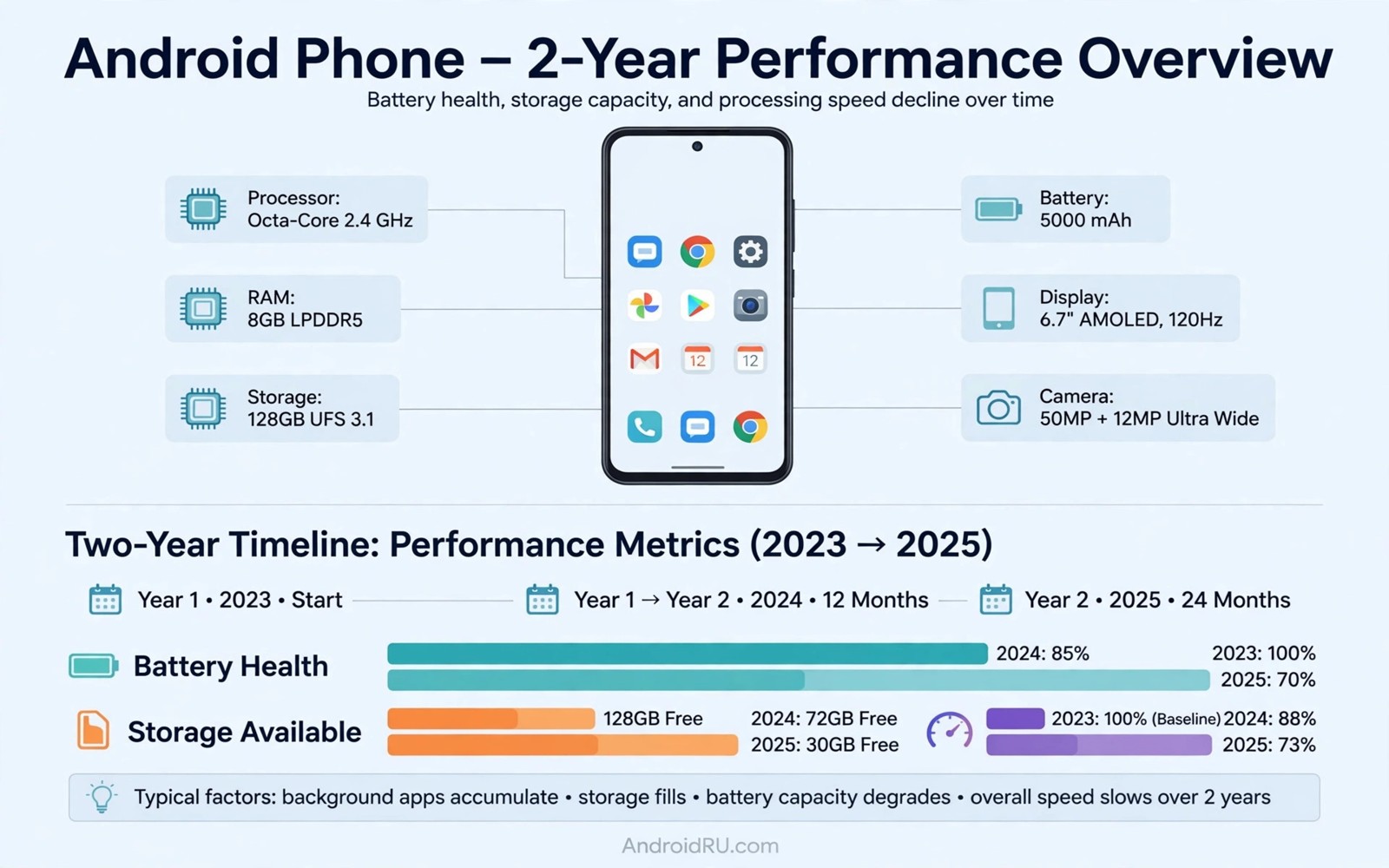
Stock Android performance after 2 years of daily usage tells a mixed story. Most phones stay usable. Some feel slower than launch day. The causes are rarely mysterious. Storage and battery and app bloat explain most slowdowns. This article separates normal aging from real problems. You will learn how to restore speed.
Two years of daily use changes any phone. Apps grow heavier and storage fills. Read stock simplicity versus custom skins for interface aging. Also see stock and custom ROM performance results for comparison context. Aging is manageable with routine care.
What actually slows down
Storage slowdown tops the list. Full storage forces the system to work harder. App caches grow unchecked over years. Old downloads and media pile up. Free space below ten percent hurts performance clearly.
Battery wear also affects perceived speed. Weak cells cannot sustain peak processor loads. The system may throttle to protect the battery. That throttling feels like lag. A worn battery mimics a slow chip.
What stays fast
Core system speed usually stays strong. App launches remain quick on good hardware. Scrolling stays smooth when storage is free. Camera launch stays fast on stock tuning. Google services stay optimized for stock.
Security updates keep the system current. App compatibility stays broad. Banking and payment apps keep working. That stability is a stock strength. Custom ROM users trade some of it for control.
App bloat over two years
Users install dozens of apps over two years. Many run background services forever. Social apps wake the phone often. That background load drains battery and slows launches. Auditing apps restores surprising speed.
Remove apps you have not opened in months. Disable background use for chatty apps. Turn off unused notifications. Each small cut helps. The phone feels lighter within days.
Storage and cache routine
Free storage regularly for best speed. Delete old videos and downloads. Clear large app caches monthly. Move photos to cloud or computer. Keep at least fifteen percent free when possible.
Avoid storage cleaner apps that promise miracles. Manual cleanup works better. Check storage settings for large items. That built in view names the true culprits. Trust system tools over cleaner hype.
Battery health after two years
Battery capacity drops with charge cycles. Two years of daily charging costs capacity. Heat accelerates that loss. Fast charging adds heat. Those factors combine over time.
Check battery health in settings where available. Replace the cell if capacity is poor. A fresh battery often restores peak speed. That repair costs less than a new phone. It also extends stock life further.
When a reset beats tweaks
A factory reset restores launch day software cleanliness. It removes years of clutter at once. Back up first since reset wipes data. Also weigh reviving an old phone with a custom ROM if reset alone disappoints. A reset plus a fresh battery revives many phones.
Reset only after trying cleanup steps. Cleanup solves most slowdowns. Reset suits phones with deep clutter. After reset install apps selectively. That discipline preserves the fresh feel.
adb shell dumpsys batterystats | grep -i health
adb shell pm list packages -3 | wc -l
adb shell df -h /data
These commands follow the pattern shown in the official Android developer documentation for adb dumpsys and package tools. They only read battery and storage state.
A monthly maintenance routine for stock phones
Monthly maintenance keeps stock phones fast without drastic steps. Start with a storage check each month. Delete large files you no longer need. Clear caches for the largest apps. That routine takes fifteen minutes. It prevents the slow creep of full storage. Small monthly efforts beat rare heroic cleanups.
Review app permissions monthly as well. Revoke location access for apps that do not need it. Turn off background data for chatty apps. Those cuts improve battery and privacy together. They also reduce system load. Monthly permission review becomes a healthy habit quickly.
Check battery health every few months. Note capacity trends over time. A falling trend warns you before sudden shutdowns. Plan a battery replacement early. Early planning avoids emergency repairs. A fresh battery extends stock life by years on many phones.
Review update settings monthly too. Ensure security patches install promptly. Delayed patches leave known holes open. Automatic updates suit most users. Manual users must check deliberately. Security deserves a calendar reminder if you update manually.
How updates change old phones over time
Major Android updates bring new features to old phones. They also bring heavier system demands. Old chips handle new demands unevenly. Some updates feel smooth on old hardware. Others introduce lag in animations. That unevenness frustrates long term owners. Test major updates on a backup first when possible. Backup testing prevents regret. Regret after an update is hard to undo.
Security updates rarely affect speed noticeably. They patch holes without adding features. Their performance cost stays small. Users should install security updates promptly. Delaying them for speed fears is misguided. Speed gains from skipping patches are tiny. Security losses are real. Install patches and keep speed tweaks elsewhere. That priority ordering serves users well.
App updates drive perceived slowdown more than system updates. Apps grow heavier each year. Old phones run new app versions slowly. Developers target new hardware in testing. Old hardware becomes an afterthought. Lite app versions help on old phones. Use lite versions when available. Lite apps restore speed without system changes. That switch is easy and safe.
Google services updates also affect old phones. Play services grow in size and scope. Background services multiply over years. Disabling unused Google features helps. Review sync settings annually. Turn off services you never use. That pruning restores battery and speed. Annual pruning beats constant frustration. Small cuts compound over time.
Storage technology ages alongside software. Flash cells wear with write cycles. Worn cells slow write speeds. That slowing feels like system lag. No software tweak fixes worn storage. Users should recognise hardware limits honestly. A phone with worn storage needs replacement. Software care delays that day but cannot prevent it. Honest limits guide upgrade timing.
Two year old phones still suit most daily tasks. Calls and messaging and browsing run well. Heavy gaming and video editing strain them. Match tasks to hardware age. That matching keeps old phones satisfying. Expecting flagship gaming from old hardware disappoints. Realistic expectations preserve satisfaction. Satisfaction beats specs for daily happiness.
Storage health and long term speed
Flash storage wears with every write cycle. Writes include app installs and updates. Writes include photo saves and downloads. Heavy users wear storage faster. Faster wear slows write speeds. Slower writes feel like system lag. Lag from storage mimics processor slowness. Users blame processors wrongly. Wrong blame leads to wrong fixes. Fixes should target storage health. Health checks reveal storage state. State awareness guides decisions.
Free space buffers storage wear effects. Controllers need free blocks for wear levelling. Levelling spreads writes across cells. Spreading extends storage life. Full storage blocks levelling. Blocked levelling concentrates wear. Concentrated wear kills cells early. Early death slows phones sharply. Keep fifteen percent free always. Free space is cheap insurance. Insurance against wear costs nothing. Nothing beats free space for storage health.
App cache growth fills storage silently. Social apps cache gigabytes over months. Gigabyte caches slow storage operations. Clearing caches monthly restores space. Monthly clearing takes minutes. Minutes save hours of lag. Lag hours accumulate unnoticed. Noticed lag feels sudden. Sudden lag is actually gradual. Gradual causes hide in caches. Cache checks expose them. Exposure enables fixes.
Photo and video libraries dominate storage use. Old videos consume gigabytes quickly. Cloud backup frees local space. Local freeing needs backup verification. Verification prevents loss disasters. Disasters follow unverified deletions. Deletions without backups lose memories. Memories deserve verification first. First verify then delete. That order protects irreplaceable files. Files can be retaken never. Never risk memories carelessly.
When stock phones deserve replacement
Replacement timing depends on repair costs. Repair costs above half replacement price suggest upgrading. Upgrading buys new support windows. Support windows bring security. Security matters more than nostalgia. Nostalgia keeps old phones too long. Too long means vulnerability. Vulnerability grows after support ends. Ended support needs ROMs or replacement. Replacement is simpler for many.
Hardware faults also force replacement timing. Failing storage cannot be repaired cheaply. Failing screens cost nearly new prices. Prices guide rational decisions. Rational decisions beat emotional attachment. Attachment to old phones is understandable. Understandable attachment still costs money. Money spent on doomed repairs wastes. Waste avoidance favours replacement.
Software needs eventually exceed old hardware. New apps demand more RAM. RAM cannot be upgraded on phones. Fixed RAM caps app futures. Futures shorten as apps grow. Growth is relentless yearly. Yearly growth strains old chips. Strained chips lag daily. Lag daily frustrates users. Frustration signals replacement time.
Common mistakes
Blaming Android updates for all slowdowns misleads. App bloat and full storage cause more lag. Ignoring battery health also misleads. A worn cell throttles speed silently.
Installing cleaner apps that run constantly adds load. Those apps promise speed and consume resources. Manual cleanup beats them. Factory resetting without a backup loses data. Back up first always.
Keeping every app installed forever guarantees bloat. Audit apps quarterly. That habit keeps two year old phones fast.
Frequently asked questions
Does stock Android slow down after 2 years?
It can slow modestly due to storage and battery and app bloat. Core system speed usually holds up. Cleanup and battery care restore most lost speed. Hardware limits still apply on budget phones.
Is a factory reset worth it after 2 years?
Yes if cleanup steps fail to restore speed. Reset removes deep clutter. Back up fully before resetting. Reinstall apps selectively after reset.
Should I switch to a custom ROM for speed?
Only if stock cleanup fails and your model has a stable ROM. Custom ROMs add install risks. Try storage and battery fixes first. Those fixes solve most cases.
Conclusion
Two year old stock Android usually stays fast with basic care. Storage space and battery health decide most slowdowns. App audits restore speed without risky changes.
Your concrete next step is to free storage to fifteen percent and audit unused apps today. Note speed and battery for one week before considering a reset or a ROM.

