

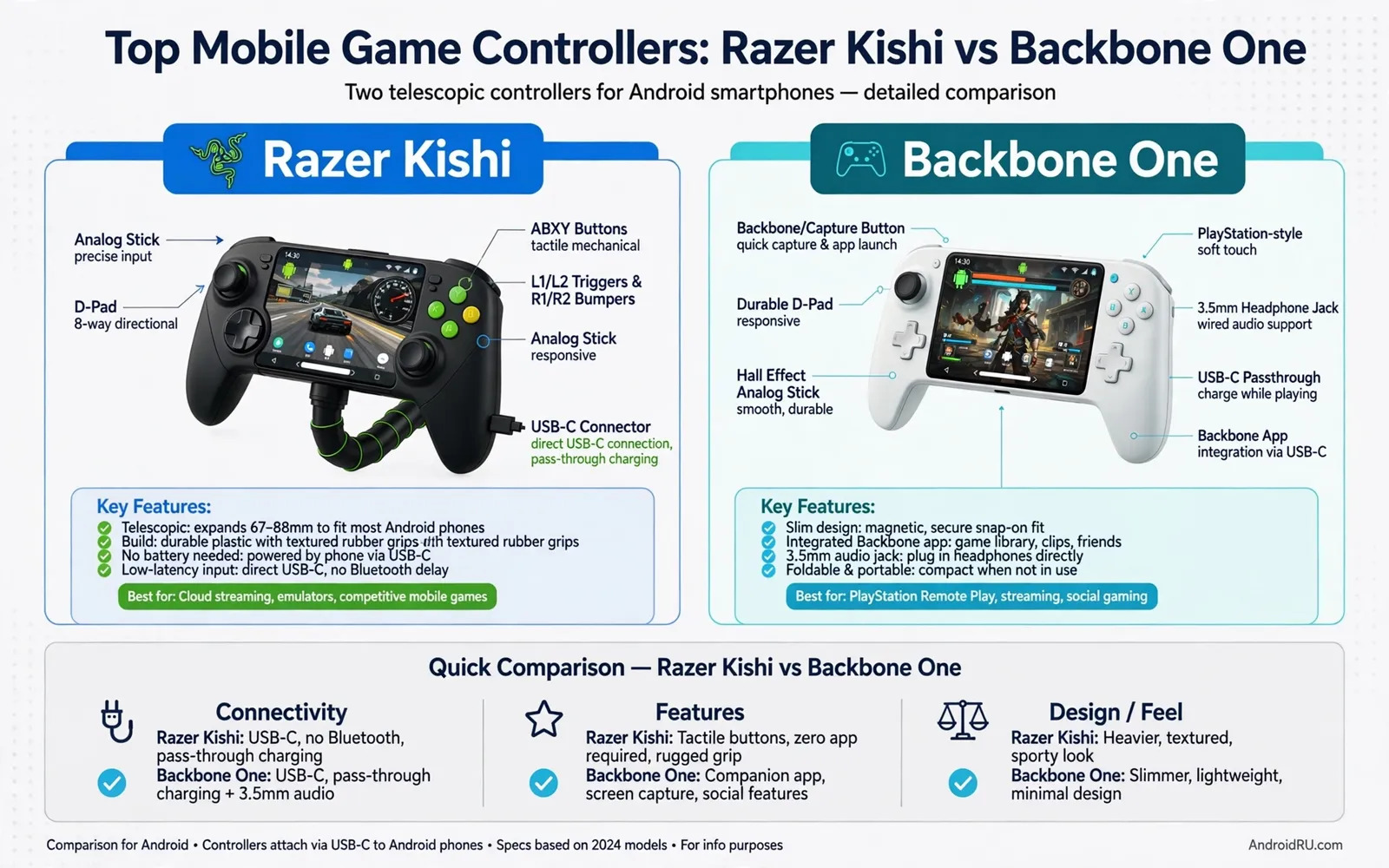
Top Mobile Game Controllers: Razer Kishi vs Backbone One
A telescopic controller stretches to hold your phone in the middle. It turns a phone into a handheld console shape. Your hands grip controllers on both sides. Your thumbs reach sticks and buttons naturally. That shape beats touch controls for many games, because touch controls cover the screen with fingers while physical buttons leave the screen fully visible. Physical sticks offer finer movement control, physical triggers offer finer aim control, and long sessions feel less tiring with a proper grip. Short sessions feel more precise with real buttons.
Both controllers in this comparison use this telescopic shape. They differ in fit, feel, and features, and they differ in phone compatibility. This guide compares the Razer Kishi V2 and the Backbone One head to head, so you can choose the one that fits your phone, your games, and your hands. Prices are around 99 dollars for each in most regions, with the Kishi V2 Pro and the Backbone One PlayStation Edition at similar prices, so check the current price before you buy. Check your exact phone model before buying either one: a controller that cannot stretch enough will not fit, and a controller that fits loosely will wobble during play.
What a Telescopic Controller Changes
Connection type shapes latency and convenience. A direct USB-C connection links controller and phone physically. That link usually offers very low latency, and it draws no extra battery for wireless pairing. A Bluetooth connection offers wireless freedom, but it may add small latency in fast games, and it needs separate charging for the controller. Both models in this guide focus on direct USB-C connection for Android in their main versions, so neither needs charging and neither adds wireless lag.
Check the exact version before purchase. Some versions target a different phone system, and a version for another system may not work on Android. Read the box for Android support explicitly. The Razer Kishi V2 USB-C works with Android phones, while the older Lightning version does not. The Backbone One second generation USB-C works with Android, while the first-generation Lightning version does not. Test the controller on your phone during the return window. That test confirms fit, connection, and game support in one session.
Razer Kishi vs Backbone One: Head-to-Head Comparison
| Feature | Razer Kishi V2 (USB-C) | Backbone One 2nd Gen (USB-C) |
|---|---|---|
| Price | About $99 | About $99 |
| Connection | USB-C direct, very low latency | USB-C direct, very low latency |
| Pass-through charging | Yes, USB-C port | Yes, USB-C port |
| Headphone jack | No (V2 Pro adds 3.5 mm) | Yes, 3.5 mm built in |
| Haptics | No (V2 Pro adds HyperSense) | No |
| Case compatibility | Tight fit, case usually off | Magnetic adapters fit many cases |
| Companion app | Razer Nexus, optional | Backbone app, central to experience |
| Capture button | No dedicated button | Yes, dedicated capture button |
| Best for | Cloud gaming and emulation | Remote play and recording clips |
Both controllers cost about the same and connect the same way, so the choice comes down to fit, feel, and the small features that matter to your games. The sections below judge each one on its own terms before giving a verdict per use case.
Razer Kishi V2: Strengths and Weaknesses
The Razer Kishi V2 is built for players who want a console feel without an app getting in the way. It uses micro-switch face buttons with a firm click, analogue triggers, and clickable sticks, and it connects over USB-C with latency so low that most players cannot feel it. The Razer Nexus app is optional: you can launch games from it, but the controller works fine without it. The Kishi V2 Pro, at a higher price, adds Razer HyperSense haptics and a 3.5 mm headphone jack.
Razer Kishi V2 pros
First, the controls feel excellent: the micro-switch buttons click firmly without mush, the triggers offer smooth analogue travel for racing games, and the sticks suit both shooters and platformers. Second, the controller is light and compact, folding small for travel. Third, it works with cloud gaming, native Android games, and emulators equally well, with no subscription and no required app. Fourth, pass-through charging keeps the phone topped up during long sessions.
Kishi V2 Pro: worth the extra money?
The V2 Pro adds haptics and a headphone jack for roughly 30 to 50 dollars more. The haptics are genuinely pleasant in supported games, and the headphone jack matters if you play with wired earbuds. If you already own good wireless earbuds and do not care about haptics, the standard V2 is the better buy.
Razer Kishi V2 cons
First, the fit is tight: most cases must come off, because the Kishi V2 grips the phone closely and leaves little room for a case. Second, there is no headphone jack on the standard V2, so wired audio needs a USB-C adapter or wireless earbuds. Third, there is no dedicated capture button, so recording clips takes an extra step. Fourth, the D-pad is good but not the best in this comparison, and fighting game players may notice.
Verdict for the Kishi V2: the best pick for players who want a clean, no-subscription controller that works everywhere, especially for cloud gaming and emulation. It is the simpler, lighter choice.
Backbone One: Strengths and Weaknesses
The Backbone One is built around its app. The Backbone app turns the controller into a game hub: it collects your games, cloud services, and clips in one place, and the dedicated capture button records and shares gameplay instantly. The second-generation USB-C model adds magnetic adapters that let many phones fit with their case still on, which is a real everyday advantage. It has a 3.5 mm headphone jack built in and pass-through charging over USB-C.
Backbone One pros
First, the app experience is the best in this category: the game hub, the capture button, and the social features make it easy to jump into a game and share a clip. Second, the magnetic adapters mean many cases stay on, which is the feature owners mention most. Third, the 3.5 mm headphone jack is built in, so wired audio just works. Fourth, the controller feels solid and balanced in the hand, with a good D-pad for retro and fighting games.
Backbone One cons
First, the best features live behind the Backbone app, and some features need a Backbone Plus subscription, which adds a recurring cost. Second, the controller is slightly heavier and bulkier than the Kishi V2. Third, the sticks are a little smaller, which suits travel but may feel cramped for large hands. Fourth, the app-first design can feel pushy if you only want a controller and nothing else.
Backbone Plus: what the subscription adds
Backbone Plus adds cloud saves for clips, extra game hub options, and occasional perks. The core controller, capture button, and game launching work without it. If you record clips often, the subscription may pay for itself in convenience; if you never record, skip it and lose nothing important.
Verdict for the Backbone One: the best pick for players who record clips, play remote play services, and want a case-friendly fit. It is the more social, more featured choice, with a subscription asterisk.
Fit, Phone Size, and Case Reality
Fit depends on phone length, thickness, and camera bump. A controller stretches to a maximum length, and a phone longer than that maximum will not fit. A thick case can push a phone past the fit limit, and a large camera bump can tilt the phone in the holder. Remove the case for a fit test first, then test with the case if you plan to use one. Some controllers include rubber pads for different thicknesses. Those pads improve grip for slim phones, but they may not help very thick rugged cases. Measure your phone with the case on and compare that measure to the controller maximum. Do not guess fit from phone brand alone: two phones from one brand can differ in length, and two cases for one phone can differ in thickness. A precise fit check saves return hassle.
Weight balance affects comfort during long play. A heavy phone plus a controller can strain wrists. A controller with a good grip distributes weight evenly, while a controller with narrow grips concentrates pressure on fingers. Hold the combined unit for twenty minutes in a test. Note wrist fatigue and finger pressure, and note whether the unit feels front heavy or balanced. A balanced unit suits long role-playing sessions, while a front-heavy unit may suit short arcade sessions only. Consider a phone stand for table play as well: a stand removes weight from hands entirely, and that setup suits long strategy sessions well, though it does not suit train or bus play. Match setup to your main play location.
Sticks, Buttons, Triggers, and D-Pad Feel
Sticks decide movement precision in most games. A stick with smooth travel offers fine control, while a stick with a dead zone feels unresponsive near centre. Test slow movement in a game world: walk slowly and turn slowly, and note whether movement starts smoothly or jumps suddenly. A good stick offers gradual speed control, while a poor stick offers only stop and full speed. Stick size also matters for thumb comfort: larger sticks suit large hands better, and smaller sticks suit travel and small hands better. Check stick tension as well. Loose sticks feel floppy during aim, stiff sticks tire thumbs during long sessions, and neither extreme suits most players. A medium tension suits the widest range of games.
Buttons and triggers decide action speed. Face buttons should click firmly without mush. Shoulder buttons should feel distinct from triggers. Triggers should offer smooth analogue travel for racing games, while a digital trigger offers only on and off. Racing games benefit greatly from analogue triggers, and shooting games benefit from fast digital response. A D-pad matters for retro and fighting games: a D-pad with clear directions prevents diagonal errors, while a mushy D-pad causes wrong moves in fast play. Test each control in a game you know well, because familiar games reveal control flaws faster than new games. Note any button that sticks or double presses, and return a unit with faulty controls at once.
Latency, Input Lag, and Game Types
Latency means delay between press and screen action. Low latency matters most in competitive games, where a small delay can decide a close match, and a large delay frustrates timing in rhythm games. Direct USB-C connections usually keep latency low on both controllers here. Bluetooth connections can vary by phone and environment, and crowded wireless areas can add interference, which is one reason both of these controllers use USB-C. Test latency in your normal play location: play a fast action game for a session and note whether actions feel instant or slightly behind. A delay you notice in menus may grow in intense scenes.
Game type changes which controller strengths matter. Shooters need precise sticks and fast triggers. Racers need analogue triggers and smooth sticks. Platformers need a precise D-pad and responsive buttons. Role-playing games need comfort for long sessions. Puzzle games need little more than basic buttons. Cloud gaming adds network latency on top of controller latency: a low-latency controller helps cloud play, but it cannot fix a slow network connection. Test cloud games on your home Wi-Fi first, then on mobile data if you play outside. A controller that feels great offline may still struggle on a weak network, and that struggle comes from network, not controller. Separate those causes before you blame hardware. Accessory pairing habits carry over from other gear: a controller connects over a direct port while audio often travels over wireless links. The way wireless earbuds for Android with active noise canceling handle Bluetooth pairing shows why a stable wireless link matters when you add a headset to a gaming session.
Battery, Pass-Through Charging, and Ports
Telescopic controllers usually draw power from the phone. That draw reduces phone battery during play, so pass-through charging matters. A USB-C port on the controller accepts a charger, and that charger powers both controller and phone in many designs. Check pass-through wattage before long sessions: a weak pass-through charger may not keep up with gaming drain, because gaming drains battery faster than video watching. A strong pass-through charger keeps battery level stable. Test pass-through charging during a real game session and note battery level after thirty minutes, and note whether the phone feels hot during charging. Heat during gaming plus charging can throttle performance, so a cooler setup maintains frame rates better. Take breaks during very long sessions to cool the device.
Port placement affects cable comfort during play. A charging port on the bottom centre suits table play, while a port on the side may interfere with grip. Check port location in product photos and imagine holding the controller with a cable attached. Note whether the cable presses against fingers or blocks a trigger. A right-angle cable can solve some placement problems by routing the cable away from hands. Keep a spare cable for controller sessions, because a broken cable can end a gaming session early. Keep controller firmware current through its companion app when available: updates can improve compatibility with new phones, and they can also change button behaviour, so read update notes before you install a major change and test favourite games again after an update.
Portability, Travel, and Everyday Carry
Portability decides whether a controller travels with you. A telescopic controller folds small when collapsed, yet it still adds bulk to a pocket. A small bag or jacket pocket suits it well, while a slim jeans pocket may not. A hard case protects sticks during travel, because sticks can bend under heavy bag pressure. A case with moulded stick wells prevents that damage. Check case availability for your controller model: some makers sell cases separately, and third-party cases may fit less precisely. Test case fit before a trip. A loose case offers little protection, and a tight case may press buttons constantly. Button presses in a bag can wake the phone and drain battery during travel, so lock the phone screen before packing the controller.
Daily carry habits also affect controller lifespan. Avoid leaving a controller in a hot car, because heat can warp plastic over time. Avoid leaving it in a damp bag after rain, because moisture can affect buttons and sticks. Clean grips with a dry cloth regularly, because sweat buildup makes grips slippery over time. Check sticks for dust around the base: dust can cause drift in stick readings, which means the stick reports movement without touch. Clean dust gently with compressed air if needed, and do not use sharp tools near stick bases. Replace a controller with severe drift through warranty when possible. Think about the full kit you carry for play. A controller travels alongside audio gear and protection for the phone itself. Portable Bluetooth speakers for Android suit shared listening after a session ends while a controller stays in the bag. A protective case for transport rounds out that kit. Heavy duty protective cases for extreme drops guard a phone that moves between bag and hands many times a day. Choose the controller that fits your phone, your games, and your bag. That three-way fit beats any single spec advantage. Good care keeps a controller precise for years.
Razer Kishi vs Backbone One: Your Questions Answered
Which is better, Razer Kishi V2 or Backbone One?
Neither is better for everyone. The Kishi V2 is better if you want a light, simple controller with no subscription and no required app. The Backbone One is better if you record clips, use remote play, and want to keep your case on. Both cost about the same and both connect over USB-C with very low latency, so the choice is about fit and features, not performance.
Do these controllers work with any Android phone?
Both work with most modern Android phones that have a centred USB-C port, but fit depends on phone length and case thickness. Check the maximum phone length for each controller and measure your phone with its case on. Some very large phones and very thick cases will not fit. Test during the return window to confirm fit, connection, and game support.
Do I need a subscription to use the Backbone One?
No. The Backbone One works without a subscription, and the app is free. A Backbone Plus subscription adds extra features such as cloud saves for clips and more game hub options, but the core controller, capture button, and game launching work without it. If you dislike subscriptions, the Kishi V2 avoids the question entirely.
Can I play any Android game with a telescopic controller?
Some games offer full controller support natively, some offer partial support for menus only, and some offer no support at all. Check support for your favourite games before buying: developer pages often list controller support, and community forums confirm real details. Emulator apps and cloud gaming apps usually support controllers well. Touch mapping apps can add support for unsupported games by mapping buttons to screen touches, though that takes setup time and works best for simple games.
Choosing Between the Two: A Verdict per Player
Choose based on fit first and feel second. A controller that fits your phone wins over a controller with more features. A controller that feels comfortable wins over a controller with a famous name. Test both controllers if a store allows it: hold each one for several minutes, press each button, move each stick, and note which grip suits your hand size, which button layout feels natural, and which trigger travel suits your games. A store test cannot replace a home game test, so use the return window for a full game test. Play your favourite games on each controller, compare comfort after an hour of play, compare latency in fast scenes, and compare battery drain during sessions. Those real tests decide the winner for you.
If you want a short answer: pick the Razer Kishi V2 for cloud gaming, emulation, and a clean no-subscription setup. Pick the Backbone One for remote play, clip recording, and keeping your case on. Pick the Kishi V2 Pro if you want haptics and a headphone jack in the Razer design. Either way, the real winner is the controller that fits your phone, survives your games, and feels good after an hour. Buy it, test it in your favourite game during the return window, and keep the one that disappears into your hands.

