

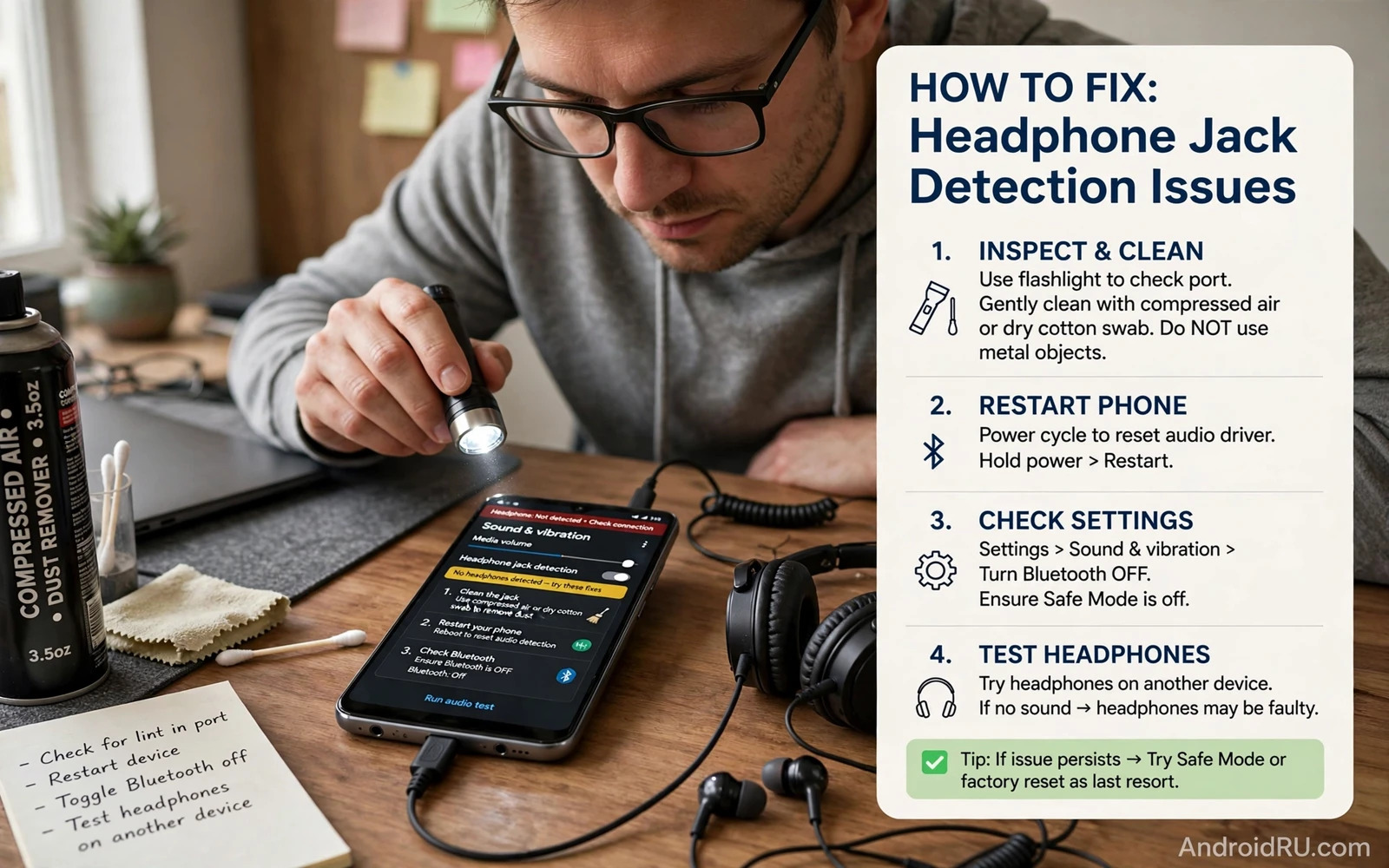
Why The Phone Misses Your Headphones
A headphone jack is a small mechanical socket with several contacts. Dust and lint and pocket fluff can sit inside the socket and stop the plug from seating fully. A bent plug or a worn cable can break contact on one channel. Software can also misroute audio when a Bluetooth device stays connected or when an app holds the audio output. The symptom looks the same in every case. Sound keeps coming from the speaker even though headphones are plugged in.
Start by testing the headphones on another device. If they fail there too then the headphones or the cable are faulty. If they work elsewhere then the fault lives in the phone or its socket. Also test a second pair of headphones on the phone. Two pairs failing on one phone points to the socket or software. One pair failing everywhere points to that pair. These two tests take a minute and prevent a long software hunt for a broken cable.
Clean The Socket Safely
Power off the phone and look into the socket with a bright light. Lint often packs into the bottom of the socket where it is hard to see. Use a wooden toothpick or a plastic pick to lift lint out gently. Never use a metal pin because metal can short the contacts or scratch them. Work slowly and check often. A small amount of lint removed can restore full contact at once.
Blow out loose dust with a short burst of dry air. Do not blow with your mouth because moisture can enter the socket. Do not pour liquid cleaner into the socket. If the socket looks corroded or damaged then stop cleaning and consider repair. Aggressive cleaning of a damaged socket makes the fault worse. A clean socket plus a plug that clicks fully into place is the goal. The plug should sit flush without wobbling.
Check Cables Adapters And Plugs
Wired headphones use different plug standards. A three-ring plug carries stereo plus microphone. A two-ring plug carries stereo only. Some phones expect one standard and misread the other. If your headphones use an adapter then test without the adapter. If the phone has no jack and you use a USB adapter then test a second adapter. Cheap adapters fail often and a second adapter quickly proves the point.
Bend the cable gently near the plug and near the earpieces while audio plays. If sound cuts in and out then the cable is breaking internally. A failing cable can mimic a detection fault because contact comes and goes. Replace the cable if it is detachable or replace the headphones if it is not. Also check for a case that blocks the plug. A thick case can stop the plug from seating fully. Remove the case and test again before you change any setting.
Fix Audio Routing In Software
Disconnect all Bluetooth audio devices before testing wired headphones. A connected Bluetooth speaker or earbuds can steal audio routing even when wired headphones are plugged in. Turn Bluetooth off fully for the test. Then plug the headphones in and play audio. If sound moves to the headphones then Bluetooth routing was the cause. Reconnect Bluetooth later only when you need it.
Check the volume and the media output setting. Open the volume panel and tap the output selector if your phone shows one. Choose the wired headphones as the output. Also check that no app has forced audio to the speaker. A video app or a call app can hold an audio route after it closes. Restart the phone to clear a stuck route. A restart is a simple fix for routing faults that survive unplugging and replugging.
Test In Safe Mode And Update Software
Boot into safe mode if the fault persists. Safe mode disables third party apps so you can test whether an app interferes with audio routing. Plug the headphones in while in safe mode and play audio. If detection works in safe mode then a third party app is likely responsible. Restart normally and remove recently installed audio apps one by one. An equaliser app or a sound booster app is a common suspect.
Check for a system update and install it. Updates can fix audio routing bugs and jack detection logic. Also update any audio related system app if the Play Store offers an update. After the update test again with the case off and Bluetooth off. A clean test removes variables and gives a trustworthy result. Readers with broader audio trouble can also read the guide to fixing speaker distortion and quiet output because speaker and jack faults sometimes share a routing cause.
When The Socket Needs Repair
A socket that feels loose or accepts the plug only at an angle may be physically worn. A socket that fails with every headphone after cleaning and software steps is likely a hardware fault. Continued forcing of the plug can damage the board behind the socket. Stop forcing it and seek repair. A repair centre can replace the socket or the small board that carries it. The cost varies by phone model and by whether the socket sits on a separate board.
While waiting for repair a USB adapter or Bluetooth headphones can keep you listening. A USB adapter uses a different port and avoids the faulty socket entirely. Bluetooth headphones avoid ports altogether. Either option is a practical bridge. Do not attempt to solder a socket yourself unless you have the tools and the skill. Phone boards are dense and heat damage spreads easily. A professional repair protects the rest of the phone.
Keep The Jack Working Longer
Store the phone with the socket facing up when possible so lint falls away rather than into the socket. Keep the phone out of dusty pockets without a case. Unplug headphones by gripping the plug rather than yanking the cable. Yanking strains the socket and the cable together. Coil cables loosely instead of wrapping them tightly around the phone. Tight wraps stress the plug joint over time.
Clean the socket lightly every few months with a dry pick. Check cables for early wear near the plug. Replace a fraying cable before it fails during an important call. For call audio specifically the guide to fixing microphone audio during calls pairs well with this guide because a headset microphone fault can hide inside a jack problem. A clean socket and a healthy cable keep wired audio simple and reliable.
Bluetooth Versus Wired Trade-offs
Wired headphones give instant audio with no battery and no pairing. Bluetooth headphones give freedom from cables but need charging and pairing. A jack fault forces a choice between those worlds. If the jack is unreliable then Bluetooth becomes the daily path. If Bluetooth is unreliable then the jack becomes the refuge. Keep both paths working when possible so a fault in one never silences the phone entirely.
A USB adapter is a middle path. It uses the charging port for wired audio when the jack fails. A USB adapter with a built-in DAC can even sound better than a basic jack. Test an adapter before a repair decision. An adapter that works well may make repair unnecessary for daily listening. The guide to fixing Bluetooth pairing failures helps when the wireless path also misbehaves. Two working paths beat one perfect path.
Protect The Socket From Pocket Damage
Pocket lint is the socket enemy. A phone carried loose in a pocket collects lint every day. A case with a port cover blocks lint but adds a step to every plug-in. A pocket dedicated to the phone without keys or coins reduces debris. Shake lint out of pockets regularly. These tiny habits extend socket life more than any cleaning tool.
Plug orientation matters too. A plug forced at an angle stresses one contact more than the others. Insert the plug straight and remove it straight. A straight habit keeps contacts even. An angled habit bends contacts over time until detection becomes intermittent. Intermittent detection is the hardest fault to diagnose because it works during testing and fails during use. Straight plugs prevent that mystery.
Sound Quality Checks After A Fix
After detection returns test sound quality in both channels. Play a song with clear left and right parts and listen for balance. A channel that sounds quiet may indicate a contact that still misses. Wiggle the plug gently while listening. Sound that changes with wiggling points to a contact that cleaning did not fully restore. A second gentle clean may finish the job.
Test microphone function too if the headset has one. Record a voice note with the headset and play it back. A headset that plays audio but fails to capture voice has a microphone contact fault. That fault can hide inside a jack problem. The companion audio guide to audio codecs on mobile explains why wired and wireless audio can sound different even when both work. Detection fixed plus quality tested equals a complete repair.
A Practical Checklist For Wired Audio
Run this checklist whenever wired audio misbehaves. Test the headphones on another device and test a second pair on the phone. Clean the socket gently with a dry pick and remove the case for testing. Turn Bluetooth off fully so no wireless device steals routing. Play audio and confirm both channels sound balanced. Wiggle the plug gently while listening and note any cutouts. Each step isolates one variable. A checklist followed in order finds the fault faster than random setting changes because it removes variables one at a time instead of changing several at once.
Check the full audio chain beyond the socket. Test the headset microphone with a voice recording and test call audio separately from music audio. Music and calls use different audio routes on many phones. A headset that plays music but fails on calls has a route or microphone issue rather than a pure detection fault. Test speaker audio too because a speaker fault can share a routing cause with a jack fault. A full chain test maps the fault precisely. Precise mapping leads to a precise fix instead of a hopeful reset that may not address the real layer.
Keep wired audio healthy with small habits. Store headphones coiled loosely and unplug by the plug rather than the cable. Clean the socket lightly every few months and inspect cables for fraying near the plug. Replace a fraying cable before it fails during an important call. Keep a spare adapter or a spare pair of headphones for critical days. A spare costs little and it rescues a day that a single failed cable would otherwise ruin. Wired audio is simple technology and simple habits keep it working for years.

