

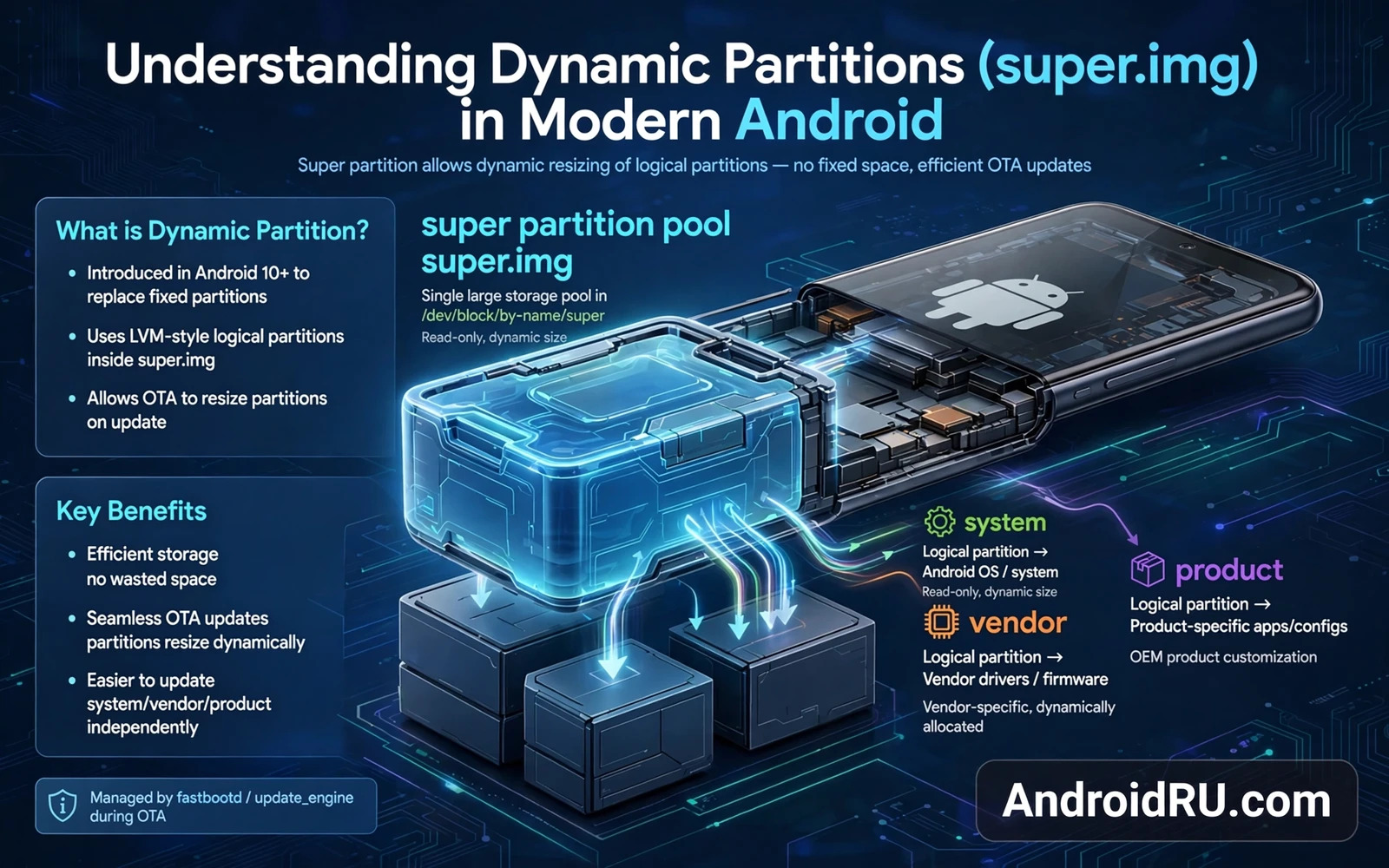
Dynamic partitions changed how Android stores system software on modern phones. Older phones gave each partition a fixed size at factory time and that size never changed. Modern phones place system and vendor and product partitions inside one large super partition and each logical partition grows or shrinks as needed. That flexibility helps makers ship updates and helps ROM makers support many devices with fewer builds. This guide explains the super image layout in plain terms and it shows why flashing steps differ on modern devices.
Read the safety warning before you flash anything on a dynamic partition device. A wrong flash can cause a bootloop or a brick and it can void the device warranty. Partition work can also wipe user data when a flash step resets storage or when a failed boot forces a factory reset. Back up photos and videos and documents and accounts before you start and keep a full copy of stock firmware on a computer. Never flash a super image from another model even when the phone name looks similar.
From Fixed Partitions To Logical Partitions
A fixed partition layout reserves space for each part of the system whether that part needs the space or not. That waste made updates harder because a growing system partition could not borrow free space from a shrinking vendor partition. A dynamic layout solves that waste by pooling the space inside the super partition. Logical partitions draw from the pool and they release space back to the pool when they shrink. The pool itself has a fixed total size but the split inside the pool can change with each update.
The super partition lives on flash storage as one physical region and the system reads a metadata table to find each logical partition inside it. That metadata describes the name and the size and the location of every logical partition. If the metadata is damaged then the system cannot find its own parts even when the data itself is intact. That is why super image tools always work with the metadata together with the data and never treat the super image as a simple raw file to copy blindly.
What Lives Inside The Super Image
A typical super image holds the system partition and the vendor partition and the product partition and sometimes an extra partition for maker apps. The system partition holds the Android framework and the core apps. The vendor partition holds maker drivers and hardware support files. The product partition holds extra apps and features that sit above the core system. Each logical partition mounts at its own path during boot and Android treats them as separate parts even though they share one pool.
Some devices use two slots for updates and each slot has its own set of logical partitions inside the super area. A slot system lets an update install in the background on the idle slot while the phone keeps running on the active slot. After a reboot the phone switches slots and the update becomes active. If the new slot fails to boot then the phone can fall back to the old slot. That fallback only works when both slots stay intact and when no flash step damages the shared metadata.
Partition history helps here and the partition schemes guide for A and B systems explains slot layouts and single slot layouts side by side. That guide pairs with this tutorial because dynamic partitions and slot layouts often appear together on the same phone. Read both guides before you plan a flash so you know whether your phone uses one slot or two slots. A flash plan for a single slot phone can break a two slot phone when it overwrites the wrong slot.
FastbootD And Why Normal Fastboot Is Not Enough
Normal fastboot mode runs in the bootloader and it cannot always see logical partitions inside the super image. FastbootD mode runs inside a small recovery environment and it understands logical partitions and it can create and resize and flash them. That is why modern flashing guides ask you to reboot into fastbootD before flashing a super image or a logical partition. Skipping fastbootD and flashing from normal fastboot can fail with a confusing error or it can write to the wrong target.
FastbootD also lets you delete a logical partition before you flash a replacement. Deleting first frees space in the pool so the new image fits even when the old image was larger. That delete step feels risky but it is normal on dynamic devices when done in the right order. Always confirm the partition name twice before you delete anything. A deleted system partition can be reflashed but a deleted metadata entry without a backup is far harder to repair.
fastboot reboot fastboot
fastboot delete-logical-partition product
fastboot flash system system.img
ROM Installation On Dynamic Devices
Custom ROM installation on a dynamic device starts with checking the super layout and the slot layout for that exact model. A ROM package for a dynamic device often ships as a super image or as separate logical partition images plus a flashing script. Follow the ROM maker script order exactly because the script handles deletion and creation and flashing in a tested sequence. Changing the order by hand can leave a logical partition missing at boot.
The custom ROM installation guide walks through a full ROM install with recovery steps and backup steps that apply to dynamic devices too. That guide helps you place this super image knowledge into a complete install workflow. Do not start a ROM install on a dynamic device until you have read both guides and until you have a stock firmware copy ready for rollback. A rollback plan is not optional on a device where partition metadata can block boot.
Boot image work connects to this topic as well and the boot image extraction guide shows how to keep a trustworthy original boot file beside your super backups. That guide reminds you to store the original file outside the phone. A super backup that lives only on a phone that cannot boot helps no one.
Backups And Recovery For Super Devices
Back up the super metadata and the partition list before any flash step. A simple list of logical partition names and sizes is a useful record when you need to rebuild the layout. Back up user data separately because a partition backup does not always include photos and documents in a restorable form. Keep backups on a computer and label them with the model name and the build number and the date of the backup.
Super Metadata And Repair Risks
Super metadata is a small table with an outsized effect because it maps every logical partition inside the pool. Tools that resize logical partitions must update that table correctly or the system will fail to find its own partitions. A metadata edit made by hand without a tool that understands the format can corrupt the whole pool even when partition data stays intact. Never edit metadata bytes directly unless you fully understand the format and you hold a complete backup of the original table.
Metadata backups are often overlooked because users back up partition data but forget the table that locates that data. A partition data backup without its metadata backup is like a library of books with no catalog. Back up the partition list and the sizes and the slot state together with any image backup. That combined record lets a skilled repair rebuild the layout when a flash step damages the table.
Slot metadata adds another layer because the system must know which slot is active and which slot is bootable. A flash that changes the active slot without updating bootable flags can leave the phone trying to boot an incomplete slot. Check slot state after a flash with a read command before you reboot when the tool allows that check. A pre reboot check catches slot errors while recovery options remain open.
Updates And Super Space Planning
System updates on dynamic devices need free space inside the super pool for the new logical partitions. An update can fail when the pool lacks room even when the phone shows free user storage. User storage and super pool space are different pools and free space in one does not help the other. That distinction confuses many users who free photos to make room for an update that needs super space instead. Check update error text carefully for pool related wording before you delete personal files.
Removing unused logical partitions can free pool space on some devices but it carries risk when the removed partition serves a hidden function. A product partition that looks empty may still hold files that a system app expects. Research a partition name before you delete it and back up its contents when possible. A deleted partition with no backup cannot be recreated from user storage alone.
Future Android designs may expand dynamic partitions further with more logical parts and more flexible pools. That trend makes super knowledge more valuable rather than less valuable. Users who learn the pool model now will adapt faster when new partitions appear. Users who treat the super image as a single file will struggle with each new layout change.
Super Image Tools And Safety
Super image tools vary in maturity because dynamic partitions are newer than fixed partitions. A tool that handles fixed images well may mishandle super metadata. Prefer tools with recent updates and clear support for your exact super layout. Read tool release notes for mentions of your device family before you trust a tool with a super image. A tool without super support should never touch a super image.
Test super tools on a copy of the image rather than on the phone storage directly. A copy on a computer can be examined and rebuilt without risk to the phone. A direct edit on phone storage risks the only copy of the layout. Copy first and edit the copy and verify the copy before any flash step.
Keep super tool versions recorded beside your backups because a future rebuild may need the same tool version. A newer tool version may change metadata handling in a subtle way. Version notes turn a future rebuild from guesswork into a repeatable step.
Dynamic partitions give Android room to grow and give ROM makers room to adapt. They also demand more care because a single pool and a shared metadata table replace many simple fixed boxes. Learn the layout and use fastbootD correctly and back up before every flash. With those habits a modern phone becomes easier to update and safer to customize.

