

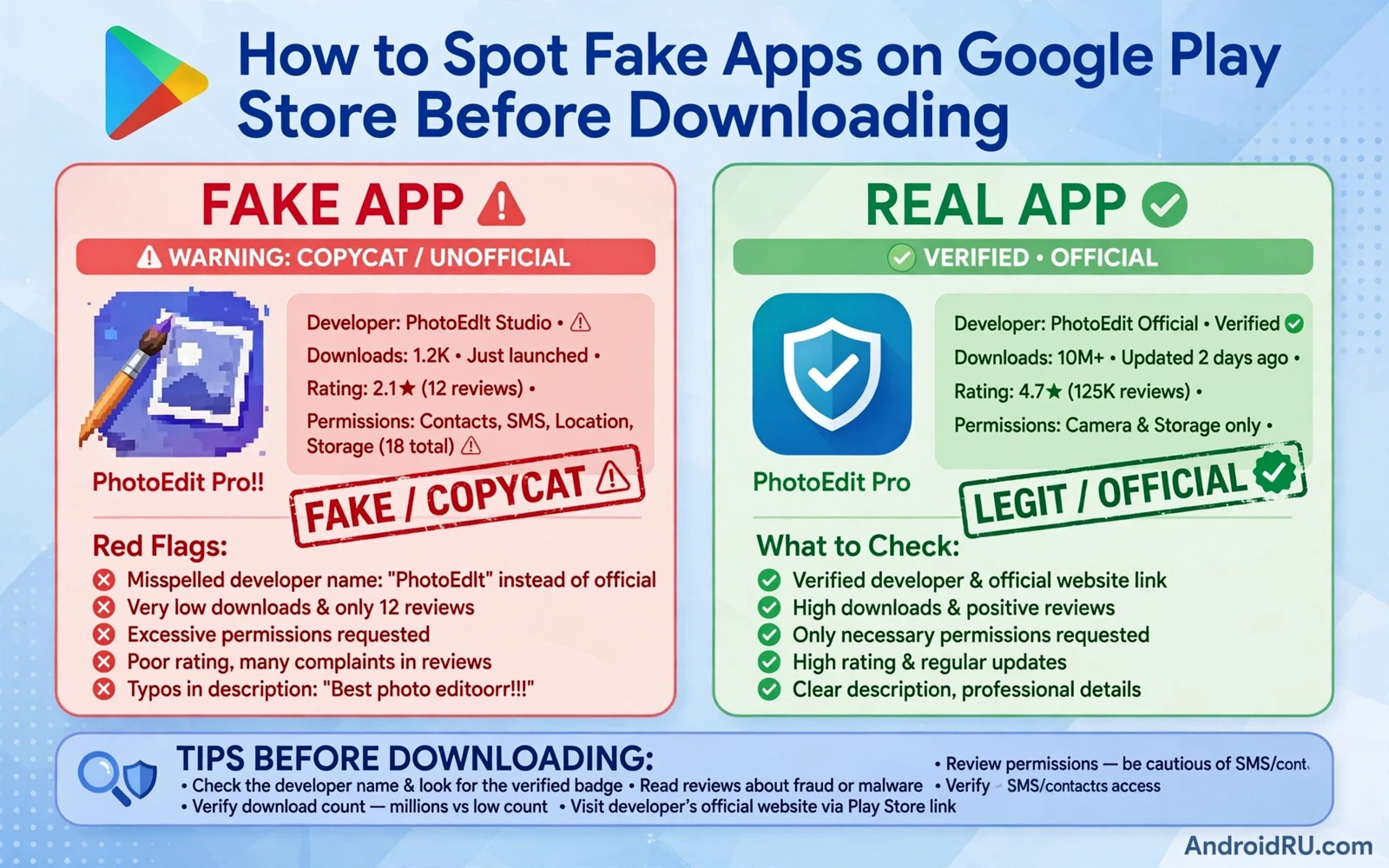
Fake apps on the Play Store imitate popular apps with similar names and similar icons and similar descriptions in order to trick users into installing malware or adware or subscription traps. A fake banking app can steal credentials. A fake game can show aggressive ads and collect data. A fake utility can request broad permissions and run silently in the background. Spotting fakes before downloading protects you far more effectively than removing malware after installation because some fakes steal data within minutes of first launch.
Copycat apps succeed because users search by app name and tap the first plausible result without checking developer identity. Attackers exploit that habit by buying search visibility for a near identical name and by copying screenshots and descriptions from the genuine app. The Play Store listing itself contains the evidence needed to expose most fakes. Developer name and developer history and review patterns and permission lists and update history together reveal whether an app is genuine or imitation. Learning to read those signals takes only a minute per app.
This guide teaches a pre download checklist that catches most fakes without special tools. You will check developer identity and listing details and reviews and permissions and external verification. You will also learn what to do when you already installed a suspicious app and how to report a fake so that other users stay safe.
Check Developer Identity Before Anything Else
Open the developer name on the Play Store listing and examine the developer page. A genuine developer usually publishes several connected apps or a single well established app with a long history. A fake developer often publishes a single copycat app with a recently created account and no other credible products. Check the developer website link and the developer contact email for professionalism and consistency. A genuine company website matches the app brand and a fake website often looks generic or unconnected or missing entirely.
Compare the developer name character by character with the official developer of the genuine app. Attackers use subtle tricks such as replacing a letter or adding a word such as official or pro or original to a copied name. A banking app published by a developer whose name differs even slightly from the bank official developer deserves rejection. When doubt remains search the web for the official Play Store link from the company own website and follow that link rather than trusting a search result inside the store.
Read Reviews For Patterns Rather Than Stars
Star ratings alone mislead because fake apps buy or fabricate positive reviews in bulk. Read recent reviews in detail and look for vague praise repeated with similar wording across many accounts. Genuine apps attract specific reviews that mention features and bugs and device models. Fake apps attract generic praise such as great app and best app repeated without detail. A sudden burst of five star reviews followed by detailed one star complaints about ads or charges or data theft is a classic fake pattern.
Check the review dates and the review language distribution. A genuine popular app accumulates reviews steadily over years. A fake app may show hundreds of reviews within days of publication. Reviews written in broken language that does not match the app target audience also deserve suspicion. Most importantly read negative reviews carefully because they often describe the exact harm that the fake causes. A handful of detailed warnings outweighs hundreds of generic praises.
Inspect Permissions Screenshots And Descriptions
Open the permission list before downloading and ask whether each permission serves a visible feature. A wallpaper app that requests contacts and SMS and call logs has no legitimate need for those permissions. A flashlight app that requests location and microphone access is suspicious regardless of its rating. A fake app often requests broad permissions on first launch because data collection is its real purpose. Reject any app whose permissions exceed its function even when its screenshots look polished.
Compare screenshots and descriptions with the genuine app when you know it. Fake listings often reuse stolen screenshots but contain spelling errors or inconsistent branding or promises that sound too generous such as free premium for life or unlimited rewards. Check the download count and the update date as well. A supposed official app with very few downloads and no recent updates while the genuine app has millions of downloads is almost certainly a copy. Low downloads alone do not prove fakery for a new genuine app but low downloads combined with a copied brand do.
Verify Outside The Store When Stakes Are High
For banking and payment and messaging and government apps verify outside the store before installing. Visit the official company website by typing its address yourself and follow its official store link. Check the company support pages for the exact app name and developer name. For a bank call the official support number from the back of your card when doubt remains. That external verification takes minutes and it eliminates the search result trick entirely because you never rely on a store search result for a high stakes app.
Avoid installing high stakes apps from links inside messages or social posts or advertisements. Those links can lead to a convincing fake listing or to a direct download outside the store. Even when a link looks official treat it as untrusted until you verify the developer identity through the official website route. A genuine company will never pressure you to install its banking app urgently through a message link. Urgency plus an install link is a strong fraud signal on its own.
If You Already Installed A Suspicious App
Uninstall the suspicious app immediately and then change passwords for any account that you opened inside it. Check your device for unusual battery drain or data usage or new apps that appeared without your action. Run a Play Protect scan and review app permissions for remaining apps that may have been installed alongside the fake. Check bank statements and account activity for unauthorised transactions during the period when the fake app was installed. Report the fake app from its Play Store listing so that store reviewers can investigate it.
Report details matter because a clear report helps reviewers act faster. Note the fake developer name and the copied brand and the suspicious permissions and any harmful behaviour that you observed. A report that says only fake app gives reviewers little to verify. A report that names the genuine app and the specific deception gives reviewers a concrete comparison. Your report protects the next user who searches for the same popular app name.
Fake app defence starts with store protection so run Google Play Protect manual scans regularly and learn detecting hidden spyware installed on your phone for post install checks while signs your Android phone is hacked and how to fix it covers the wider response when a fake app already ran.
- Check developer name character by character against the official developer
- Read recent reviews for generic praise bursts and detailed harm warnings
- Reject apps whose permissions exceed their visible function
- Verify banking and payment apps through the official company website
- Uninstall and change passwords immediately if a suspicious app was installed
Building A Fake App Checklist For Family Devices
Family devices need a fake app checklist because children and older relatives may install apps without checking developer identity. Teach a simple three check rule that anyone can follow. Check the developer name against the official brand and check the download count for popular apps and check permissions before tapping install. A three check rule is easy to remember and it catches most copycats without requiring technical knowledge. Practise the rule together on a real listing so that family members recognise a suspicious listing when they see one alone.
Set up family devices to reduce fake app risk structurally. Switch on Play Protect and keep it switched on. Use family controls to require approval for new installs on child devices. Remove payment methods from devices used by children unless a purchase is actively planned. Those structural controls catch mistakes that education alone misses because even careful users tap quickly when an app promises a popular game or a free reward. Structure plus education together protect far better than either alone.
Review installed apps on family devices monthly as a shared routine. Open the apps list together and ask what each unfamiliar app does and who installed it. Uninstall copycats immediately and change passwords for any account opened inside a suspicious app. Monthly review also catches apps that turned harmful after installation through an update that added aggressive ads or broad permissions. A fake app checklist plus a monthly review turns app safety into a family habit rather than a one time lecture.
Fake Apps And Subscription Traps On Family Phones
Subscription traps are a common fake app business model that goes beyond malware. A fake app offers a free trial that converts into an expensive weekly charge through a payment flow that the user barely noticed. Check subscription status in Play Store account settings after installing any new app that requested payment details. Cancel trials immediately after testing an app that you do not intend to keep. A trial cancelled early cannot convert into a charge later no matter what the app interface implied.
Teach family members to recognise subscription trap language such as free premium for life paired with a weekly charge in small print. Show them where subscription management lives in the Play Store app so that they can check charges themselves. Review Play Store order history monthly as a household routine and dispute charges for apps that were never deliberately purchased. Subscription awareness protects bank balances just as permission awareness protects privacy and both habits belong in the same safety routine.
Spotting fake apps before downloading is a habit that pays off on every search. Developer identity and review patterns and permission lists and external verification together expose most copycats before they reach your phone. Slow down for one minute on every unfamiliar listing and especially on high stakes apps. That minute prevents malware and subscription traps and credential theft that could take weeks to undo.

