

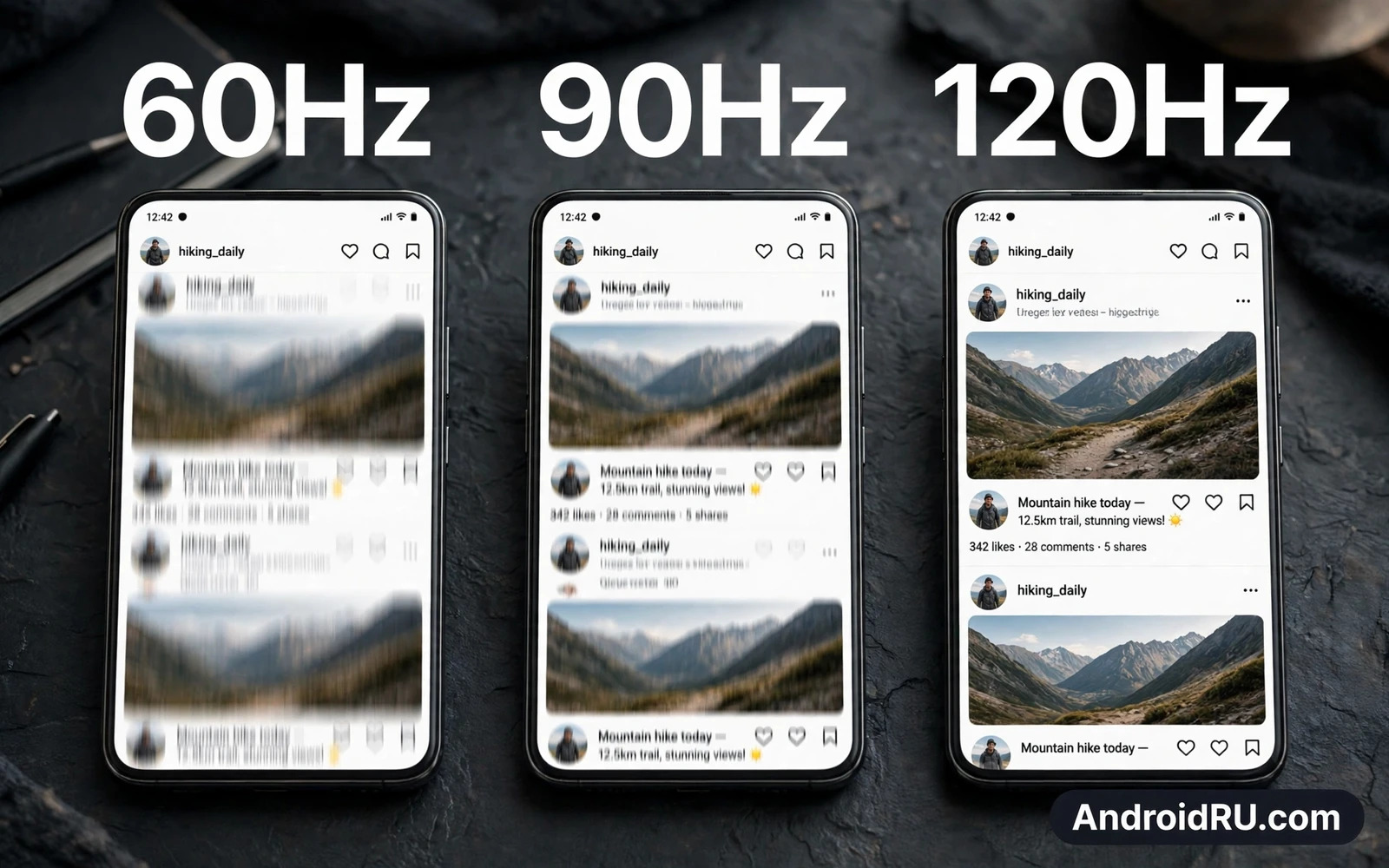
What Refresh Rate Really Means
Refresh rate counts how many times a screen redraws its image in one second. A 60Hz screen redraws sixty times per second. A 90Hz screen redraws ninety times per second. A 120Hz screen redraws one hundred and twenty times per second. More redraws mean motion looks smoother because each step between frames becomes smaller and harder to notice.
Think of scrolling through a long feed as a flipbook. A slow flipbook jumps from page to page in visible steps. A fast flipbook blends the steps into flowing motion. Refresh rate works the same way on a phone screen. It does not change the content itself but it changes how motion feels as content moves across the screen.
How 60Hz Feels In Daily Use
A 60Hz screen still serves many people very well. Text stays sharp and photos look clear and video plays smoothly because most video uses a far lower frame count than the screen refresh limit. Reading and messaging and maps feel steady on a good 60Hz panel. Battery use also tends to stay lower because the screen and processor redraw less often.
The limits of 60Hz appear during fast scrolling and fast swiping. Long feeds can look slightly juddery when you flick quickly. Games with rapid camera movement can feel less fluid even when the game itself runs well. For calm daily use these limits rarely matter. For users who scroll constantly the difference becomes easier to feel over a full day.
Where 90Hz Finds A Middle Ground
A 90Hz screen adds a clear smoothness boost over 60Hz without demanding as much power as a top tier panel. Scrolling feels softer and swiping feels more responsive and animations feel more polished. Many users notice the upgrade within minutes of switching even when they cannot name the technical reason. The jump from 60Hz to 90Hz often feels larger than the jump from 90Hz to 120Hz.
Battery cost rises with refresh rate but a 90Hz panel keeps that cost moderate. Adaptive modes can drop the rate when the screen shows still content and raise it only during motion. That smart behaviour preserves battery while keeping motion smooth where it counts. For a balanced phone a 90Hz screen often gives the best mix of feel and endurance. A related look at balanced hardware choices appears in Best Battery Life Smartphones: Tested for Heavy Usage where endurance and display behaviour are judged together.
What 120Hz Adds For Gamers And Scrollers
A 120Hz screen makes fast motion feel remarkably fluid. Rapid scrolling stays readable for longer. Fast games feel more connected to your fingers because the image updates sooner after each touch. Competitive players value that tight link between input and image even when the visual gain looks small in a photo.
The gain depends on the app and the game. An app capped at a lower frame output cannot use the full screen rate. A game that cannot sustain high frame output will not look smoother just because the panel supports a higher rate. Check whether your favourite games and apps actually support high frame output before paying extra for the fastest panel. The gaming angle is explored further in Top Smartphones with Dedicated Gaming Trigger Buttons where controls and display speed work as one system.
Battery Life And Adaptive Refresh
Higher refresh rates draw more power because the screen and graphics system work harder every second. The size of the cost depends on brightness and content and the efficiency of the panel. A bright screen showing constant motion at full rate uses noticeably more energy than a dim screen showing still text. That is why adaptive refresh matters so much on modern phones.
Adaptive refresh changes the rate to match the moment. It can run high during scrolling and gaming and drop low when you read a static page or view a photo. Good adaptive behaviour feels invisible and saves battery without hurting smoothness. Poor adaptive behaviour can feel jumpy when the rate changes at the wrong moment. Test adaptive mode in real use rather than trusting a specification line alone.
Touch Response Is A Separate Story
Refresh rate is not the same as touch sampling rate. Refresh rate controls how often the image updates. Touch sampling controls how often the screen checks for your finger. A phone can show a smooth image yet feel slightly delayed when touch sampling lags behind. A phone can also track touches quickly yet show motion in larger steps when refresh stays low.
Both numbers shape how responsive a phone feels. Gamers should weigh both together rather than chasing one headline figure. Everyday users will notice refresh smoothness more than touch sampling in normal scrolling and reading. Knowing the difference stops a single specification from misleading a buying decision. The distinction also matters when you compare hardware in Snapdragon vs MediaTek Dimensity: Processor Showdown because processor power decides whether high frame output can stay steady.
Which Rate Should You Choose
Choose 60Hz when battery life and price matter most and your use stays calm. Reading and calls and light social use feel fine at this level. Choose 90Hz when you want a clear smoothness upgrade without a large battery penalty. This middle level suits most buyers who scroll often and play casual games. Choose 120Hz when you game often or scroll for hours and you accept higher power use for maximum fluidity.
Always judge the whole screen rather than the rate alone. Brightness and colour accuracy and sharpness shape daily satisfaction just as much as motion smoothness. A dim or washed out high rate panel can feel worse than a bright and vivid lower rate panel. The best screen for you balances motion and brightness and colour and battery in a way that fits your eyes and your day. A compact perspective on daily comfort can be found in Top Compact Android Phones for One-Handed Use where screen size and handling shape the same decision.
The Bottom Line
Refresh rate changes how motion feels but it does not change content quality by itself. The jump to 90Hz gives most users a clear benefit. The jump to 120Hz gives gamers and heavy scrollers the smoothest feel at a higher energy cost. Pick the rate that matches your habits and pair it with a bright accurate panel and a battery that survives your day.
Motion Clarity Beyond Scrolling
Refresh rate also shapes how video and animation feel on a phone. Smooth interface animations make the phone feel polished every time you open an app or switch tasks. Smooth transitions reduce the sense of waiting even when loading time stays the same. That perceived speed matters because a phone that feels responsive encourages relaxed use while a phone that stutters feels old long before its hardware ages.
Motion clarity also helps reading while content moves. A higher rate keeps text readable for a fraction longer during a fast flick. That small gain helps when you scan a long article or a long social feed quickly. It helps less when you read slowly and steadily because the screen spends most time showing still text. Your reading style therefore decides how much motion clarity you will actually notice in daily life.
Display Settings Worth Exploring
Many phones let you force a fixed rate or leave adaptive mode in control. Fixed high rate gives maximum smoothness at maximum power cost. Adaptive mode balances smoothness and battery by changing rate to match content. Some phones also offer a power saving mode that caps the rate to extend battery on long days. Explore these settings during a normal week rather than judging them in a single test session.
Also explore motion and animation settings in accessibility options. Reduced motion settings can calm animations for users who feel dizzy during fast transitions. Larger text settings can improve reading comfort without changing refresh behaviour. A display that fits your eyes and your comfort matters more than a display that wins a specification contest. The best setting is the one that you forget about because it simply feels right.
Refresh Rate And Eye Comfort
Higher refresh rates can reduce perceived flicker during scrolling and animation. That reduction helps some users feel less eye strain during long sessions. Eye comfort still depends more on brightness and text size and break habits than on refresh alone. A very bright screen in a dark room strains eyes at any rate. A dim screen in sunlight forces squinting at any rate. Pair a suitable rate with sensible brightness and regular breaks for the best comfort.
Night modes and warm colour shifts also help evening comfort by reducing harsh blue light. A comfortable evening screen lets you read longer without fatigue. A harsh evening screen can disturb sleep even when motion looks smooth. Treat refresh as one part of a comfort system that includes brightness and colour and posture and breaks rather than as a cure for eye strain by itself.
Gaming Frame Output Explained
A game must output frames at a high rate for a high refresh screen to show its benefit. A game capped at a lower output will look the same on a fast panel as on a slower panel. A game that outputs high frames but cannot sustain them will stutter as output drops and rises. Sustained output therefore matters more than peak output for a smooth gaming feel. Check community reports for your favourite titles before assuming that a fast panel guarantees fast gameplay.
Thermal behaviour also limits sustained output during long sessions. A phone that heats up will reduce processor speed to protect itself. That reduction can drop frame output below the screen rate and create uneven motion. Good cooling and sensible graphics settings keep output steady for longer. A balanced gaming setup pairs a fast screen with a cool processor and a game setting that the phone can actually sustain.
Refresh Rate Myths To Ignore
One myth claims that a higher refresh rate always means a better screen. Brightness and colour accuracy and resolution can matter more for daily satisfaction. A bright accurate panel at a moderate rate often feels better than a dim washed out panel at a top rate. Judge the whole image rather than worshipping a single number on a box. A balanced screen wins daily use while a one trick screen impresses only in a shop demo.
Another myth claims that human eyes cannot notice rates above a certain threshold. Sensitivity varies widely between people and between tasks. Fast scrolling and fast gaming reveal differences that slow reading hides. Some users notice every step while others notice little change. Trust your own eyes during a side by side comparison rather than trusting a general claim about human vision. Personal testing beats internet debate every time.
Choosing With A Whole Phone View
Refresh rate should never decide a purchase alone. Processor power must sustain the frame output that a fast panel promises. Battery size must support the extra power draw during long days. Thermal design must keep performance steady when the phone heats up. A phone that balances these parts gives a smooth experience that lasts. A phone that pairs a fast panel with a weak processor gives a smooth home screen and a stuttering game.
Also consider software smoothness beyond raw rate. Animation tuning and touch response and app optimisation shape perceived fluidity. A well tuned phone at a moderate rate can feel smoother than a poorly tuned phone at a top rate. Read long term user reports about smoothness after months of use. A phone that stays smooth over time delivers more value than a phone that dazzles only on launch week.

