

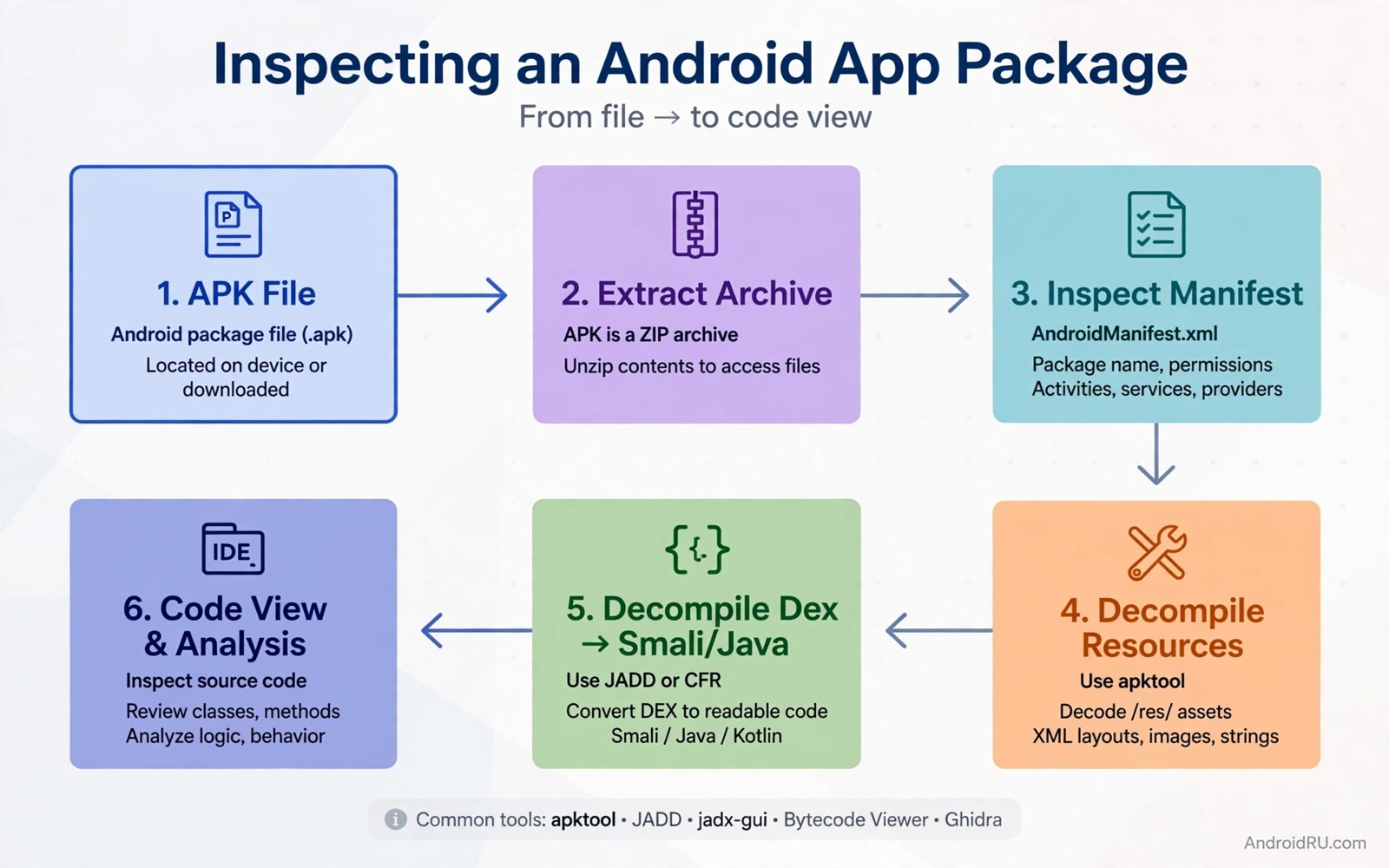
APK modding means changing an Android package file and rebuilding it. Experts use modding to study how an app works and to test fixes and to learn about file formats. The techniques range from simple resource changes to complex code patches. Each technique has a different level of difficulty and a different level of risk.
The most important rule in modding is ownership and permission. Mod only apps that you own or apps that you have clear permission to study. Modding someone else app to remove payment checks or to bypass security harms developers and users. Research that respects ownership helps the whole Android community. Research that breaks trust harms it.
This guide explains five techniques that experts use in legitimate research. It focuses on method and on safety rather than on shortcuts for cheating. Use a dedicated test device and keep original files backed up. A modded APK should never replace an app on a daily phone that holds personal data.
Technique one resource and manifest edits
Resource edits change images or strings or layout files inside an APK. An expert may change a label to test how the interface handles long text. An expert may replace an icon to test asset loading. Resource edits are a good first technique because they rarely affect code logic. They teach the APK structure without deep code work.
Manifest edits change app metadata such as permissions or components. An expert may test how an app behaves when a permission is removed from the manifest. That test reveals whether the app handles a missing permission gracefully. Manifest edits need care because a wrong value can prevent installation. Keep the original manifest backed up for every test.
Resource and manifest work requires unpacking and repacking the APK correctly. Use tools that you trust for your own files. Check the rebuilt APK for structural errors before installing it on a test device. A corrupted APK wastes test time and it can confuse results when the install itself fails.
Technique two Smali patching and DEX edits
Smali is a readable form of Android bytecode. Patching Smali lets an expert change a small piece of logic without source code. An expert may change a constant or flip a condition in a test app to see how the app reacts. That method is powerful because it works at the level that the device actually executes.
DEX edits work on the compiled code files directly. An expert may patch a DEX file to test a fix without a full rebuild. That method is faster for small changes but it is easier to break the file structure. Always verify the patched DEX with a tool that checks its integrity before installing the result.
Smali patching needs a clear understanding of the method that you change. A change to a return value can affect callers in ways that are not obvious. Test a patch on a small method first. Log the behaviour before and after the patch. A careful patch and a clear log make the result trustworthy.
Technique three native library and asset work
Native libraries carry compiled code for a specific processor architecture. An expert may replace a native library with a test version that logs calls. That method reveals how Java code interacts with native code. It also reveals performance behaviour that Java analysis alone cannot show. Native work needs knowledge of the target architecture and calling conventions.
Asset files can hold data such as models or configuration files. An expert may replace an asset with a test version to see how the app handles different data. That method is useful for testing parsers and loaders. It also helps to find assumptions that the app makes about asset format. A test asset should be small and well formed to keep results clear.
Native and asset changes can affect app signing. A modified APK needs a new signature for installation on a test device. Use a debug key for test builds and keep the test device separate from daily use. Never try to pass a modified APK off as an original signed release.
Technique four and five instrumentation and rebuild checks
Instrumentation adds logging or monitoring code to an app that you own. An expert may add a log call at a key method to trace execution during a test. That method gives dynamic evidence that static reading cannot provide. Instrumentation works best when the added code is small and clearly marked as test code.
Rebuild checks form the final technique. After any mod the expert verifies the APK structure and the signature and the installation result. A rebuild check catches a corrupted file before it wastes a test run. It also confirms that the mod did not change unrelated parts of the package. A clean rebuild check is part of professional modding work.
Combine techniques only after each one works alone. A resource edit plus a Smali patch plus a native change at once creates a confusing result when something fails. Build up complexity slowly. Each technique that you master alone becomes a reliable tool for larger research later.
- Add small clearly marked logging code for tracing.
- Verify APK structure after every rebuild.
- Confirm the signature and install result on a test device.
- Keep the original APK backed up for comparison.
Code you can adapt
# Safe workflow for modding an app that you own
# 1. Copy the original APK to a backup folder
# 2. Unpack the APK with a tool you trust
# 3. Make one small change and note it in a log
# 4. Repack and sign the test APK with a debug key
# 5. Install only on a dedicated test device
cp original.apk backup/original.apk
echo "Change: label text in test screen" >> mod-log.txt
The snippet above is an original example written for this guide. It shows a safe workflow script for modding an app that you own with a backup and a change log.
A change log is a small habit with a large payoff. It tells you exactly what changed between the original and the modded version. When a test fails you can return to the log and undo one change at a time. Without a log you may forget which edit caused a problem and waste hours retesting.
A backup folder serves a similar purpose. It lets you restore the original app fast and it lets you compare file sizes and structures. A comparison between original and modded files often reveals an unintended change such as a missing resource. That comparison belongs in every modding session.
How this topic connects to nearby work
Modding becomes easier when protection is weak and the weak points are listed in the guide to APK obfuscation mistakes.
A responsible modding workflow starts with the audit routine in the guide to application security audits.
Modded builds on rooted devices meet the detection questions explored in the guide to bypass Android root detection.
Putting it into practice
Signing scheme versions affect whether a modded APK installs on a modern device. Android checks signature scheme v2 and v3 for newer apps. A repacking tool that only signs with an old scheme may produce an APK that a modern device rejects. Check the signature schemes in the rebuilt APK before installing it. A tool that supports current schemes saves time and prevents a confusing install failure that looks like a modding error.
Alignment also matters for a rebuilt APK. Zip alignment aligns uncompressed data on boundaries that the system expects for efficient reading. A rebuilt APK without proper alignment may install but run slower or fail a verification step. Run an alignment check after repacking and fix alignment before signing. That check belongs in the rebuild workflow beside the signature check.
A final modding check should compare the modded APK file list with the original file list. List all files in both packages and note any file that was added or removed unintentionally. An unintentional removal can break a feature that the mod did not intend to touch. An unintentional addition can increase app size for no reason. That file comparison takes a minute with a simple script and it catches repacking errors that a visual test would miss. Keep the file comparison output with the mod log so a later reviewer can see exactly what the repack changed. That output also helps a new researcher repeat the same mod without guessing.
Common mistakes
A common mistake is to mod an app without a backup. A failed repack can destroy the only copy that you had. Always copy the original before unpacking. A backup costs almost no time and it saves a full rebuild when a test goes wrong.
Another mistake is to make several changes at once. Several changes hide the cause of a failure. Make one change and test it. Repeat that cycle for each new change. A slow cycle gives clear results while a fast cycle gives confusion.
A third mistake is to install a modded APK on a daily phone. A modded app may behave unexpectedly and it may hold test code that logs data. Use a dedicated test device for all modding work. Keep personal accounts and personal data off that device.
Frequently asked questions
Is APK modding legal?
It depends on ownership and purpose and local law. Modding your own apps for research and testing is a legitimate developer activity. Modding other apps to bypass payment or security usually violates terms and may break the law. Seek permission and legal advice when unsure.
What is the easiest modding technique to learn first?
Resource edits are usually the easiest starting point. They teach APK structure without deep code changes. Move to Smali patching only after resource work feels comfortable and after you have a reliable backup workflow.
Why does a modded APK need a new signature?
Android checks signatures to confirm that a package comes from its claimed signer. A modified package no longer matches the original signature. A test device can install a debug signed test build for research on apps that you own.
Conclusion
APK modding techniques build on each other from resources to code to native libraries. Each technique needs a backup and a change log and a dedicated test device. Research that respects ownership and permission helps developers learn and improve their own apps. Shortcuts that target other apps for cheating do not belong in professional work.
Your concrete next step is to copy an APK from your own test app today and make one resource change with a full backup and a change log. Install the result on a test device and confirm the change. That exercise proves the whole workflow before you try code patching.

