

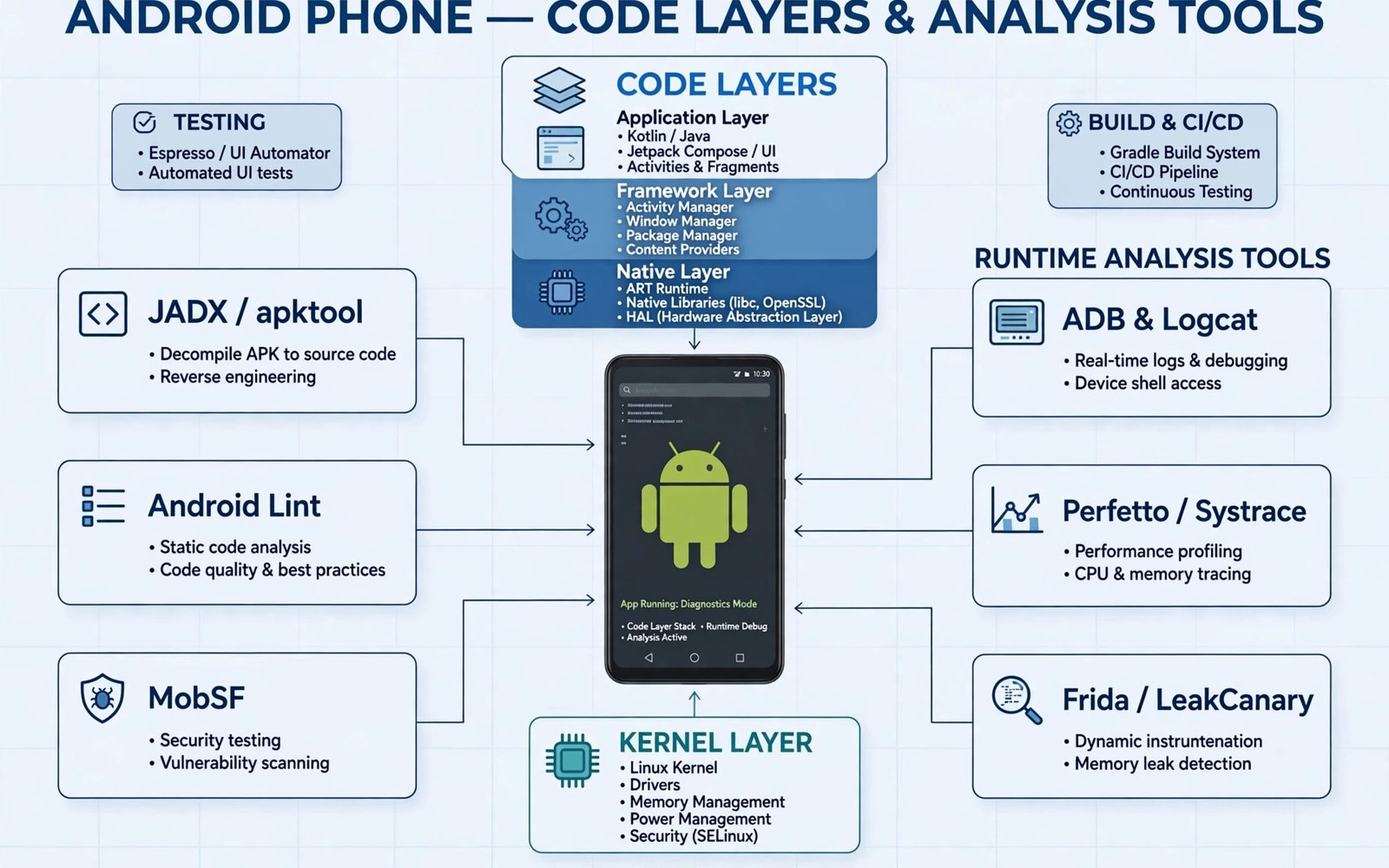
APK reverse engineering is the study of an Android app package to learn how it works. An APK file holds compiled code and resources and media and a manifest. Analysts open that package in a careful way to see its structure. They do not need the original source code to learn the basic design. The goal is understanding and testing and fixing problems. This work supports security research and app repair and learning. It can also support compatibility testing on new devices. A clear purpose keeps the work focused and useful. Beginners should start with a small test app that they own. That habit builds skill without creating risk for other people. Reading about decompiling APK files helps explain the first practical step in this field.
Reverse engineering differs from simple app use in one important way. A normal user sees screens and buttons and menus. An analyst also sees the code paths that create those screens. That deeper view reveals hidden settings and permissions and network calls. It can reveal weak storage of sensitive data. It can also reveal logic errors that break the app on some phones. Analysts record what they find in notes with steps that another person can repeat. Repeatable notes turn a vague guess into a tested claim. That discipline matters when a finding will guide a fix. It also matters when a finding will be shared with a developer.
Common Tools Analysts Use
Analysts use a small set of tools for most early work. A decompiler turns compiled code into readable code. A disassembler shows low level instructions for close study. A resource tool unpacks layouts and images and strings. A proxy tool shows network traffic while the app runs. A debugger lets an analyst pause the app and inspect its state. Each tool answers a different question. No single tool gives a full picture on its own. A good analyst checks a finding in a second tool before trusting it. That cross check catches tool errors and wrong guesses. It also builds confidence in the final report.
Tool choice depends on the question at hand. A layout problem needs a resource tool first. A crash problem needs logs and a debugger first. A network problem needs a proxy and a test device first. A permission problem needs a manifest review first. Starting with the right tool saves time and avoids noise. Analysts also keep their tools updated. Old tools may fail on new file formats. Updated tools handle new Android versions with fewer errors.
Static And Dynamic Study
Static study looks at files without running the app. It covers code and resources and the manifest and native libraries. This method is safe because the app never runs. It also finds code that a normal test run might never reach. Dynamic study looks at the app while it runs. It covers network calls and file writes and screen flow. This method shows real behaviour on a real device. It can miss code paths that need special input. Strong analysis uses both methods together. Static work points to places worth testing live. Dynamic work confirms or corrects the static guess.
A combined workflow starts with a copy of the test app. The analyst lists permissions and components and libraries. The analyst then runs the app in a test environment. The analyst watches logs and traffic and storage changes. Each observation goes into a dated note. The note states the input and the result and the tool used. That record makes later review possible. It also helps a developer reproduce the issue fast.
Ethical Rules That Matter
Ethical rules protect users and developers and the analyst. Only study apps that you own or that you have clear permission to test. Do not copy paid content or private user data from an app. Do not use findings to harm users or to break a service. Report security problems through a responsible channel when one exists. Give the developer time to fix the issue before sharing details widely. Respect licence terms and local law in your region. These rules are not optional extras. They define the line between research and abuse. Learning about in-app security controls shows why respect for those controls matters in practice.
A test environment also protects real users. Use a spare device or an emulator for risky tests. Keep test accounts separate from personal accounts. Delete test data when the work ends. Never test on a phone that holds banking apps or private photos. Never run an unknown app on a main device just to see what happens. These habits reduce harm if a test app behaves badly. They also keep personal data out of test logs. Good ethics and good safety habits support each other.
A Safe First Project
A safe first project uses a simple app built for learning. Build a tiny app with one screen and one button. Add a string and an image and a simple setting. Then unpack that app and study each part. Compare the unpacked result with the source that you wrote. That comparison teaches how compilation changes code and resources. It also shows which details survive the build process. Repeat the exercise with a second feature. Add a network call to a test server that you control. Watch how the call appears in a proxy log. That loop teaches more than reading alone.
Document each step as you learn. Write the tool name and the command and the result. Save the unpacked files in a project folder. Keep the original file untouched as a reference. Label test files clearly so they are never confused with a real release. Share your notes with a peer for review when possible. A second pair of eyes often spots a wrong assumption early. Over time these notes become a personal handbook. That handbook grows with each new project.
apktool d test-app.apk -o test-app-out
jadx -d jadx-out test-app.apk
ls test-app-out
cat test-app-out/AndroidManifest.xml
Mistakes Beginners Should Avoid
Beginners often trust the first tool output too quickly. Decompiled code can contain errors or misleading names. Resource names can differ from the names in the original source. Network logs can include test data that looks like real data. Always verify a claim with a second check. Another common mistake is changing code without a backup. A broken build wastes hours and hides the original error. Keep a copy of the original file before any change. A third mistake is testing on a personal device. That choice risks private data and daily apps. Use a dedicated test setup from the start.
Beginners also rush to share findings online. A public post can expose users before a fix exists. A public post can also break the law in some places. Check permission and disclosure rules before publishing anything. Keep personal data out of screenshots and logs. Blur or remove tokens and keys and account names. These steps protect users and protect the analyst. They also build trust with developers who receive reports.
Working With Real Findings
Real findings need clear evidence before they are shared. A screenshot alone rarely proves a claim. A log line alone can come from a test setup. A code snippet alone can lack context. Strong evidence combines at least two independent checks. It states the input and the tool and the result. It also states the app version and the device used. That detail lets another analyst repeat the test. Repeatable tests separate real findings from guesses. They also help developers fix problems fast. Keep evidence in a folder with dates and file names. That folder becomes the record for the whole project.
Reporting a finding also needs care with wording. State what was observed in plain words. State the steps that produced the result. State the impact in terms of user harm or app failure. Avoid claims that go beyond the evidence. Avoid naming a developer in a harsh way. Avoid sharing private data in the report. A calm report gets a faster and fairer response. A harsh report can close a conversation before it starts. Good reporting is a skill that grows with practice. Review your report after a short break before sending it. That break often reveals a missing detail or an unclear sentence.
Learning does not stop with one tool or one app. New Android versions change file formats and runtime rules. New tools add support for those changes. Analysts should read release notes for their main tools. They should test new versions on a small app first. They should update their notes when a tool changes its output. That habit keeps old knowledge from becoming misleading. It also keeps projects compatible with current devices. A small weekly review of tools and notes helps a lot. That review can be short and still be useful.
Practice projects should grow in difficulty in stages. Start with a single screen app that you built. Move to a small app with two screens and a setting. Then study a larger open learning app with permission. Each stage adds a new skill without adding risk. Each stage also adds a new tool to your workflow. Keep a list of skills that you have practised. Tick off a skill only after you have used it twice. That rule stops a single lucky success from counting as mastery. It also shows gaps that need more work.
Community learning helps when it stays within ethical rules. Read public write-ups from trusted analysts. Compare their methods with your own notes. Ask questions in a learning forum when you are stuck. Share your own learning notes when they contain no private data. Do not share code that harms users or breaks a service. Do not ask for help to bypass a protection for a paid app. A healthy community rewards clear questions and careful answers. It also corrects mistakes in a kind way. That culture helps beginners grow fast.
- Keep the original APK file untouched.
- Record the tool name and version for each test.
- Save logs and screenshots with dates.
- Verify each finding with a second tool.
- Remove private data before sharing notes.
- Label test builds clearly as test builds.
Reviewing Tools With A Critical Eye
Tools change over time and analysts must review them with care. A tool update can change output layout in small ways. A tool update can also fix a bug that hid a finding. Analysts should test a new tool version on a known app first. They should compare the new output with the old output. A large difference needs an explanation before trust returns. A small difference may be a formatting change only. Record the version and the test result in project notes. That record helps a peer understand a later finding. It also helps you explain why an old note looks different. Tool review is a quiet habit that protects accuracy.
Open tools deserve the same review as commercial tools. An open tool may have a large community and fast fixes. It may also have a gap for a new Android version. Check the issue list for reports about your target format. Check the release date for the latest version. A tool with no recent release may still work well. A tool with a recent release may still contain a new bug. Test both cases on a small app before a large project. That test takes minutes and saves hours. It also builds a habit of evidence over reputation.
- Test a new tool version on a known app first.
- Compare new output with old output before trusting it.
- Record the tool version in every project note.
- Check issue lists for format problems.
Conclusion
APK reverse engineering is a skill built from tools and patience and care. It starts with understanding the package format and the code inside it. It grows through static study and dynamic testing. It stays useful when it follows clear ethical rules. Beginners should practise on their own test apps first. They should keep notes and verify claims and use a safe test device. That path leads to real skill without harm to others. Further reading on static and dynamic analysis can help you choose the right method for each new question.
The steps above follow the approach described in the official developer documentation for Android applications and in widely used testing guidance for mobile software.

