

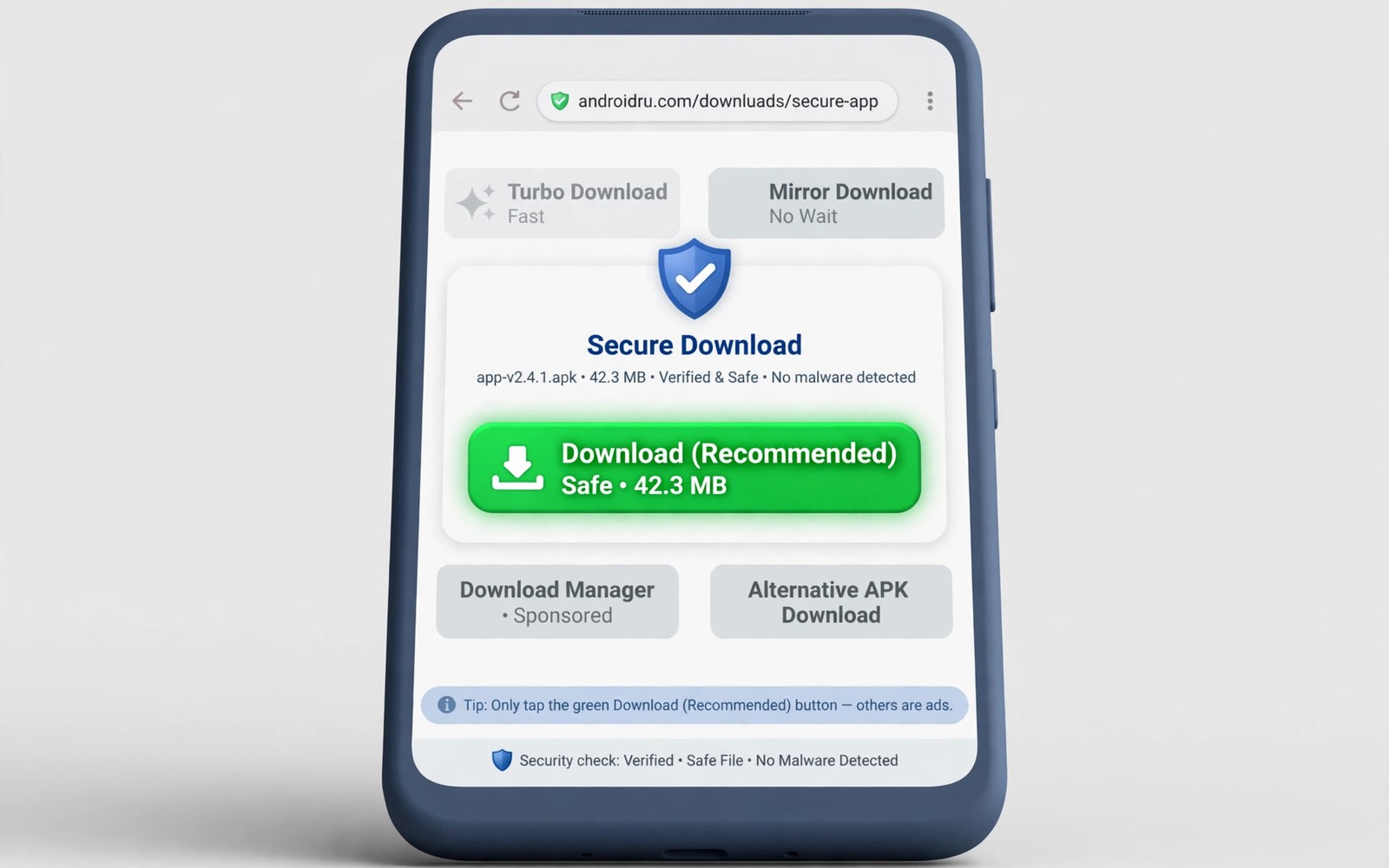
Fake download buttons are designed to win a race for your tap. They sit near the real button and they use bright colours and urgent wording to pull your finger first. One wrong tap can start a harmful download or open a deceptive page that asks for permissions. Learning to pause for two seconds before you tap changes the outcome completely. The safety advice in the master playbook for safe sideloading and distribution explains why a calm check matters more than speed.
Most fake buttons share a pattern once you know what to look for. They often appear above or beside the real content and they repeat the word download many times on one page. They may promise a faster file or an unlocked version that the real page never mentions. A page with three large download buttons for one file should raise suspicion immediately. Real download pages usually offer one clear path to the file.
Slow down and read the whole page
Before you tap anything, scroll the page and read the headings and the file details. A genuine page usually names the file and its version and its size in one place. A deceptive page often hides those details behind ads and popups. If you cannot find a file name and a version then stop and leave the page. A missing file identity is a strong warning sign.
Look at button wording carefully because fake buttons often use vague promises. Phrases about instant access or free premium features try to create urgency. A real button usually states the action plainly such as download file or get the app. Urgency is a sales tactic, not proof that a button is genuine.
Check the address and the file before you tap
Check the page address in the browser bar and compare it with the address you expected. A small spelling change or an extra word can signal a copycat page. Do not trust a page just because it looks professional, because deceptive pages copy layouts from genuine sites. Address and file details together give a better verdict than appearance alone.
After a download starts, check the file name and size before you open it. A file that claims to be an app but arrives as a tiny installer or a document deserves suspicion. Delete files you did not expect and do not grant permissions during a rushed install. The notes on file repositories every power user keeps bookmarked can help you compare trusted sources for future downloads. A trusted source plus a file check beats a fast tap every time.
Use browser habits that block the trap
Turn on browser protections that warn about deceptive sites and block unwanted popups. These settings do not catch every trap but they reduce the number of fake buttons you see. Keep the browser updated so protections stay current. An outdated browser may miss warnings that a newer version would show.
Avoid pages that open many new tabs after one tap. A genuine download rarely needs three new tabs to deliver one file. Close extra tabs immediately and return to the original page. If the original page disappears behind popups then abandon the download entirely. No file is worth chasing through a maze of ads.
Teach yourself a two second rule
Make a habit of hovering over a button mentally for two seconds before you tap it. Ask yourself whether the button sits near the file description and whether its label matches the file you want. Ask whether the page shows one clear download path or several competing buttons. Two seconds of doubt can prevent a harmful install that takes hours to clean up.
Share the habit with family members who download apps and games on shared devices. Children and older relatives often tap the brightest button first. A simple rule about pausing and checking the file name protects the whole household. Safety habits spread best when they are simple enough to remember.
A fake button check you can reuse
Use this short check on any page that offers a download. It covers the signals that matter most and it takes less than a minute once it becomes routine.
Page check: one clear download path, file name shown, version shown
Button check: label matches file, no urgency promise, near file details
Address check: address matches expected site, no odd spelling
File check: name and size look plausible before opening
Action if unsure: close page, do not tap, find a trusted source
The code above is an original example written for this guide. It shows one practical way to apply the idea in this article. You can adapt the wording and the values to fit your own phone and your own routine.
Check downloads on shared devices
Shared devices need stricter download habits because one careless tap affects every user of the device. Children may tap bright buttons during games, while guests may download files without checking sources. Set up a separate profile for guests when your device supports it, so downloads stay isolated from your main account. A separate profile also makes cleanup easier, because you can review its downloads folder without touching your own files.
Review the downloads folder on a shared device once a week and delete files you do not recognise. A weekly review catches harmful files before they are opened by someone else. Teach each regular user the two second rule, so the habit survives even when you are not watching. Shared safety works best when everyone knows the same simple check.
Recover after a bad download
If a harmful file does reach your device, act calmly and in order rather than panicking. Uninstall any app that appeared after the download and revoke permissions it requested. Delete the downloaded file and clear browser data that may contain deceptive pages. A calm sequence prevents further damage while you assess what happened.
Watch for unusual behaviour after removal, such as new popups or battery drain or unexpected data use. These signs may indicate a second file that you missed during cleanup. Run a security scan when your device offers one, and consider resetting browser settings to remove persistent redirects. Early detection makes recovery far simpler.
Spot fake buttons beyond the browser
Fake buttons are not limited to browser pages, because in app ads and social posts use the same tricks. A post that promises a free version of a paid app may link to a deceptive download page. Treat any download link in a social post with the same suspicion as a crowded web page. Check file details before you tap, regardless of where the link appeared.
App stores themselves can host misleading listings, so check developer names and review patterns before installing. A listing with copied descriptions and generic screenshots deserves caution. The discussion of open source mods and unlimited app features shows how attractive promises can hide risky downloads. A consistent habit of checking details protects you across every channel, not only in the browser.
Use download managers with care
Download managers can resume interrupted files, but they also add another layer that may show its own ads and buttons. A manager that injects extra offers can recreate the fake button problem inside a tool meant to solve it. Choose a manager with a clean interface and no bundled offers, and test it on a small file first. A manager should simplify downloads, not add new traps.
Pause and resume features help on unstable connections, because a large file need not restart from zero after a drop. Test resume on a medium file before relying on it for a large app package. If resume fails repeatedly, the manager may be corrupting partial files. A reliable manager saves time, while an unreliable one wastes it.
Report deceptive pages when you can
Reporting a deceptive page helps other users who may visit it later, even though a report feels like a small action. Use the browser report option when it is available, and describe the fake button pattern you saw. Reports feed block lists that protect users who lack the habit of checking pages manually.
Do not engage with a deceptive page beyond reporting it, because clicking further may trigger more downloads or popups. Close the page after reporting and clear any files it may have started. Reporting plus cleanup is enough, and further exploration only increases exposure.
Common mistakes
The most common mistake is tapping the largest button without reading the page. Size and colour are designed to attract taps, not to prove legitimacy. Another mistake is trusting a page because it appears high in search results. Search ranking does not guarantee safety.
- Do not open a downloaded file immediately when its name or size looks wrong.
- Do not grant install permissions while popups still cover the original page.
- Do not return to a page that opened several unwanted tabs after one tap.
- Do not ignore a browser warning just because the page looks familiar.
A final mistake is downloading the same file from a second deceptive page after the first one failed. Repeated attempts on shady pages increase exposure. Stop after one suspicious page and switch to a trusted source instead.
Frequently asked questions
How can I tell a fake download button from a real one?
A real button usually sits near clear file details such as name and version and size. A fake button often uses urgent wording and appears several times on one page. When several buttons compete for one file, treat the page as suspicious and leave it.
What should I do after tapping a fake button by mistake?
Close the page and any extra tabs immediately and do not grant permissions. Check your downloads folder and delete any file you did not expect. Run a security scan if your device offers one and watch for unusual permission requests.
Are browser warnings enough to stay safe?
Warnings help but they do not catch every deceptive page. Combine browser protections with your own checks of address and file details. A habit of pausing before you tap adds protection that software alone cannot provide.
Check downloads before you leave Wi-Fi
Download behaviour changes when you move from Wi-Fi to mobile data, because some browsers pause large files or switch to a different download path. Confirm that a download finished completely before you leave a Wi-Fi zone, especially for large app packages. An incomplete file may look complete in the downloads list yet fail during install. A quick size check before you travel prevents a frustrating install failure later.
Conclusion
Fake download buttons succeed by rushing you toward the brightest option on a crowded page. A two second pause plus checks of file details and page address will expose most traps before they cause harm.
Your concrete next step is to practise the check on the next download page you visit. Confirm the file name and version before you tap anything and close the page if those details are missing.

