

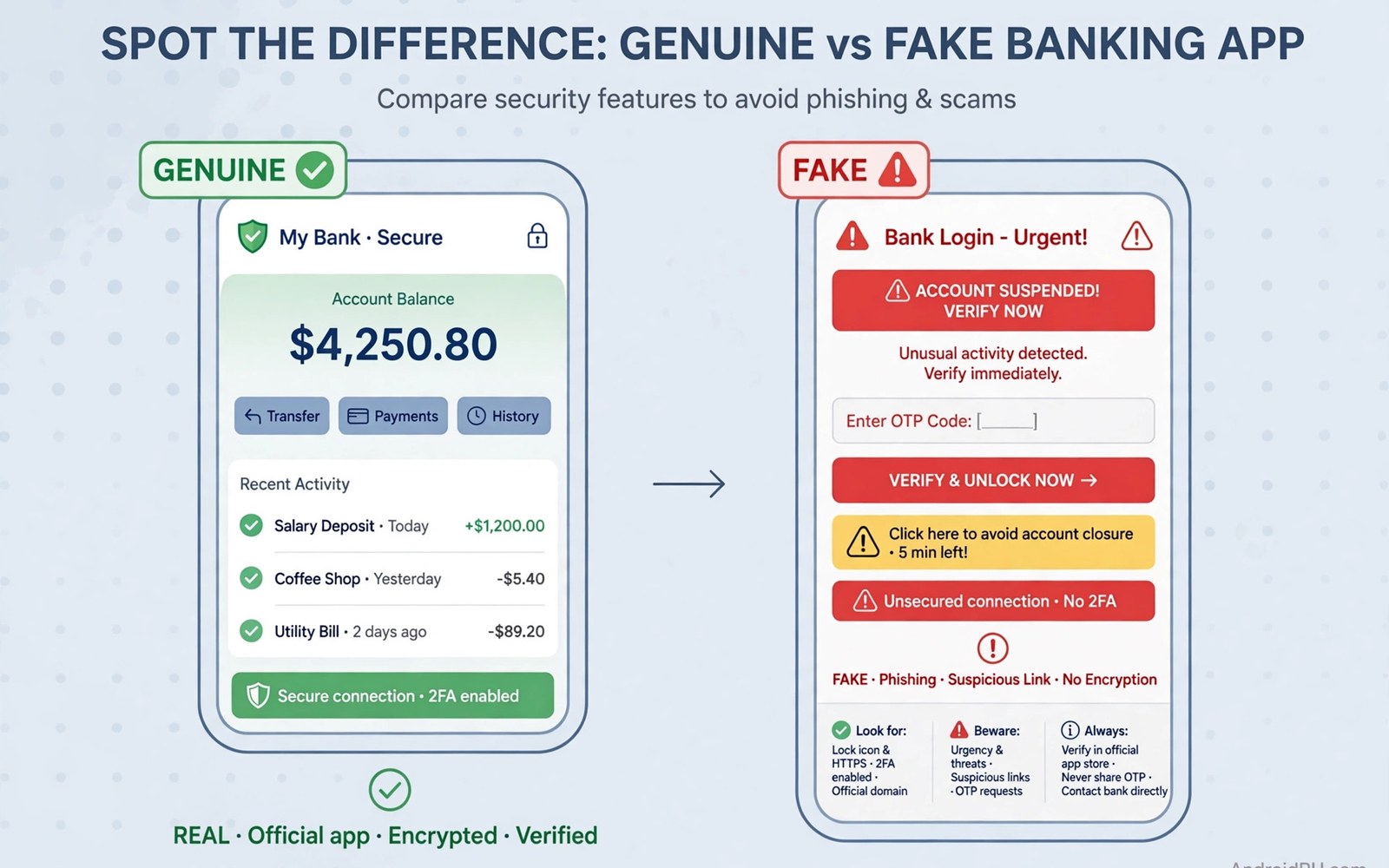
Fake banking apps look like real bank apps. They copy logos and colours and login screens. They appear in search results and in messages. A user who installs one enters real credentials into a fake app. The fake app sends those credentials to an attacker. Money can move within minutes. Identifying a fake before install is therefore a money skill. This guide shows the checks that expose clones fast.
Clones succeed through haste and trust. A user searches for a bank name and taps the first result. A user taps a link in a message that claims an account issue. Both paths skip verification. Attackers design clones for those paths. They buy ads that push clones to the top. They send messages that create urgency. Slow down at both moments. Verification takes one minute. Recovery from a stolen login takes weeks. That time trade favours a careful check every time.
Check the developer name first
Open the store page and read the developer name letter by letter. Real banks publish apps under a clear official developer name. A clone uses a similar name with a small change. It may add a word like official or global. It may misspell the bank name slightly. It may use a generic developer name with no link to the bank. A mismatch here is a strong warning. Do not install an app with a doubtful developer name. Search for the bank name again and compare developers side by side.
Check the developer page for other apps. A real bank developer often has a small set of related apps. A clone developer often has one app only. That single app may be new. It may have no history. A lone new app claiming to be a major bank is suspicious. A major bank would have a long store history. It would have many installs. It would have reviews spread over years. A new clone has none of those. History is a powerful fake detector.
Check contact details on the developer page where shown. A real bank lists a website and support channels. A clone may list a generic email or no contact at all. A missing website from a banking app is a warning. A website that does not match the bank domain is a stronger warning. Do not trust a developer page that hides its identity. Real banks do not hide. Clones must hide to survive review.
Check installs reviews and dates
Install count tells a story. Real banking apps have large install counts. They serve millions of customers. A clone has a small count. It may show a few thousand installs. It may show a few hundred. A small count for a major bank is a red flag. A small count for a small local bank may be normal. Judge the count against the size of the bank. A national bank with a tiny install count cannot be real.
Review dates tell another story. Real banking apps collect reviews over years. A clone collects reviews in a burst after launch. Look at the review timeline. A flood of glowing reviews in one week is unnatural. Generic praise repeated many times is also unnatural. Real reviews mention specific features and specific problems. Fake reviews praise in vague words. Read a sample of low reviews too. Real apps have complaints about real issues. Clones may have few low reviews because they are new.
Update history tells a third story. Real banking apps update regularly with security fixes. A clone may have one version only. It may have no update history. A banking app with no updates for years is suspicious. Security apps need updates. A stale banking app cannot be trusted with money. Check the last update date before install. A recent update from a real developer is a good sign. No update from a new developer is a bad sign.
Check permissions at install time
A real banking app needs a limited set of permissions. It may need camera access for cheque scans. It may need notification access for alerts. It may need biometric access for login. It does not need SMS read access for all messages. It does not need contact access for all contacts. It does not need accessibility service at install time. A clone that requests all of those at once is harvesting data. Deny those grants or skip the app entirely.
Watch for overlay permission requests from a banking app. A real banking app rarely needs to draw over other apps. A clone uses overlay to fake login screens. It may also use overlay to hide its own activity. Turn off overlay permission for any banking app that requests it without a clear floating feature. That single check blocks many clone tricks. For trojan overlay attacks in detail see how trojan malware steals banking credentials and review its defences.
- Read the developer name letter by letter before install.
- Compare install count with the real size of the bank.
- Read review dates and look for a burst of fake praise.
- Check update history for regular security updates.
- Deny SMS and contact and accessibility access for banking clones.
Test the login screen with care
Never enter real credentials into an app you doubt. Test the app without logging in first. Open it and explore its menus. A real banking app shows help and branch info and support links. A clone may show only a login screen. A clone may crash when you tap help. A clone may show a login screen with no fingerprint option that the real app offers. Those gaps reveal a shallow copy. A real app has depth. A clone has only a login mask.
Check the app behaviour after a failed login. A real bank will show a specific error and a lockout warning after repeated failures. A clone may accept any input or show a generic error. It may redirect to a fake support page. It may ask for a full card number at login. Real banks rarely ask for a full card number at login. They ask for a username and a password or a biometric. A request for a full card number plus a PIN at first login is a harvest attempt. Stop at once and remove the app.
Compare the login screen with the bank website login if you can do so safely. Open the bank website yourself by typing its address. Do not tap a link from the suspect app. Compare colours and field labels. A clone may copy the design closely. Small differences in wording can still reveal it. A clone may use a slightly different logo. It may use a different font for the bank name. Trust small differences when they appear. They often mark a copy.
Safe install habits for banking
Install banking apps only from a trusted store. Never install a banking app from a link in a message. Never install one from a direct download link. Search for the bank name in the store yourself. Verify the developer name before you tap install. After install verify permissions before you log in. This order prevents most clone installs. It costs one minute. It saves a bank account.
Use the bank official website to confirm the store link when in doubt. Type the bank address yourself. Find the mobile app section on that site. Use the store button from that site only if you trust the site address. Do not use a store button from a message or a search ad. Ads can lead to clones. A typed address leads to the real site. That distinction matters for money apps more than for any other app type.
Keep banking on a phone with few risky apps. Do not install games and tools on a banking phone if you can avoid it. Use a second device for risky installs. Keep the banking phone updated. Review its permissions monthly. For smishing delivery of clones see how malicious SMS links target users and learn its red flags. For a broader infection check see how to know if your phone is infected and complete it after any doubt.
Verify through the bank directly
When doubt remains after store checks then verify through the bank directly. Call the bank on a number from your card or from a statement. Ask which developer name publishes its official app. Ask whether the app you found matches that name. A short call resolves doubt that hours of guessing cannot. Bank support teams handle fake app reports daily. They can confirm the real developer in seconds. Use a known number only. Do not call a number from the suspect app or from a suspect message. A known number reaches the real bank. An unknown number may reach the attacker.
Visit a branch if a call feels uncertain. Branch staff can show you the official app on a staff device. Compare that app with the app on your phone. A side by side comparison reveals clones fast. A clone may differ in icon shade or in menu layout. A real app matches the staff device exactly. A branch visit takes time but it protects money. For large transfers or new banking setups a branch check is worth the trip. Verification through a human channel beats verification through a screen alone.
Also check bank alerts after you install a verified app. Set transaction alerts for every transfer. Alerts give you a live view of account activity. A strange alert after a new install deserves an immediate bank call. Do not wait for a statement to confirm a theft. Speed matters for recovery. A bank can freeze transfers fast if you report fast. Alerts plus verification plus permission checks give three layers for banking safety.
Check for clone ads in search results
Clone apps often appear as paid ads above real results in search. An ad label next to a banking app deserves extra care. Attackers buy ads to push clones to the top of a search page. Scroll past ads to organic results when you search for a bank app. Verify the developer name on the organic result. An ad with a slightly wrong developer name is a clone ad. Report that ad through the store if a report option is offered. Reporting an ad protects the next searcher. Never install a banking app from an ad without a developer check. Ads are a paid placement not a trust badge.
Fake bank check:
Developer name matches exactly? Yes or No
Install count fits bank size? Yes or No
Reviews spread over years? Yes or No
Permissions limited and logical? Yes or No
If any answer is No then do NOT log in
The steps above follow the approach described in the official developer documentation for Android security and app permissions. That guidance stresses developer verification and least privilege for sensitive apps. It also stresses user control over powerful permissions. Apply those checks before every banking login.
Fake banking apps win through speed and trust. Slow down and verify the developer and the history and the permissions. Never log into a doubtful app. Install only from a trusted store after your own search. Those habits keep your login info with your real bank and nowhere else.

