

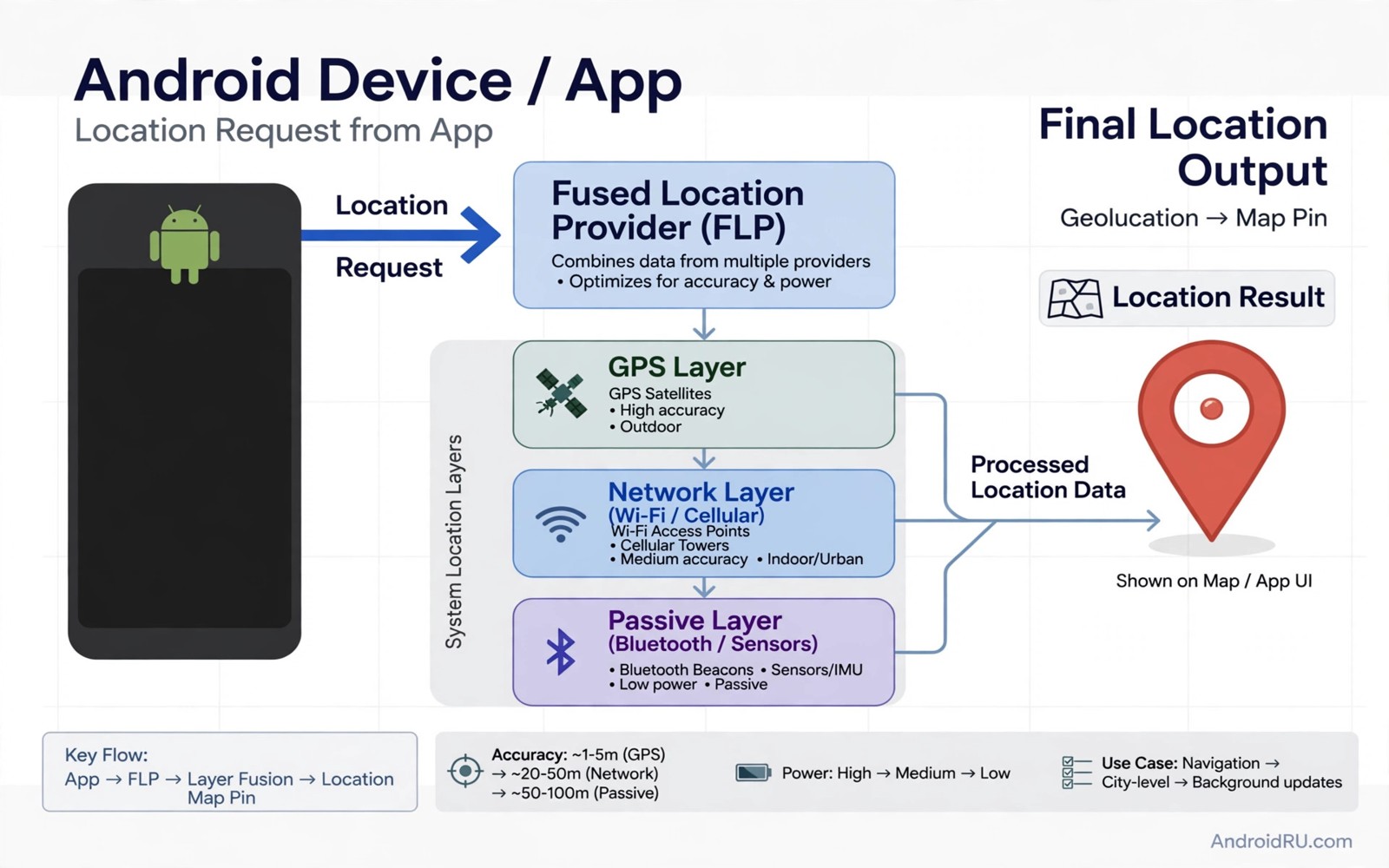
Location on Android comes from many sources at once. GPS satellites give precise coordinates. Wi-Fi networks give nearby positions. Cell towers give rough positions. Sensors refine movement. An app that checks only one source is easy to fool. An app that cross-checks sources is not. Systemwide mocking must handle that whole flow.
Developer options offer a simple mock location app. That option works for many casual uses. It fails when an app detects mock status. It fails when an app reads location from a lower layer. It fails when an app uses a fused provider that ignores the mock flag. Deep framework mocking aims to fix those gaps. It replaces location data at a lower point in the stack. A similar kind of disguise is at work when you spoof a device model, since both tricks change what an app believes about the phone before it decides what to allow.
This guide explains the layers involved. It explains what a framework hook can change. It explains what it cannot change. It also explains the risks. Location spoofing can break navigation and safety features. It can violate app terms. It can trigger account flags. Use it only for lawful testing and for apps where you accept those risks.
Start with a clear test goal. Pick one app and one location. Decide how you will verify the result. A map pin alone is weak proof. A route calculation and a nearby search give stronger proof. A weak test leads to false confidence. A strong test reveals gaps early.
How Android builds a location fix
The location stack starts with hardware. A GPS chip reports satellite data. A Wi-Fi chip reports nearby networks. A modem reports cell towers. The framework merges those inputs into a single location object. Apps receive that object through location APIs. They rarely talk to hardware directly.
The fused provider blends sources for balance. It favours accuracy when GPS is strong. It favours speed when Wi-Fi data is fresh. It falls back to cell data when both are weak. A mock that changes only GPS leaves Wi-Fi and cell data intact. A cross-checking app can spot the mismatch. That mismatch is the most common reason a shallow mock fails.
Mock status is a flag on the location object. Developer mock apps set that flag. Many apps read the flag and reject the location. Deep hooks can clear the flag or replace the object entirely. Clearing the flag helps with apps that check it. Replacing the object helps with apps that read raw coordinates. Both approaches need care.
Some apps use their own location SDKs. Those SDKs may read sensor data directly. They may use network timing. They may compare IP location with GPS location. A framework hook cannot fix an IP mismatch. A VPN can change IP location but it adds latency and its own detection risk. Accept that no single hook covers every check.
Framework hooks versus driver hooks
A framework hook targets location manager methods. It intercepts the call that returns a location. It returns your chosen coordinates instead. That hook covers most normal apps. It runs in the system process or in the app process depending on design. It is easier to maintain than a driver hook.
A driver-level approach targets lower layers. It may hook the hardware abstraction layer. It may feed fake satellite data to the GPS stack. That approach is deeper and more fragile. A system update can break it silently. A wrong value can confuse the whole location stack. Most users should prefer a framework hook over a driver hook.
Think in terms of blast radius. A framework hook affects location APIs. A driver hook affects every consumer of that hardware path. A mistake at driver level can break emergency location and navigation. A mistake at framework level is easier to disable. Choose the shallowest hook that passes your test.
Module scope controls that blast radius further. Scope the location module to test apps only. Leave maps for emergency use outside the scope if you can. Leave banking and ride apps outside the scope as well. A narrow scope limits damage when a hook misbehaves.
Setting up a systemwide mock safely
Install a location module that supports systemwide mode. Enable it in LSPosed with a narrow scope first. Set a test coordinate near your real area. A nearby coordinate reduces obvious mismatches. A faraway coordinate with a local IP address looks suspicious to cross-checking apps. Start close and expand only if needed.
Disable the developer mock option if the module replaces it. Two mock systems can conflict. One may set the mock flag while the other clears it. That conflict produces unstable results. Use one system at a time. Record which system you chose.
Restart the target app fully after enabling the module. Location objects can cache inside a running app. A cached real location may persist after you enable mocking. Force stop the app. Clear its location cache if needed. Then open it fresh and check the result.
Test with a map app first. A map app shows the mocked pin clearly. It also shows route and search behaviour. If the map app shows the mock location then the hook works at framework level. If it shows your real location then the scope or the hook needs fixing before you test other apps.
Testing apps that cross-check location
Cross-checking apps compare GPS with Wi-Fi and IP data. A GPS-only mock fails that test. You may need to disable Wi-Fi scanning during the test. You may need to use mobile data instead of Wi-Fi. Each change reduces one mismatch source. Document each change so you can undo it later.
Some apps check movement plausibility. A sudden jump across continents looks fake. A gradual move looks real. Some modules offer a route mode that moves the pin along a path. Route mode helps with apps that track movement. It also helps with games that expect walking speed. Use route mode for movement tests.
Sensor data can betray a static mock. An accelerometer that reports stillness while GPS moves looks odd. A module that also mocks sensor data is more convincing. It is also more invasive. Only enable sensor mocking for the specific app that needs it. Leave it off for other apps.
Permission control interacts with location mocking. An app that loses location permission cannot receive any location at all. That failure looks different from a mock failure. The guide on controlling app permissions beyond system settings explains granular permission control. Check permissions before you blame the mock module.
Attestation and account risks
Many apps combine location checks with integrity checks. A rooted phone may fail integrity even if location passes. A location mock cannot fix an integrity failure. Treat those as separate problems. Fix integrity first if the app refuses to run at all. Test location only after the app runs normally.
Account flags are a longer-term risk. An app may log location jumps over days. A pattern of impossible travel can trigger a review. A single test rarely causes a flag. Repeated jumps across countries increase the risk. Keep mocking sessions short and plausible. Avoid mocking on accounts you cannot afford to lose.
Some services use location for safety. Ride apps and delivery apps rely on real location for pickup. Emergency apps rely on real location for help. Never mock location for those services in a real situation. A wrong pickup or a delayed response is a safety failure not a technical trick.
The attestation guide on passing hardware attestation checks covers integrity failures that often appear alongside location tests. Read it if an app fails before it even requests location. That order saves wasted mocking effort.
Building a realistic mock route
A realistic mock route moves at plausible speeds. Walking speed suits a pedestrian test. Driving speed suits a road test. A jump from a home address to a distant city in one second looks fake. A gradual route looks real to movement checks. Build routes with realistic timing.
Start a route near your real location. Move along real roads where possible. Pause at plausible stops. A route that follows roads passes more checks than a straight line across buildings. Road-following modules help when available. Manual waypoints can approximate roads when they are not.
Match route speed to the app type. A fitness app expects walking or running speeds. A delivery app expects driving speeds. A game expects walking speeds for most play. Wrong speeds trigger plausibility checks. Right speeds blend in.
End the route cleanly. Stop mocking before you close the app. Let the app save its final position. A sudden stop mid-route can look odd in logs. A clean end looks like a normal session end. That detail matters for repeated tests.
Permission handling also affects route tests. An app that loses location permission mid-route stops receiving updates. The guide on controlling app permissions in fine detail explains that interaction. Check permissions before you judge a route failure.
Common mistakes
- Mocking only GPS while leaving Wi-Fi and cell data to contradict the mock.
- Jumping to a faraway location with a local IP address and then wondering why an app rejects it.
- Running a developer mock app and a framework module at the same time.
- Testing with a cached app session that still holds a real location.
- Scoping the module to every app including safety and banking apps.
Frequently asked questions
Why does a map show the mock location but another app shows my real location?
The other app may use a different location source. It may read a cached fix. It may use its own SDK. Check the module scope for that app. Force stop the app and test again with a fresh session.
Does systemwide mocking hide the mock flag from all apps?
No hook hides the flag from every possible check. A good framework hook clears the flag for normal APIs. A custom SDK may still detect mocking through other signals. Test each target app separately.
Can mocking break navigation permanently?
Mocking should stop when you disable the module and restart the app. A stuck location usually means a cached fix or a still-active module. Disable the module scope. Restart the phone if the location stays wrong.
adb shell dumpsys location | grep -i "last location" -A 2
# Inspect the last reported location on your own device.
# Compare the result with the module enabled and disabled.
The command above is a generic inspection example written for this guide. It shows how to check the last location reported by the system. It does not change location settings. It does not send location data anywhere.
Conclusion
Systemwide mocking works when you respect the whole location stack. Hook at framework level first. Test with a map app. Reduce Wi-Fi and IP mismatches. Keep the scope narrow. Keep sessions short and plausible.
Your concrete next step is to pick one test app and one nearby coordinate today. Enable the module for that app only. Force stop the app. Open it fresh and verify the pin and a nearby search before you expand the scope.

