

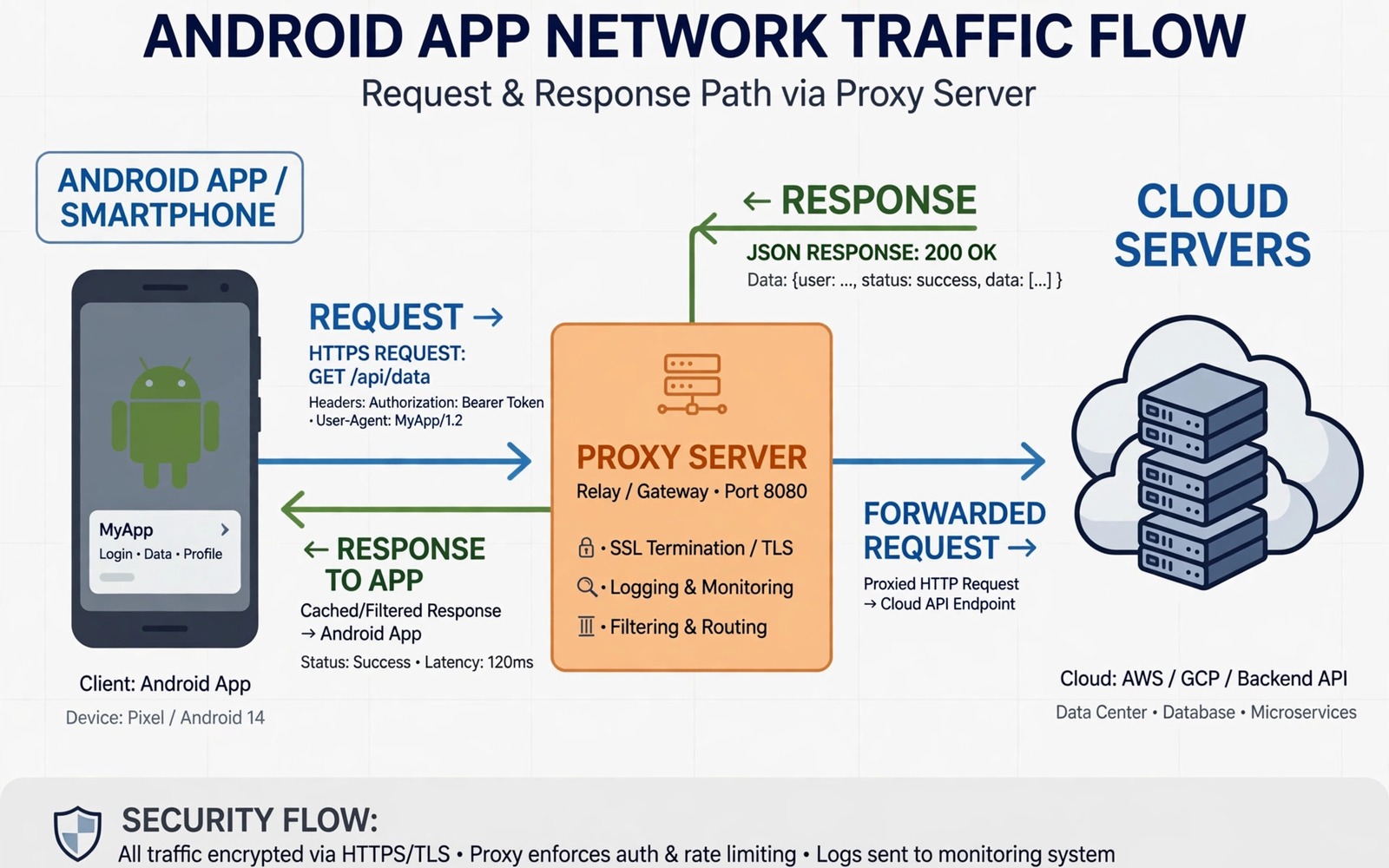
Network traffic tells you what an app really does behind its screens. A proxy sits between the app and the server and records each request and response. This view helps you debug slow calls and broken data. It also helps you see which data an app sends during a normal flow. This guide explains a safe test setup for your own apps.
Use a test device or emulator that you can reset. Do not intercept traffic from apps that you do not own or from real user accounts. Use test accounts and test servers when you can. A controlled setup keeps your work ethical and it keeps real data safe. It also makes results repeatable because test data does not change unexpectedly.
Start with a simple flow that you understand well. A login flow or a feed load gives you clear requests to study. Record the requests in order and note the response codes. A clear baseline makes it easy to spot a failing call later. Keep the baseline log beside your code notes.
Set Up A Proxy On A Test Device
Install a proxy tool on your computer and connect the test device to the same network. Set the device Wi-Fi proxy setting to point at your computer. Use the proxy port that the tool shows on its main screen. Test the connection by opening a simple page on the device. If the page loads through the proxy then the basic setup works.
Install the proxy certificate on the test device when you need to read encrypted traffic. Follow the tool instructions for certificate installation on a test device only. Do not install a proxy certificate on a daily phone that holds personal accounts. A test device keeps the risk contained and it makes cleanup easy when the test ends.
- Use a test device or emulator only
- Connect device and computer to the same network
- Set the Wi-Fi proxy host and port correctly
- Install the certificate only on the test device
- Test with a simple page before you study an app
Capture A Single User Flow
Open the app and run one flow at a time. A single flow produces a clean log that is easy to read. A long session with many flows mixes requests and hides the order of events. Clear the proxy log before you start the flow. Save the log with a name that matches the flow and the app version.
Watch for the first request that starts the flow. It often fetches user data or a feed list. Follow the chain of requests that follow it. A feed load may trigger image requests and analytics requests after the main data request. Note which requests block the screen and which requests run in the background. Blocking requests deserve more attention when a screen feels slow.
Runtime behaviour also connects to dynamic tools covered in the material on essential reverse engineering tools. A proxy log plus a runtime log gives you both network timing and code timing. Use both logs to confirm whether a delay comes from the server or from local processing. That distinction decides where the fix belongs.
Read Requests And Responses Carefully
Read the request path and method first. A GET request usually fetches data and a POST request usually sends data. Check the headers for content type and authentication tokens in test data. Do not share real tokens from a log. Replace real tokens with placeholders before you share a log with anyone else.
Read the response code and body next. A success code with empty data points to a server logic issue. An error code with a clear message points to a request problem. A large response body may explain slow loading on a weak network. Record the size and timing for each important response so you can compare builds later.
Handle Encrypted Traffic Correctly
Most modern apps use encrypted connections. A proxy can read encrypted traffic only when the test device trusts the proxy certificate. Some apps add certificate pinning which blocks even a trusted proxy certificate. Pinning is a security feature and it should not be bypassed on apps that you do not own. For your own test builds you can disable pinning in a debug build to allow inspection.
Create a debug build for traffic testing when pinning blocks your proxy. Keep the debug build separate from the release build. Never ship a build with pinning disabled to real users. A debug build gives you full visibility without weakening the release app. Document the debug setting so it does not leak into a release by accident.
Debug Slow And Failing Calls
Slow calls often come from large responses or repeated requests. Check whether the app requests the same data twice in one flow. Check whether images load at full size when a small size would work. Check whether a call waits for a slow server before the screen can show cached data. Each pattern has a different fix and the proxy log shows which pattern applies.
Failing calls need a different check. Look at the request that failed and compare it with a successful request for the same feature. A missing header or a wrong parameter often explains the failure. Test the corrected request in isolation when the proxy tool supports replay. A replay test confirms the fix before you change app code.
Clean Up After Testing
Remove the proxy certificate from the test device when testing ends. Reset the Wi-Fi proxy setting to no proxy. Delete logs that contain test tokens or personal data. A clean device state prevents accidental interception later. It also prevents a forgotten proxy setting from breaking normal use of the test device.
Archive only the logs that you need for documentation. Replace tokens with placeholders in archived logs. Add a short note that explains the flow and the result. Future readers should understand the log without needing the original test device. A tidy archive turns a debugging session into reusable evidence.
proxy_host = 192.168.1.10
proxy_port = 8080
device_wifi_proxy = manual
test_flow = feed_load
The snippet above is an original example written for this guide. It shows generic settings that you can adapt to your own test network. It does not copy code from any outside source.
Replace the host address with the address of your own computer on the test network. Keep the port value matched to the proxy tool setting. Use a test flow name that matches the log file that you save.
Filter Noise From Proxy Logs
Proxy logs contain many requests that do not matter for a specific debugging task. Analytics calls and image requests can bury the main data request in a long list. Filter the log by host name to focus on the service that owns the feature. Filter by path to focus on the endpoint that returns the data. A filtered log shows the request chain clearly and it hides the background noise. Save the filter settings beside the log so a teammate can apply the same filter later.
Group requests by user flow rather than by time alone. A feed flow may include a main request and several image requests that follow it. A login flow may include a token request and a profile request in order. Grouping by flow reveals the sequence that time ordering alone can hide when background requests interleave. Label each group with the flow name and the result. A grouped log reads like a story of the feature rather than a raw list of calls.
Export a filtered log for documentation when a bug is fixed. An exported log should contain only the requests that prove the bug and the fix. Remove tokens and personal data before export. Add a short note that explains what the log shows and what changed after the fix. A concise exported log is more persuasive in a review than a huge raw log. Reviewers can verify the fix quickly when the evidence is focused.
Filtered logs also help during incident response when time is short. A responder who can filter by host and flow can find a failing request in minutes. A responder who must read a raw log may waste an hour before finding the same request. Prepare filter presets for the most important flows before an incident happens. A preset list is a small investment that pays off during a stressful outage.
Common Mistakes
A common mistake is intercepting traffic on a daily phone with real accounts. A proxy certificate on a daily phone creates risk for personal data. Use a dedicated test device for all proxy work. A test device can be reset and it holds no personal accounts.
Another mistake is capturing a long session and trying to read it all at once. Long logs hide the order of a single flow. Capture one flow at a time and label each log clearly. Short logs lead to faster and more accurate conclusions.
Some testers also share logs without removing tokens. A token in a shared log can give access to an account. Replace tokens with placeholders before sharing. Check headers and bodies for tokens before you send any log file.
Finally do not bypass certificate pinning on apps that you do not own. Pinning protects user data and bypassing it on other apps breaks trust. Use a debug build of your own app when you need visibility. Respect security features on apps that belong to others.
Frequently Asked Questions
Do I need a proxy for basic network debugging?
A proxy helps when you need to see full requests and responses. Simple logging in code can work for your own app. A proxy adds value when you compare behaviour across builds or devices.
Why does the proxy show no traffic for some apps?
Some apps use certificate pinning which blocks proxy certificates. Some apps use direct connections that bypass Wi-Fi proxy settings. Check pinning and connection type before you assume the setup failed.
Is proxy testing safe for real users?
Proxy testing is safe only on test devices with test accounts. Do not install proxy certificates on devices that hold real user data. Keep test traffic separate from production traffic at all times.
Conclusion
Proxy interception gives you a clear view of app network behaviour when you use a safe test setup. Set up the proxy on a test device and capture one flow at a time. Read requests and responses in order and clean up certificates after testing. Your concrete next step is to set up a proxy on a test device today and capture one feed load from your own app. Record the slowest request and decide whether the fix belongs in code or on the server. For code context you can study decompiling and inspecting APK files and for security context you can study securing mobile app credentials and for runtime hooks you can study dynamic code injection with Frida as next steps.

