

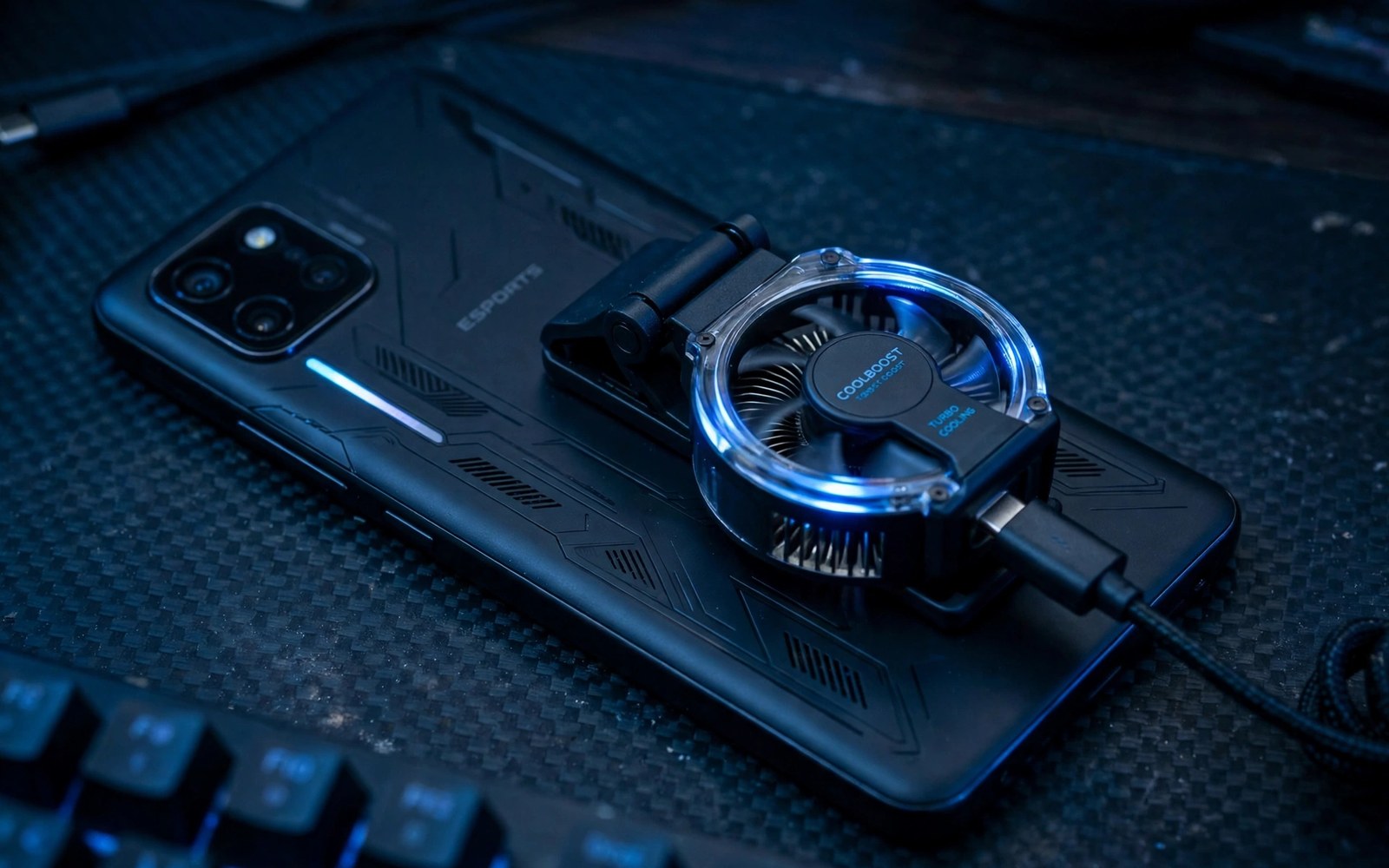
Cooling fans thermal accessories mobile gamers use them to fight heat throttling. Phones slow down when internal heat rises too high. Frame rates drop and touch response feels sluggish. A cooler phone holds performance steadier for longer sessions.
Heat comes from processor load and screen brightness and charging at once. Gaming while charging generates the most heat of all. A cooling fan pulls heat from the phone back or case. Passive cases spread heat but cannot match active fans for long sessions. Choose cooling based on session length and game intensity.
This article compares fan types and cases and habits for cool play. You will learn which coolers fit your phone. You will learn how to use them without blocking controls. You will also learn free habits that cut heat before buying gear.
Why phones throttle during games
Processors reduce speed when temperature crosses a safety threshold. That slowdown protects chips from heat damage. Players notice it as frame drops after twenty minutes of play. Throttling hits hardest in demanding games at high graphics. A cooler phone delays that threshold and keeps frames steadier.
Charging during play adds heat from the battery to processor heat. That combined heat triggers throttling sooner. Play on battery when possible for intense sessions. Charge between sessions rather than during boss fights. That single habit cuts heat more than many accessories do.
Clip fans and semiconductor coolers
Clip fans blow air across the phone back to carry heat away. They cost little and fit many phones. They work best with good airflow around the phone. Semiconductor coolers use a cold plate pressed against the phone back. They cool faster but need power from a cable or battery. They also add weight that some players dislike.
Fit matters for coolers as much as cooling power. A cooler that blocks buttons or grips hurts play. Check cooler size against your phone and grip style. Telescopic grips may conflict with large cooler plates. Test fit with your full gaming setup before a long session.
Cases and passive cooling choices
Thick cases trap heat against the phone back during play. Thin cases with vents let heat escape faster. Some gaming cases include metal plates that spread heat. Remove heavy cases for intense sessions when possible. A bare phone with a fan cools best of all for long ranked play.
Screen brightness also drives heat during play. Lower brightness a little to cut heat without losing visibility. For audio comfort during long sessions consider low latency earbuds for gamers so you can play at lower volume and stay focused on the game.
Habits that keep phones cool for free
Close background apps before intense games to cut processor load. Turn off downloads and sync during play sessions. Play in a cool room away from direct sunlight. Sunlight heats phones fast even with a fan attached. Shade matters as much as any cooler on hot days.
Take short breaks between long missions to let heat dissipate. A five minute pause drops temperature noticeably. Use breaks to stretch hands and rest eyes as well. Breaks protect both phone performance and player health. Long sessions feel better with planned pauses built in.
Accessories that pair well with this setup
A small power bank pairs naturally with any active cooling kit for travel. Coolers draw power while games drain phone batteries fast. A bank keeps both phone and cooler running on long days. Choose a bank with enough wattage for phone plus cooler together. That combined power plan prevents cooler shutdowns during crucial gaming moments away from outlets.
A vented thin case complements active cooling better than a thick rugged case. Thick cases trap heat against the phone back during play. Thin vented cases let fans move heat away faster. Choose a case that exposes the cooler contact area fully. That fit choice maximises cooler efficiency without sacrificing basic drop protection entirely.
Eye comfort accessories also matter during long cooled gaming sessions. Cool phones enable longer play which strains eyes more over time. Blue filtering lenses may ease fatigue for some players. Learn their honest limits in blue light glasses for sessions before buying. Cooling plus eye care together support truly long sessions safely and comfortably.
A weekly routine that keeps everything working
Clean cooler fans weekly to remove dust that slows airflow. Dusty fans cool less and grow noisier over time. A soft brush clears fan blades gently without damage. Check cooler plates for grit during the same routine. Clean coolers maintain rated cooling power across months of daily use and dusty travel conditions.
Test frame rates monthly with and without cooling in the same demanding game. That comparison proves whether cooling still helps your current games. Note results briefly for seasonal comparison. Summer heat may demand cooling that winter play does not need. Monthly tests match cooling use to real conditions rather than habit alone.
Review power bank capacity monthly as gaming travel grows. Longer trips demand larger banks or more frequent charging stops. The high wattage options are clear in high wattage power banks for players planning travel power. Monthly review keeps travel power matched to trip length and game intensity together.
How this plays out in real life
A ranked player in a hot climate uses a semiconductor cooler for summer matches. Ambient heat plus gaming load throttles phones quickly without cooling. The cooler delays throttling through long tournament sessions. That competitive edge matters when rankings depend on steady frames. Hot climate players benefit most from active cooling investments of all gamers.
A casual gamer in a cool room relies on free habits instead of buying coolers. Lower brightness and charging breaks keep phones cool enough for story games. That habit first approach saves money for casual session lengths. Coolers remain unnecessary when throttling never appears in practice. Honest need assessment beats gear enthusiasm for casual players wisely.
A traveller in a sunny destination struggles with phone heat on outdoor breaks. Direct sunlight overwhelms even good fans during midday play. Shade plus a fan together restore playable temperatures. That combined approach shows environmental awareness matters most. No cooler alone defeats harsh sun without shade and sensible session timing choices.
A student plays long sessions in a dorm without air conditioning during summer. A clip fan plus open window airflow keeps frames steady for hours. That affordable cooling setup respects student budgets perfectly. Breaks between matches let heat dissipate further. Combined habits and cheap fans solve dorm heat without expensive semiconductor gear at all.
A content creator records gameplay for hours and needs stable performance throughout. Frame drops ruin recorded footage quality for viewers. Active cooling plus a vented case keeps recordings smooth. That professional need justifies premium cooling gear fully. Creators cannot reshoot throttled footage easily so cooling becomes essential production equipment.
A practical check you can run
You can check thermal state and battery temperature before cooling tests. Run the checks below on a computer linked to the phone. The output shows thermal status and battery temperature readings.
adb shell dumpsys thermalservice
adb shell dumpsys battery
adb shell cat /sys/class/thermal/thermal_zone0/temp
The commands above are adapted from public platform documentation for Android developer tools. They are included here as a teaching example for checking device behaviour and not as copied product code.
Common mistakes
A common mistake is gaming while charging at full brightness. That combo creates maximum heat and triggers throttling fast. Charge between sessions and lower brightness during play. Those two habits beat many cooler purchases for casual players.
Another mistake is buying a cooler that blocks your grip or buttons. Cooling power means little if controls suffer. Test cooler fit with your pad and grip style. Return coolers that force awkward hand positions during play.
A third mistake is ignoring room temperature and sunlight during play. A fan cannot overcome direct sun on a hot day. Move to shade and a cooler room first. Then add a fan for extra headroom during intense games.
Frequently asked questions
Do phone coolers really improve frame rates?
Coolers help when heat throttling causes frame drops. They delay throttling and keep speeds steadier in long sessions. They cannot fix a phone that lacks power for a game. Test frame rates with and without the cooler in the same game to judge value.
Are semiconductor coolers safe for phones?
Semiconductor coolers are safe when used as directed for normal sessions. Extreme cold plates can cause condensation in humid rooms. Wipe moisture from the phone after long cooler sessions. Avoid running a cold plate for hours without breaks.
Can a case replace a cooling fan?
Vented or metal plate cases help spread heat but cool slower than fans. Cases suit casual games and short sessions well. Fans suit long intense sessions where throttling appears. Combine a thin case with a fan for the best balance of protection and cooling.
Conclusion
Cooling gear works best as part of a wider heat plan. Charge between sessions and lower brightness and play in shade. Add a fan or cooler for long intense games. Test fit with your grip before committing to daily use.
Your next step is a heat test today. Play your hardest game for thirty minutes without charging. Note when frames drop and how hot the phone feels. Then repeat with free habits applied and judge whether a cooler is still needed.
Plan your first cooling week around heat tests with and without accessories. Play your hardest game on day one without charging and note frame drop timing. Repeat on day two with lower brightness and charging breaks applied. Test a clip fan on day three during the same game and compare frame stability. Test a semiconductor cooler on day four if heat persists despite fans. Note room temperature on day five since ambient heat shapes results strongly. Review cooler fit with your grip on day six for comfort trade offs. Decide on day seven which cooling level your games truly need. An evidence based week prevents overspending on cooling gear that free habits already replace.
Keep cooling habits simple enough to follow on every gaming day without effort. Charge between sessions and lower brightness slightly and play in shade. Those three habits cost nothing and prevent most throttling cases alone. Add fans only when habits prove insufficient for your hardest games. Simple habits plus targeted gear together beat expensive gear used without habits every time.

