

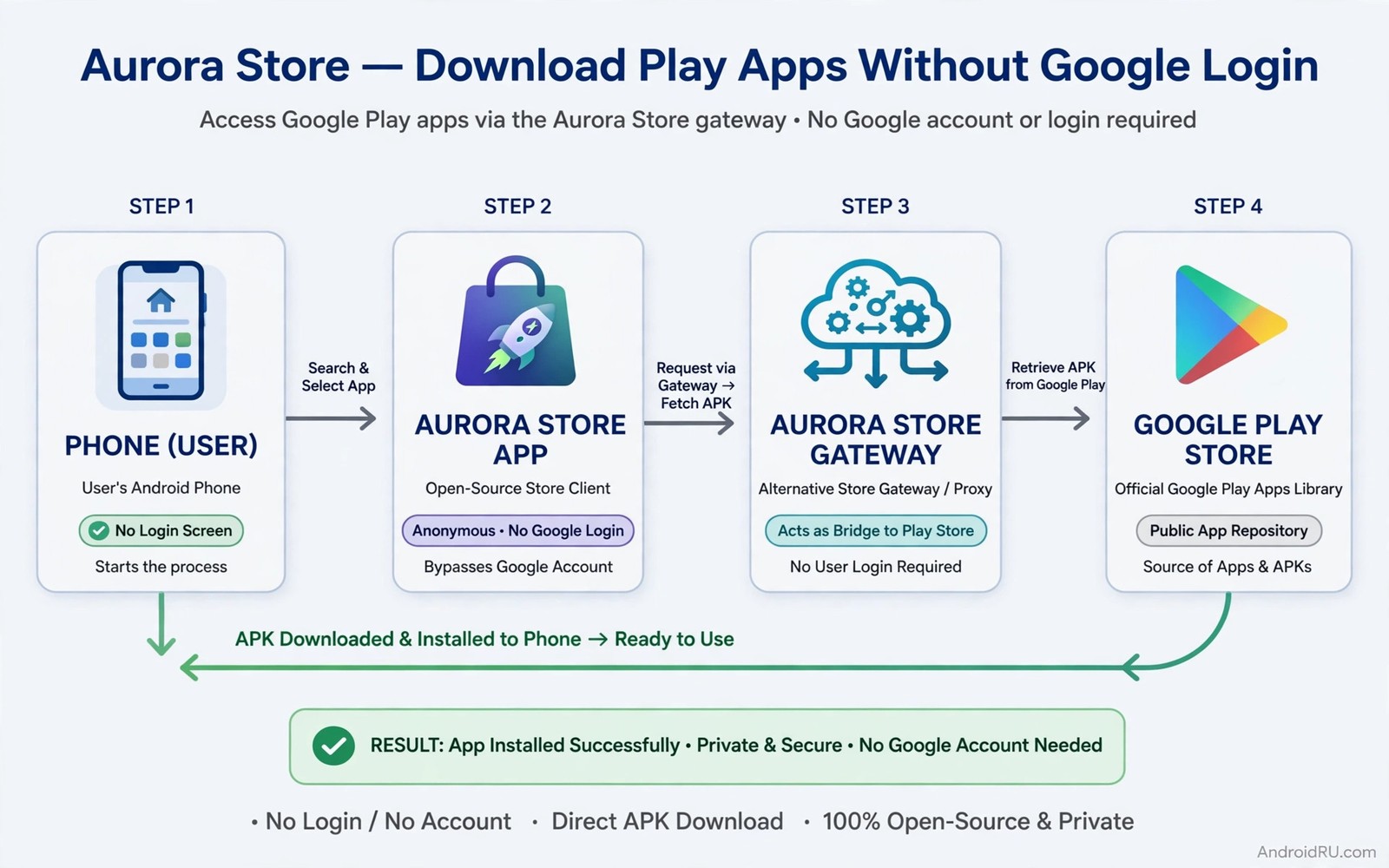
Aurora Store lets Android users download official Play apps without signing in to a Google account. It acts as an alternative front end to the same official catalogue. Users who avoid Google accounts for privacy reasons or who run degoogled phones gain access to official apps through this bridge. The app itself is open source and its behaviour is transparent to anyone who reads its code.
Aurora Store does not host apps itself in the usual sense. It fetches packages from official sources using anonymous or personal account tokens depending on settings. That distinction matters for trust. A store that hosts its own copies must be trusted to keep them unmodified. A front end that fetches official packages shifts trust toward the official source and toward the token system it uses.
This guide explains how Aurora Store works and how to use it safely. It covers account modes and anonymous limits and update behaviour. It also explains when Aurora Store is not the right tool. Users exploring Play Store alternatives often choose Aurora Store for official app access without a Google profile on the device.
Understand anonymous and account modes
Aurora Store offers anonymous sessions that use shared tokens to fetch apps. Anonymous mode requires no personal account and it works well for free apps. It may hit rate limits when many users share the same token pool. Downloads may slow or fail temporarily during peak use. Those limits are a tradeoff for privacy rather than a flaw in the app.
Account mode lets you sign in with your own Google account inside Aurora Store. That mode raises download limits and gives access to your purchased apps. It also ties downloads to your account in the same way the official store does. Users who want privacy should weigh that tradeoff carefully. Anonymous mode suits free apps while account mode suits purchased apps.
Some users create a separate account only for Aurora Store. That separation keeps their main Google identity off the phone while still allowing purchases. A dedicated account is a reasonable middle path. It still requires trusting Aurora Store with account credentials so use a strong unique password and two factor protection for that account.
Install Aurora Store correctly
Install Aurora Store from its official site or from a trusted open source repository. Allow install permission only for the source you used for that single install. Open Aurora Store and choose anonymous mode first to test basic function. Search for a free app you know and check that version and size information looks correct.
Grant Aurora Store install permission as a dedicated source. Do not grant the same permission to browsers and file managers at the same time. A narrow permission keeps Aurora Store as the controlled gate for official app downloads. Review the permission list after install to confirm only Aurora Store holds the gate for this purpose.
Update Aurora Store itself regularly. Token systems and official APIs change over time. An outdated Aurora Store may fail to fetch apps or may use outdated security practices. Check for updates through its own update channel or through the repository you used for install. A current store app is essential for reliable downloads.
Download and update apps through Aurora Store
Search in Aurora Store works like search in the official store. Results show app name and developer and rating and version. Open an app page and read permissions and version history before download. That review step matters even for official apps because permissions reveal data behaviour. A familiar app with new broad permissions deserves a second look.
Downloads through Aurora Store deliver the official package for your device configuration. Split packages are handled by the store installer. You do not need a separate split installer for most Aurora Store downloads. After download Aurora Store triggers the system install screen. Confirm the app name and permissions there before you accept.
Updates flow through Aurora Store when you open it and check for updates. Enable update notifications inside the app so you learn about new versions. Update timing may lag behind the official store slightly during anonymous token limits. Patience during peak periods avoids failed update attempts that confuse version state.
Handle purchased apps and licences
Free apps work best in anonymous mode. Purchased apps require account mode because licences tie to an account. Sign in with the account that owns the purchase. Aurora Store will then show purchased apps as available. Licence checks for some apps may still require Google services on the device. An app that checks licences through Google services may fail on a degoogled phone even after successful download.
Do not share account credentials to access someone else purchased apps. That sharing violates platform rules and risks account security. Each user should use their own account for purchases. Family sharing through official platform settings is the legitimate path for household sharing when available.
Keep purchase records outside Aurora Store as well. Note purchase dates and prices in your own records. That note helps you recover purchases if you switch accounts or devices. Official purchase history in your account remains the authoritative record. Your own note is a convenient backup.
adb install aurora-store.apk
adb shell pm list packages | grep aurora
adb shell dumpsys package aurora.store | grep version
The code block above uses the standard Android Debug Bridge command pattern to confirm the Aurora Store package and its version before signing in. It is included so you can confirm the Aurora Store package installed and check its version before signing in.
Troubleshoot common Aurora Store problems
Anonymous token exhaustion is the most common problem. Downloads fail with a token or rate message. Wait and retry later rather than creating many accounts to bypass limits. Repeated retries in quick succession can worsen rate limiting. A calm retry after some hours usually succeeds when token pools refresh.
App not available errors may mean the app is region restricted or device incompatible. Aurora Store cannot bypass regional restrictions that the official catalogue enforces. Check whether the app is available in your region through the official store page. A region block is a catalogue rule rather than an Aurora Store failure.
Install failures after download often point to signature conflicts. An existing version from a different source with a different signature blocks the Aurora Store update. Back up data and uninstall the conflicting version before reinstalling through Aurora Store. Keep one source per app afterwards to prevent recurrence.
Privacy strengths and limits
Aurora Store improves privacy by removing the need for a Google account on the device for free apps. It does not make downloaded apps private by itself. An official app can still track usage and collect data after install. Review each app permissions and privacy behaviour separately. Store privacy and app privacy are different layers.
Anonymous mode still reveals your IP address to download servers in the same way any download does. Users who need stronger network privacy should use a trusted VPN for downloads. That extra layer is optional for most users but it matters for high privacy needs. Judge your threat level honestly before adding complexity.
Account mode reduces privacy to official store levels for that account. That tradeoff is acceptable when you need purchased apps. Use anonymous mode for free apps and account mode only for purchases. That split keeps most downloads anonymous while still supporting paid apps.
Use Aurora Store for a clean test device
A test device without a Google account is an ideal place to learn Aurora Store. Install it in anonymous mode and download a handful of free apps that you know well. Compare versions and behaviour with the same apps on your main phone. That comparison builds trust in the store before you use it for daily apps. A test device also lets you practise update checks without disturbing your main setup.
Keep the test device updated through Aurora Store for a month. Note any download failures and how long retries took. That record tells you whether anonymous limits affect your usage pattern. Users who download rarely will see few limits. Users who update many apps at once may see more. Your own record beats general claims about reliability.
Common mistakes
The most common mistake is signing in with a main Google account unnecessarily for free apps. Anonymous mode covers free apps without account exposure. Reserve account sign in for purchases only. That discipline keeps privacy gains real.
Another mistake is using an outdated Aurora Store version for months. Outdated versions fail more often and may miss security improvements. Update the store app itself as part of your monthly routine. A current store app is a prerequisite for reliable downloads.
A third mistake is mixing Aurora Store with other sources for the same app. Mixed sources create signature conflicts and update confusion. Pick Aurora Store as the single source for apps you obtain through it. Consistency prevents most update problems.
Frequently asked questions
Is Aurora Store legal to use?
Aurora Store is an open source client that accesses official app data. Using it to download free apps you are entitled to use is widely accepted. Downloading paid apps without purchase remains against platform rules regardless of client.
Does Aurora Store work without Google Play Services?
Yes Aurora Store itself works without Google services. Individual apps may still need Google services for full function. Test each app for its core features after install on a degoogled phone.
Can Aurora Store update apps automatically?
Aurora Store can check for updates and notify you. Automatic background updates depend on device settings and on whether the store app stays active. Manual weekly checks are reliable when automatic updates prove inconsistent.
Switch Aurora Store modes deliberately
Switching between anonymous and account modes in Aurora Store should be a deliberate choice rather than an accident. Anonymous mode suits free apps and protects privacy. Account mode suits purchased apps and raises limits. Switching modes for a single download and then switching back keeps most activity anonymous. Note which mode you used for each app in your own records. That note prevents confusion when an update behaves differently in a new mode.
Conclusion
Aurora Store gives users official Play apps without a Google account on the device for free apps and with a dedicated account for purchases. It works best when you keep sources consistent and update the store itself regularly. Your concrete next step is to install Aurora Store in anonymous mode today and download one free official app you already use. Compare its version and permissions with your current install before you switch sources. Further reading includes stores without Google services and the F-Droid guide and running apps without Google services.

