

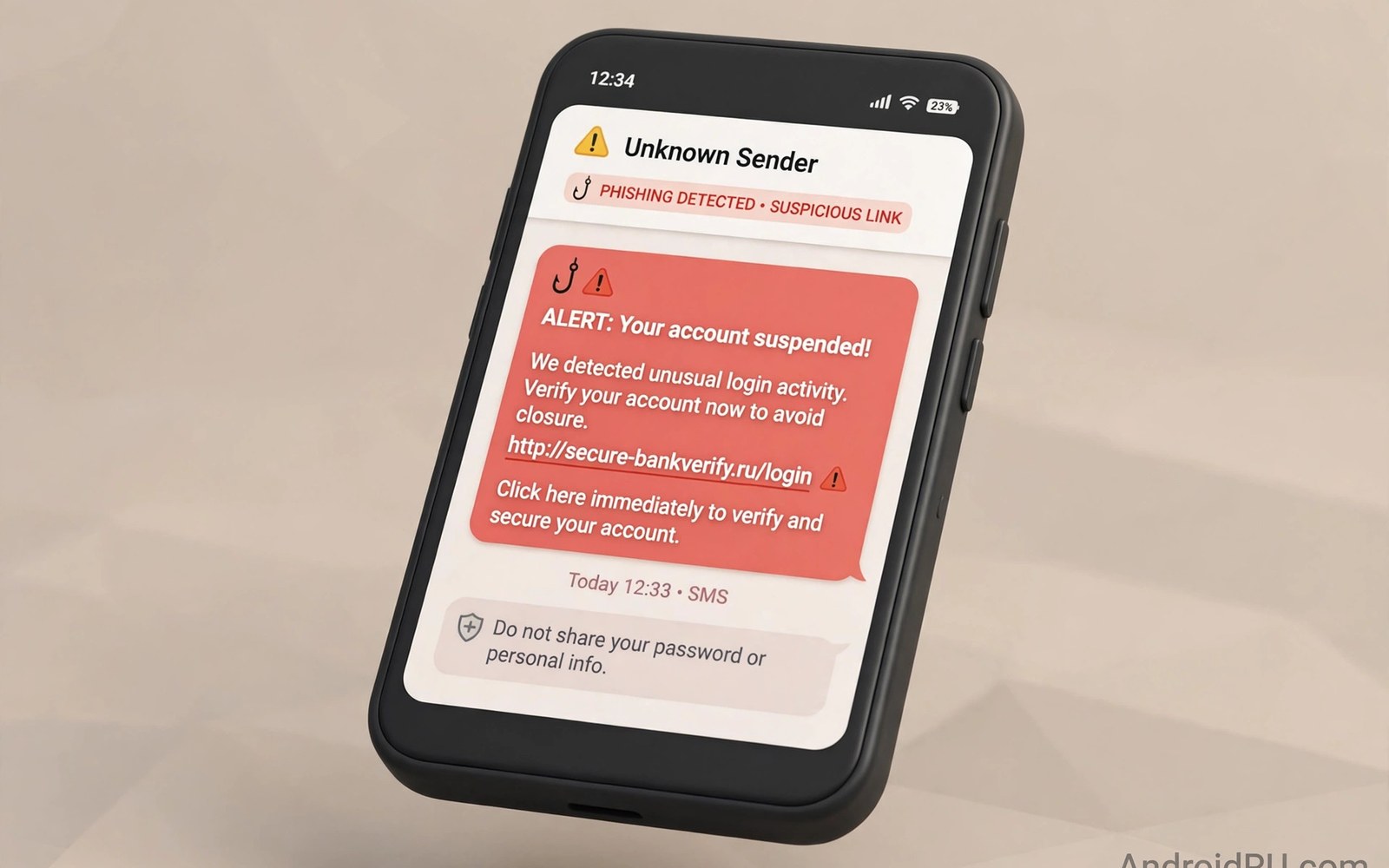
Smishing is phishing by SMS. A message pretends to come from a bank or a delivery firm or a government office. It claims a problem that needs urgent action. It includes a link. That link leads to a fake site or a bad download. A user who taps it may enter credentials into a fake page. A user who downloads from it may install malware. Smishing works because SMS feels personal and urgent. Learning its patterns blocks most attacks.
Smishing messages share a simple structure. They name a trusted brand. They claim an urgent problem. They offer a link as the fix. They threaten a consequence if you delay. A delivery message claims a package cannot arrive. A bank message claims an account will close. A tax message claims a fine will grow. Each version pushes a fast tap. A fast tap skips verification. Verification is the defence. Slow down and check the sender and the link before you tap anything.
Common smishing stories
Delivery smishing is the most common story. It claims a parcel is waiting or a delivery failed. It asks you to tap a link to reschedule. The link leads to a fake delivery site. That site may ask for a small fee. It may ask for card details to pay that fee. Real delivery firms rarely ask for card details by SMS link. They also rarely use a generic sender name. A delivery message from an unknown number with a shortened link deserves suspicion. Track parcels only through the official app or site you already use.
Bank smishing claims an account problem. It may claim a suspicious login or a blocked card. It asks you to verify through a link. The link leads to a fake bank login page. That page captures your username and password. Real banks rarely send login links by SMS. They ask you to open the app yourself. A bank message with a login link is a warning. Open the bank app yourself instead of tapping the link. That habit defeats bank smishing fully.
Prize and tax smishing use greed and fear. A prize message claims you won a gift. A tax message claims you owe a fine. Both include a link to claim or pay. A prize that you never entered cannot be real. A tax fine would arrive through official channels not a random SMS link. Both stories push a tap before thought. Pause and ask if the story fits your life. A story that does not fit is a scam story. Delete it without tapping.
How to spot a smishing message
Check the sender first. A real brand message often comes from a short code or a verified sender. A smishing message often comes from a random mobile number. It may come from a number with a foreign code you do not expect. It may spoof a brand name in text while the number remains random. The number matters more than the displayed name. A random number claiming to be a major bank is a red flag. Block that number after you verify the message is fake.
Check the link without tapping it. Long press the link on many phones to preview its address. A preview shows the real domain. A fake domain may misspell the brand name. It may add extra words to the brand name. It may use a shortened link that hides the domain fully. A shortened link from an unknown sender is a warning. Do not tap it to see where it goes. Tapping can trigger a download or a tracking event. Preview only and delete if the domain looks wrong.
Check the language for urgency and errors. Smishing messages often contain spelling errors. They often use awkward phrasing. They often threaten immediate closure or loss. Real brand messages use calm language. They give you time to act through official channels. A message that threatens loss in one hour is a pressure tool. Real services give days not hours for most actions. Urgency plus a link equals a likely scam.
What happens after a tap
A tap may lead to a fake login page. That page copies a real brand design. It asks for a username and password. It may ask for a card number and a PIN. Entering data there sends it to the attacker. The attacker may log in at once. The attacker may sell the data later. Change passwords at once if you entered data on a suspect page. Use a clean device for those changes. Contact the real brand through a known channel to report the theft.
A tap may also trigger a download. The download may install a trojan or a locker app. The install may request broad permissions. A delivery app that requests SMS and accessibility access is a trojan. Remove it in safe mode if normal removal fails. Check battery and data after removal. A download from a smishing link deserves a full phone audit. For a removal routine see removing spyware and adware step by step and follow it after any download.
- Never tap a link in a message from an unknown number.
- Preview a link address by long press without tapping it.
- Open bank and delivery apps yourself instead of tapping links.
- Block and report smishing numbers after you verify them.
- Change passwords on a clean device if you entered data.
Report and block smishing
Block the sender number after you confirm a message is fake. Blocking stops repeat messages from that number. Attackers change numbers often. Blocking still reduces noise. Report the message to your carrier if a report option is offered. Forward it to the carrier spam number where available. A report helps carriers block the campaign for others. Include the full message text in the report. Do not edit the link out of the report. Carriers need the full text to trace it.
Report fake bank pages to the real bank as well. Banks track phishing campaigns against their brand. A report with the fake domain helps them request a takedown. A takedown protects other customers. Keep your report factual and short. Note the sender number and the message time. Note the fake domain from the link preview. That detail speeds a takedown. Your report may save another user from the same trap.
Delete the message after you report it. A deleted message cannot be tapped by mistake later. A message left in the inbox remains a risk. Children or relatives using the phone may tap it. Deletion removes that risk. Keep a screenshot only if you need evidence for a bank report. Store that screenshot outside the message app. Then delete the original message.
Build a smishing proof habit
Make a rule for all SMS links. Never tap a link in an SMS to log in or pay. Open the app yourself or type the address yourself. That rule covers bank and delivery and tax messages alike. It costs a few seconds per message. It blocks nearly all smishing. Teach the rule to family members. A shared rule protects a shared phone. A household that never taps SMS links is a hard target for smishers.
Turn on spam filtering in your message app if it is offered. Spam filters move suspect messages to a spam folder. They do not catch every smishing message. They catch many. Check the spam folder weekly for real messages caught by mistake. Move real messages back to the inbox. Keep suspect messages in spam until you delete them. A filter plus a no tap rule gives strong defence. For fake banking apps delivered by smishing see identifying fake banking apps and verify any banking app before install.
Keep your phone updated and your message app updated. Updates improve spam detection. They also patch flaws that smishing downloads abuse. Turn on automatic updates for the message app. Restart after major updates. For a broader infection check see how to know if your phone is infected and complete it after any smishing download.
Protect older relatives from smishing
Older relatives face a higher smishing risk because they may trust SMS more than younger users. They may have grown up when a message from a brand felt official. Explain that SMS sender names can be faked. Show them a real smishing example on your phone. Walk through the sender check and the link preview check together. A live demo teaches more than a warning alone. Set their message app to filter spam if it offers that option. Check their spam folder together each month. A shared review keeps their inbox safe.
Set a family rule for money messages. Any message about money must be verified by a call to a known number. No link in a money message may be tapped. No code in a money message may be shared. Write that rule on paper for relatives who prefer paper notes. A paper rule by the phone reminds them at the moment of risk. A rule that is visible beats a rule that is only remembered. Revisit the rule after any new scam story in the news. Fresh stories make the rule feel real again.
Also help relatives set up authenticator apps for key accounts. An authenticator removes the need for SMS codes in many cases. Fewer SMS codes mean fewer chances for a smishing trick to work. Walk through setup together and test a login together. A tested setup builds confidence. An untested setup creates confusion at login time. Take the time to test. A confident relative with an authenticator is a hard target for smishers.
Check group messages and forwarded smishing
Smishing also spreads through group messages and forwards from people you know. A friend may forward a prize message without knowing it is fake. A family group may share a delivery link that looks helpful. Treat forwarded links with the same no tap rule as direct messages. A link does not become safe because a friend sent it. A friend account may be compromised. A friend may simply be fooled. Verify any money or delivery link by opening the official app yourself. Tell the sender that the link looks suspicious. A short warning protects the whole group from the same trap.
Smishing rule:
SMS link to log in or pay? NEVER tap
Instead: Open the app yourself > Type address yourself
Check: Sender number + link preview + urgency language
Act: Block > Report > Delete > Change passwords if data entered
The steps above follow the approach described in the official developer documentation for Android security and app permissions. That guidance stresses user verification and least privilege for apps that handle messages. It also stresses reporting of phishing attempts. Use those habits for every SMS link.
Smishing wins through urgency and trust in SMS. Slow down and verify the sender and the link. Never log in or pay through an SMS link. Open apps yourself and type addresses yourself. Block and report and delete suspect messages. Those habits turn a dangerous inbox into a quiet one.

