

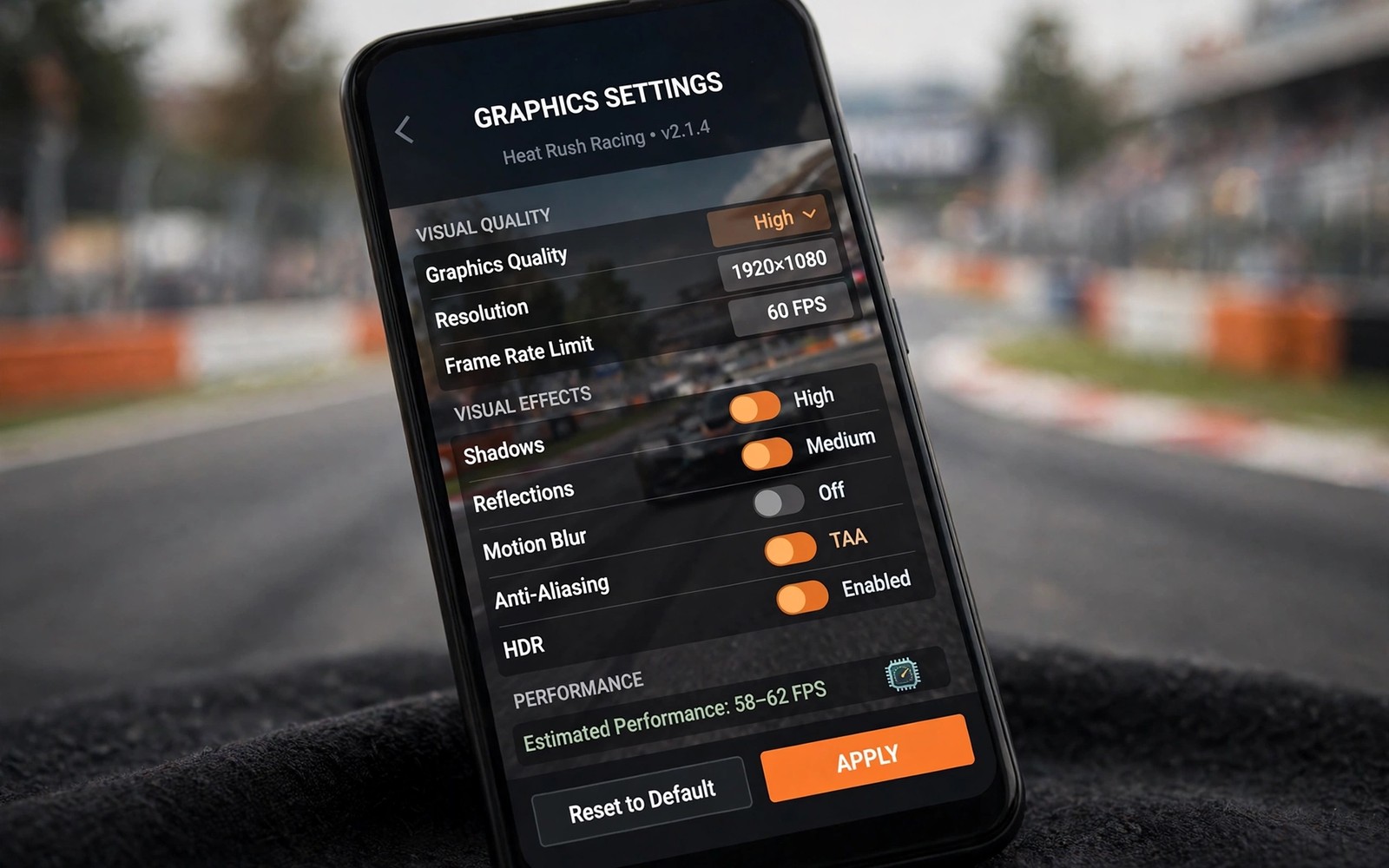
Graphic settings in mobile racers affect far more than how pretty a race looks. Frame rate changes how quickly you can react to corners and rivals. Visual detail changes how clearly you judge braking points and distances. This guide explains each setting in practical racing terms.
Many players set graphics to maximum and accept stutter as normal. Stutter hides braking markers and makes steering feel delayed. A smooth lower setting often produces faster lap times than a beautiful choppy one. Speed of response beats visual richness in competitive racing. drag racing games
This guide walks through shadows and textures and draw distance and effects one by one. You will learn what each setting costs and what it gives back. You will finish with a tuning method that fits your phone. No technical background is needed to follow it.
Benchmark culture in mobile gaming often overvalues peak frame rates. Stable frame rates matter more than peak numbers for racing. A phone hitting ninety frames briefly then dropping feels worse. Consistency benchmarks reveal true racing performance better.
Frame rate is the most important setting
Frame rate controls how often the screen updates your view of the race. Higher frame rates show corner entry and rival movement sooner. That earlier view gives your brain more time to react correctly. Sixty frames per second feels dramatically smoother than thirty. Competitive players should prioritise frame rate above all else.
Unstable frame rates hurt more than low stable frame rates in racing. A rate that jumps between high and low values feels unpredictable. Steering inputs seem to lag during sudden drops. Cap the frame rate at a value your phone holds steadily. Stability creates trust between your hands and the car.
Refresh rates on modern phones interact with game frame rates. A 120Hz screen shows smoother motion when games sustain high frames. Games capped at sixty frames waste high refresh potential partly. Match game caps to screen capabilities sensibly. Screen and game settings should align for smoothness.
Shadows cost power and give little racing value
Shadows look beautiful in screenshots and replays of racing games. During a race you rarely study shadow shapes on the road. Shadows consume large power on phone graphics chips. Lowering shadows often frees enough power for stable frame rates. That trade improves lap times without hurting awareness.
Car shadows help judge position relative to rivals in close racing. Keep simple car shadows on when possible for that reason. Full scene shadows add trees and buildings that distract more than help. Medium shadow settings balance awareness and performance well. Test shadow levels in time trial first. flight simulators for Android
Thermal throttling reduces frame rates during long championship sessions. Phones heat gradually and processors slow protectively. Cooling breaks restore performance between races. Cases trap heat and worsen throttling noticeably. Remove cases during long ranked sessions when safe.
adb shell settings put global animator_duration_scale 0.5
adb shell cmd game mode performance com.example.racer
adb shell dumpsys gfxinfo com.example.racer framestats
The commands above are adapted from public platform documentation for Android settings and game performance tools. They are included here as a teaching example for measuring graphics performance and not as copied game code.
Draw distance and track clarity
Draw distance controls how far ahead you can see track details. Long draw distance helps on fast circuits with distant corners. Short draw distance hides braking markers until too late. That late view forces rushed braking and missed apexes. Keep draw distance high when your phone allows it.
Texture quality affects road markings and signs more than car paint. Clear road markings help you find braking points quickly. Low textures blur markings and slow your reactions. Medium textures usually keep markings readable on phones. High textures help only on large screens with strong hardware.
Resolution scaling offers finer control than preset graphics levels. Lower internal resolution while keeping interface sharp. That trick preserves readability while boosting frames. Some games offer resolution sliders in advanced settings. Explore advanced menus beyond simple presets.
Effects and crowds distract the eye
Particle effects like sparks and smoke look exciting during crashes. During clean racing they can block your view of the next corner. Heavy rain and dust effects also hide braking markers. Lower effects during ranked races for clearer vision. Save full effects for replays and casual fun races.
Crowd detail and background buildings rarely affect racing decisions. Lower those settings first when you need performance headroom. The track and rivals matter far more than distant scenery. A clean track view improves focus during long championships. Visual calm helps mental stamina too. futuristic anti-gravity racing
Anti aliasing smooths jagged edges at significant performance cost. Jagged edges matter little at racing speeds on phones. Disable anti aliasing first when seeking frame gains. Visual loss stays minimal during fast races. Performance gains often reach ten percent or more.
Build a tuning routine for your phone
Start from the lowest preset and raise one setting at a time. Run three laps after each change and note frame stability. Stop raising when stutter appears during busy race starts. That point reveals your phone limit honestly. Save that stable preset for ranked racing use.
Revisit settings after major game updates because performance can change. New tracks may demand more power than older tracks. Heat also lowers performance during long sessions. A preset that works cold may stutter after thirty minutes. Test presets in race conditions and not only in menus.
Vibration and haptic effects consume little power but distract some players. Disable haptics during ranked races for focus. Haptics suit casual races with immersion goals. Setting profiles per race type helps competitive players. Save calm profiles for ranked use.
Tune graphics per track type
Track types demand different graphics priorities for best results. City tracks with dense scenery need lower crowd detail. Desert tracks need higher draw distance for distant corners. Forest tracks need balanced shadows for depth perception. Per track tuning beats global presets for serious players.
Save graphics presets per track category when games allow. City presets prioritise frame stability over scenery. Open presets prioritise draw distance over effects. Rain presets prioritise clarity over particle beauty. Preset switching takes seconds before races.
Test new presets in time trial before ranked races always. Time trials reveal stutter without rating risk. Ranked races punish untested preset mistakes harshly. Practice testing protects rating and confidence together.
Revisit presets seasonally as phone age and updates change performance. Battery health affects sustained performance over years. Older phones need gentler presets gradually. Honest preset aging keeps racing enjoyable long term.
Keep improving after the basics
Advanced graphics tuning uses frame time graphs rather than average frame rates alone. Frame time graphs reveal stutter spikes that averages hide. Spikes during race starts matter more than steady cruising frames. Learn to read simple frame time tools in game menus. Tools often show graphs after benchmark runs. Analyse graphs after changing each setting. Graph based tuning produces smoother races than guesswork based tuning.
Battery health affects sustained graphics performance over phone lifetimes. Degraded batteries throttle processors earlier under load. Older phones may need gentler presets than when new. Accept preset aging gracefully rather than fighting hardware limits. Gentler presets preserve enjoyable racing for years. Performance expectations should match device age honestly. Enjoyment survives preset reductions when frame stability remains.
Display brightness and refresh settings interact with game graphics noticeably. High brightness increases heat during long sessions. Heat triggers throttling that hurts frame stability. Moderate brightness preserves performance and battery life. Outdoor racing may need higher brightness temporarily. Balance visibility against thermal costs thoughtfully. Environmental awareness is part of mobile graphics tuning.
Common mistakes
The biggest mistake is chasing maximum graphics on a phone that cannot hold them. Stutter costs lap time and causes crashes at braking points. Lower settings until frame rate stays stable in busy starts. Beauty never compensates for missed corners in ranked races.
Another mistake is copying presets from a different phone model. Hardware differs hugely across Android devices and years. A preset that runs well on a flagship may stutter on a mid range phone. Tune for your own device with lap testing.
A further mistake is enabling every visual enhancement simultaneously. Combined enhancements multiply performance costs unexpectedly. Enable enhancements one at a time with testing. Cumulative testing reveals true costs clearly.
Frequently asked questions
Do graphics settings change actual physics?
Graphics settings do not change physics formulas directly in most games. They change frame rate and visual clarity which affect your reactions. Low frame rates make physics feel delayed and heavy. Smooth visuals let you use true physics properly.
Graphics settings do not change physics formulas directly usually. They change frame rate and clarity which affect reactions. Low frame rates make physics feel delayed. Smooth visuals let true physics work properly.
Should I use auto graphics settings?
Auto settings give a decent starting point for casual racing. Manual tuning beats auto settings for competitive play. Auto settings may raise detail during quiet moments and stutter later. Lock a stable manual preset for ranked races.
Auto settings give decent starting points for casual racing. Manual tuning beats auto settings for competitive play. Auto settings may stutter during busy race moments. Lock stable manual presets for ranked races.
Does resolution matter more than frame rate?
Frame rate matters more than resolution for racing reactions. High resolution with low frame rate feels sluggish and delayed. Medium resolution with high frame rate feels responsive and clear. Choose smoothness first on every phone.
Frame rate matters more than resolution for racing reactions. High resolution with low frames feels sluggish. Medium resolution with high frames feels responsive. Choose smoothness first on every phone.
Conclusion
Graphic settings in mobile racers shape reaction time and clarity more than beauty. Prioritise stable frame rate and clear braking markers. Lower shadows and effects before touching draw distance. Tune in small steps and test with real laps.
Your next step is quick tonight. Lower shadows and effects in your favourite racer and run five time trial laps. Compare lap times and stability with your old preset. Keep the faster smoother preset for ranked races.
Create a written preset list for your phone and favourite tracks. Written presets prevent repeated tuning guesswork. Share presets with friends using similar phones. Community preset sharing saves everyone testing time.

