

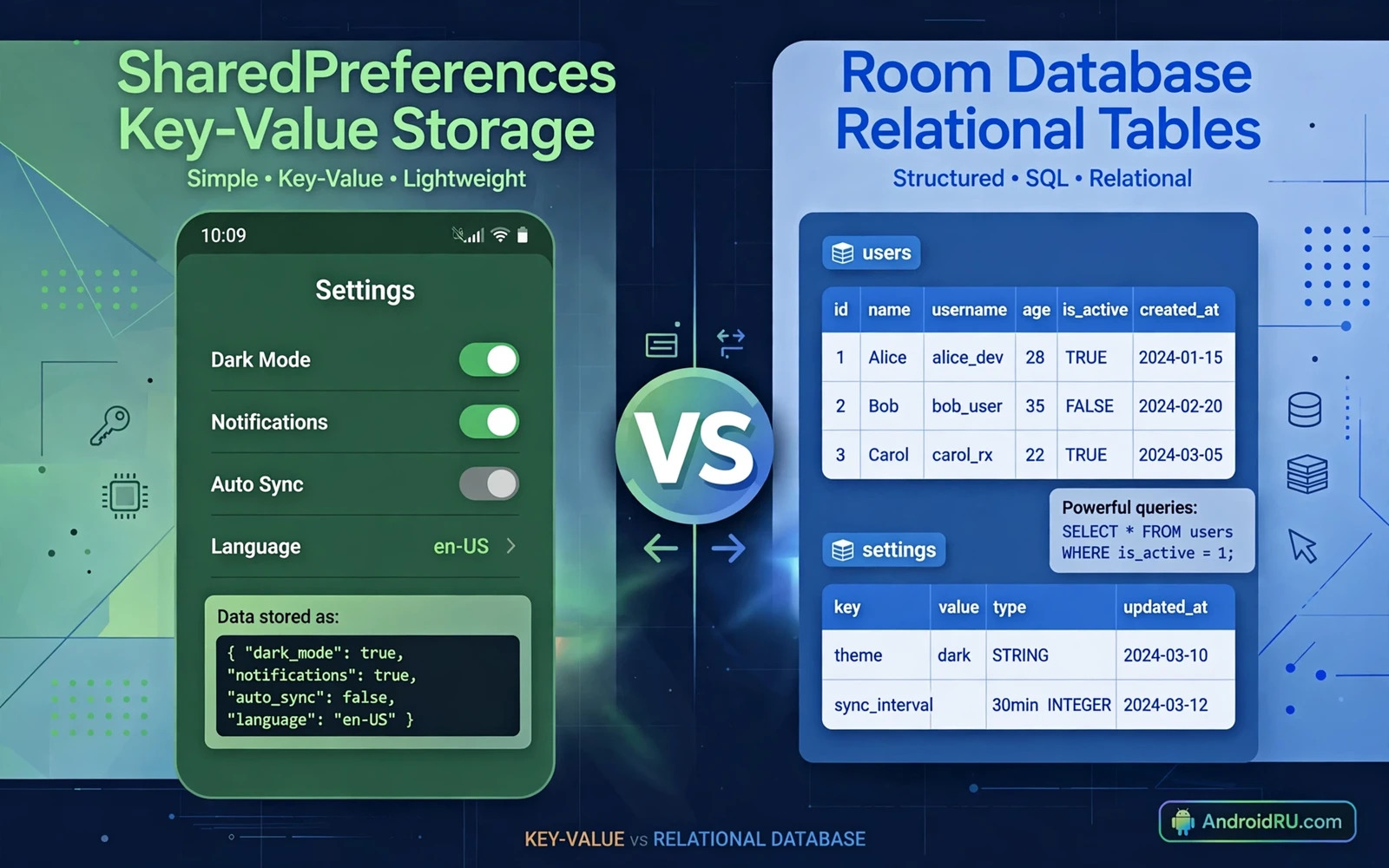
Two Different Tools for Different Jobs
Shared Preferences stores simple key value pairs. A key names a setting. A value holds the setting content. Typical values include a boolean for dark mode and a string for a username and a number for a font size. The store is easy to use and it loads quickly for small data sets. It is designed for settings and preferences rather than for large collections of records.
Room stores structured data in tables. A table defines columns for a record type. A row holds one record. Queries can filter and sort and join records. Room builds on a local database engine and it adds compile time checks for queries. It is designed for collections that grow and change and need searching. Examples include messages and tasks and products and offline content.
Confusion starts when a developer uses one tool for the job of the other. Storing a large list in Shared Preferences turns a simple store into a fragile document. Querying that list requires loading everything and parsing it in memory. Storing a single boolean in Room adds a table and a query for a value that could be a key value pair. Each tool works well inside its own domain and poorly outside it.
How Shared Preferences Works
Shared Preferences reads a file that holds key value pairs for the app. The app obtains a preferences instance by name. It reads a value by key with a default when the key is absent. It writes a value through an editor that batches changes. The editor can apply changes in the background or commit them synchronously. Apply is preferred for most UI settings because it does not block the calling thread.
Values are limited to simple types. Strings and numbers and booleans and sets of strings cover most settings needs. Complex objects must be converted to a string form before storage. That conversion adds code and it adds risk when the object shape changes. A settings store should stay simple. When a value needs a complex shape then that value probably belongs in a database record instead.
Shared Preferences is not a secure store for secrets. Values are stored in a file that is private to the app by default but the file is not encrypted by the store itself. A rooted device or a backup may expose the file. Tokens and passwords and keys should use a dedicated secure store rather than plain preferences. Settings that are not sensitive are safe in preferences. Sensitive values need stronger protection.
How Room Works
Room defines an entity for each table. An entity is a data class with fields that map to columns. A data access object defines queries and inserts and updates and deletes for that entity. A database class ties entities and data access objects together. The compiler checks queries at build time. A query that references a missing column fails the build rather than failing at run time.
Room supports observation of data changes. A query can return a flow that emits a new list whenever the underlying table changes. The user interface observes that flow and redraws when data changes. That reactive pattern removes manual refresh logic. It also keeps the interface consistent because every screen that observes the same query sees the same data.
Room supports migrations when the schema changes. A migration describes how to move data from an old schema to a new schema. A missing migration can cause data loss or a crash on update. A careful migration preserves user data across app updates. Migrations should be tested with a database file from the old version. That test proves that real user data survives the update.
Data Shape and Query Needs
Data shape is the first decision factor. Flat settings with independent keys fit preferences. Linked records with fields that must be searched fit Room. A list of tasks with title and due date and completion state fits Room because the app may filter by date and sort by priority. A single toggle for notifications fits preferences because it has no relations and no search need.
Query needs are the second decision factor. Preferences can only fetch by key. It cannot search by value or sort by a field or join two collections. Room can filter by any column and sort by any column and join linked tables. An app that needs to show only incomplete tasks sorted by due date needs Room. An app that needs only the current theme needs preferences.
Growth is the third decision factor. Preferences performance stays good for dozens of keys. It degrades when hundreds of keys or large string values are stored. Loading the whole file for one value wastes work when the file is large. Room performance stays good for thousands of rows because queries fetch only the needed rows. An app that expects growth should choose Room early rather than migrating a bloated preferences file later.
Threading and Consistency
Preferences reads are fast and they can happen on the main thread for small values. Writes with apply happen in the background. Writes with commit block until the write completes. Commit should be used only when the next step depends on the write being durable. Most UI settings should use apply. A settings change that must survive an immediate process kill may need commit but that case is rare.
Room forbids database access on the main thread by default. Queries and writes must run on a background thread or through a reactive flow. That restriction protects the interface from freezing during a large query. It also forces a clean architecture where data work lives in a repository rather than in a view. The repository exposes flows or suspend functions. The view model collects those flows and publishes interface state.
Consistency matters when several values must change together. Preferences editors can batch several key changes into one apply call. Room transactions can batch several table changes into one atomic operation. A transaction either completes fully or rolls back fully. That atomicity prevents a half updated state after a crash. Settings that must change together should use one batch or one transaction rather than separate writes.
Backup and Restore Behaviour
Both stores participate in app backup when backup is enabled. Preferences files and Room database files are included in the backup set by default in many configurations. The developer should decide whether each store should be backed up. Settings such as theme and language usually should be backed up. Device specific data such as a local cache usually should not be backed up. Backup rules can exclude files that should stay local to one device.
Restore behaviour differs in practice because preferences restore is simple while database restore must respect schema version. A restored database from an older app version must still migrate to the current schema on first launch. A test that restores an old backup and launches the new version proves that the migration path works for restored users as well as for updated users. That test is often forgotten and it causes crashes for users who restore on a new device.
Data that must sync across devices needs a server source in addition to local storage. Local storage alone cannot sync between a phone and a tablet. A repository that merges server data with local Room data gives a robust sync model. Preferences can hold the last sync time and the user identifier for that sync. Room holds the synced records. That division keeps sync metadata simple and synced content queryable.
Migration From Preferences to Room
Migration should happen when data shape or query needs outgrow preferences. The first step is to define the Room entity and the data access object for the data that will move. The second step is to write a one time migration that reads the old preferences values and inserts them as Room rows. The third step is to keep the old preferences file until the migration is confirmed. Deleting the source before confirmation risks data loss if the migration fails.
Migration code should run once and it should record completion in a simple flag. A flag in preferences can mark that migration has completed. Later launches skip the migration. The migration should handle missing keys gracefully. A missing key means that the user never set that value. The migrated row should use a sensible default in that case rather than failing.
Testing migration needs a preferences file from the old version. The test installs the old version and sets values and then installs the new version. The new version should show the same data through Room queries. The test should also cover an empty preferences file. An empty file should migrate to an empty database without error. Migration tests protect existing users during a change that they did not request.
Security and Privacy Notes
Neither store is a substitute for encrypted storage for sensitive data. Preferences values are readable by the app and by backup and by a rooted device. Room data is readable in the same ways. Sensitive data such as tokens should use a dedicated encrypted store. Personal data in Room should be minimised to what the feature needs. Data that is no longer needed should be deleted rather than kept forever.
Exported data also needs care. A database file copied for debugging may contain personal data. A preferences file shared in a bug report may contain identifiers. Debug exports should be redacted before sharing. Production code should never log full database rows or full preferences content. Logs should contain identifiers and counts rather than personal values.
Understanding nearby storage and state topics helps a team avoid mixing concerns and the guide to app state and lifecycle events explains how in memory state differs from durable storage and when each should be used. Background work also interacts with storage because a worker may write to Room while the interface is gone and the guide to background services and WorkManager shows how deferred work should handle database writes safely. Interface work connects too because a settings screen must stay clear on every device and the guide to responsive layouts in Jetpack Compose helps a team build settings screens that adapt well.
Common Mistakes to Avoid
One common mistake is storing a JSON list in a single preferences value and then parsing it on every read. Performance suffers and queries become impossible. Another mistake is creating a Room table for a single toggle. The code grows for no benefit. A third mistake is accessing Room on the main thread by disabling the check. The interface will freeze on large data sets.
Another mistake is forgetting a migration after a schema change. Users who update will lose data or crash on launch. A further mistake is storing secrets in plain preferences. A rooted device or a backup will expose them. A final mistake is using preferences for data that must be searched. The app ends up loading everything into memory to find one record.
// Preferences and Room sketch in Kotlin
// val prefs = context.getSharedPreferences("settings", Context.MODE_PRIVATE)
// prefs.edit().putBoolean("dark_mode", true).apply()
// Room entity: data class Task(val id: Int, val title: String, val done: Boolean)
// Room query: SELECT * FROM tasks WHERE done = 0 ORDER BY id

