

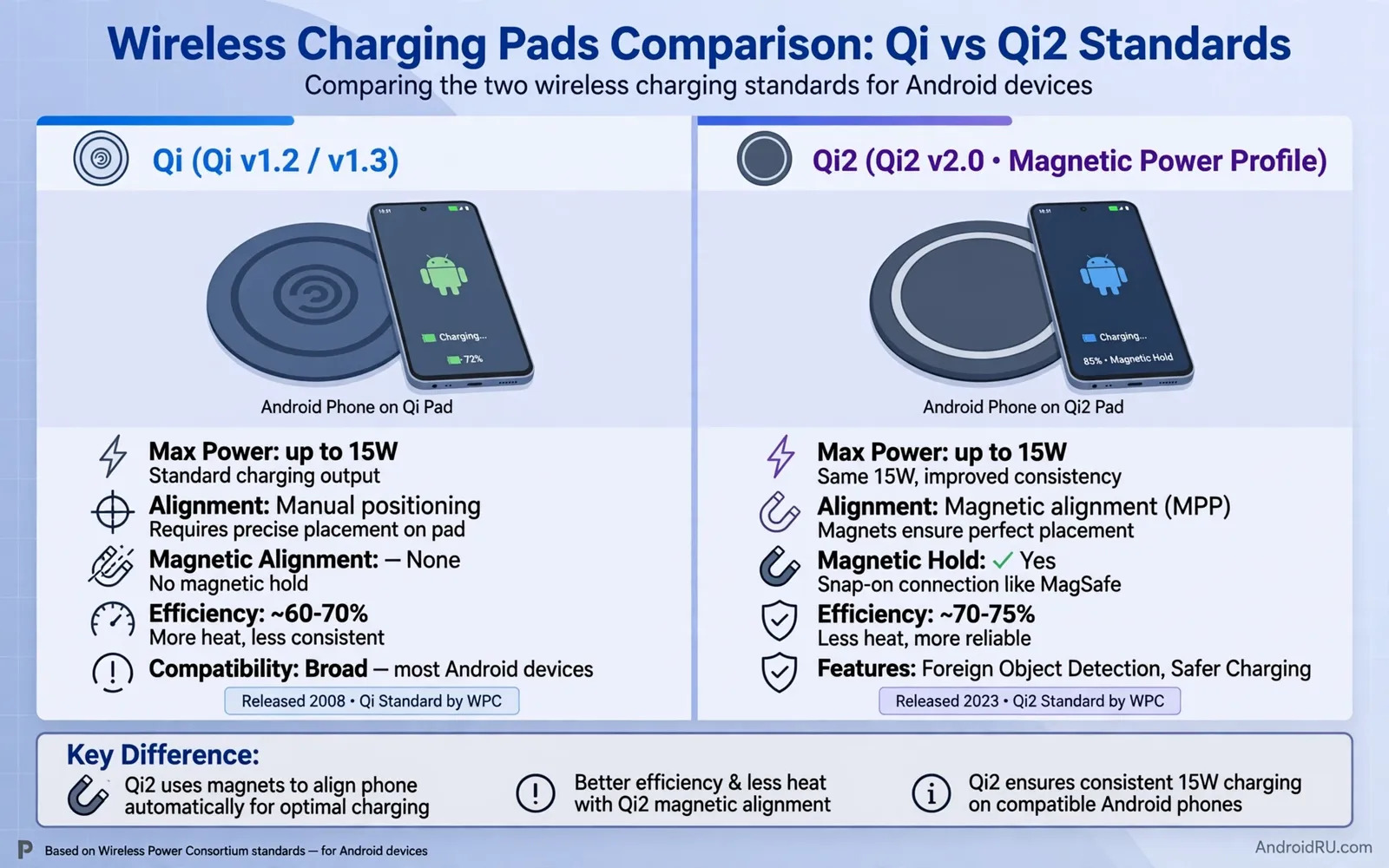
How Wireless Charging Pads Work On Android Phones
A wireless charging pad sends power through a coil under its surface. Your phone receives that power through a coil inside its body. The two coils must sit close together for power to flow well. A small gap can slow charging or stop it completely. A thick case can create such a gap. A metal plate inside a case can block power as well. This is why pad choice matters more than many buyers expect. A pad that looks neat on a desk may still charge slowly. A pad with clear alignment guides helps you place the phone right every time. Good alignment saves time and reduces heat during long charging sessions.
Qi is the older open standard that most Android phones support today. Qi2 adds a magnetic alignment ring to the same basic idea. The magnet pulls the phone into the sweet spot on the pad. That simple change makes charging more consistent from day to day. It also helps accessories snap into place with less guesswork. Phones without a built in magnet ring can still use Qi2 pads. They may need a magnetic case to get the full alignment benefit. A plain Qi pad can still charge a Qi2 ready phone. The phone will simply charge without magnetic help. Knowing this difference keeps you from buying the wrong pad for your phone.
Qi Versus Qi2 In Daily Use
Daily use shows the real gap between the two standards. A Qi pad asks you to center the phone by eye. A slight shift overnight can leave you with a half full battery in the morning. A Qi2 pad locks the phone in place with magnets. You hear a soft snap and you know the phone sits right. That snap matters most when you charge in the dark. It also matters when you place the phone in a hurry before bed. Parents and shift workers often notice this benefit first. The pad removes one small daily frustration. Over months that small win adds up to real peace of mind.
Heat is another daily factor worth watching. A misaligned phone often runs warmer while it charges. Warm charging can feel worrying even when the phone protects itself. A well aligned phone tends to stay cooler during the same session. Cooler charging also helps the battery age more slowly over time. If your phone often feels hot on a pad then alignment is the first thing to check. Try removing the case and centering the phone again. Try a pad with a raised guide ring or a magnetic ring. Small changes in placement often solve the heat problem without new hardware. When heat stays high on every pad then the case or the cable may be at fault.
Choosing A Pad For Your Phone Model
Start with your phone model and its charging support. Check the settings menu and the manual that came with the phone. Look for wireless charging support in the battery section. Look for any mention of magnetic alignment in the specs list. If your phone lacks magnets then a magnetic case can add them. A magnetic case turns a plain phone into a Qi2 friendly phone. The case must fit tightly and must not add too much thickness. A loose case can shift the magnet ring out of place. A very thick case can weaken the magnetic hold. Test the case on the pad before you commit to daily use.
Power bricks matter just as much as pads do. A pad can only deliver what its brick supplies. An old low power brick will starve even a good pad. Use the brick that ships with the pad when one is included. When no brick is included then buy one that matches the pad maker guidance. Cable quality matters as well in this chain. A worn cable can drop power without any visible damage. A short thick cable often beats a long thin cable for stable power. Readers who want the wider charging picture can explore how modern GaN chargers and older adapters differ in size and heat and daily refill speed. That background helps you pick a brick that will not bottleneck your new pad.
Pad Shapes And Desk Setups
Flat pads suit desks and nightstands where the phone lies still. Stand pads suit desks where you glance at notifications while charging. A stand holds the phone upright at a readable angle. It also keeps the screen visible during video calls. Some stands fold flat for travel. A folding stand gives you two products in one small package. A three in one station can charge a phone and earbuds and a watch together. Such stations reduce cable clutter on a small desk. They also need a stronger brick than a single pad needs. Check the total power guidance before you buy a multi device station.
Travel pads deserve special attention for Android users on the move. A small round pad fits a jacket pocket with ease. A pad with a built in cable avoids one more item in your bag. A pad with a non slip base stays put on a hotel desk. A pad with a long cable reaches awkward wall sockets with ease. Think about where you will actually charge while traveling. A car setup has different needs from a hotel setup. A car mount with wireless charging keeps the phone visible for navigation. You can read about car mounts with wireless charging holders to see how driving setups solve placement and heat in a moving vehicle. That context helps you avoid a travel pad that only works well at home.
Battery Health And Charging Habits
Wireless charging feels effortless but it still affects battery health over time. Heat is the main enemy of long term battery health. A cool aligned charge is kinder than a hot misaligned charge. Overnight charging on a pad is convenient for most people. Modern phones slow charging near full to protect the battery. You can still help by avoiding a hot sunny windowsill for your pad. You can also help by removing a thick insulating case at night. These habits cost nothing and they pay off over years of use. A battery that stays cooler tends to hold its capacity longer.
Charging speed claims can mislead buyers who only read headlines. Real speed depends on the phone and the pad and the brick together. A pad alone cannot force a phone to charge faster than its design allows. A phone with modest wireless support will charge modestly on any pad. A phone with strong wireless support still needs a matching pad and brick. Judge a pad by stable daily performance rather than by peak claims. Test a new pad for a full week before you judge it. Note the morning battery level each day. Note any heat or missed charges. That simple log tells you more than any product page can.
Common Problems And Simple Fixes
A phone that charges then stops often suffers from alignment drift. A notification vibration can nudge a phone off center on a slick pad. A pad with a grippy surface reduces this drift. A magnetic pad removes it almost completely. A phone that never starts charging may face a case problem. Remove the case and test again with the bare phone. A phone that charges slowly may face a brick problem. Swap the brick and the cable one at a time. Change only one part at a time so you know which change helped. This methodical approach saves money on needless replacements.
Foreign objects between phone and pad can also block charging. A bank card in the case can trigger a safety stop. A metal ring holder can block the coil completely. A pop socket with a metal plate can do the same. Remove such items before you blame the pad. Keep the pad surface clean as well. Dust and crumbs create tiny gaps that hurt alignment. Wipe the pad weekly with a dry cloth. Power bank users face a similar chain of parts where one weak link limits the whole setup. The guide to high capacity power banks for long travel shows how brick and cable and device must match for steady power on the road. The same matching logic applies on your desk at home.
Final Buying Advice For Qi And Qi2
Buy Qi2 when your phone or your case supports magnetic alignment. The magnet removes daily guesswork and it improves consistency. Buy a good Qi pad when your phone lacks magnets and you want value. A well made Qi pad still serves most Android phones very well. Spend more on alignment and build quality than on flashy lights. A pad with a solid base and a grippy top will outlast a flashy pad with a slick top. Read return policies before you buy. A pad that fails on your phone and case combo should go back quickly. Your desk setup should make charging boring and reliable. Boring is the highest praise a charging pad can earn.
Think of the pad as part of a small charging system. The phone and the case and the pad and the brick all play a role. Change one part and the whole system can behave differently. Keep a spare cable at home for testing when problems appear. Keep the pad in a cool spot away from direct sun. Replace a pad that warps or cracks or smells hot. Safety matters more than saving a few coins on a worn pad. With the right pad your Android phone will greet each morning fully charged. That quiet reliability is what makes wireless charging worth the switch for so many people today.
Pad Safety And Certification Basics
Safety marks on packaging tell you whether a pad passed independent testing. A pad with recognized certification marks has survived heat and fault tests in a lab. A pad without any marks may still work but it carries unknown risk. Cheap uncertified pads can overheat or fail under load. Foreign object detection is another safety feature worth seeking. It stops power when keys or coins sit on the pad. Temperature control circuits slow charging when a pad grows too hot. These protections work silently in the background every night. A pad that lacks them asks you to trust luck instead of engineering. Spend a little more for a pad that protects your phone while you sleep.
Cables and bricks age just like pads do over years of use. A frayed cable can spark or drop power without warning. A swollen brick can damage a pad and a phone together. Inspect cables monthly for cuts and kinks near the plugs. Replace any cable that feels stiff or shows exposed wires. Retire a pad that smells hot or shows warping on its surface. Safety gear deserves retirement before failure rather than after it. Keep a spare certified cable at home for quick testing. A quick swap test often reveals whether a pad or a cable is at fault. Careful owners enjoy wireless charging for years without a single scare.

